What is Delaware Form DE-W4?
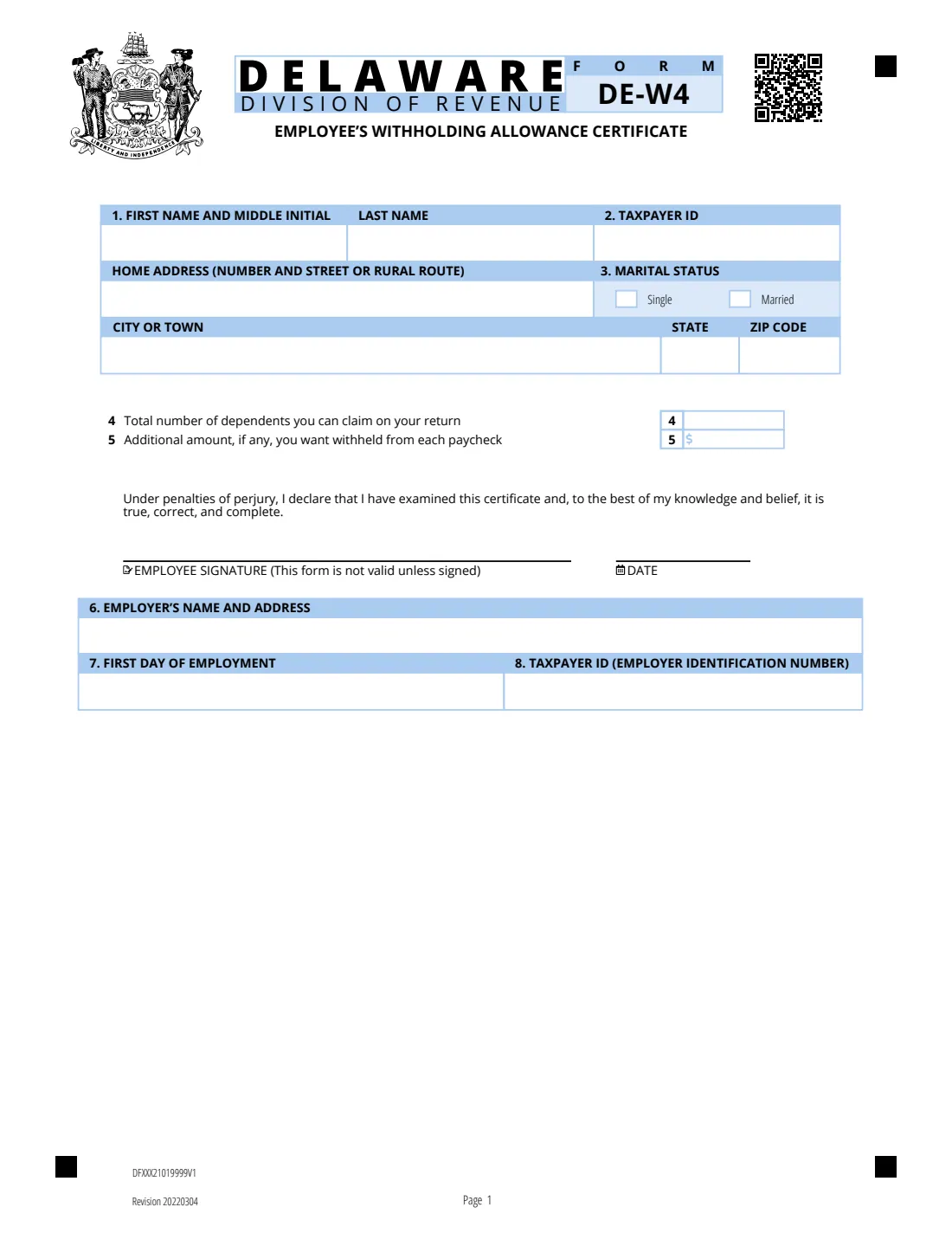
Form DE-W4 is the Delaware Division of Revenue's Employee's Withholding Allowance Certificate. When the IRS redesigned the federal Form W-4 without withholding allowances, Delaware kept its deduction or personal credit for exemptions, so it created its own certificate for Delaware withholding. The edition FileIt uses is marked 'Revision 20220304'.
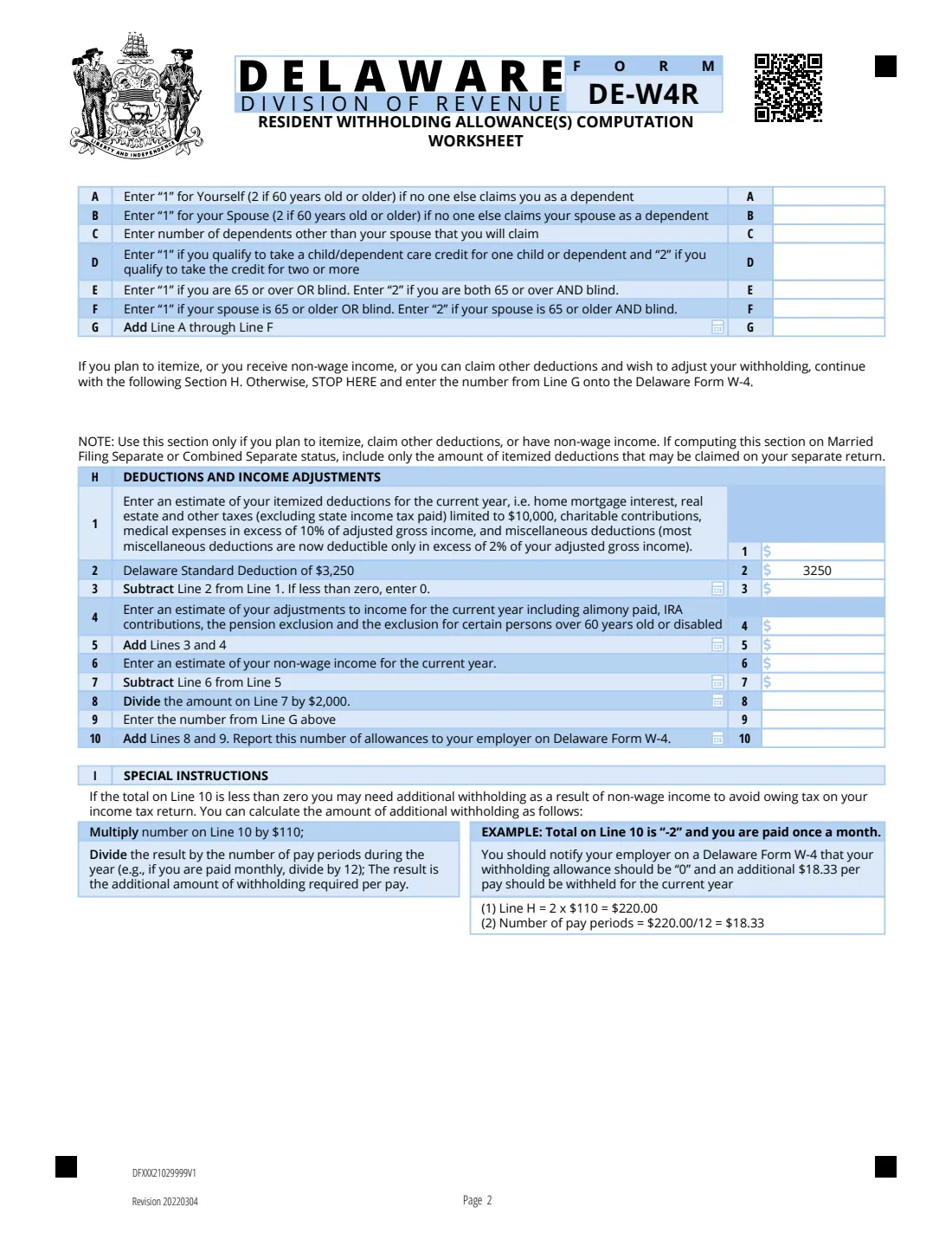
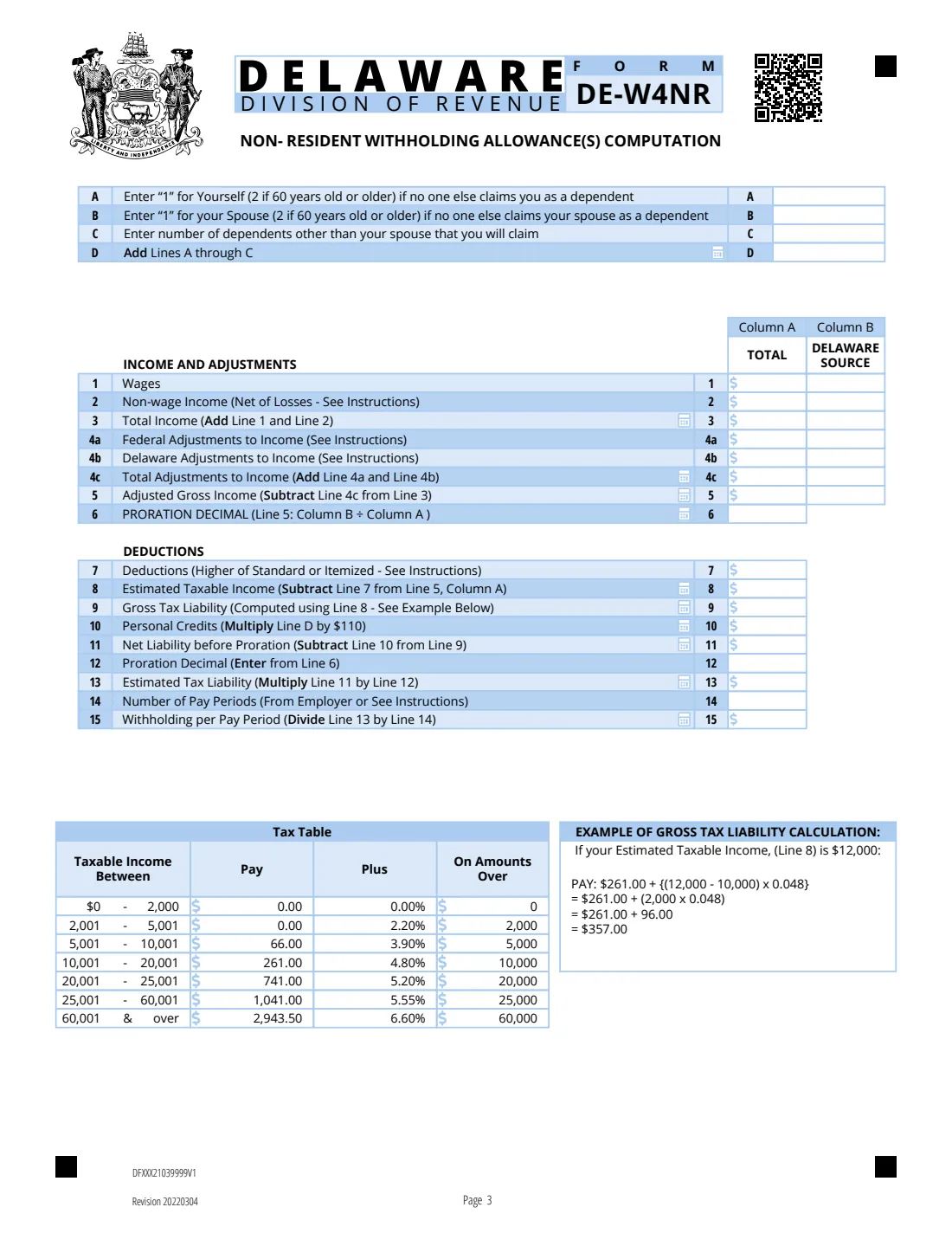
The PDF has three pages: the certificate itself, the DE-W4R resident worksheet that works out your allowances, and the DE-W4NR non-resident worksheet. The certificate asks for your name, Social Security number, address and marital status, the number on line 4, and any additional amount per paycheck. Lines 6 to 8 are for the employer, and the form can also be used to report a new employee.
FileIt fills out the certificate online, works through the resident worksheet with you (including the Section H deductions and the special instructions when the result is below zero), and prints everything onto the Division of Revenue's own PDF. The filled form is saved in your vault, and you can send it for e-signature. FileIt never submits anything: you give the signed form to your employer yourself.
- Who fills it
- The employee (lines 1-5 and the signature). The employer completes lines 6-8.
- Given to
- Your employer.
- Worksheets
- Page 2 for Delaware residents (DE-W4R), page 3 for non-residents (DE-W4NR). FileIt works through the resident worksheet.
- Standard deduction in the worksheet
- $3,250, printed on line H2 of the Revision 20220304 edition.
- Signatures
- The employee signs and dates the certificate. It is not valid unless signed.
- Edition
- DE-W4, Revision 20220304, three pages.
Who needs to fill out Delaware Form DE-W4?
- Employees who have Delaware income tax withheld from their pay.
- New hires in Delaware.
- Employees whose marital status, dependents or deductions have changed.
- Employees with non-wage income who want extra Delaware tax withheld.
- Employers who want the new-hire details (employer name and address, first day of work, EIN) on the same form.
When to use Delaware Form DE-W4
- When you start a new job with Delaware withholding.
- When you marry or divorce, or gain or lose a dependent.
- When you turn 60 or 65, or your spouse does, since the worksheet gives extra allowances.
- When you plan to itemize deductions or expect non-wage income.
- When you find you owe Delaware tax at the end of the year and want more withheld.
What you need before you start
- Your name, Social Security number, home address and marital status.
- The number of dependents you will claim, and whether you qualify for the child/dependent care credit.
- Your age and your spouse's, and whether either of you is blind.
- If you itemize or have non-wage income: estimates of your itemized deductions, adjustments to income and non-wage income for the year.
- Your number of pay periods in the year, if the worksheet total comes out below zero.
- For the employer part: the employer's name, address and EIN, and your first day of employment.
What’s on Delaware Form DE-W4
The 2022 edition has 3 pages. FileIt asks for it in 5 parts, and it is signed by Employee:
- Lines 1-3: Your details and marital statusEmployee
- Lines 4-5Employee
- Declaration and dateEmployee
- Resident worksheet (DE-W4R, page 2)Employee
- Lines 6-8: EmployerEmployer
How to fill out Delaware Form DE-W4, step by step
1 Lines 1 to 3: Your details
Enter your first name and middle initial, last name, taxpayer ID (your Social Security number), home address, city or town, state and ZIP code, and tick Single or Married.
2 Resident worksheet, lines A to G
Line A is 1 for yourself, or 2 if you are 60 or older, if no one else claims you as a dependent. Line B is the same for your spouse. Line C is the number of dependents other than your spouse. Line D is 1 or 2 if you qualify for the child/dependent care credit for one, or two or more. Lines E and F are 1 or 2 for you and your spouse being 65 or over and/or blind. Line G adds them up. If you don't itemize, claim other deductions or have non-wage income, line G is your number.
3 Resident worksheet, Section H
Line 1 is your estimated itemized deductions. Line 3 subtracts the $3,250 Delaware standard deduction (not below zero). Line 4 adds your adjustments to income, such as alimony paid, IRA contributions and the pension exclusion; line 5 is lines 3 + 4. Line 6 is your non-wage income and line 7 subtracts it. Line 8 divides line 7 by $2,000, and line 10 adds line G. FileIt does all of this, rounding line 8 down to a whole number.
4 If line 10 is below zero
The Special Instructions on page 2 say to report 0 allowances and have more withheld: multiply line 10 by $110 and divide by your number of pay periods in the year. The form's example: line 10 of -2, paid monthly, gives $220 / 12 = $18.33 extra per pay. FileIt works out the amount for you to enter on line 5.
5 Lines 4 and 5
Line 4 is printed 'Total number of dependents you can claim on your return', while the worksheet says to report its result on the Delaware W-4; FileIt carries the worksheet result there. Line 5 is any additional amount to withhold from each paycheck.
6 Sign, date, and the employer part
Sign and date under the perjury declaration; the form isn't valid unless signed. The employer then enters its name and address, your first day of employment and its EIN on lines 6 to 8.
Common mistakes to avoid
- Using only the federal W-4. Delaware's personal credits need the DE-W4.
- Forgetting to sign. The form says it is not valid unless signed.
- Claiming 2 on line A or B when the person is under 60.
- Leaving extra withholding off when the worksheet total is below zero.
- Including itemized deductions you can't claim on a separate return when you file separately.
- Non-residents using the resident worksheet. Page 3 is the non-resident worksheet.
After you fill it out
Sign and date the certificate and give it to your employer, who completes lines 6 to 8 if they use it for new-hire reporting.
Keep the worksheet pages for your own records.
FileIt saves the filled PDF in your vault. Update it when your family, age-related allowances, deductions or non-wage income change.
Fill out Delaware Form DE-W4 online with FileIt
- Pick the person. Choose someone from People and FileIt fills in their name, date of birth, address and other details it already knows.
- Answer plain-language questions. One part of the form at a time, with the official help text beside each question — 34 fields in all. Your answers save as you go.
- Check the live preview. Watch your answers land on the real Delaware Division of Revenue form, and let FileIt do any worksheet arithmetic.
- Generate the official PDF. FileIt prints your answers into the agency’s own PDF and files it in that person’s folder in your vault. Sign it, or send it for e-signature.
FileIt fills the form — it never files or submits anything for you. Deliver the finished form to whoever asked for it, the way the form’s instructions say.
Start Delaware Form DE-W4 now — it’s freeDelaware Form DE-W4: frequently asked questions
Why does Delaware have its own W-4?
The federal W-4 no longer uses withholding allowances, but Delaware still allows a deduction or personal credit for exemptions. The DE-W4 lets your employer withhold with those in mind.
How do I work out my allowances?
Delaware residents use the DE-W4R worksheet on page 2: lines A to F for you, your spouse, dependents, the child care credit, age and blindness, then Section H if you itemize or have non-wage income.
What if my worksheet total is negative?
Page 2 says to report 0 allowances and have an additional amount withheld: the line 10 number times $110, divided by your pay periods in the year.
I don't live in Delaware but work there. Which worksheet do I use?
The DE-W4NR non-resident worksheet on page 3. FileIt doesn't fill that worksheet; you can complete it by hand on the printed form.
Does the employer fill anything in?
Yes, lines 6 to 8: the employer's name and address, your first day of employment and the employer's EIN.
Can I fill out the DE-W4 online?
Yes. FileIt fills it out online and prints your answers on the official PDF. You sign it and give it to your employer yourself; FileIt does not submit it anywhere.
Official sources
- Blank form (PDF), published by Delaware Division of Revenue: https://revenuefiles.delaware.gov/2021/DE-W4.pdf
- Official instructions and guidance: https://revenue.delaware.gov/frequently-asked-questions/delaware-w-4-employees-withholding-allowance-certificate
- Edition shown on this page: DE-W4 (Revision 20220304) (checked 2026-10-01).
FileIt is not affiliated with or endorsed by Delaware Division of Revenue or any government. This page explains the form in general terms and is not legal, tax or immigration advice. Always read the official instructions, and check that you are using the edition the recipient accepts. Page last reviewed 2026-10-01.