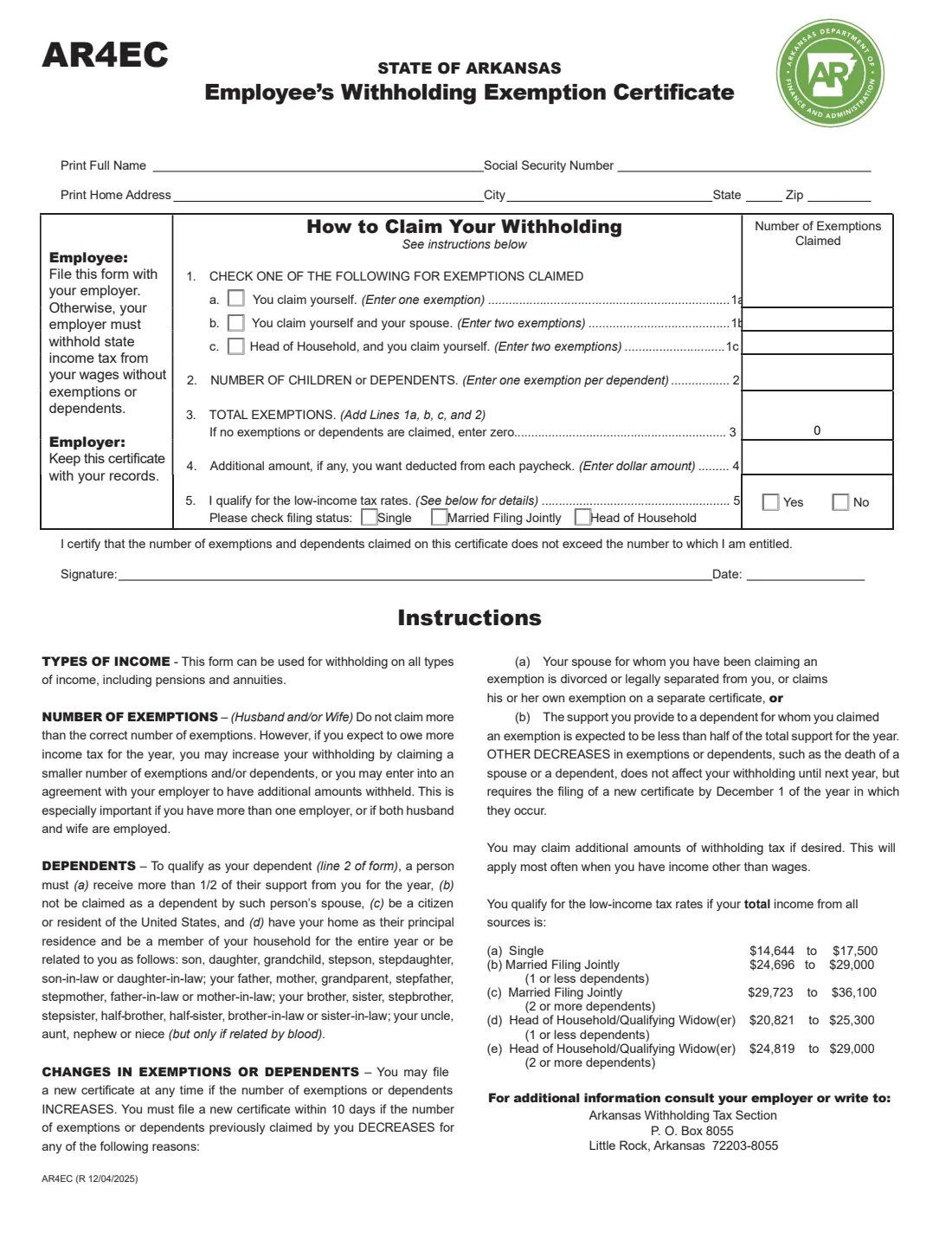
What is Form AR4EC?
Form AR4EC, the State of Arkansas Employee's Withholding Exemption Certificate, is how you tell your employer how much Arkansas income tax to withhold. It's issued by the Arkansas Department of Finance and Administration (DFA), and the current edition is R 12/04/2025. The form says it can be used for withholding on all types of income, including pensions and annuities.
The AR4EC is a one-page certificate. You check whether you claim yourself, yourself and your spouse, or head of household, add one exemption per dependent, and can ask for an extra amount per paycheck. Line 5 asks whether you qualify for Arkansas's low-income tax rates, based on your total income from all sources. If you don't file one, the form says your employer must withhold state income tax from your wages without exemptions or dependents.
FileIt lets you fill out the AR4EC online in a guided form. It works out lines 1 and 3 for you, pre-fills your name from the People records in your vault, and prints your answers into DFA's official PDF. The finished form is saved in your vault and can be sent for e-signature. FileIt never submits anything to DFA or your employer — you give the form to your employer yourself.
- Who fills it
- The employee (or pension or annuity recipient).
- Given to
- Your employer, who keeps it with its records.
- When
- When you start a job, any time your exemptions increase, and within 10 days of certain decreases.
- Signatures
- The employee signs and dates the certificate.
- Edition
- AR4EC (R 12/04/2025).
- Cost
- Free to fill out on any FileIt account.
Who needs to fill out Form AR4EC?
- Employees whose wages are subject to Arkansas income tax withholding.
- People receiving a pension or annuity who want Arkansas tax withheld at the right rate.
- Existing employees whose exemptions or dependents have changed.
- Employees who want an additional amount withheld from each paycheck.
- People whose total income falls within Arkansas's low-income tax rate ranges.
When to use Form AR4EC
- When you start a job in Arkansas — without it your employer withholds without exemptions or dependents.
- Any time the number of your exemptions or dependents increases.
- Within 10 days if your exemptions decrease because the spouse you were claiming is divorced or legally separated from you or claims their own exemption, or because you no longer expect to provide more than half of a dependent's support.
- By December 1 of the year in which other decreases occur, such as the death of a spouse or dependent.
- When you want more withheld, for example because you have more than one employer, both spouses work, or you have income other than wages.
What you need before you start
- Your full name, Social Security number and home address.
- Whether you claim yourself, yourself and your spouse, or head of household.
- The number of children or dependents you can claim.
- Any additional amount you want withheld per paycheck.
- An estimate of your total income from all sources, if you might qualify for the low-income tax rates.
What’s on Form AR4EC
The 2025 edition has 1 page. FileIt asks for it in 4 parts, and it is signed by Employee:
- Your detailsEmployee
- Lines 1–3: Exemptions and dependentsEmployee
- Lines 4–5: Extra withholding and low-income ratesEmployee
- SignatureEmployee
How to fill out Form AR4EC, step by step
1 Your name, Social Security number and address
Print your full name, Social Security number and home address with city, state and ZIP code. FileIt pre-fills your name from the person's record in your vault and stores your SSN encrypted.
2 Line 1: Exemptions for yourself and your spouse
Check one: (a) you claim yourself — one exemption; (b) you claim yourself and your spouse — two exemptions; or (c) head of household, and you claim yourself — two exemptions. FileIt enters the number beside the box you check.
3 Line 2: Children or dependents
Enter one exemption per dependent. The instructions say a dependent must receive more than half of their support from you for the year, not be claimed as a dependent by their own spouse, be a U.S. citizen or resident, and either have your home as their principal residence and be a member of your household for the entire year or be a relative listed in the instructions, such as a child, grandchild, stepchild, parent, grandparent, sibling or in-law, or an uncle, aunt, nephew or niece related by blood.
4 Line 3: Total exemptions
The total of lines 1 and 2. If you claim no exemptions or dependents, the form asks you to enter zero, and FileIt does that for you.
5 Line 4: Additional withholding
Enter a dollar amount if you want extra deducted from each paycheck. The instructions suggest this if you expect to owe more tax, especially with more than one employer, if both spouses work, or when you have income other than wages.
6 Line 5: Low-income tax rates
Check Yes if your total income from all sources is within the ranges on the form, and check your filing status. For the R 12/04/2025 edition: Single $14,644 to $17,500; Married Filing Jointly with 1 or fewer dependents $24,696 to $29,000, with 2 or more $29,723 to $36,100; Head of Household or Qualifying Widow(er) with 1 or fewer dependents $20,821 to $25,300, with 2 or more $24,819 to $29,000.
7 Signature and date
You certify that the exemptions and dependents you claim don't exceed the number you're entitled to. FileIt prints the date; you sign by hand or by e-signature.
Common mistakes to avoid
- Claiming more exemptions than you're entitled to — the form says not to claim more than the correct number.
- Checking more than one box on line 1 — it's one choice.
- Counting a dependent who doesn't get more than half of their support from you.
- Not filing a new certificate within 10 days after a divorce or separation, or when your spouse starts claiming their own exemption.
- Checking Yes on line 5 without checking a filing status.
After you fill it out
Sign the AR4EC and give it to your employer. The form tells the employer to keep the certificate with its records.
FileIt saves the finished PDF in the person's folder in your vault, so you have a copy.
Check your pay stubs to confirm Arkansas tax is withheld as expected, and file a new AR4EC when your exemptions change. For questions, the form lists the Arkansas Withholding Tax Section, P.O. Box 8055, Little Rock, Arkansas 72203-8055.
Fill out Form AR4EC online with FileIt
- Pick the person. Choose someone from People and FileIt fills in their name, date of birth, address and other details it already knows.
- Answer plain-language questions. One part of the form at a time, with the official help text beside each question — 18 fields in all. Your answers save as you go.
- Check the live preview. Watch your answers land on the real Arkansas Department of Finance and Administration form, and let FileIt do any worksheet arithmetic.
- Generate the official PDF. FileIt prints your answers into the agency’s own PDF and files it in that person’s folder in your vault. Sign it, or send it for e-signature.
FileIt fills the form — it never files or submits anything for you. Deliver the finished form to whoever asked for it, the way the form’s instructions say.
Start Form AR4EC now — it’s freeForm AR4EC: frequently asked questions
What is Form AR4EC?
It's the State of Arkansas Employee's Withholding Exemption Certificate. It tells your employer how many exemptions and dependents to allow when withholding Arkansas income tax, any extra amount to withhold, and whether you qualify for the low-income tax rates.
Can I fill out the AR4EC online?
Yes. FileIt lets you fill it out online free and prints your answers into DFA's official PDF, ready to download, print or send for e-signature.
Where do I send my AR4EC?
Give it to your employer, who keeps it with its records. FileIt doesn't submit it for you.
What if I don't file an AR4EC?
The form says your employer must withhold state income tax from your wages without exemptions or dependents.
Can I use the AR4EC for a pension?
Yes. The instructions say the form can be used for withholding on all types of income, including pensions and annuities.
Who qualifies for the low-income tax rates?
Those whose total income from all sources falls in the ranges printed on the form, which depend on filing status and number of dependents — for example $14,644 to $17,500 for Single on the R 12/04/2025 edition.
Which edition does FileIt fill?
AR4EC (R 12/04/2025), the file DFA links on its Withholding Tax Forms and Instructions page.
Official sources
- Blank form (PDF), published by Arkansas Department of Finance and Administration: https://www.dfa.arkansas.gov/wp-content/uploads/AR4EC2026.pdf
- Official instructions and guidance: https://www.dfa.arkansas.gov/office/taxes/income-tax-administration/withholding-tax-branch/withholding-tax-forms-instructions/
- Edition shown on this page: AR4EC (R 12/04/2025) (checked 2026-09-28).
FileIt is not affiliated with or endorsed by Arkansas Department of Finance and Administration or any government. This page explains the form in general terms and is not legal, tax or immigration advice. Always read the official instructions, and check that you are using the edition the recipient accepts. Page last reviewed 2026-09-28.