What is Form 2678?
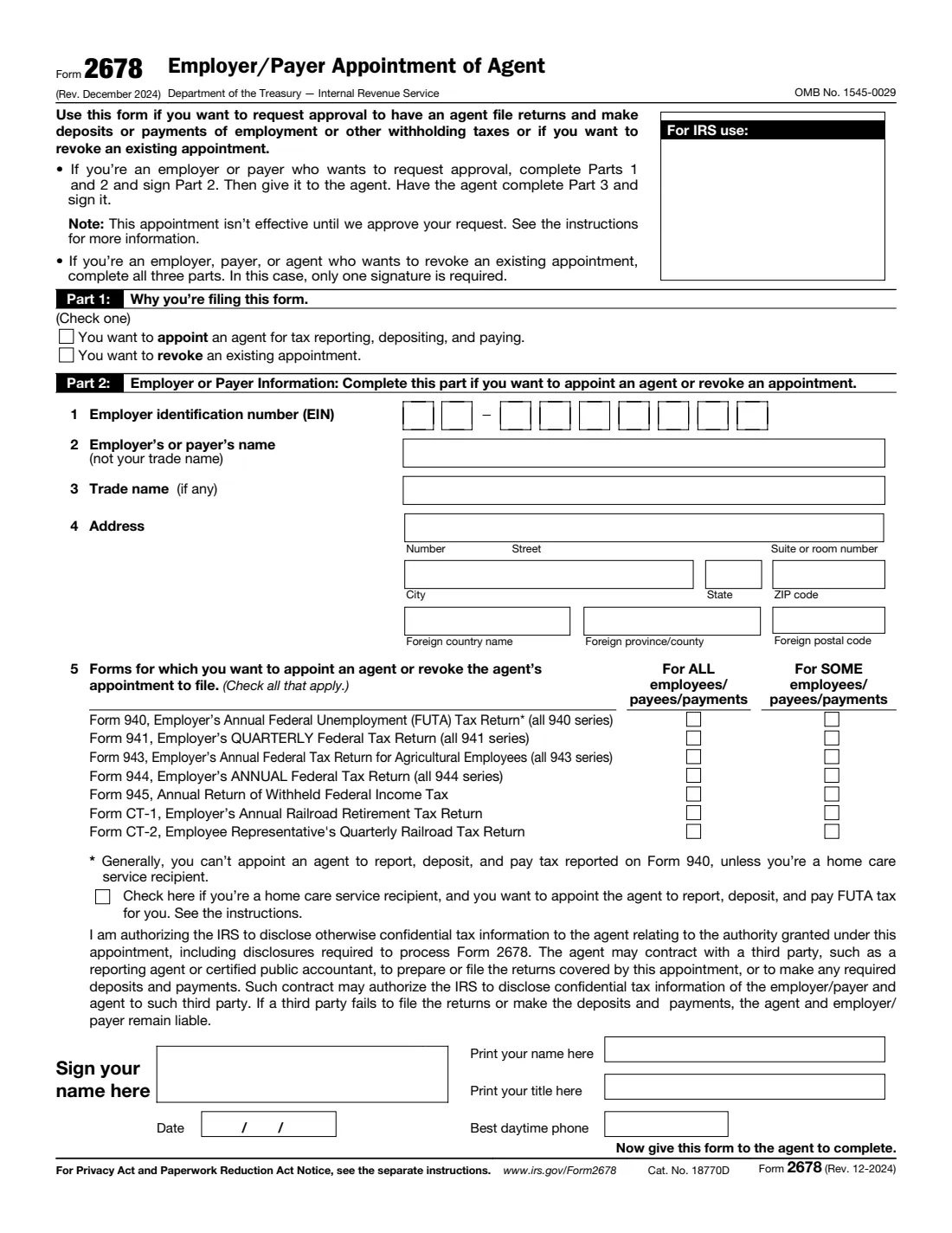
Form 2678 asks the Internal Revenue Service to approve an agent who will file employment tax returns and make deposits and payments for an employer or payer. It's how a person who hires a home care worker through a state Medicaid or self-directed care program lets the program's fiscal/employer agent handle Form 941 and the related taxes, and how a business can hand its withholding returns to an agent that files under the agent's own EIN.
The same form also revokes an existing appointment. An employer, payer or agent can revoke, and only one signature is needed. Appointing takes two: the employer or payer signs Part 2, then the agent completes and signs Part 3. The appointment only starts on the date in the IRS's approval letter, which usually follows within about 30 days.
FileIt walks you through each part, prints the answers into the IRS's own PDF and can route it to the agent for signature. You mail the signed form to the IRS yourself — FileIt never sends anything to the IRS.
- Who fills it
- An employer or payer appointing an agent, or an employer, payer or agent revoking an appointment.
- Sent to
- IRS in Kansas City, MO 64999 or Ogden, UT 84201, depending on the employer's location (see the instructions).
- Processing
- Generally about 30 days; the appointment starts on the date in the IRS letter.
- Signatures
- Employer or payer and agent to appoint; one of them to revoke.
- Edition
- Rev. December 2024 (earlier versions aren't accepted)
- Agency
- Internal Revenue Service (IRS), Department of the Treasury
Who needs to fill out Form 2678?
- People who receive home care services through a federal, state or local program and employ their own caregiver, with a fiscal/employer agent handling payroll.
- Household employers whose agent will file Form 941 or 944 and, for home care recipients, Form 940.
- Businesses and payers appointing an agent for Forms 941, 943, 944, 945, CT-1 or CT-2, for all or only some employees or payments.
- Agents accepting an appointment, and employers, payers or agents ending one.
When to use Form 2678
- Before the agent starts filing and depositing for you: the agent isn't responsible for anything until the IRS approves the request.
- When you switch to a different fiscal agent or payroll provider and need to revoke the old appointment.
- Not to give a payroll company permission to sign and file under your own EIN: that's Form 8655, Reporting Agent Authorization.
- Not to let someone simply see or discuss your tax information: that's Form 8821 or Form 2848.
What you need before you start
- The employer's or payer's EIN, legal name, any trade name and address.
- The list of returns the agent will handle, and whether it's for all or only some employees or payments.
- Whether you're a home care service recipient, which is the only case where an agent can be appointed for Form 940 (FUTA).
- The agent's EIN, legal name, trade name and address.
- Names, titles and daytime phone numbers for whoever signs.
What’s on Form 2678
The 2024 edition has 2 pages. FileIt asks for it in 5 parts, and it is signed by Employer or payer and Agent:
- Part 1: Why you're filing this formEmployer, payer or agent
- Part 2: Employer or payerEmployer, payer or agent
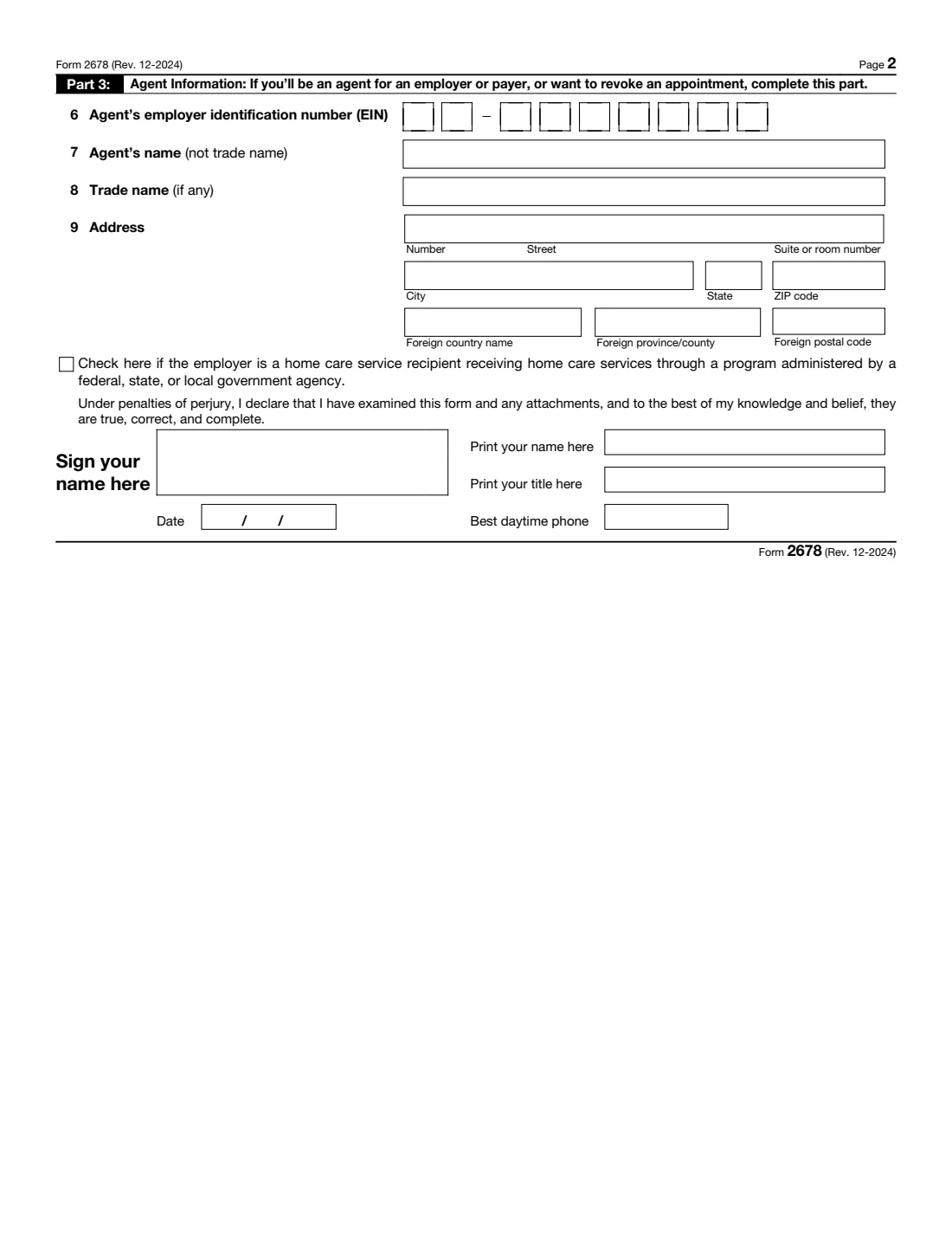
- Part 3: AgentEmployer, payer or agent
- Employer or payer signs (Part 2)Employer or payer
- Agent signs (Part 3)Agent
How to fill out Form 2678, step by step
1 Part 1: Appoint or revoke
Tick one box. You complete all three parts either way.
2 Part 2, lines 1–4: The employer or payer
Enter the EIN and legal name — for a sole proprietor that's the owner's own name, with the business name on line 3. Leave the trade name blank if it's the same. If you're an agent revoking, enter the employer's details here.
3 Part 2, line 5: Which returns
For each return, tick For ALL or For SOME employees, payees or payments. Choose For SOME if, for example, you pay bonuses or executives directly and report those under your own EIN. Form 940 is allowed only with the home care box ticked, and FUTA needs the 941 or 944 appointment too. FileIt checks both rules.
4 Part 3, lines 6–9: The agent
The agent's EIN, legal name, trade name and address. Tick the box below line 9 if the employer gets home care services through a government program.
5 Signatures
Turn on the employer's signing part, the agent's, or both. Appointing needs both. Revoking needs only one, and FileIt only adds the signers whose part is switched on when you send it for signature.
Common mistakes to avoid
- Using an older version of Form 2678 — the IRS no longer accepts them.
- Ticking Form 940 when the employer isn't a home care service recipient.
- Appointing an agent for FUTA without also appointing them for Form 941 or 944.
- A business name on line 2 with the home care box ticked: the instructions say such forms are rejected, because a home care recipient is always an individual.
- Expecting the agent to take over straight away; nothing changes until the IRS approval letter arrives.
- Confusing Form 2678 with Form 8655, the reporting agent authorization payroll companies often ask for.
After you fill it out
Print the PDF and have each signer sign and date it. When appointing, the employer signs first and then gives the form to the agent to sign Part 3.
Mail it to the IRS address for the employer's location in the Form 2678 instructions: Kansas City, MO 64999 for many eastern and midwestern states, Ogden, UT 84201 for the rest and for anyone without a US location, and Ogden 84201-0046 if you file Form 941 for an exempt organization or government entity.
The IRS writes to the employer and the agent once it approves (for home care recipients, only the agent gets the letter). FileIt keeps the completed form in your vault, so you can file the approval letter next to it.
Fill out Form 2678 online with FileIt
- Pick the person. Choose someone from People and FileIt fills in their name, date of birth, address and other details it already knows.
- Answer plain-language questions. One part of the form at a time, with the official help text beside each question — 38 fields in all. Your answers save as you go.
- Check the live preview. Watch your answers land on the real Internal Revenue Service (IRS) form, and let FileIt do any worksheet arithmetic.
- Generate the official PDF. FileIt prints your answers into the agency’s own PDF and files it in that person’s folder in your vault. Sign it, or send it for e-signature.
FileIt fills the form — it never files or submits anything for you. Deliver the finished form to whoever asked for it, the way the form’s instructions say.
Start Form 2678 now — it’s freeForm 2678: frequently asked questions
Who signs Form 2678?
To appoint, the employer or payer signs Part 2 and the agent signs Part 3. To revoke, only one signature is needed: either the employer's or payer's, or the agent's.
Can an agent file Form 940 for me?
Generally no. The exception is an employer who receives home care services: they can appoint an agent for FUTA, as long as they also appoint that agent for FICA and income tax withholding (Form 941 or 944).
How long does approval take?
The instructions say processing generally takes about 30 days from receipt. The agent's authority starts on the date in the IRS letter.
Am I still liable once I have an agent?
Yes. The form says the agent and the employer or payer both remain liable for the returns, deposits and payments, even if a third party hired by the agent fails to file or pay.
Is Form 2678 the same as Form 8655?
No. Form 2678 appoints an agent under section 3504 who files using the agent's own EIN. Form 8655 authorizes a reporting agent to sign and file returns under your EIN.
Can I fill out Form 2678 online?
With FileIt you answer guided questions, the answers go into the official IRS PDF, and you can send it to the agent for an electronic signature. The IRS takes the form by mail.
Official sources
- Blank form (PDF), published by Internal Revenue Service (IRS): https://www.irs.gov/pub/irs-pdf/f2678.pdf
- Official instructions and guidance: https://www.irs.gov/forms-pubs/about-form-2678
- Edition shown on this page: Rev. December 2024 (checked 2026-10-19).
FileIt is not affiliated with or endorsed by Internal Revenue Service (IRS) or any government. This page explains the form in general terms and is not legal, tax or immigration advice. Always read the official instructions, and check that you are using the edition the recipient accepts. Page last reviewed 2026-10-19.