What is Form 2120?
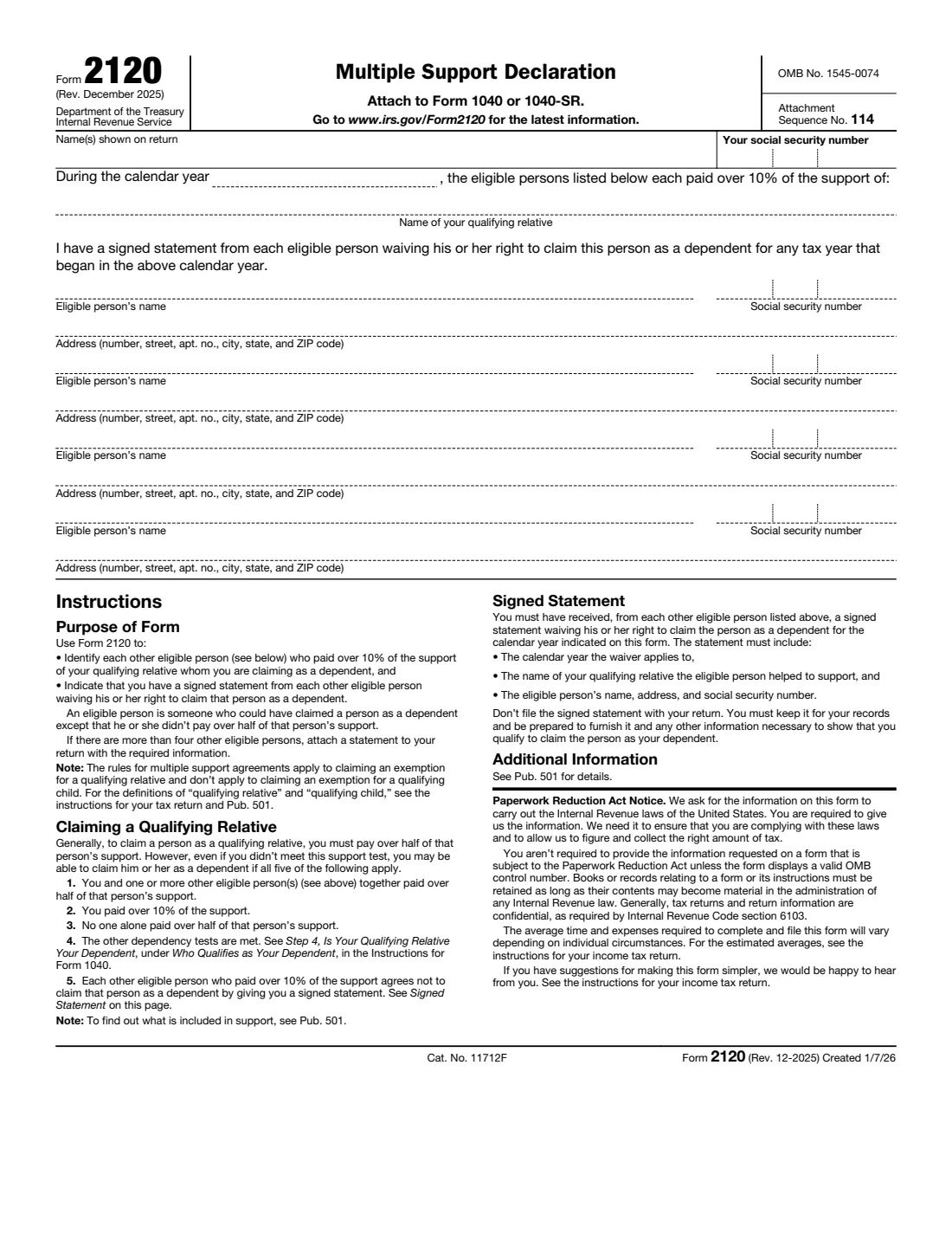
Form 2120, Multiple Support Declaration, is for families who share the cost of supporting someone, such as siblings who together support an elderly parent. Normally you can claim a qualifying relative as a dependent only if you pay over half of their support. Under a multiple support agreement, one of the people who paid over 10% can claim the relative instead, if the others agree in writing not to.
On the form you name the relative, the calendar year, and each other eligible person who paid over 10% of the support, with their Social Security number and address. You confirm that you have a signed statement from each of them waiving the right to claim the relative for that year. You attach Form 2120 to your Form 1040 or 1040-SR; the signed statements themselves are not filed, but you must keep them. The current edition is Rev. December 2025.
FileIt collects up to four eligible persons, checks the numbers, and prints everything into the IRS's official PDF, saved in your vault. You attach it to your return yourself; FileIt never files anything with the IRS.
- Who fills it
- The person claiming the qualifying relative as a dependent under a multiple support agreement.
- Filed with
- Your Form 1040 or 1040-SR (Attachment Sequence No. 114).
- Lists
- Each other eligible person who paid over 10% of the support: up to four on the form, more on an attached statement.
- Signatures
- None on the form. Each other eligible person signs a separate waiver statement that you keep.
- Edition
- Rev. December 2025
- Agency
- Internal Revenue Service (IRS), Department of the Treasury
Who needs to fill out Form 2120?
- Siblings or other relatives who together support a parent or relative, where no one pays over half.
- The member of the group who has agreed to claim the relative as a dependent for the year.
- Not for a qualifying child: the form notes these rules apply only to a qualifying relative.
When to use Form 2120
- When you file your return and claim the relative under a multiple support agreement.
- Each year you claim the relative this way: the waivers are for a specific calendar year, and the group can rotate who claims the relative.
What you need before you start
- Your name(s) as shown on the return and your Social Security number.
- The calendar year and the name of the qualifying relative.
- For each other eligible person who paid over 10% of the support: name, Social Security number and address.
- A signed statement from each of them, waiving the right to claim the relative as a dependent for that year (kept by you, not filed).
What’s on Form 2120
The 2025 edition has 1 page. FileIt asks for it in 5 parts:
- You and your qualifying relativeTaxpayer
- Eligible person 1Taxpayer
- Eligible person 2Taxpayer
- Eligible person 3Taxpayer
- Eligible person 4Taxpayer
How to fill out Form 2120, step by step
1 Check you qualify
The form lists five conditions: you and one or more other eligible persons together paid over half of the person's support; you paid over 10%; no one alone paid over half; the other dependency tests are met; and each other eligible person who paid over 10% gives you a signed statement agreeing not to claim the person. Pub. 501 explains what counts as support.
2 Your details and the relative
Enter the name(s) shown on your return, your Social Security number, the calendar year, and the name of your qualifying relative.
3 Each eligible person
For each other eligible person who paid over 10% of the support, enter their name, Social Security number and full address. An eligible person is someone who could have claimed the relative as a dependent except that they didn't pay over half of the support. If there are more than four, attach a statement with the same information.
4 The signed statements
Each statement must include the calendar year the waiver applies to, the name of the relative they helped support, and the eligible person's name, address and Social Security number. Don't file the statements with your return; keep them, ready to show the IRS if asked.
Common mistakes to avoid
- Using Form 2120 for a qualifying child. The multiple support rules apply only to a qualifying relative.
- Leaving out someone who paid over 10% of the support. Each of them must be listed and must sign a waiver.
- Listing someone who paid 10% or less. Only people who paid over 10% need to be listed.
- Filing the signed waiver statements with the return. Keep them instead.
- Two people in the group both claiming the relative for the same year.
After you fill it out
Attach Form 2120 to your Form 1040 or 1040-SR and file your return as usual. FileIt keeps a copy in your vault.
Store each signed waiver statement with your tax records (your FileIt vault is a good place) and be ready to give them and any other information showing you qualify if the IRS asks.
Next year, the group can agree on who claims the relative again; a new Form 2120 and new waivers are needed for each year.
Fill out Form 2120 online with FileIt
- Pick the person. Choose someone from People and FileIt fills in their name, date of birth, address and other details it already knows.
- Answer plain-language questions. One part of the form at a time, with the official help text beside each question — 20 fields in all. Your answers save as you go.
- Check the live preview. Watch your answers land on the real Internal Revenue Service (IRS) form, and let FileIt do any worksheet arithmetic.
- Generate the official PDF. FileIt prints your answers into the agency’s own PDF and files it in that person’s folder in your vault.
FileIt fills the form — it never files or submits anything for you. Deliver the finished form to whoever asked for it, the way the form’s instructions say.
Start Form 2120 now — it’s freeForm 2120: frequently asked questions
What is a multiple support agreement?
An arrangement where several people together pay over half of a relative's support but no one pays over half alone. One person who paid over 10% claims the relative as a dependent, and each other person who paid over 10% signs a statement agreeing not to.
Do I send the signed waiver statements to the IRS?
No. The form says not to file them with your return. You must keep them and be prepared to provide them.
What must the waiver statement include?
The calendar year it applies to, the name of the qualifying relative the eligible person helped support, and the eligible person's name, address and Social Security number.
What if more than four people helped?
List four on the form and attach a statement to your return with the same information for the others.
Can I use Form 2120 for my child?
No. The form notes that the multiple support rules apply to a qualifying relative, not a qualifying child.
Does Form 2120 need a signature?
The form itself has no signature line. The other eligible persons sign their separate waiver statements, and you sign your tax return.
Official sources
- Blank form (PDF), published by Internal Revenue Service (IRS): https://www.irs.gov/pub/irs-pdf/f2120.pdf
- Official instructions and guidance: https://www.irs.gov/forms-pubs/about-form-2120
- Edition shown on this page: Rev. December 2025 (Created 1/7/26) (checked 2026-10-01).
FileIt is not affiliated with or endorsed by Internal Revenue Service (IRS) or any government. This page explains the form in general terms and is not legal, tax or immigration advice. Always read the official instructions, and check that you are using the edition the recipient accepts. Page last reviewed 2026-10-01.