What is IMM(E)11 (OS)?
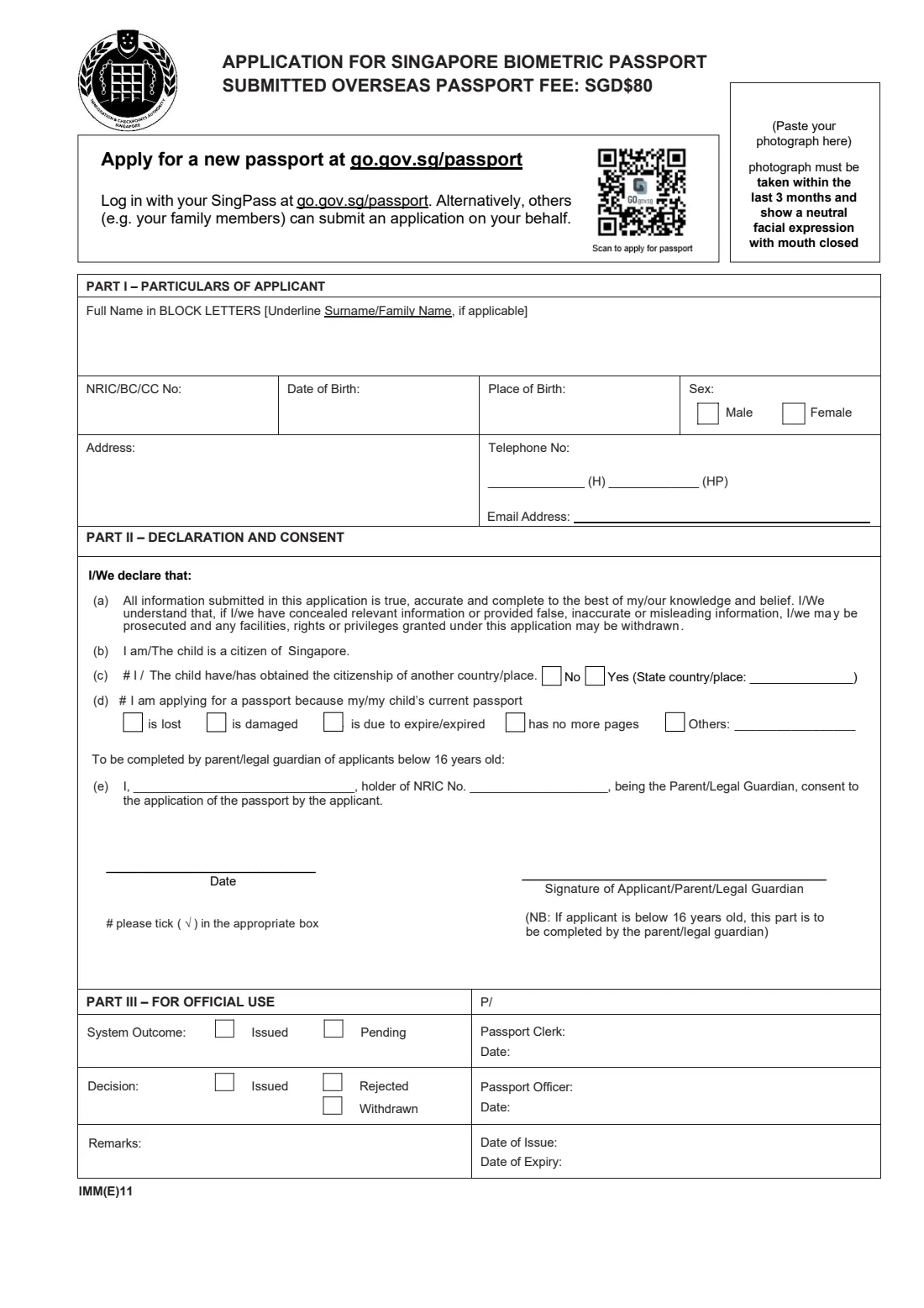
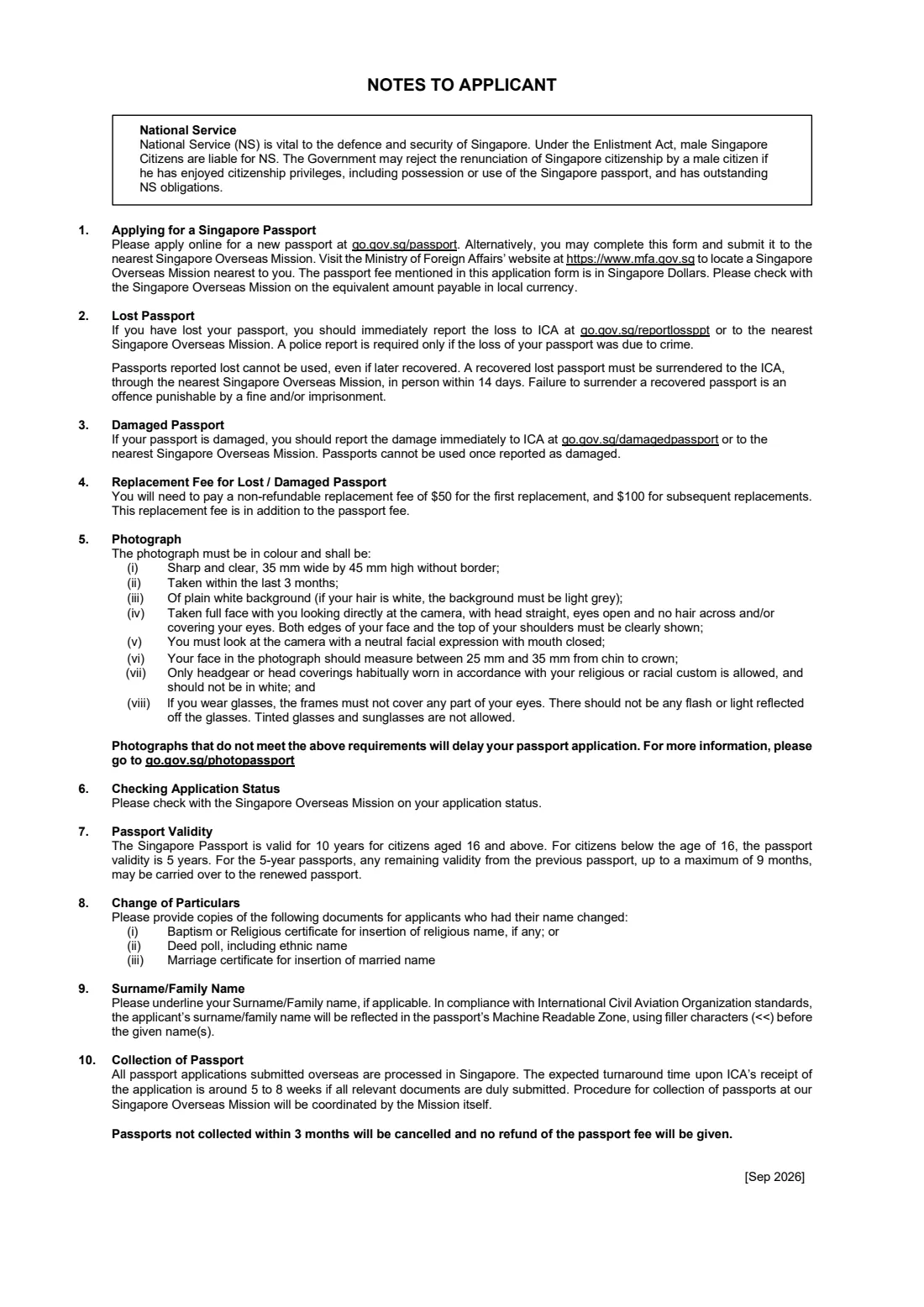
IMM(E)11 (OS) is the Immigration & Checkpoints Authority's (ICA) application form for a new Singapore biometric passport when you apply from outside Singapore. It is a short, two-page form: page one collects your particulars, your declaration and, for a child under 16, the parent's or legal guardian's consent; page two carries ICA's Notes to Applicant on photographs, lost and damaged passports, validity and collection. The current edition is marked [Sep 2026] and prints a passport fee of SGD 80.
ICA's first choice is the online application, which you log in to with Singpass and which a family member can also make on your behalf. The paper form is the alternative for citizens who would rather, or need to, apply in person at a Singapore embassy, high commission or consulate. Every overseas application is processed in Singapore, and the mission tells you how and when to collect the new passport.
FileIt walks you through IMM(E)11 (OS) in plain English and prints your answers onto ICA's own PDF, in block capitals where the form asks for them. Your name, date of birth and email can be pre-filled from the person's People record in your FileIt vault, and the finished form is saved in their folder. FileIt does not send anything to ICA: you print the form, paste the photograph, sign it in ink and take it to the mission yourself.
- Who fills it
- A Singapore citizen abroad applying for a new passport, or the parent or legal guardian of a citizen under 16
- Given to
- The nearest Singapore Overseas Mission, in person (processed by ICA in Singapore)
- When
- When the current passport is expiring or expired, lost, damaged or full, or for another reason such as a change of name
- Signatures
- Signed in ink by the applicant, or by the parent or legal guardian for an applicant under 16; no e-signature
- Fee on this edition
- SGD 80 passport fee, paid in the local equivalent; a replacement fee is added for a lost or damaged passport
- Edition
- IMM(E)11 [Sep 2026]
Who needs to fill out IMM(E)11 (OS)?
- Singapore citizens living, studying or working overseas whose passport needs replacing.
- Parents or legal guardians applying for a passport for a Singaporean child under 16 while abroad — they complete Part II (e) and sign for the child.
- Citizens whose passport has been lost or damaged overseas and who have reported it to ICA or the mission.
- Citizens who have changed their name (for example by deed poll or marriage) and need a passport in the new name.
- Anyone who cannot or prefers not to use the online application, for example because they do not have Singpass access abroad.
- Dual-status families: the form asks whether you or your child has obtained another citizenship, so it is also relevant to citizens who hold a second nationality.
When to use IMM(E)11 (OS)
- Well before a planned trip: the notes on this edition put the turnaround at around 5 to 8 weeks from when ICA receives a complete application, because overseas applications are processed in Singapore.
- When your passport is due to expire or has already expired. Many countries expect a passport to have several months' validity left, so plan ahead.
- As soon as possible after reporting a lost or damaged passport, since a passport reported lost or damaged can no longer be used.
- When the passport has no more pages for stamps and visas.
- After a change of name, with copies of the supporting documents the notes list.
What you need before you start
- Your current or most recent Singapore passport, if you still have it.
- Your NRIC number — or, for a child without an NRIC, the birth certificate (BC) number, or for a citizen by registration without an NRIC, the citizenship certificate (CC) number.
- One recent colour photograph, 35 mm wide by 45 mm high, taken within the last three months, on a plain white background, with a neutral expression and mouth closed.
- Your overseas address, home and mobile phone numbers (with country code) and an email address.
- For an applicant under 16: the parent's or legal guardian's full name and NRIC number, and that parent or guardian present to sign.
- For a change of name: copies of the deed poll, marriage certificate, or baptism or religious certificate, as applicable.
- The passport fee in the local currency equivalent (check the amount with the mission), plus the replacement fee if your passport was lost or damaged.
What’s on IMM(E)11 (OS)
The 2026 edition has 2 pages. FileIt asks for it in 3 parts:
- Part I – Particulars of applicantApplicant
- Part II – Declaration and consentApplicant
- Part II (e) – Consent of parent or legal guardian (applicant below 16)Parent / legal guardian
How to fill out IMM(E)11 (OS), step by step
1 Before you start: online or paper
The top of the form points you to ICA's online passport application, which you log in to with Singpass and which someone else, such as a family member, can submit for you. If you apply online you do not need this form. Use IMM(E)11 (OS) when you are applying in person at a Singapore Overseas Mission.
The notes also remind male citizens about National Service: the Government may reject a renunciation of citizenship by a man who has outstanding NS obligations and has enjoyed citizenship privileges, including holding a Singapore passport.
2 Photograph
Paste one photograph in the box at the top right. ICA's notes are specific: in colour, sharp and clear, 35 mm by 45 mm with no border, taken within the last three months, plain white background (light grey if your hair is white), full face looking straight at the camera, eyes open and uncovered, neutral expression with the mouth closed, and the face measuring 25 mm to 35 mm from chin to crown.
Only religious or racial head coverings habitually worn are allowed, and not in white. Glasses must not cover the eyes or reflect light, and tinted glasses are not allowed. A photo that does not meet these rules delays the application.
3 Part I – Particulars of applicant
Write your full name in block letters and underline your surname or family name, if you have one. The surname is what appears first in the passport's machine-readable zone, before the given names. FileIt prints the name in capitals; draw the underline with a pen after printing, because FileIt cannot underline.
Then give your NRIC, BC or CC number, date of birth, place of birth and sex, your full overseas address, a home (H) and mobile (HP) number, and your email address. The mission uses these details to contact you.
4 Part II (c) – Other citizenship
Tick No or Yes to say whether you (or the child) have obtained the citizenship of another country or place. If Yes, name the country or place in the space provided. Answer honestly: the declaration you sign makes clear that giving false information can lead to prosecution.
5 Part II (d) – Why you are applying
Tick the reason your current passport needs replacing: it is lost, it is damaged, it is due to expire or has expired, it has no more pages, or Others with a short explanation.
If the passport is lost or damaged, report it to ICA or the nearest mission straight away. A passport reported lost cannot be used even if you find it later, and a recovered passport must be handed in at a mission within 14 days — failing to do so is an offence. The notes on this edition list a non-refundable replacement fee of $50 for the first replacement and $100 for later ones, on top of the passport fee.
6 Part II (e) – Parent's or legal guardian's consent
Only for applicants below 16 years old. The parent or legal guardian writes their name and NRIC number, consenting to the passport application, and signs the form in place of the child. FileIt checks the applicant's age from the date of birth and reminds you to fill in this part when it is needed.
Passports for citizens under 16 are valid for 5 years, and up to 9 months of validity left on the previous passport may be carried over. Citizens aged 16 and above receive a 10-year passport.
7 Declaration, signature and date
By signing, you declare the information is true, accurate and complete and that you (or the child) are a citizen of Singapore. Sign in ink on the 'Signature of Applicant/Parent/Legal Guardian' line and date it. FileIt can print the date for you or leave it for you to write. Part III is for official use only — leave it blank.
Common mistakes to avoid
- Forgetting to underline the surname. FileIt prints the name in capitals, but the underline has to be added by hand.
- Using a photo that is too old, has a coloured background or shows a smile or open mouth — the application is delayed.
- Continuing to use a passport after reporting it lost or damaged. Once reported, it is no longer valid.
- Leaving Part II (e) empty for a child under 16, or completing it for an applicant who is 16 or older.
- Ticking more than one reason in (d), or ticking Others without saying why.
- Not bringing copies of the deed poll or marriage certificate when the name has changed.
- Filling in Part III, which is for the passport office only.
After you fill it out
Print the form, paste the photograph in the box, underline the surname and sign in ink. For an applicant under 16, the parent or legal guardian signs. Take the form, your current passport (if you have it) and the fee to the nearest Singapore Overseas Mission; the Ministry of Foreign Affairs lists missions and their opening arrangements.
The mission sends the application to ICA in Singapore. Ask the mission about the status of your application — this edition's notes say to check with the mission rather than with ICA. When the passport is ready, the mission arranges collection. Passports not collected within three months are cancelled and the fee is not refunded.
Keep a copy of the filled form in your FileIt vault alongside a scan of the new passport once it arrives, so the expiry date is tracked and you are reminded well before the next renewal.
Fill out IMM(E)11 (OS) online with FileIt
- Pick the person. Choose someone from People and FileIt fills in their name, date of birth, address and other details it already knows.
- Answer plain-language questions. One part of the form at a time, with the official help text beside each question — 18 fields in all. Your answers save as you go.
- Check the live preview. Watch your answers land on the real Immigration & Checkpoints Authority (ICA) form, and let FileIt do any worksheet arithmetic.
- Generate the official PDF. FileIt prints your answers into the agency’s own PDF and files it in that person’s folder in your vault.
FileIt fills the form — it never files or submits anything for you. Deliver the finished form to whoever asked for it, the way the form’s instructions say.
Start IMM(E)11 (OS) now — it’s freeIMM(E)11 (OS): frequently asked questions
Can I fill in the IMM(E)11 (OS) form online?
Yes. FileIt lets you fill it in online for free and prints your answers onto ICA's official PDF, ready to print. You still sign it by hand and hand it in at the mission. Separately, ICA's own online passport application lets you apply without any paper form at all.
Where do I submit the form?
In person at the nearest Singapore Overseas Mission (embassy, high commission or consulate). The mission forwards it to ICA, which processes all overseas applications in Singapore. FileIt does not submit it for you.
How much does a Singapore passport cost overseas?
This edition of the form ([Sep 2026]) prints a passport fee of SGD 80, paid in the local currency equivalent, which the mission will confirm. A lost or damaged passport adds a non-refundable replacement fee of $50 for the first replacement and $100 for later ones.
How long does it take?
The notes on this edition say around 5 to 8 weeks from ICA's receipt of the application, if all the relevant documents are submitted. The mission coordinates collection.
Can I sign the form electronically?
No. The form is signed in ink and handed in in person, so FileIt does not offer e-signature for it.
My child is under 16 — who signs?
A parent or legal guardian. They fill in Part II (e) with their name and NRIC number to consent to the application, and they sign the form. A passport for a citizen under 16 is valid for 5 years.
What if my child does not have an NRIC yet?
The identity box accepts an NRIC, birth certificate (BC) or citizenship certificate (CC) number. Use the birth certificate number for a young child without an NRIC.
What photo size does ICA need?
One colour photo, 35 mm wide by 45 mm high without a border, taken within the last three months, on a plain white background, with the face measuring between 25 mm and 35 mm from chin to crown.
Official sources
- Blank form (PDF), published by Immigration & Checkpoints Authority (ICA): https://www.ica.gov.sg/docs/default-source/ica/forms/forms_form_imme_11_os.pdf
- Official instructions and guidance: https://www.ica.gov.sg/documents/passport/apply
- Edition shown on this page: IMM(E)11 [Sep 2026] (checked 2026-09-25).
FileIt is not affiliated with or endorsed by Immigration & Checkpoints Authority (ICA) or any government. This page explains the form in general terms and is not legal, tax or immigration advice. Always read the official instructions, and check that you are using the edition the recipient accepts. Page last reviewed 2026-09-25.