What is Form 6A(1)-CASH?
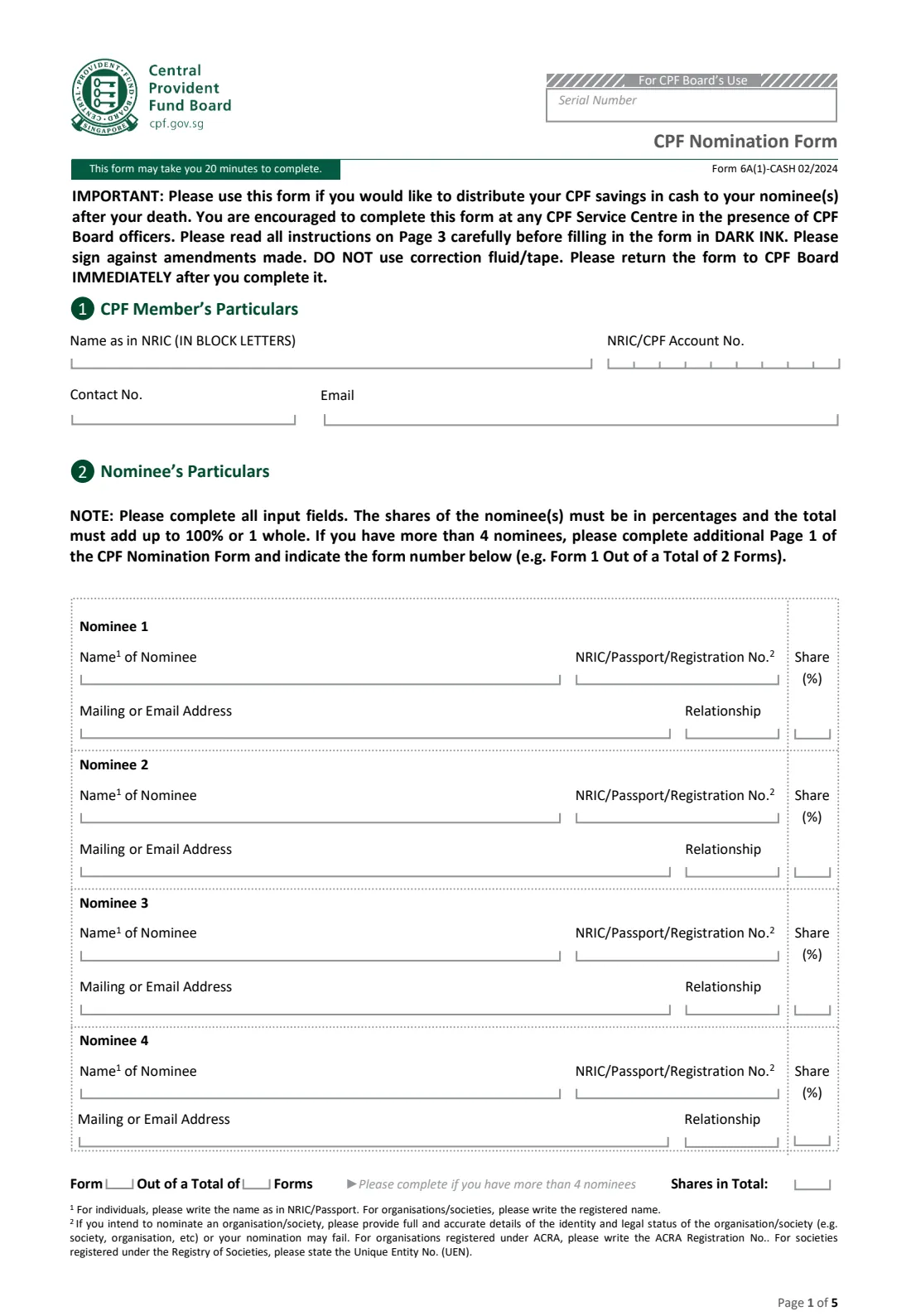
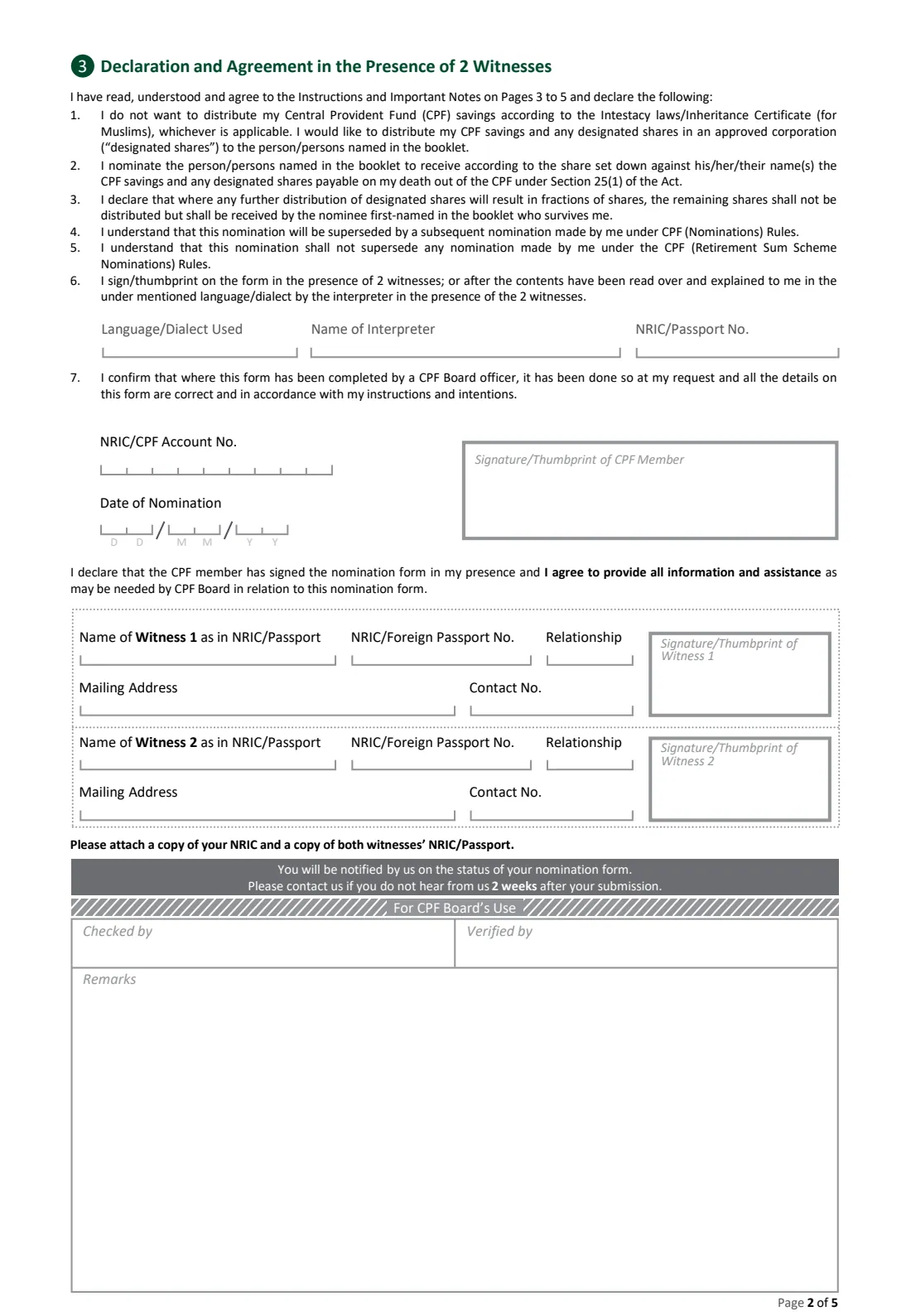
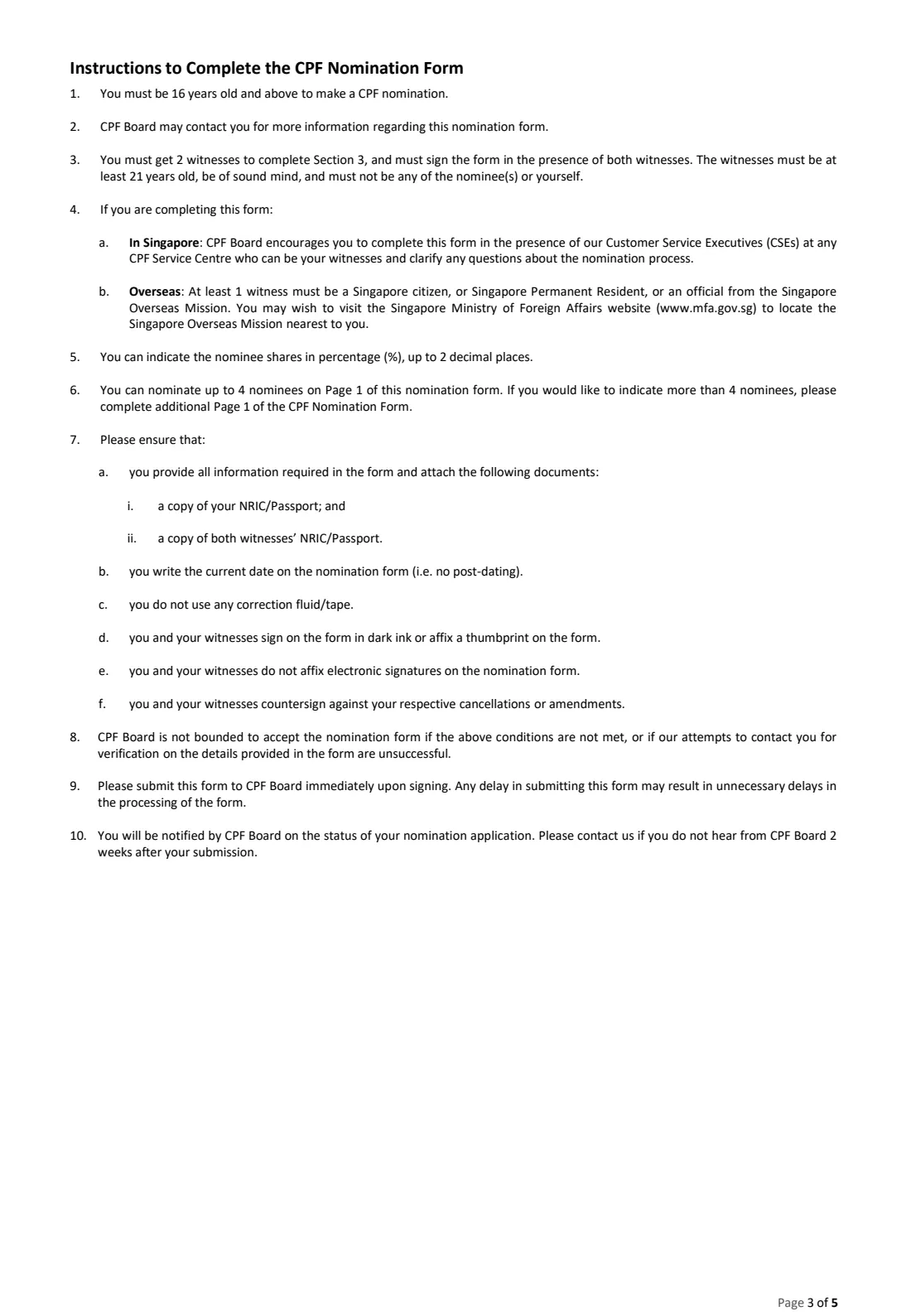
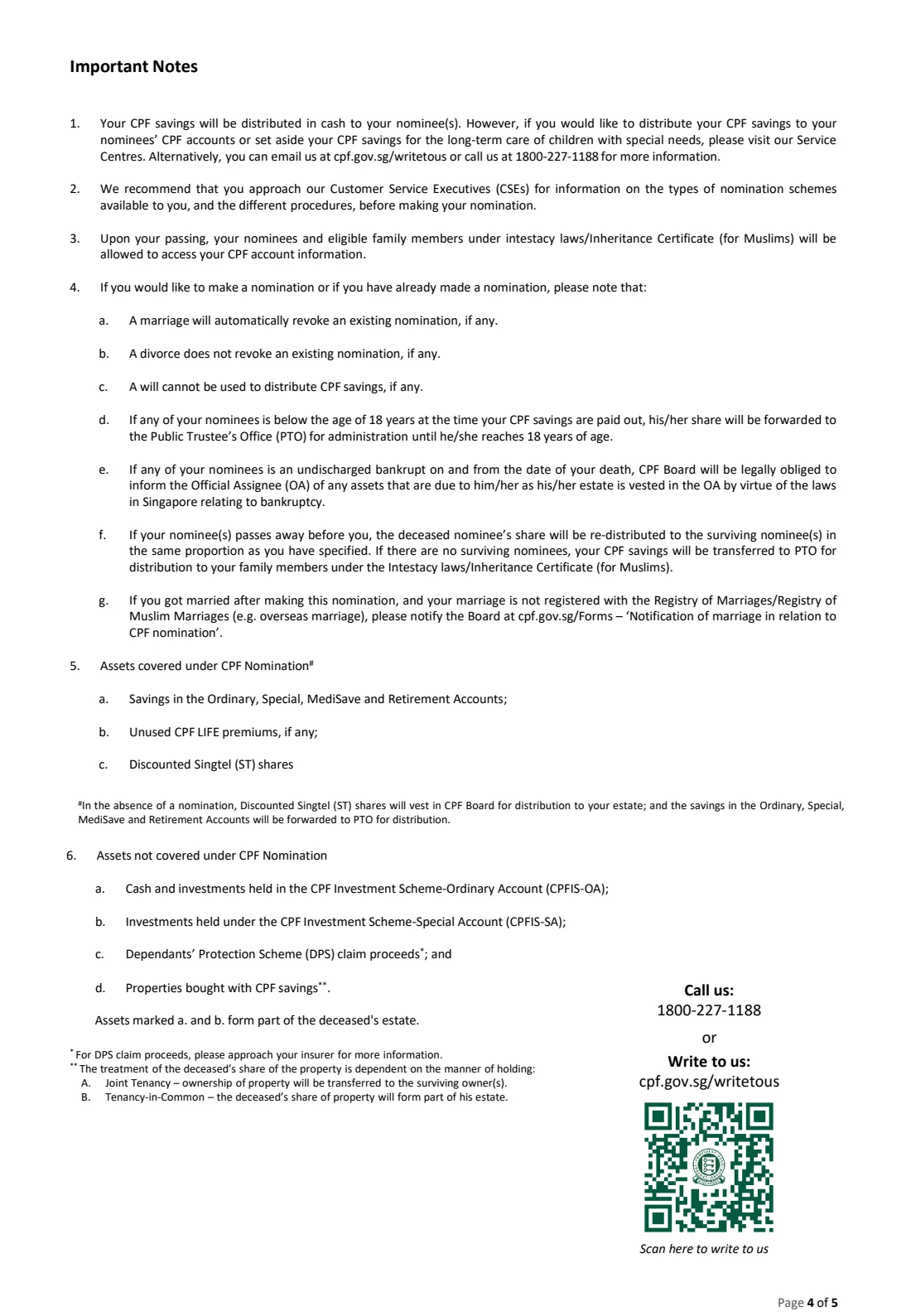
Form 6A(1)-CASH is the CPF Board's paper CPF Nomination Form. With it, a Central Provident Fund member names one or more nominees to receive their CPF savings in cash when they die, and sets each nominee's share as a percentage. The current edition is 02/2024: page 1 holds your particulars and nominees, page 2 the declaration, signatures and two witnesses, and pages 3 to 5 the instructions and notes.
A nomination matters because a will cannot be used to distribute CPF savings. Without a nomination, your savings are passed to the Public Trustee's Office for distribution to your family under the intestacy laws, or under an Inheritance Certificate for Muslims, and the Public Trustee's Office charges a fee for doing so. A nomination lets you decide who receives your savings and in what proportion. Marriage automatically revokes an existing nomination, so newly married members need to nominate again.
FileIt helps you fill in Form 6A(1)-CASH online in plain English. It pre-fills your name and email from the People records in your vault, prints names in block letters as the form asks, checks that your nominees' shares add up to exactly 100%, and places every answer in the right box on CPF Board's own official PDF. The finished form is saved in your vault folder. FileIt never submits anything to CPF Board: you print the form, sign it in dark ink in front of two witnesses, and hand it in yourself. You can also nominate online through CPF's website with Singpass instead.
- Who fills it
- A CPF member aged 16 or over.
- Handed in to
- CPF Board — the form encourages you to complete it at a CPF Service Centre with CPF officers.
- When
- Any time; again after marriage, which revokes an existing nomination.
- Signatures
- Your wet signature or thumbprint in dark ink, before 2 witnesses. No electronic signatures.
- Nominees
- Up to 4 on page 1; more on additional copies of page 1. Shares must total 100%.
- Cost
- CPF Board says making a nomination is free; filling it in with FileIt is free too.
Who needs to fill out Form 6A(1)-CASH?
- Any CPF member aged 16 or over who wants their CPF savings to go to particular people or organisations after their death.
- Members who have just married, since marriage automatically revokes any earlier CPF nomination.
- Members whose family has changed — a new child, a death in the family, or a divorce (which does not revoke a nomination on its own).
- Members who want to leave part of their CPF savings to a charity, society or other organisation.
- Members living overseas who cannot easily nominate online and need to arrange suitable witnesses abroad.
When to use Form 6A(1)-CASH
- When you first want to decide who receives your CPF savings, rather than leaving them to be distributed under the intestacy laws.
- Soon after you marry, because the marriage revokes your existing nomination.
- When you want to change your nominees or their shares — a later nomination supersedes the earlier one.
- Only when you want your nominees to receive the savings in cash; for payment into nominees' CPF accounts, or to set savings aside for a child with special needs, the form asks you to visit a CPF Service Centre.
What you need before you start
- Your NRIC (or passport), and a copy of it to attach to the form.
- Your contact number and email address, so CPF Board can reach you to verify the nomination.
- Each nominee's full name as in their NRIC or passport, or an organisation's registered name.
- Each nominee's NRIC, passport or registration number — the ACRA registration number for a company, or the Unique Entity No. (UEN) for a registered society.
- A mailing or email address for each nominee, and how they are related to you.
- The share for each nominee, as a percentage with up to 2 decimal places, adding up to 100%.
- Two witnesses aged 21 or over who are not your nominees, with their NRIC or passport numbers, addresses and contact numbers — or an appointment at a CPF Service Centre, where CPF officers can witness.
- Copies of both witnesses' NRIC or passport, and a pen with dark ink.
What’s on Form 6A(1)-CASH
The 2024 edition has 5 pages. FileIt asks for it in 7 parts:
- 1 CPF Member's ParticularsCpf member
- 2 Nominee's ParticularsCpf member
- More than 4 nominees (Form __ out of a total of __ forms)Cpf member
- 3 Declaration and Agreement in the Presence of 2 WitnessesCpf member
- Interpreter (if the form is read and explained to you)Cpf member
- Witness 1Witness
- Witness 2Witness
How to fill out Form 6A(1)-CASH, step by step
1 1 CPF Member's Particulars
Write your name exactly as it appears in your NRIC, in block letters, then your NRIC number — which is also your CPF account number — in the nine boxes. Add a contact number and email address.
CPF Board may contact you to check details on the form, and it is not bound to accept the nomination if it cannot reach you, so give a number you actually answer. FileIt fills in your name and email from your People record and prints your NRIC one character per box.
2 2 Nominee's Particulars
Page 1 has room for four nominees. For each one, give the name as in their NRIC or passport (or an organisation's registered name), their NRIC, passport or registration number, a mailing or email address, your relationship to them, and their share in percent.
Shares can have up to 2 decimal places and must add up to exactly 100%, shown in the 'Shares in Total' box. Three equal shares, for example, would be 33.33, 33.33 and 33.34. FileIt adds the shares for you and will not let you generate the form until they total 100%.
If you nominate an organisation or society, the form warns that you must give full and accurate details of its identity and legal status, or the nomination may fail.
3 More than 4 nominees (Form __ Out of a Total of __ Forms)
If you have more than four nominees, complete an additional page 1 for the rest and number each one, for example 'Form 1 Out of a Total of 2 Forms'. The shares across all the pages together must make 100%.
In FileIt, switch on this part and fill in a second copy of the form for the remaining nominees, numbering both. Hand all the pages in together.
4 3 Declaration and Agreement in the Presence of 2 Witnesses
By signing, you declare that you do not want your CPF savings distributed under the intestacy laws or an Inheritance Certificate, and that you nominate the people on page 1 to receive your savings and any designated shares in the proportions you set. You also confirm that this nomination replaces any earlier CPF nomination, but does not replace a nomination under the CPF Retirement Sum Scheme.
Your NRIC is repeated on page 2 (FileIt copies it across). Sign or put your thumbprint in the box for the CPF member, in dark ink, while both witnesses watch. Write the date you sign — the form does not allow post-dating — or let FileIt print it if you are signing that day.
5 Interpreter (Language/Dialect Used)
If the form was read over and explained to you in another language or dialect, the interpreter's name and NRIC or passport number go here, along with the language or dialect used. This must happen in the presence of the two witnesses. Leave it blank if you read the form yourself.
6 Witness 1 and Witness 2
Each witness gives their name as in their NRIC or passport, their NRIC or foreign passport number, relationship to you, mailing address and contact number, then signs or thumbprints their box to declare that you signed in their presence.
Witnesses must be at least 21, of sound mind, and must not be one of your nominees or yourself; CPF Board also says an organisation cannot be a witness. If you complete the form at a CPF Service Centre, CPF officers can be your witnesses. If you complete it overseas, at least one witness must be a Singapore citizen, a Singapore Permanent Resident, or an official from a Singapore Overseas Mission.
Common mistakes to avoid
- Shares that don't add up to exactly 100% — for example 33.33 three times makes 99.99%. Round one share up.
- Forgetting that marriage cancels your nomination. If you marry after nominating, make a new one.
- Choosing a nominee as a witness, or a witness under 21. Both make the nomination liable to be rejected.
- Signing with an electronic signature or a light-coloured pen. The form requires dark ink or a thumbprint, by you and both witnesses.
- Using correction fluid or tape. Instead, cross out and countersign any amendment — you and your witnesses each countersign your own changes.
- Post-dating the form, or leaving it unsubmitted. Write the actual date you sign and return the form to CPF Board immediately.
- Leaving out the attachments: a copy of your NRIC or passport and copies of both witnesses' NRIC or passport.
After you fill it out
Print the completed form from FileIt. Then, in front of your two witnesses, sign or thumbprint page 2 in dark ink and have both witnesses sign or thumbprint their own boxes. CPF Board encourages you to do this at a CPF Service Centre, where its Customer Service Executives can act as witnesses and answer your questions. Attach a copy of your NRIC or passport and copies of both witnesses' NRIC or passport.
Return the form to CPF Board immediately after signing; the form warns that delays can hold up processing. CPF Board will notify you of the status of your nomination, and asks you to contact it if you have not heard back within 2 weeks of submitting it. FileIt does not send the form for you.
Your filled form stays in your FileIt vault, so you can see at a glance whom you nominated and in what shares. Review the nomination whenever your circumstances change — above all after a marriage, which revokes it — and make a new one when needed; the latest nomination supersedes earlier ones.
Fill out Form 6A(1)-CASH online with FileIt
- Pick the person. Choose someone from People and FileIt fills in their name, date of birth, address and other details it already knows.
- Answer plain-language questions. One part of the form at a time, with the official help text beside each question — 42 fields in all. Your answers save as you go.
- Check the live preview. Watch your answers land on the real Central Provident Fund Board (CPF Board) form, and let FileIt do any worksheet arithmetic.
- Generate the official PDF. FileIt prints your answers into the agency’s own PDF and files it in that person’s folder in your vault.
FileIt fills the form — it never files or submits anything for you. Deliver the finished form to whoever asked for it, the way the form’s instructions say.
Start Form 6A(1)-CASH now — it’s freeForm 6A(1)-CASH: frequently asked questions
Can I fill in the CPF nomination form online?
Yes. FileIt lets you fill in Form 6A(1)-CASH online, checks your nominees' shares add up to 100%, and prints your answers into CPF Board's official PDF. You still print it and sign it by hand in front of two witnesses. Separately, CPF Board offers its own online nomination through its website with Singpass, which also needs two witnesses.
Where do I submit Form 6A(1)-CASH?
The form goes to CPF Board. It encourages you to complete it at a CPF Service Centre in the presence of CPF officers, and to return it immediately after you sign. FileIt never submits the form — you hand it in yourself.
How many nominees can I have?
Page 1 holds four nominees. If you want more, you complete additional copies of page 1 and number them, for example Form 1 out of a total of 2 forms. The shares across all the pages must add up to 100%.
Who can be a witness for a CPF nomination?
Each witness must be at least 21, of sound mind, and not one of your nominees or yourself; CPF Board also says an organisation cannot be a witness. At a CPF Service Centre, CPF officers can act as your witnesses. If you complete the form overseas, at least one witness must be a Singapore citizen, a Singapore Permanent Resident, or an official from a Singapore Overseas Mission.
Does getting married cancel my CPF nomination?
Yes. Under the notes printed on the form, marriage automatically revokes an existing nomination, while divorce does not. If you marry after nominating, you need to make a new nomination.
Can I nominate a charity or organisation?
Yes. Write its registered name and give full and accurate details of its identity and legal status. For a company registered with ACRA, give the ACRA registration number; for a registered society, give its Unique Entity No. (UEN). Incomplete details can make the nomination fail.
What does a CPF nomination cover?
According to the form, it covers savings in your Ordinary, Special, MediSave and Retirement Accounts, unused CPF LIFE premiums and discounted Singtel shares. It does not cover investments under the CPF Investment Scheme, Dependants' Protection Scheme claim proceeds, or property bought with CPF savings.
Can I use an electronic signature on the form?
No. The instructions say you and your witnesses must sign in dark ink or affix a thumbprint, and must not use electronic signatures. That is why FileIt does not offer e-signature for this form.
Official sources
- Blank form (PDF), published by Central Provident Fund Board (CPF Board): https://www.cpf.gov.sg/content/dam/web/member/account-services/documents/Form%206A1_CASH_T3.pdf
- Official instructions and guidance: https://www.cpf.gov.sg/member/account-services/providing-for-your-loved-ones/making-a-cpf-nomination
- Edition shown on this page: Form 6A(1)-CASH 02/2024 (checked 2026-09-25).
FileIt is not affiliated with or endorsed by Central Provident Fund Board (CPF Board) or any government. This page explains the form in general terms and is not legal, tax or immigration advice. Always read the official instructions, and check that you are using the edition the recipient accepts. Page last reviewed 2026-09-25.