What is IR3NR 2026 Non-resident tax return?
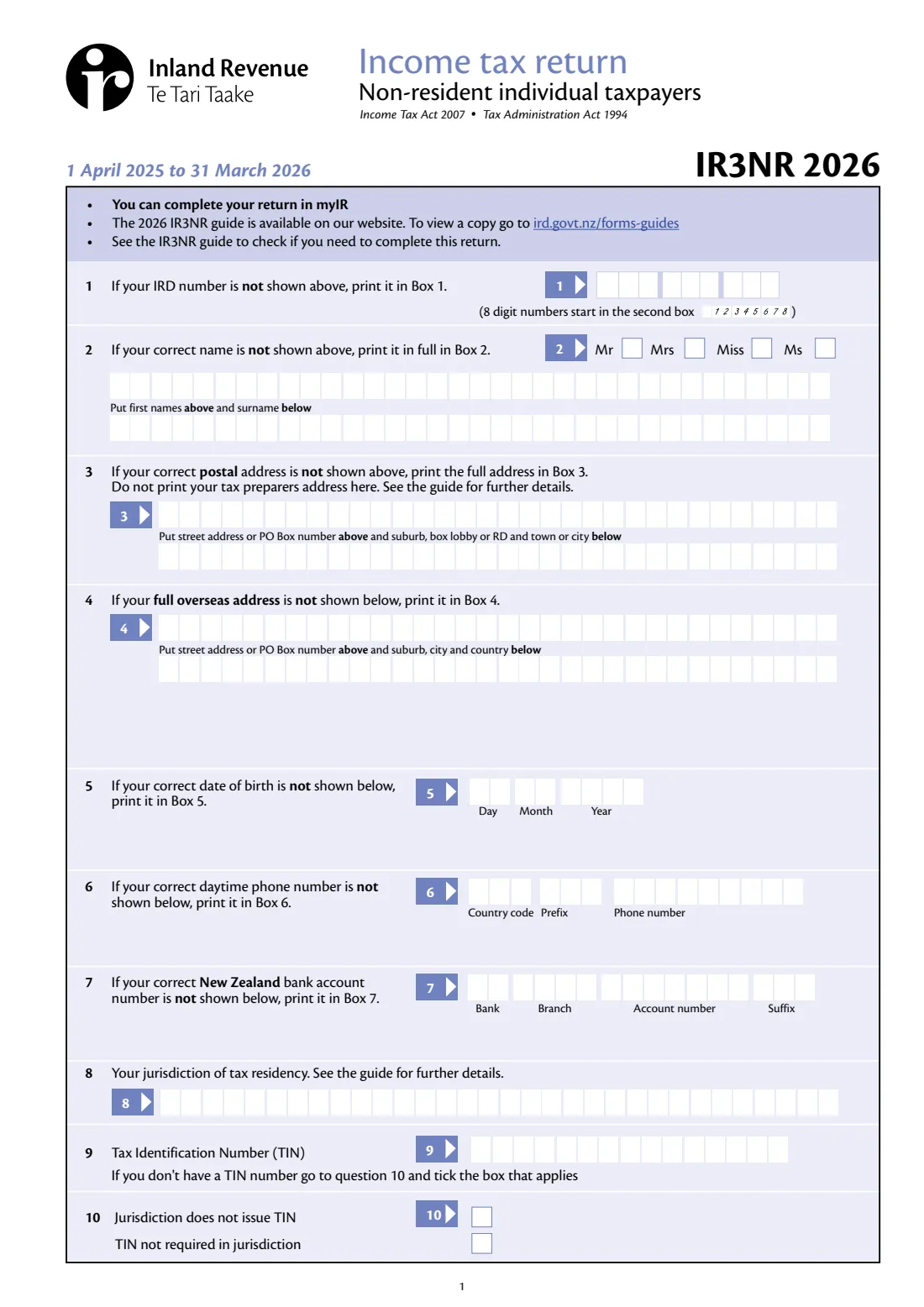
If you're not a New Zealand tax resident but you had New Zealand income in the year to 31 March 2026, you may need to file an IR3NR. It covers New Zealand interest, dividends and royalties with their non-resident withholding tax (NRWT), along with wages or other income taxed at source, partnership, trust and look-through company income, rental and other residential property income, self-employment, property sales, subsidies and other New Zealand income. The IR3NR guide explains who has to file.
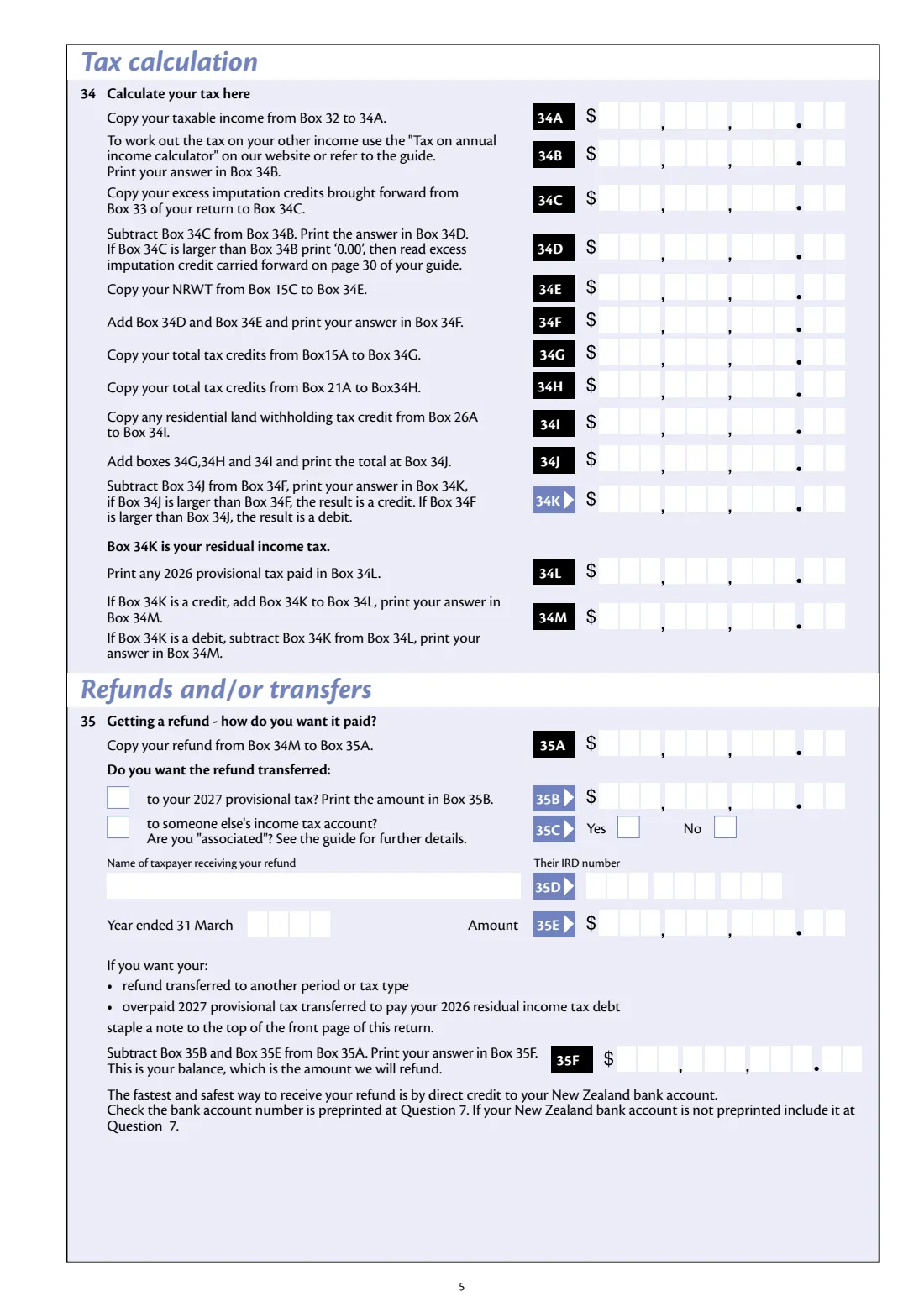
The return runs from your details and tax residency (with your foreign Tax Identification Number) through income and expenses to a tax calculation, refunds and transfers, and 2027 provisional tax. Most of the arithmetic is printed on the form: 'add Boxes 16B, 17B, 18B, 19B and 20E', 'subtract Box 29 from Box 28', and so on. You enter the tax on your taxable income from Inland Revenue's calculator or the guide.
FileIt fills Inland Revenue's own IR3NR 2026 PDF from a guided form. It asks each Yes or No question and shows the boxes only when you answer Yes. It works out every total the form describes, prints amounts digit by digit in the right cells with the cents in the last two, adds the minus sign for losses, and places names and addresses (macrons included) in their boxes. The completed return is saved in your FileIt vault, ready to sign and post.
- Who fills it
- Individuals who aren't New Zealand tax residents but had New Zealand income
- Income year
- 1 April 2025 to 31 March 2026
- Due
- 7 July 2026 unless you have an extension of time; any tax to pay by 7 February 2027
- Sent to
- Inland Revenue, PO Box 39090, Wellington Mail Centre, Lower Hutt 5045, New Zealand (or file in myIR)
- Signatures
- Yours, with the date
- Edition
- IR3NR 2026 (March 2026)
Who needs to fill out IR3NR 2026 Non-resident tax return?
- New Zealanders who have moved overseas and are no longer tax resident, but still have New Zealand income such as rent from a house here.
- Overseas residents with New Zealand interest, dividends or royalties who need to square up NRWT or claim a refund.
- Non-residents with New Zealand partnership, trust, look-through company or self-employment income.
- People who left New Zealand permanently during the year and are filing a part-year return.
When to use IR3NR 2026 Non-resident tax return
- After 31 March 2026, for the 2026 income year, if the IR3NR guide says you need to file.
- By 7 July 2026, unless you have an extension of time through a tax agent.
- When you sold New Zealand property and RLWT was deducted, to claim the credit.
- For a part-year return if you left New Zealand permanently, were declared bankrupt, are filing for someone who died, or changed balance date.
What you need before you start
- Your IRD number, overseas address, date of birth, daytime phone number and New Zealand bank account for refunds.
- Your jurisdiction of tax residency and your Tax Identification Number (TIN) there, or why you don't have one.
- Interest, dividend, royalty and distribution statements, and the NRWT rates from ird.govt.nz/nrwt.
- Your Summary of Income for New Zealand income with tax deducted.
- Figures for partnership, trust, LTC, rental, self-employment, property sale and other income, plus expenses and losses brought forward.
- The tax on your taxable income, from Inland Revenue's 'Tax on annual income calculator' or the guide, and any 2026 provisional tax you paid.
What’s on IR3NR 2026 Non-resident tax return
The 2026 edition has 6 pages. FileIt asks for it in 11 parts, and it is signed by Taxpayer:
- Your details (questions 1-10)Taxpayer
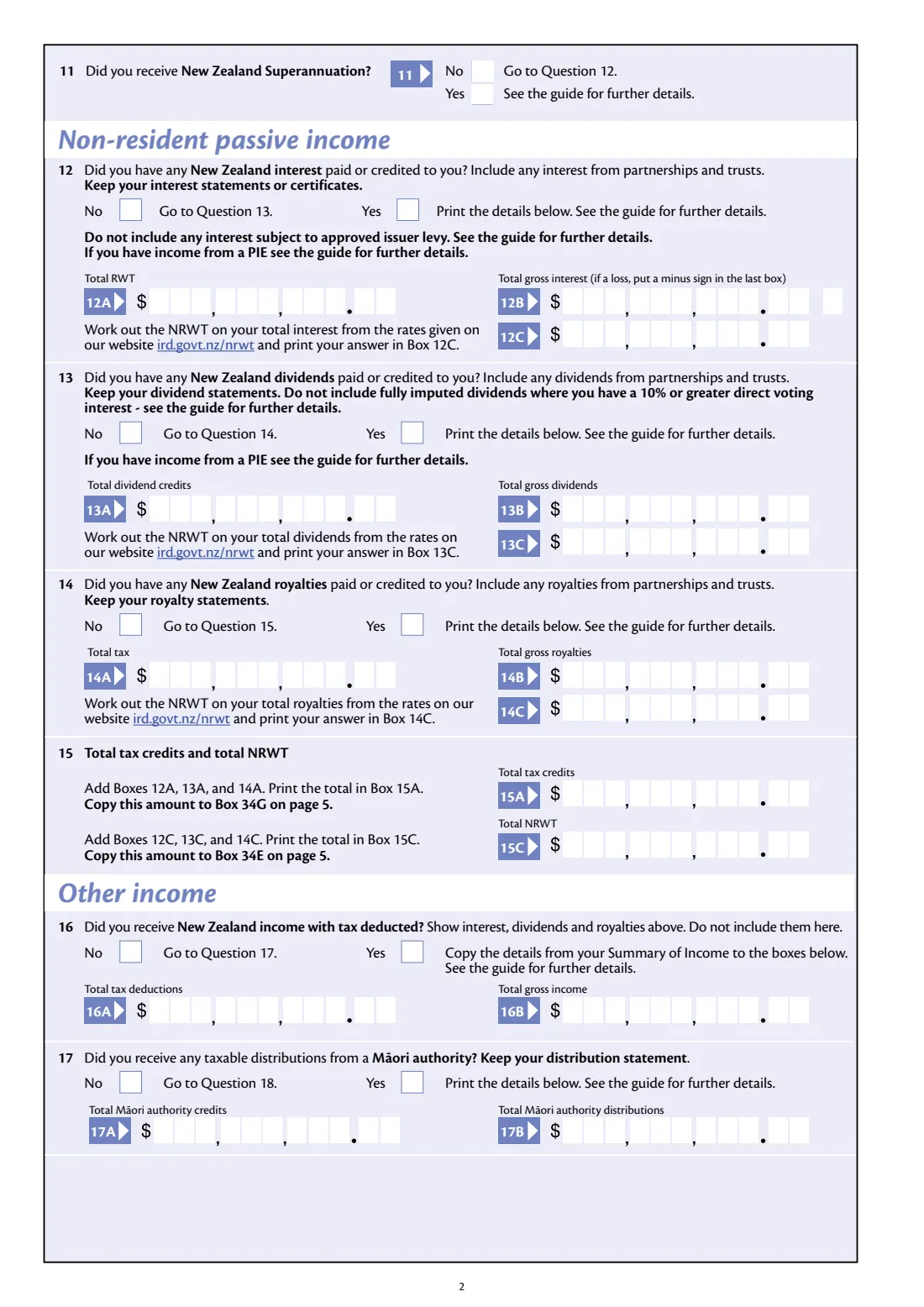
- New Zealand Superannuation (question 11)Taxpayer
- Non-resident passive income (questions 12-15)Taxpayer
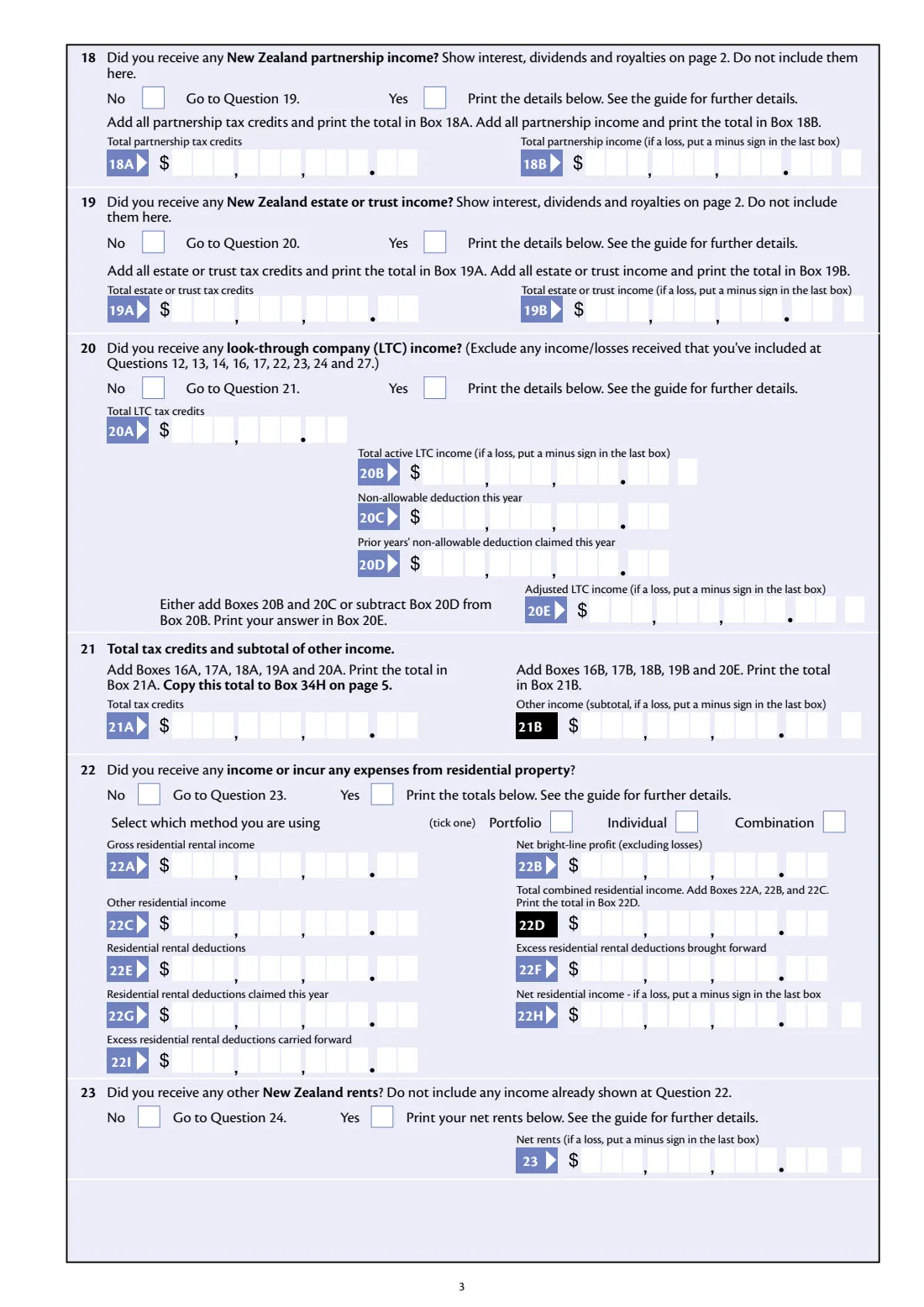
- Other income (questions 16-21)Taxpayer
- Residential property and other rents (questions 22-23)Taxpayer
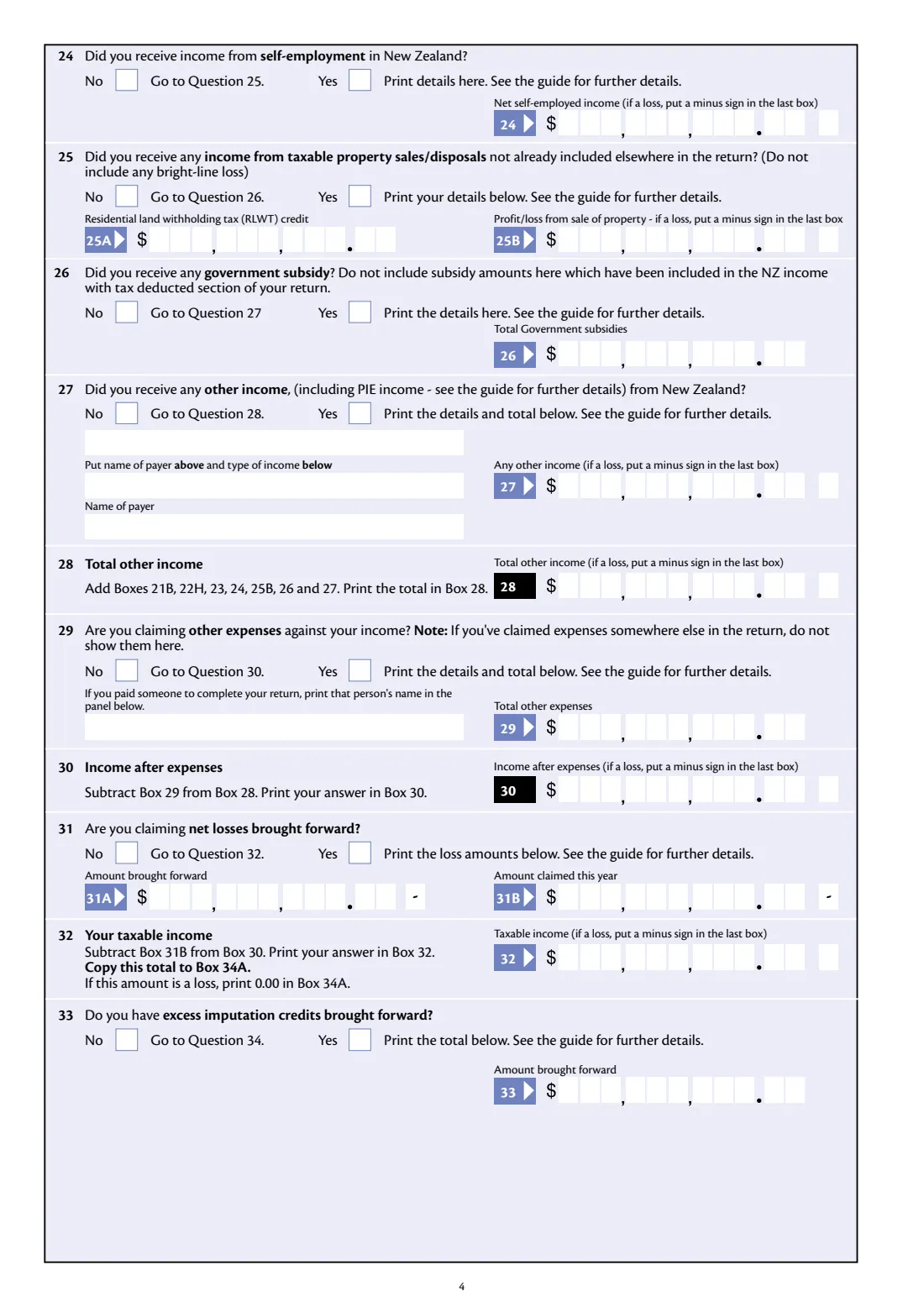
- Self-employment, property sales, subsidies and other income (questions 24-28)Taxpayer
- Expenses, losses and taxable income (questions 29-33)Taxpayer
- Tax calculation (question 34)Taxpayer
- Refunds and transfers (question 35)Taxpayer
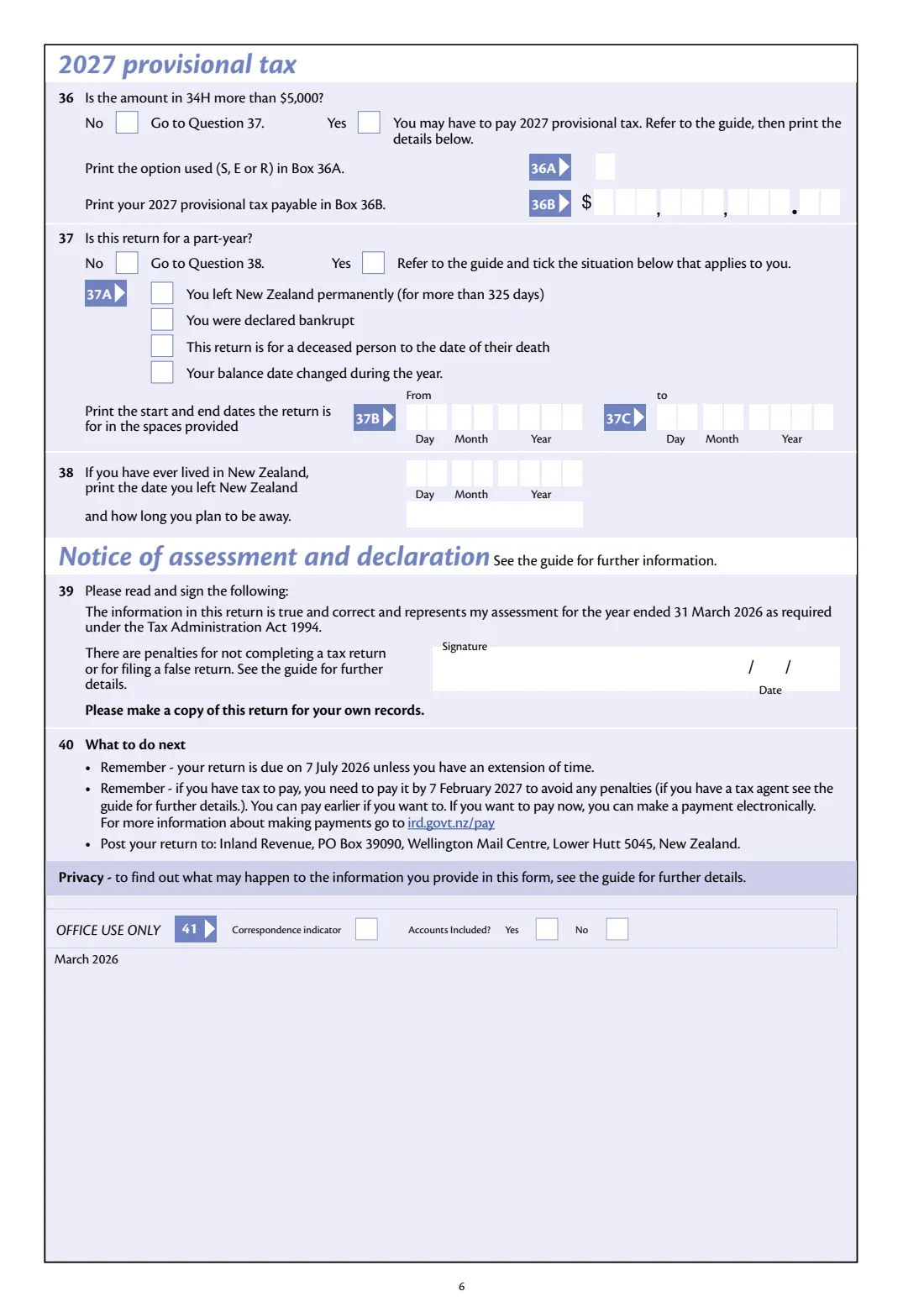
- 2027 provisional tax, part-year return and leaving New Zealand (questions 36-38)Taxpayer
- Declaration (question 39)Taxpayer
How to fill out IR3NR 2026 Non-resident tax return, step by step
1 Your details
Give your IRD number, name, postal and overseas addresses, date of birth, phone number, New Zealand bank account, jurisdiction of tax residency and TIN. On a preprinted return, only correct what's wrong.
2 Passive income
For New Zealand interest, dividends and royalties, give the tax credits, the gross amounts and the NRWT you've worked out. FileIt adds up 15A and 15C.
3 Other income
Answer questions 16 to 27 about income with tax deducted, Māori authority distributions, partnerships, estates and trusts, LTCs, residential property, other rents, self-employment, property sales, subsidies and other income. Tick 'is a loss' where an amount is negative. FileIt works out 20E, 21A, 21B, 22D, 22H, 22I and 28.
4 Expenses and losses
Add other expenses and any net losses brought forward. FileIt works out income after expenses (30) and taxable income (32).
5 Tax calculation and refunds
Enter the tax on your taxable income (34B) and any 2026 provisional tax paid (34L). FileIt fills the rest of question 34, the refund in 35A and the balance in 35F after any transfers you ask for.
6 Provisional tax, part-year and signing
Answer the 2027 provisional tax and part-year questions, give the date you left New Zealand if you've lived here, then sign. FileIt prints the date.
Common mistakes to avoid
- Including interest, dividends or royalties in the other income questions as well as on page 2.
- Leaving out the minus sign on a loss. Tick 'is a loss' so it prints in the last box.
- Using your tax preparer's address as your postal address.
- Leaving out your TIN without saying why at question 10.
- Filing the wrong year's form. The IR3NR changes every year, so use the 2026 return for 1 April 2025 to 31 March 2026.
After you fill it out
Sign and date the return, keep a copy, and post it to Inland Revenue, PO Box 39090, Wellington Mail Centre, Lower Hutt 5045, New Zealand. You can also file in myIR.
If you want a refund moved to another period or tax type, staple a note to the front page.
Pay any tax to pay by 7 February 2027. Payment options are at ird.govt.nz/pay.
FileIt keeps the completed return in your vault with your New Zealand tax records.
Fill out IR3NR 2026 Non-resident tax return online with FileIt
- Pick the person. Choose someone from People and FileIt fills in their name, date of birth, address and other details it already knows.
- Answer plain-language questions. One part of the form at a time, with the official help text beside each question — 138 fields in all. Your answers save as you go.
- Check the live preview. Watch your answers land on the real Inland Revenue (Te Tari Taake) form, and let FileIt do any worksheet arithmetic.
- Generate the official PDF. FileIt prints your answers into the agency’s own PDF and files it in that person’s folder in your vault. Sign it, or send it for e-signature.
FileIt fills the form — it never files or submits anything for you. Deliver the finished form to whoever asked for it, the way the form’s instructions say.
Start IR3NR 2026 Non-resident tax return now — it’s freeIR3NR 2026 Non-resident tax return: frequently asked questions
What is the IR3NR?
The IR3NR is Inland Revenue's income tax return for non-resident individual taxpayers: people who aren't New Zealand tax residents but had New Zealand income in the year.
When is the 2026 IR3NR due?
The form says your return is due on 7 July 2026 unless you have an extension of time, and any tax to pay is due by 7 February 2027.
Do I need a foreign tax number?
The return asks for your jurisdiction of tax residency and your Tax Identification Number there. If you don't have one, tick whether your jurisdiction doesn't issue TINs or doesn't require one.
Does FileIt calculate my tax?
FileIt does the additions and subtractions printed on the form, such as totals, taxable income and the refund balance. You enter the tax on your taxable income (Box 34B), worked out with Inland Revenue's calculator or the guide.
Can I file the IR3NR online instead?
Yes. The form says you can complete your return in myIR.
Can I fill in the IR3NR online with FileIt?
Yes. FileIt guides you through every question and prints your answers into Inland Revenue's official IR3NR 2026 PDF, ready to sign and post.
Official sources
- Blank form (PDF), published by Inland Revenue (Te Tari Taake): https://www.ird.govt.nz/-/media/project/ir/home/documents/forms-and-guides/ir1---ir99/ir3nr/ir3nr-2026.pdf
- Official instructions and guidance: https://www.ird.govt.nz/international-tax/individuals/tax-for-non-resident-taxpayers/complete-my-non-resident-individual-tax-return---ir3nr
- Edition shown on this page: IR3NR 2026 (March 2026) (checked 2026-10-19).
FileIt is not affiliated with or endorsed by Inland Revenue (Te Tari Taake) or any government. This page explains the form in general terms and is not legal, tax or immigration advice. Always read the official instructions, and check that you are using the edition the recipient accepts. Page last reviewed 2026-10-19.