What is IR215 Adjust your income?
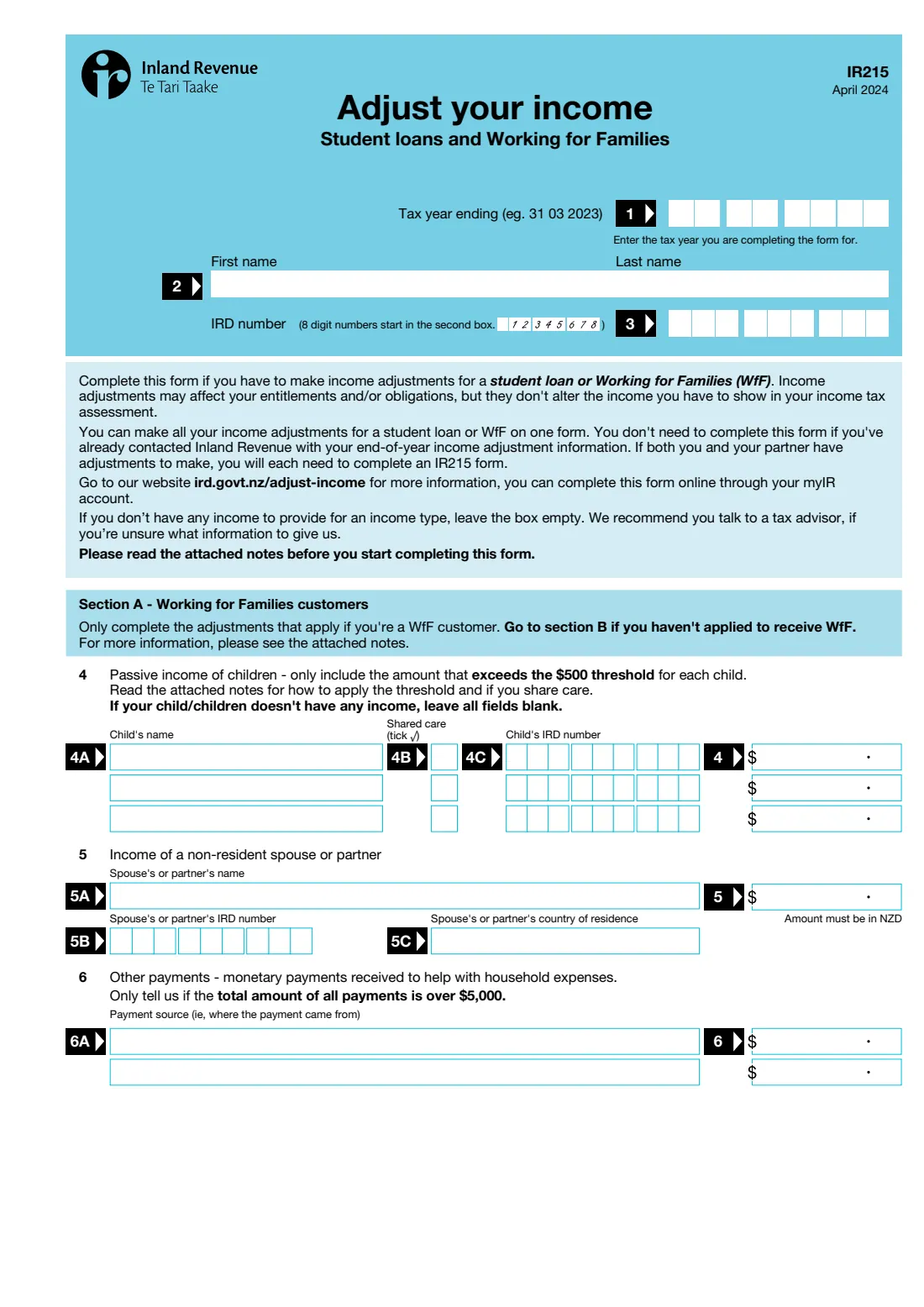
For student loan repayments and Working for Families tax credits, Inland Revenue looks at more than your taxable income. Amounts such as children's passive income, a non-resident partner's income, trust distributions, PIE income, tax-exempt pensions and some company income are added on as income adjustments. These adjustments can change what you're entitled to or what you owe, but they don't change the income in your income tax assessment.
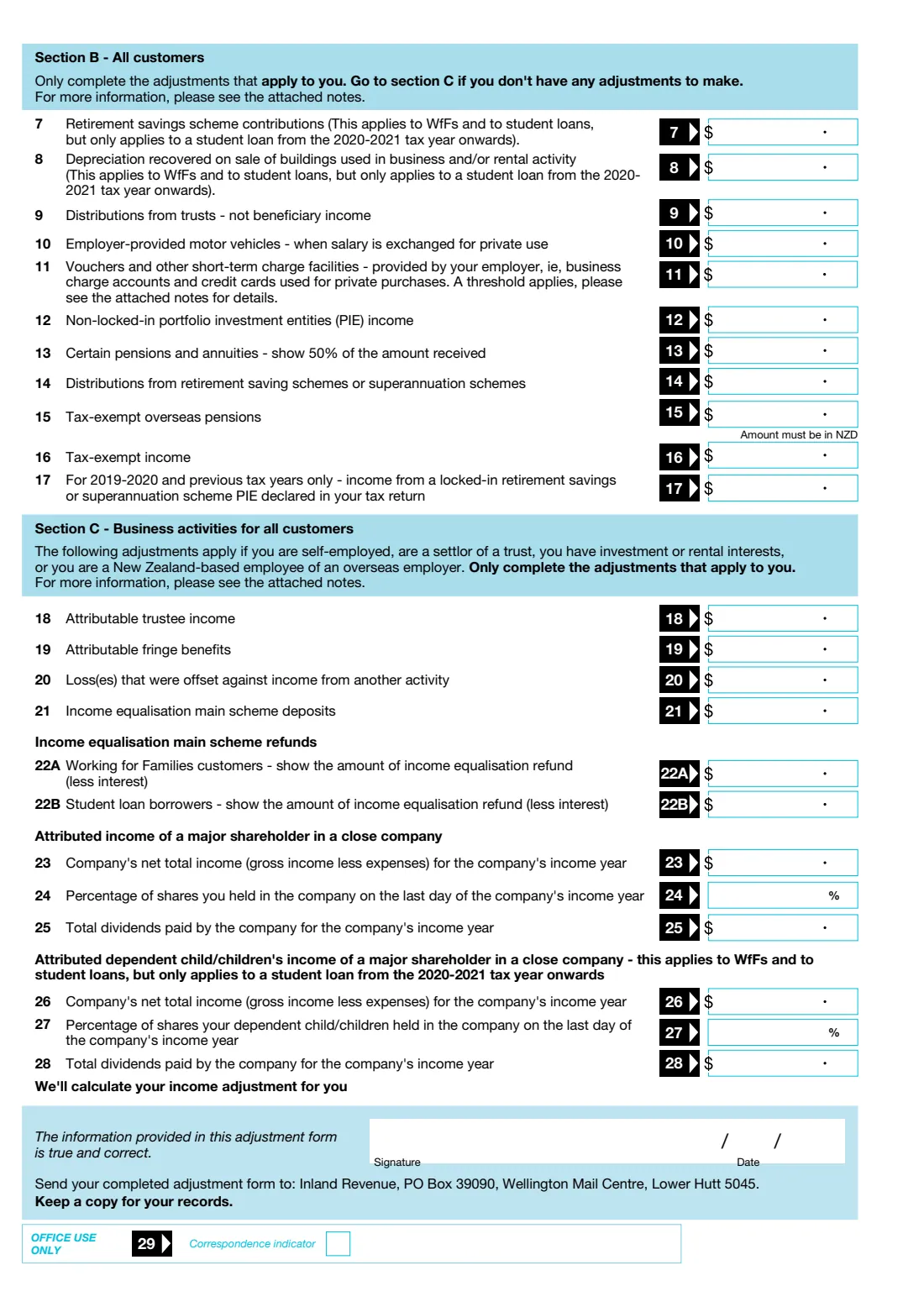
The IR215 lists each adjustment as a numbered box for one tax year. Section A is only for Working for Families customers, Section B is for everyone, and Section C covers business activities such as attributed trustee income and close-company shareholdings. You fill in only the boxes that apply, and Inland Revenue works out the adjustment. If you and your partner both have adjustments, you each complete an IR215.
FileIt fills Inland Revenue's own IR215 PDF from a guided form. Only the sections you switch on appear, amounts land either side of the printed decimal point, IRD numbers start in the right box, and the finished form is saved in your FileIt vault, ready to sign and send.
- Who fills it
- Student loan borrowers and Working for Families customers with income adjustments
- Sent to
- Inland Revenue, PO Box 39090, Wellington Mail Centre, Lower Hutt 5045 (or done online in myIR)
- Covers
- One tax year ending 31 March
- Calculation
- Inland Revenue calculates your adjustment from the amounts you give
- Signatures
- Yours, with the date
- Edition
- IR215 April 2024
Who needs to fill out IR215 Adjust your income?
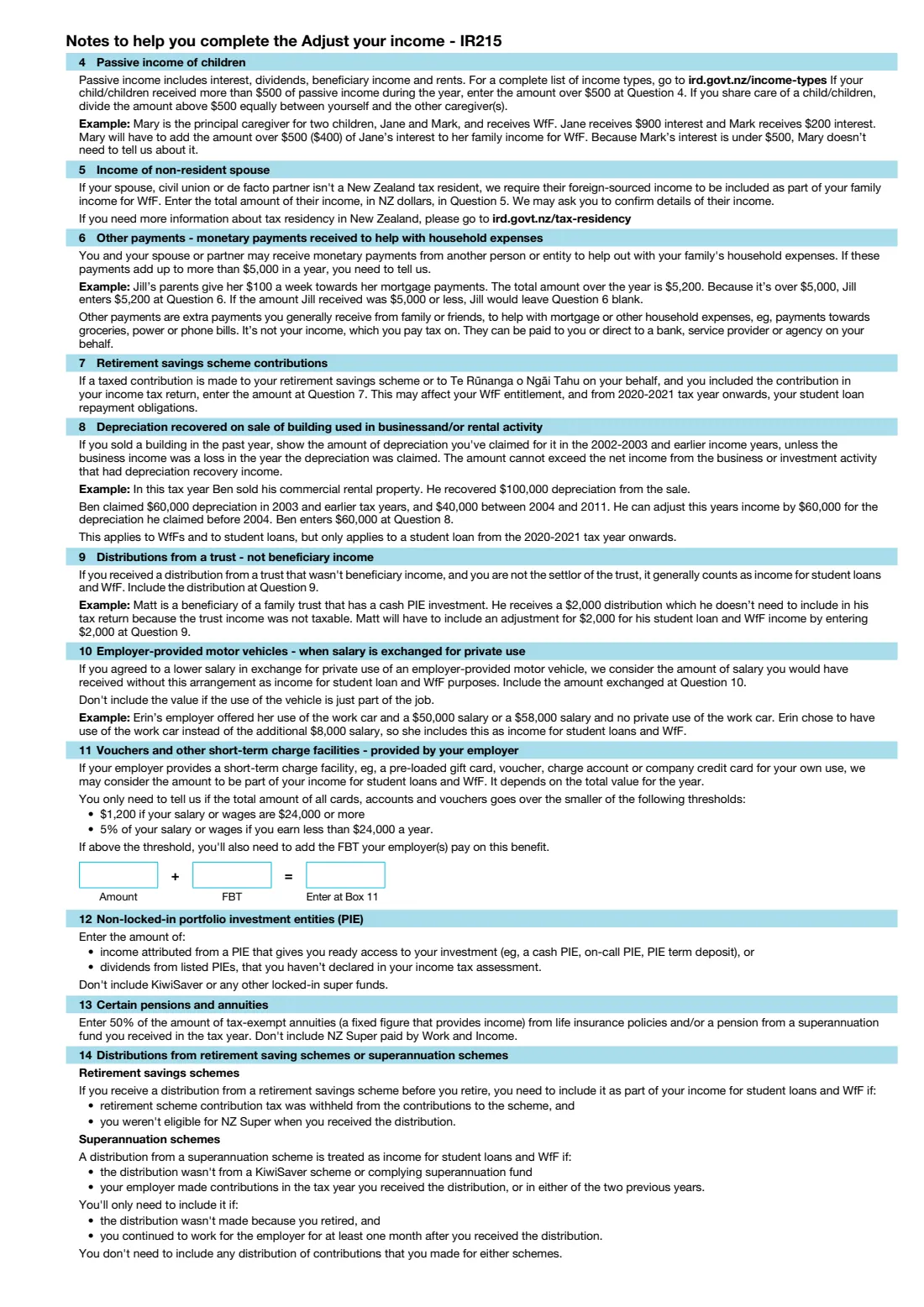
- Working for Families customers whose children have passive income over $500, or whose partner lives overseas.
- Families who received more than $5,000 in other payments to help with household expenses.
- Student loan borrowers and WfF customers with trust distributions, PIE income, tax-exempt income, or certain pensions and annuities.
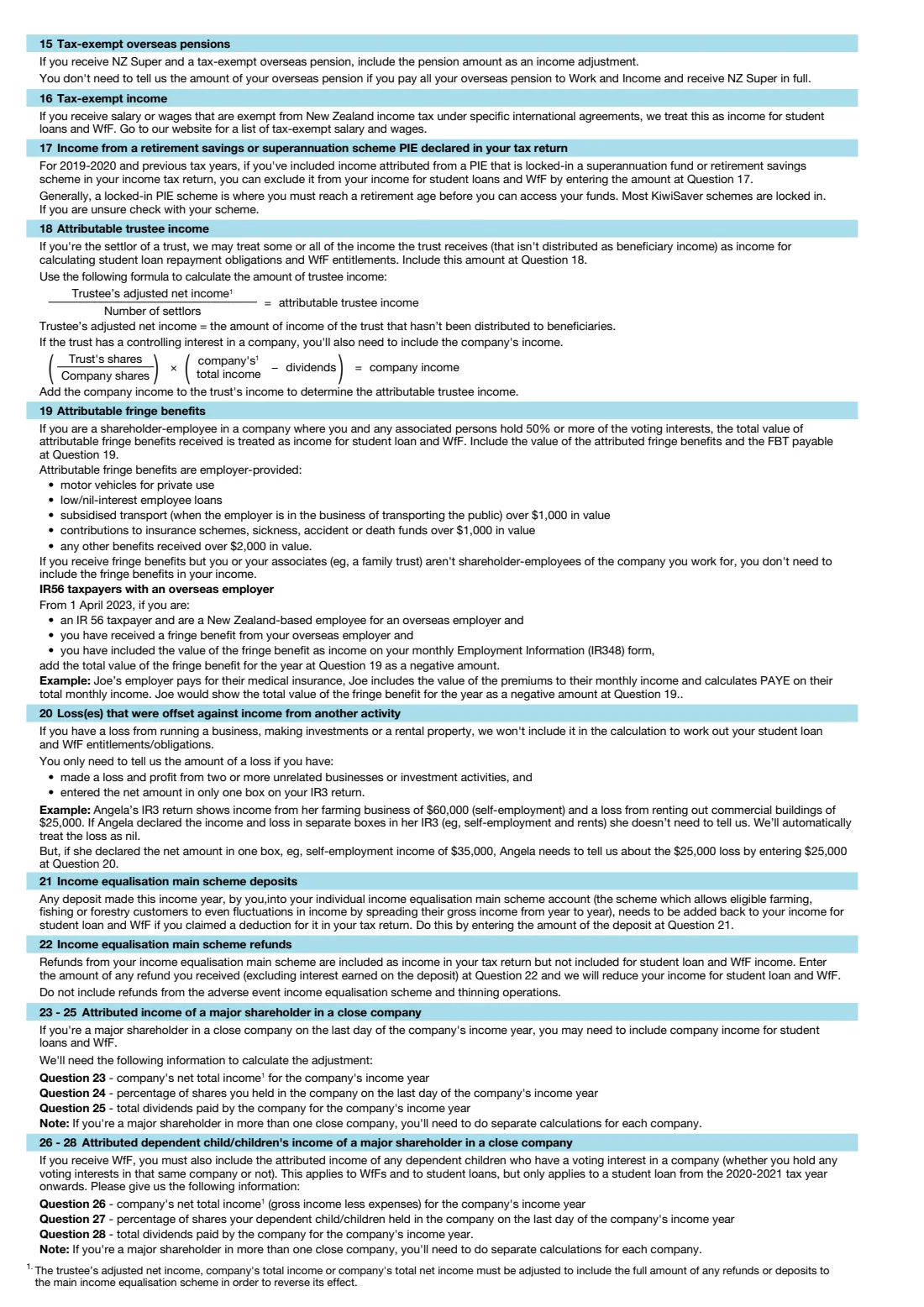
- Self-employed people, trust settlors and close-company shareholders with attributed or business income adjustments.
When to use IR215 Adjust your income
- At the end of a tax year, when you have adjustments Inland Revenue doesn't already know about.
- When Inland Revenue asks for your end-of-year income adjustment information.
- Not needed if you've already given Inland Revenue your income adjustments for the year, for example in myIR.
What you need before you start
- The tax year you're reporting (the year ending 31 March), plus your name and IRD number.
- For Section A: each child's name, IRD number and passive income above $500, and whether you share care. Also your non-resident partner's name, IRD number, country and income in NZD, and any household payments over $5,000 in total.
- For Section B: amounts such as retirement savings contributions, trust distributions, PIE income, pensions and tax-exempt income.
- For Section C: attributable trustee income, fringe benefits, offset losses, income equalisation amounts, and close-company income, shares and dividends.
What’s on IR215 Adjust your income
The 2024 edition has 4 pages. FileIt asks for it in 5 parts, and it is signed by Taxpayer:
- Your detailsTaxpayer
- Section A: Working for Families customersTaxpayer
- Section B: all customersTaxpayer
- Section C: business activitiesTaxpayer
- DeclarationTaxpayer
How to fill out IR215 Adjust your income, step by step
1 Your details
Enter the tax year (for example 2026 for the year ending 31 March 2026), your name and your IRD number.
2 Section A: Working for Families
Switch this part on if you get WfF. Add children's passive income above the $500 threshold, a non-resident spouse's or partner's income, and other payments that helped with household expenses if they total over $5,000.
3 Section B: everyone
Fill in only the boxes that apply, from retirement savings scheme contributions (box 7) to tax-exempt income (box 16). Amounts are entered in dollars and cents.
4 Section C: business activities
Switch this part on for attributed trustee income, fringe benefits, losses offset against other income, income equalisation, or income from a close company where you or your dependent children are major shareholders.
5 Sign and send
FileIt prints the date. Sign the form, post it to Inland Revenue, and keep a copy.
Common mistakes to avoid
- Including all of a child's passive income instead of only the part above $500.
- Reporting a partner's overseas income in another currency. It must be in New Zealand dollars.
- Listing household payments when they total $5,000 or less.
- Entering the full pension or annuity in box 13 instead of 50% of the amount received.
- Filling in one form for both partners. Each partner with adjustments completes their own IR215.
After you fill it out
Sign the form and post it to Inland Revenue, PO Box 39090, Wellington Mail Centre, Lower Hutt 5045, or make the adjustments in myIR instead.
Inland Revenue calculates your income adjustment and updates your student loan or Working for Families assessment.
Keep a copy for your records. FileIt keeps the completed PDF in your vault with your tax papers.
Fill out IR215 Adjust your income online with FileIt
- Pick the person. Choose someone from People and FileIt fills in their name, date of birth, address and other details it already knows.
- Answer plain-language questions. One part of the form at a time, with the official help text beside each question — 49 fields in all. Your answers save as you go.
- Check the live preview. Watch your answers land on the real Inland Revenue (Te Tari Taake) form, and let FileIt do any worksheet arithmetic.
- Generate the official PDF. FileIt prints your answers into the agency’s own PDF and files it in that person’s folder in your vault. Sign it, or send it for e-signature.
FileIt fills the form — it never files or submits anything for you. Deliver the finished form to whoever asked for it, the way the form’s instructions say.
Start IR215 Adjust your income now — it’s freeIR215 Adjust your income: frequently asked questions
What is the IR215 form?
The IR215 is Inland Revenue's form for reporting income adjustments for a student loan or Working for Families. These are amounts that count towards your income for those purposes but aren't in your taxable income.
Does the IR215 change my tax?
The form says adjustments may affect your entitlements and obligations, but they don't alter the income you have to show in your income tax assessment.
Do my partner and I fill in one IR215?
No. If you both have adjustments to make, you each need to complete an IR215.
Do I have to work out the adjustment myself?
No. You give the amounts and Inland Revenue calculates your income adjustment.
Can I do this in myIR instead?
Yes. Inland Revenue says you can complete the adjustments online through your myIR account.
Can I fill in the IR215 online with FileIt?
Yes. FileIt guides you through the sections that apply and prints your answers into Inland Revenue's official IR215 PDF, ready to sign and post.
Official sources
- Blank form (PDF), published by Inland Revenue (Te Tari Taake): https://www.ird.govt.nz/-/media/project/ir/home/documents/forms-and-guides/ir200---ir299/ir215/ir215-2024.pdf
- Official instructions and guidance: https://www.ird.govt.nz/working-for-families/all-about-working-for-families/working-out-your-family-income
- Edition shown on this page: IR215 April 2024 (checked 2026-10-19).
FileIt is not affiliated with or endorsed by Inland Revenue (Te Tari Taake) or any government. This page explains the form in general terms and is not legal, tax or immigration advice. Always read the official instructions, and check that you are using the edition the recipient accepts. Page last reviewed 2026-10-19.