What is IR456 Choose your RWT deduction rate?
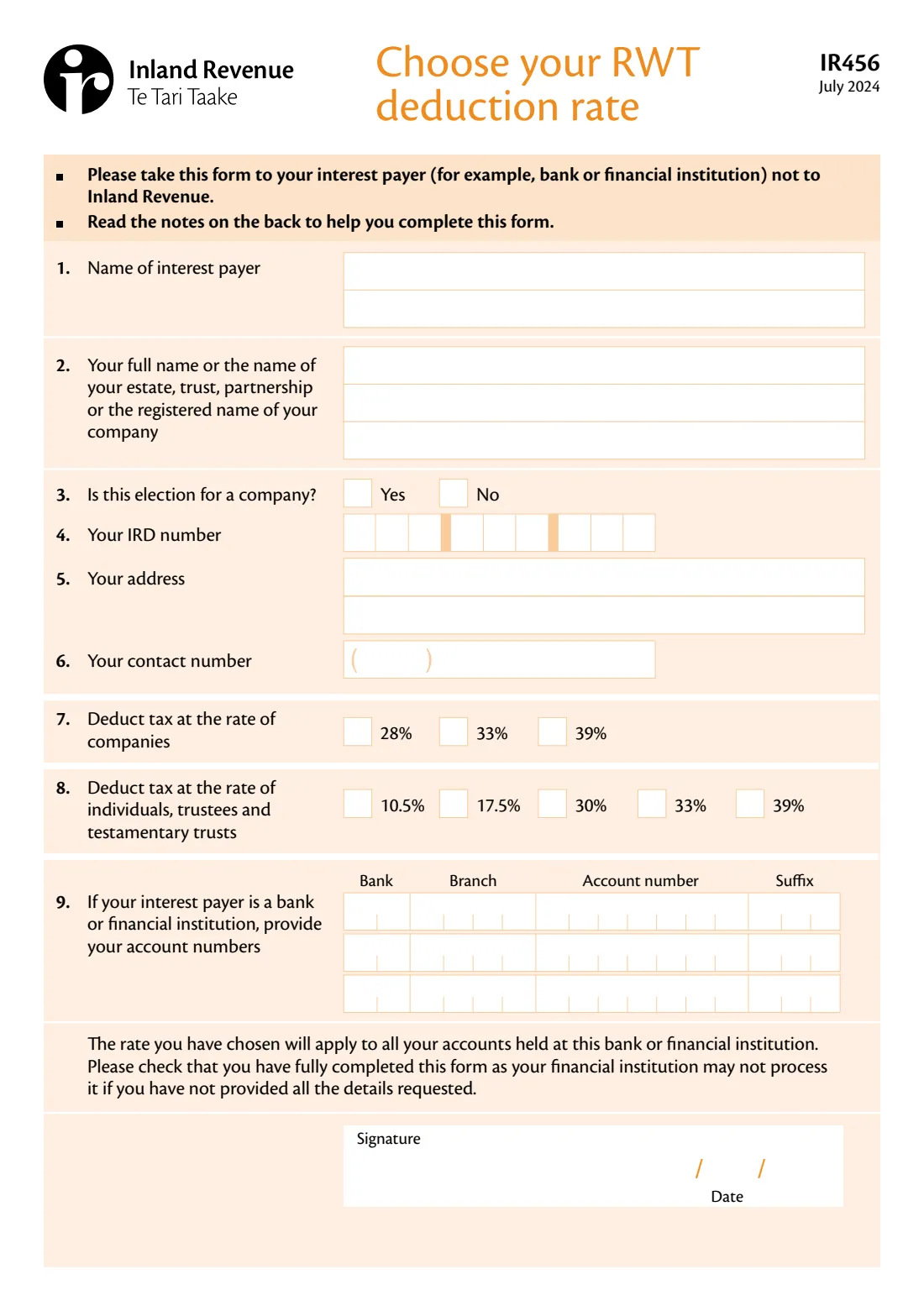
When a New Zealand bank, building society, credit union or finance company pays you interest, it deducts resident withholding tax (RWT) first. The rate it uses depends on what you tell it. The IR456 is Inland Revenue's paper form for choosing that rate, and you give it to the interest payer, not to Inland Revenue.
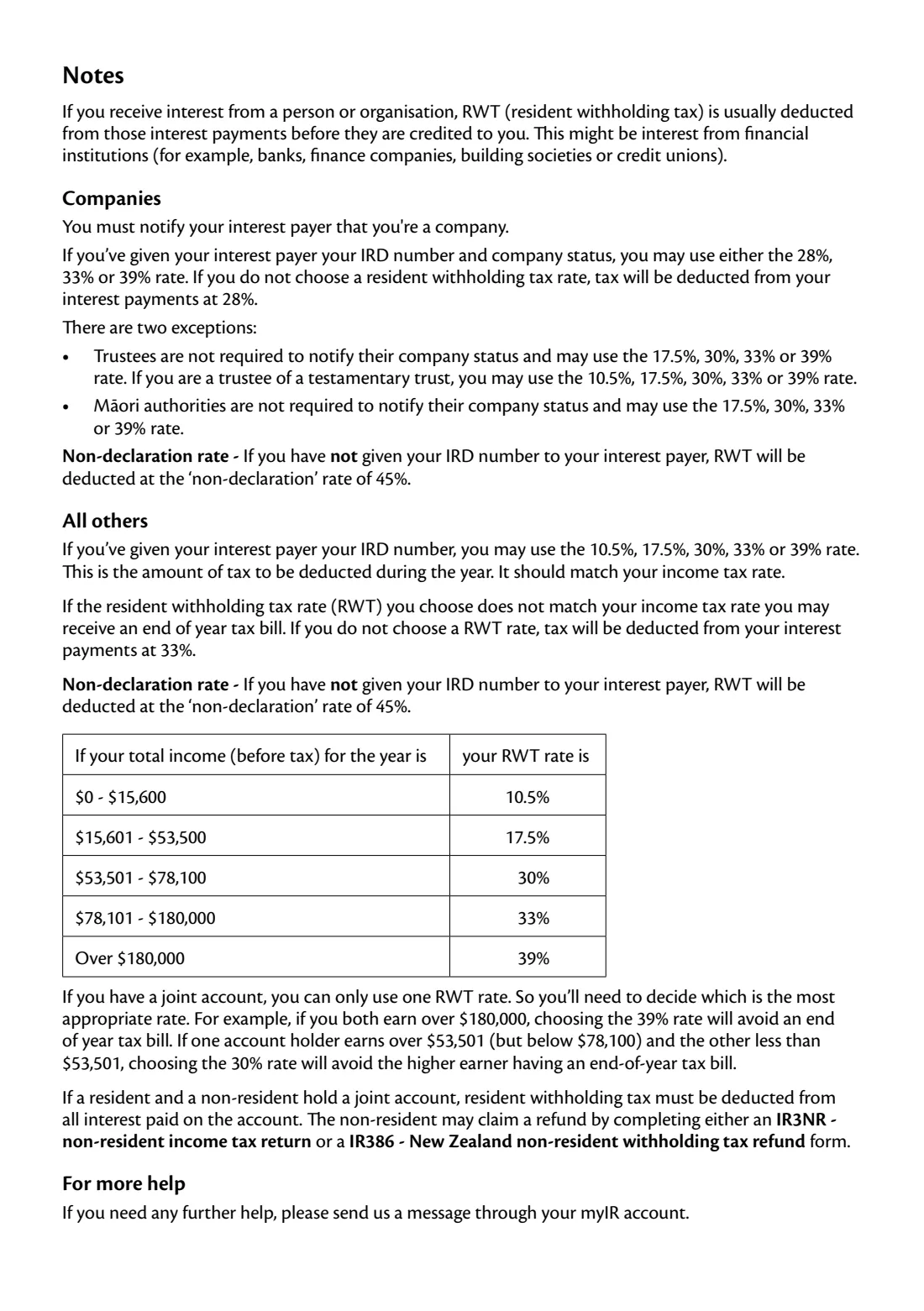
Individuals, trustees and testamentary trusts choose from 10.5%, 17.5%, 30%, 33% or 39%. Companies that have given their IRD number and company status choose from 28%, 33% or 39%. If you choose nothing, the payer uses 33% (or 28% for a company), and if it doesn't have your IRD number it must use the non-declaration rate of 45%. A rate that doesn't match your income tax rate can mean a tax bill at the end of the year.
FileIt fills Inland Revenue's own IR456 PDF from a short guided form. Your IRD number and account numbers land in the right boxes, with an 8-digit IRD number starting in the second box. Names with macrons print correctly, and the finished form is saved in your FileIt vault, ready to sign and take to your bank.
- Who fills it
- The person, trust, partnership or company that receives the interest
- Given to
- Your interest payer (bank or financial institution), not Inland Revenue
- Rates
- 10.5%, 17.5%, 30%, 33% or 39%; companies 28%, 33% or 39%
- Accounts
- Up to three account numbers; the rate covers every account with that payer
- Signatures
- Yours, with the date
- Edition
- IR456 July 2024
Who needs to fill out IR456 Choose your RWT deduction rate?
- Anyone earning interest from a New Zealand savings account or term deposit who wants a different RWT rate.
- People whose income has moved into a new band, for example after a pay rise, retirement or a change in work.
- Trustees, including trustees of testamentary trusts, choosing the trust's RWT rate.
- Companies telling their bank which company RWT rate to use.
When to use IR456 Choose your RWT deduction rate
- When you open an account and want to set the RWT rate from the start.
- When your expected total income for the year changes bands, so the RWT you pay matches your income tax rate.
- When your bank has been using the default or non-declaration rate and you want that changed.
- When joint account holders agree on the one rate to use for a shared account.
What you need before you start
- The name of your bank or other interest payer.
- Your full name, or the name of the estate, trust, partnership or company the account is in.
- Your IRD number.
- Your address and a contact phone number.
- Your expected total income before tax for the year, to pick the rate from the bands in the notes.
- The account numbers (bank, branch, account and suffix) the rate should apply to.
What’s on IR456 Choose your RWT deduction rate
The 2024 edition has 2 pages. FileIt asks for it in 4 parts, and it is signed by Account holder:
- Your detailsAccount holder
- Your RWT rateAccount holder
- 9. Your account numbersAccount holder
- SignatureAccount holder
How to fill out IR456 Choose your RWT deduction rate, step by step
1 Your details
Give the interest payer's name, your full name (or the account holder's name), say whether this is for a company, then add your IRD number, address and contact number.
2 Your RWT rate
A company picks 28%, 33% or 39%. Everyone else picks from 10.5% up to 39%. The notes match each rate to a band of total income before tax, for example 30% for income from $53,501 to $78,100.
3 Account numbers
Add up to three account numbers at this payer, split into bank, branch, account number and suffix. FileIt lines up shorter account numbers and suffixes on the right, the way they're written.
4 Sign
FileIt prints the date. Sign in the signature box, then hand or send the form to your interest payer.
Common mistakes to avoid
- Sending the form to Inland Revenue. It goes to your bank or other interest payer.
- Leaving out your IRD number, so your interest is taxed at the non-declaration rate of 45%.
- Picking a rate below your income tax rate, which can leave you with a tax bill at the end of the year.
- Choosing two rates for one joint account. A joint account can only use one RWT rate.
- Leaving details blank. The form warns that a financial institution may not process an incomplete form.
After you fill it out
Sign the form and give it to your interest payer. Many banks also let you change your RWT rate in online banking.
Check your next interest statement to see that the new rate is being used.
Review the rate each year, or whenever your income changes bands.
FileIt keeps the completed PDF in your vault with your banking records.
Fill out IR456 Choose your RWT deduction rate online with FileIt
- Pick the person. Choose someone from People and FileIt fills in their name, date of birth, address and other details it already knows.
- Answer plain-language questions. One part of the form at a time, with the official help text beside each question — 22 fields in all. Your answers save as you go.
- Check the live preview. Watch your answers land on the real Inland Revenue (Te Tari Taake) form, and let FileIt do any worksheet arithmetic.
- Generate the official PDF. FileIt prints your answers into the agency’s own PDF and files it in that person’s folder in your vault. Sign it, or send it for e-signature.
FileIt fills the form — it never files or submits anything for you. Deliver the finished form to whoever asked for it, the way the form’s instructions say.
Start IR456 Choose your RWT deduction rate now — it’s freeIR456 Choose your RWT deduction rate: frequently asked questions
What is the IR456 form?
The IR456 is Inland Revenue's form for choosing your resident withholding tax (RWT) rate. It tells your interest payer, such as your bank, what rate of tax to deduct from the interest it pays you.
Do I send the IR456 to Inland Revenue?
No. The form says to take it to your interest payer, for example your bank or financial institution, not to Inland Revenue.
What happens if I don't choose a rate?
If your interest payer has your IRD number, it deducts 33% (28% for a company). If it doesn't have your IRD number, it deducts the non-declaration rate of 45%.
Which RWT rate should I pick?
The notes on the form match rates to total income before tax: up to $15,600 is 10.5%, $15,601 to $53,500 is 17.5%, $53,501 to $78,100 is 30%, $78,101 to $180,000 is 33%, and over $180,000 is 39%.
Can a joint account have two RWT rates?
No. A joint account can use only one rate, so the holders need to agree on the most suitable one.
Can I fill in the IR456 online?
Yes. FileIt guides you through the questions and prints your answers into Inland Revenue's official IR456 PDF, ready to sign and give to your bank.
Official sources
- Blank form (PDF), published by Inland Revenue (Te Tari Taake): https://www.ird.govt.nz/-/media/project/ir/home/documents/forms-and-guides/ir400---ir499/ir456/ir456-2024.pdf
- Official instructions and guidance: https://www.ird.govt.nz/income-tax/withholding-taxes/resident-withholding-tax-rwt/using-the-right-rwt-tax-rate
- Edition shown on this page: IR456 July 2024 (checked 2026-10-19).
FileIt is not affiliated with or endorsed by Inland Revenue (Te Tari Taake) or any government. This page explains the form in general terms and is not legal, tax or immigration advice. Always read the official instructions, and check that you are using the edition the recipient accepts. Page last reviewed 2026-10-19.