What is Form IR6104?
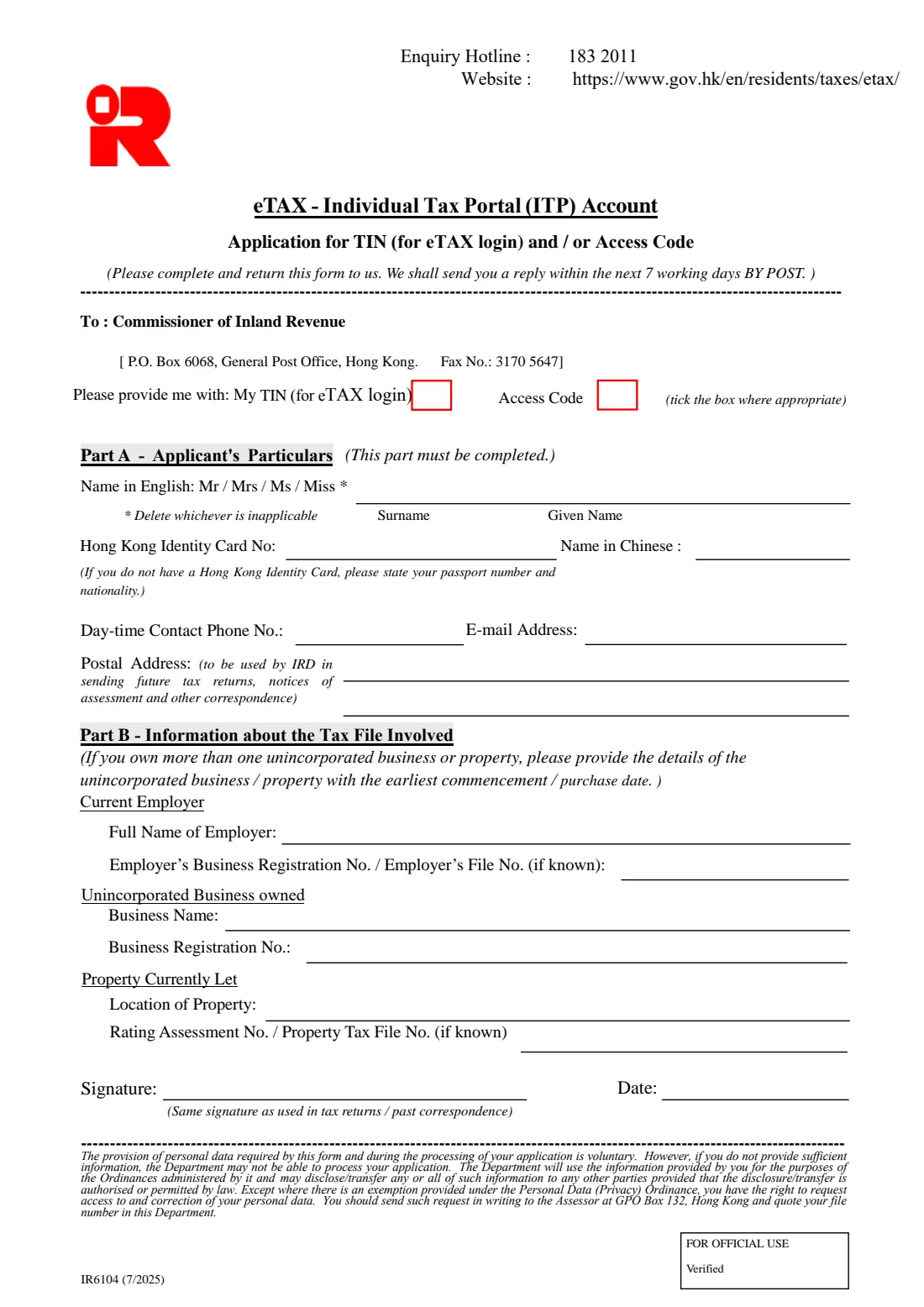
Form IR6104 is the Inland Revenue Department's (IRD) application for your Taxpayer Identification Number (TIN) for eTAX login and/or an Access Code. It is headed 'eTAX - Individual Tax Portal (ITP) Account': the two codes are what you use to set up your eTAX account. The form is meant for existing eTAX users and people who already have a tax file with the IRD.
It is a one-page English form. Part A, which must be completed, takes your name, Hong Kong Identity Card number (or, without one, your passport number and nationality), contact phone, e-mail and postal address. Part B identifies your tax file: your current employer, an unincorporated business you own, or a property you let. The form says the IRD will send a reply within the next 7 working days by post.
FileIt walks you through it and prints your answers into the IRD's own PDF (the 7/2025 edition). It strikes out the titles that don't apply, checks your HKID check digit, and files the finished PDF in your vault. You then sign it and send it to the IRD yourself — FileIt never files anything with the IRD.
- Who fills it
- An individual with a tax file at the IRD, or an existing eTAX user, who needs a TIN for eTAX login or an Access Code
- Given to
- The Commissioner of Inland Revenue, P.O. Box 6068, General Post Office, Hong Kong — or by fax to 3170 5647, as printed on the form
- Reply
- By post, within the next 7 working days (as the form says)
- Signatures
- Yours — the same signature as used in tax returns and past correspondence
- Edition
- IR6104 (7/2025), 1 page
- Enquiries
- The form prints the enquiry hotline 183 2011
Who needs to fill out Form IR6104?
- Hong Kong taxpayers who want to open an eTAX Individual Tax Portal account and don't have their TIN for eTAX login or an Access Code.
- Employees, owners of an unincorporated business and landlords who already have a tax file with the IRD.
- Existing eTAX users who need their TIN or a new Access Code.
When to use Form IR6104
- When you want to manage your tax online through eTAX but don't have the codes to set up your account.
- When you prefer to apply on paper, by post or fax, and receive the reply by post.
What you need before you start
- Your name in English as on your Hong Kong Identity Card or passport, and your title.
- Your Hong Kong Identity Card number with its check digit — or your passport number and nationality if you have no HKID card.
- A day-time contact phone number, an e-mail address and the postal address for IRD correspondence.
- Details of your tax file: your current employer's name (and its business registration or file number, if known), an unincorporated business's name and business registration number, and/or a let property's location (and its rating assessment number or property tax file number, if known).
What’s on Form IR6104
The 2025 edition has 1 page. FileIt asks for it in 4 parts, and it is signed by Applicant:
- What you are asking forApplicant
- Part A — Applicant's particularsApplicant
- Part B — Information about the tax file involvedApplicant
- Signature and dateApplicant
How to fill out Form IR6104, step by step
1 What you want
Tick 'My TIN (for eTAX login)', 'Access Code', or both.
2 Part A — Applicant's particulars
This part must be completed. The form prints 'Mr / Mrs / Ms / Miss' and asks you to delete whichever is inapplicable; FileIt strikes the others through. Give your surname and given name in English, and your Hong Kong Identity Card number — FileIt prints it with the check digit in brackets and checks the check digit. If you have no Hong Kong Identity Card, the form asks for your passport number and nationality instead.
There is also a box for your name in Chinese. FileIt can't print Chinese characters, so leave it blank and write it in by hand if you wish. Then your day-time phone number, e-mail and postal address — the IRD uses that address to send future tax returns, notices of assessment and other correspondence.
3 Part B — The tax file involved
Give your current employer's full name and, if known, its business registration number or employer's file number; the name and business registration number of an unincorporated business you own; and/or the location of a property you currently let, with its rating assessment number or property tax file number if known. If you own more than one unincorporated business or property, the form asks for the one with the earliest commencement or purchase date.
4 Signature and date
Sign with the same signature you use on tax returns and past correspondence with the IRD, and date the form.
Common mistakes to avoid
- Ticking neither box — say whether you want your TIN, an Access Code, or both.
- Leaving Part A incomplete: the form says it must be completed.
- Giving a passport number without your nationality, or giving a passport number when you have a Hong Kong Identity Card.
- Using a different signature from the one on your tax returns and past correspondence.
- Listing a later business or property when you own several — the form asks for the one with the earliest commencement or purchase date.
After you fill it out
Sign the form and send it to the Commissioner of Inland Revenue, P.O. Box 6068, General Post Office, Hong Kong, or fax it to 3170 5647 — both are printed on the form.
The form says the IRD will send you a reply within the next 7 working days by post, to the postal address you gave.
FileIt keeps the completed PDF in your vault, so you can see what you asked for and when.
Fill out Form IR6104 online with FileIt
- Pick the person. Choose someone from People and FileIt fills in their name, date of birth, address and other details it already knows.
- Answer plain-language questions. One part of the form at a time, with the official help text beside each question — 26 fields in all. Your answers save as you go.
- Check the live preview. Watch your answers land on the real Inland Revenue Department (IRD), Hong Kong form, and let FileIt do any worksheet arithmetic.
- Generate the official PDF. FileIt prints your answers into the agency’s own PDF and files it in that person’s folder in your vault. Sign it, or send it for e-signature.
FileIt fills the form — it never files or submits anything for you. Deliver the finished form to whoever asked for it, the way the form’s instructions say.
Start Form IR6104 now — it’s freeForm IR6104: frequently asked questions
What is Form IR6104?
It is the Inland Revenue Department's application for your TIN (for eTAX login) and/or an Access Code, the codes used to open an eTAX Individual Tax Portal (ITP) account.
How long does the IRD take to reply?
The form says the IRD will send a reply within the next 7 working days, by post.
I don't have a Hong Kong Identity Card — can I still apply?
Yes. The form asks for your passport number and nationality instead.
Can I fax the form?
The form prints a fax number, 3170 5647, next to the IRD's postal address. FileIt can prepare it for e-signature, or you can download it and sign by hand.
Does FileIt send the form to the IRD?
No. FileIt fills in the IRD's official PDF and files it in your vault. You sign it and send it to the IRD yourself.
Official sources
- Blank form (PDF), published by Inland Revenue Department (IRD), Hong Kong: https://www.ird.gov.hk/eng/pdf/ir6104.pdf
- Official instructions and guidance: https://www.gov.hk/en/residents/taxes/etax/
- Edition shown on this page: IR6104 (7/2025) (checked 2026-10-01).
FileIt is not affiliated with or endorsed by Inland Revenue Department (IRD), Hong Kong or any government. This page explains the form in general terms and is not legal, tax or immigration advice. Always read the official instructions, and check that you are using the edition the recipient accepts. Page last reviewed 2026-10-01.