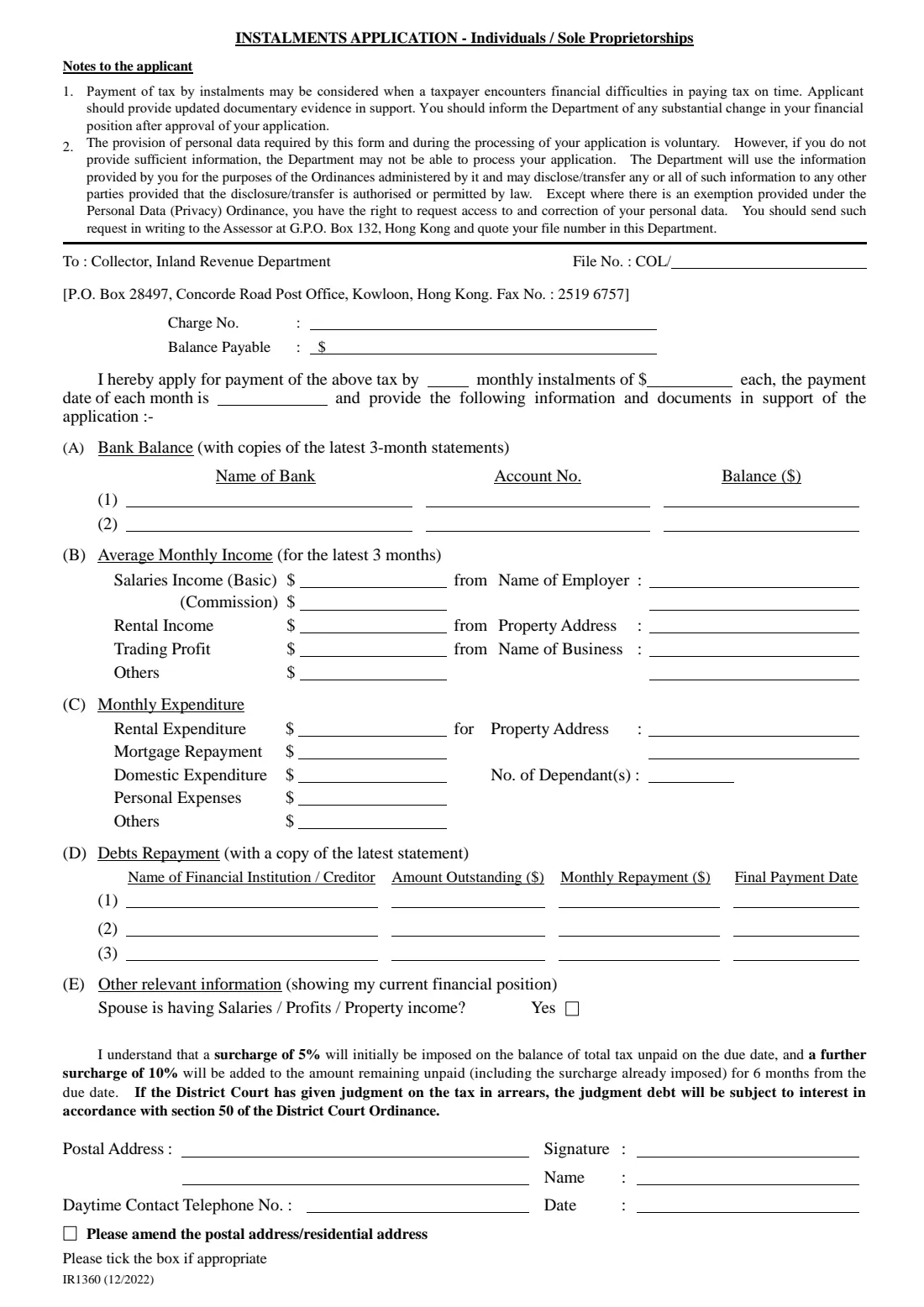
What is Form IR1360 (pay tax by instalments)?
Form IR1360 is how an individual taxpayer or a sole proprietor in Hong Kong asks the Collector of Inland Revenue for permission to pay a tax bill by monthly instalments. The form's own notes say instalments may be considered when a taxpayer has financial difficulties paying tax on time, and that you should send updated documentary evidence in support.
On one page you give the file number, charge number and balance payable from your demand note, propose the number and amount of monthly instalments and the day of the month you will pay, and set out your financial position: bank balances, average monthly income for the latest three months, monthly expenditure, debt repayments and whether your spouse has income.
FileIt walks you through each part in plain English, formats the amounts, checks that your instalments add up to the balance, crosses out the words the form asks you to delete, and prints everything into IRD's own PDF. The finished form is saved in your vault. FileIt does not send anything to the IRD: you sign it and send it yourself.
- Who fills it
- An individual taxpayer or a sole proprietor who can't pay a tax bill on time.
- Sent to
- The Collector of Inland Revenue, P.O. Box 28497, Concorde Road Post Office, Kowloon, or by fax to 2519 6757 (both printed on the form).
- Attach
- Copies of the latest 3 months' bank statements and the latest statement of each debt.
- Surcharge
- Still applies: 5% on tax unpaid on the due date, and a further 10% on the amount still unpaid 6 months after the due date.
- Edition
- IR1360 (12/2022).
Who needs to fill out Form IR1360 (pay tax by instalments)?
- Salaried employees who have received a demand note for salaries tax they can't pay in full by the due date.
- Sole proprietors whose profits tax bill arrives at a time when the business is short of cash.
- Taxpayers with rental income, several jobs or large debt repayments who need to spread a tax payment over a few months.
- Family members helping a relative put together an instalment request.
When to use Form IR1360 (pay tax by instalments)
- As soon as you know you can't pay a demand note in full by its due date: the form's warning says the 5% surcharge is imposed on tax unpaid on the due date.
- When your finances have changed (a job loss, illness, a drop in business) and paying in one go would cause hardship.
- Each time you need an instalment arrangement for a new demand note.
What you need before you start
- Your demand note: the file number, the charge number and the balance payable.
- The number of monthly instalments you propose, the amount of each, and the day of the month you will pay.
- Your bank accounts: bank name, account number and current balance, with copies of the latest 3 months' statements.
- Your average monthly income over the latest 3 months (basic salary, commission, rent, trading profit, other), with the employer, property or business it comes from.
- Your monthly expenditure: rent, mortgage, household spending, personal expenses and the number of dependants.
- Your debts: each lender, the amount outstanding, the monthly repayment and the final payment date, with a copy of the latest statement.
- Your postal address and a daytime telephone number.
What’s on Form IR1360 (pay tax by instalments)
The 2022 edition has 1 page. FileIt asks for it in 7 parts, and it is signed by Taxpayer:
- The tax and the instalments you proposeTaxpayer
- (A) Bank balancesTaxpayer
- (B) Average monthly income (latest 3 months)Taxpayer
- (C) Monthly expenditureTaxpayer
- (D) Debts repaymentTaxpayer
- (E) Other relevant informationTaxpayer
- Your details and signatureTaxpayer
How to fill out Form IR1360 (pay tax by instalments), step by step
1 Header — the tax and your proposal
Enter your file number after the printed 'COL/', the charge number and the balance payable from the demand note. Then complete the sentence 'I hereby apply for payment of the above tax by __ monthly instalments of $__ each, the payment date of each month is __'.
FileIt checks that the instalments cover the balance without an extra, unnecessary instalment, and prints the payment day the way the form's own list does (1st, 2nd, 15th and so on).
2 (A) Bank balance
Two lines for bank accounts: the bank's name, the account number and the balance. The form asks for copies of the latest 3-month statements. If you have more accounts, list them on a separate sheet.
3 (B) Average monthly income
Your average income over the latest 3 months: salaries (basic and commission) with the employer's name, rental income with the property address, trading profit with the name of the business, and any other income. Leave a line blank if it doesn't apply.
4 (C) Monthly expenditure
Rent (with the address), mortgage repayments, domestic expenditure, the number of dependants, personal expenses and other outgoings each month.
5 (D) Debts repayment
Up to three debts: the financial institution or creditor, the amount outstanding, the monthly repayment and the final payment date. The form asks for a copy of the latest statement for each.
6 (E) Other relevant information
Whether your spouse has salaries, profits or property income. The form says to delete the kinds that don't apply and tick Yes; FileIt crosses out the words you don't pick.
7 Surcharge, address and signature
Read the surcharge statement (5% on the unpaid tax on the due date, then a further 10% on the amount still unpaid 6 months later, and interest on any District Court judgment debt). Give your postal address, daytime telephone number, name and date, and sign. If the address is new, tick 'Please amend the postal address / residential address'; FileIt ticks it and crosses out the address type you aren't changing.
Common mistakes to avoid
- Proposing instalments that don't add up to the balance payable.
- Forgetting the supporting documents: the latest 3 months' bank statements and the latest statement of each debt.
- Waiting until after the due date: the 5% surcharge is imposed on tax still unpaid on the due date.
- Leaving out income or debts. The Collector looks at your whole financial position, and the notes ask you to report any substantial change after approval.
- Sending it unsigned.
After you fill it out
Print the form from FileIt, check it, and sign it (or use FileIt's e-signature step). Attach copies of your bank statements and debt statements.
Send it to the Collector of Inland Revenue at the P.O. Box printed on the form, or by fax to the number printed on it. IRD's forms page also offers an iAM Smart e-form version. FileIt does not submit anything for you.
Keep paying as agreed, and tell the Department about any substantial change in your finances after the application is approved, as the form's notes ask. A copy stays in your FileIt vault.
Fill out Form IR1360 (pay tax by instalments) online with FileIt
- Pick the person. Choose someone from People and FileIt fills in their name, date of birth, address and other details it already knows.
- Answer plain-language questions. One part of the form at a time, with the official help text beside each question — 59 fields in all. Your answers save as you go.
- Check the live preview. Watch your answers land on the real Inland Revenue Department, the Government of the Hong Kong Special Administrative Region (IRD) form, and let FileIt do any worksheet arithmetic.
- Generate the official PDF. FileIt prints your answers into the agency’s own PDF and files it in that person’s folder in your vault. Sign it, or send it for e-signature.
FileIt fills the form — it never files or submits anything for you. Deliver the finished form to whoever asked for it, the way the form’s instructions say.
Start Form IR1360 (pay tax by instalments) now — it’s freeForm IR1360 (pay tax by instalments): frequently asked questions
Who can use form IR1360?
Individuals and sole proprietorships. The title of the form says so: 'Instalments Application - Individuals / Sole Proprietorships'.
Does paying by instalments stop the surcharge?
The form asks you to confirm you understand that a surcharge of 5% will initially be imposed on the balance of total tax unpaid on the due date, and a further 10% on the amount remaining unpaid 6 months from the due date. Read that statement carefully before signing.
Where do I send it?
To the Collector, Inland Revenue Department, P.O. Box 28497, Concorde Road Post Office, Kowloon, Hong Kong, or by fax to 2519 6757, as printed at the top of the form.
What documents do I need to attach?
Copies of the latest 3-month statements for your bank accounts and a copy of the latest statement for each debt, plus any other updated documentary evidence of your financial difficulties.
Can I fill in IR1360 online?
Yes. FileIt lets you fill it in online, checks the figures and prints your answers into IRD's official PDF, which you then sign and send. FileIt does not file it with the IRD.
What if my spouse has income?
Tick Yes in part (E) and delete the kinds of income that don't apply (salaries, profits, property). FileIt does the deleting for you.
Official sources
- Blank form (PDF), published by Inland Revenue Department, the Government of the Hong Kong Special Administrative Region (IRD): https://www.ird.gov.hk/eng/pdf/ir1360e.pdf
- Official instructions and guidance: https://www.ird.gov.hk/eng/paf/for.htm
- Edition shown on this page: IR1360 (12/2022) (checked 2026-09-28).
FileIt is not affiliated with or endorsed by Inland Revenue Department, the Government of the Hong Kong Special Administrative Region (IRD) or any government. This page explains the form in general terms and is not legal, tax or immigration advice. Always read the official instructions, and check that you are using the edition the recipient accepts. Page last reviewed 2026-09-28.