What is ISP-3026?
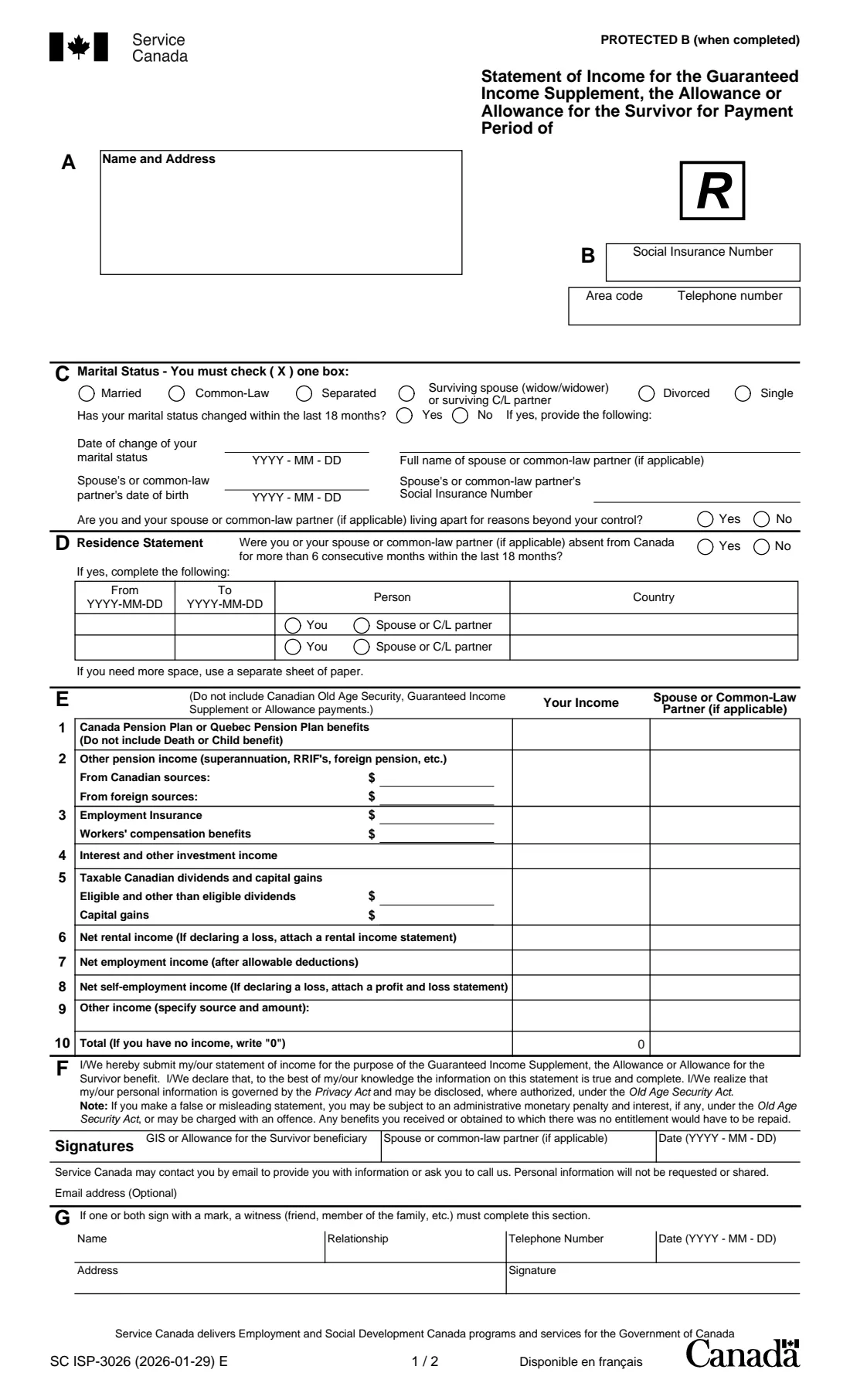
ISP-3026, Statement of Income for the Guaranteed Income Supplement, the Allowance or Allowance for the Survivor, is the Service Canada form for reporting the income these benefits are based on. The current edition is SC ISP-3026 (2026-01-29) E.
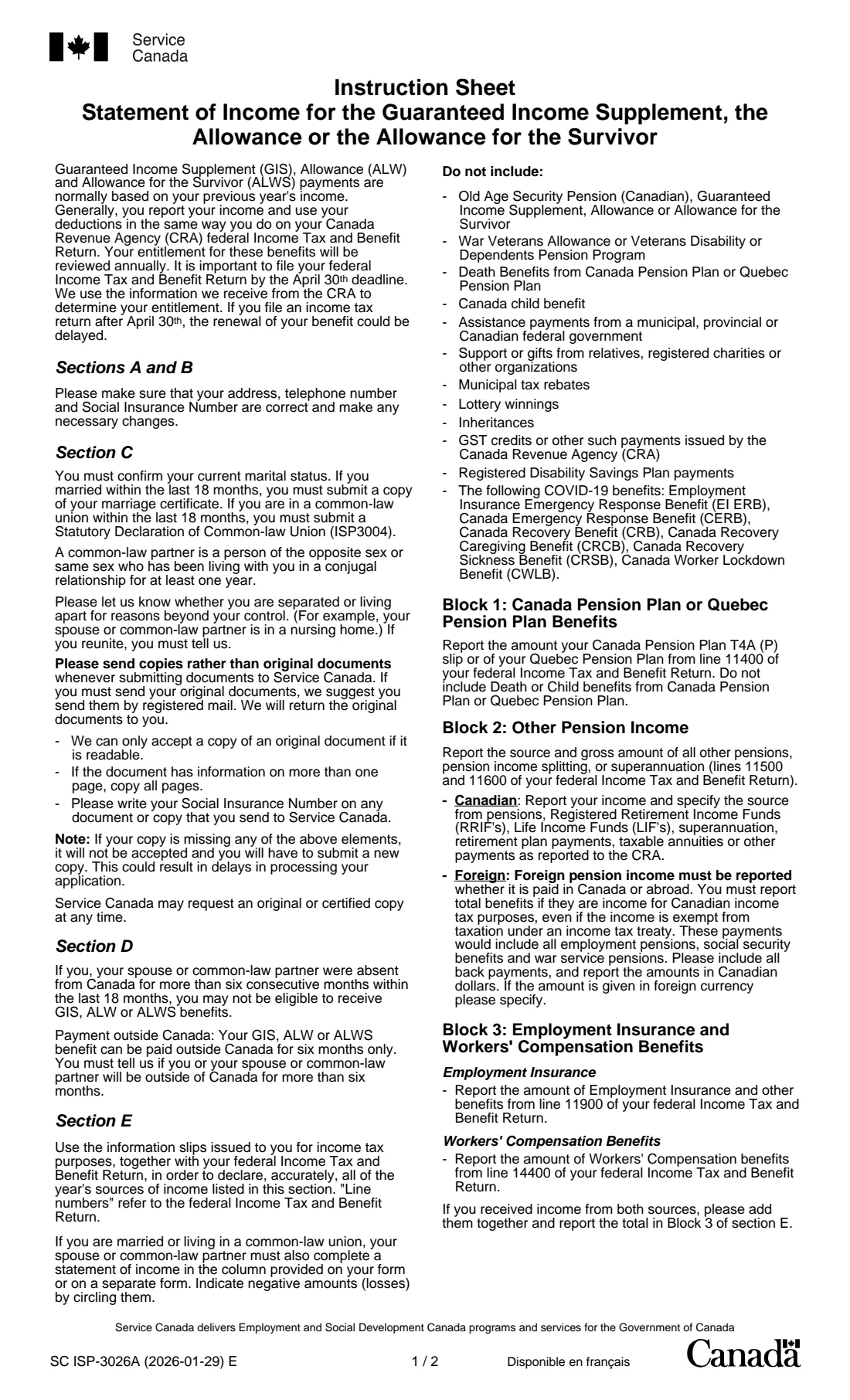
GIS, Allowance and Allowance for the Survivor payments are normally based on your previous year's income, and Service Canada usually gets that information from your federal income tax and benefit return. The instruction sheet says it is important to file your return by April 30 and that late returns can delay the renewal of your benefit. On this statement you choose the July-to-June payment period, confirm your marital status and any absence from Canada of more than six months, and report each kind of income for you and your spouse or common-law partner, using the same amounts as on the tax return.
FileIt fills in ISP-3026 from a guided web form, adds up line 10 for each of you, and prints your answers on Service Canada's own PDF. Your name can come from your People record, and the finished PDF is filed in your vault. FileIt never sends anything to Service Canada: you sign the form by hand and mail it.
- Who fills it
- A GIS, Allowance or Allowance for the Survivor beneficiary, and their spouse or common-law partner if applicable
- Given to
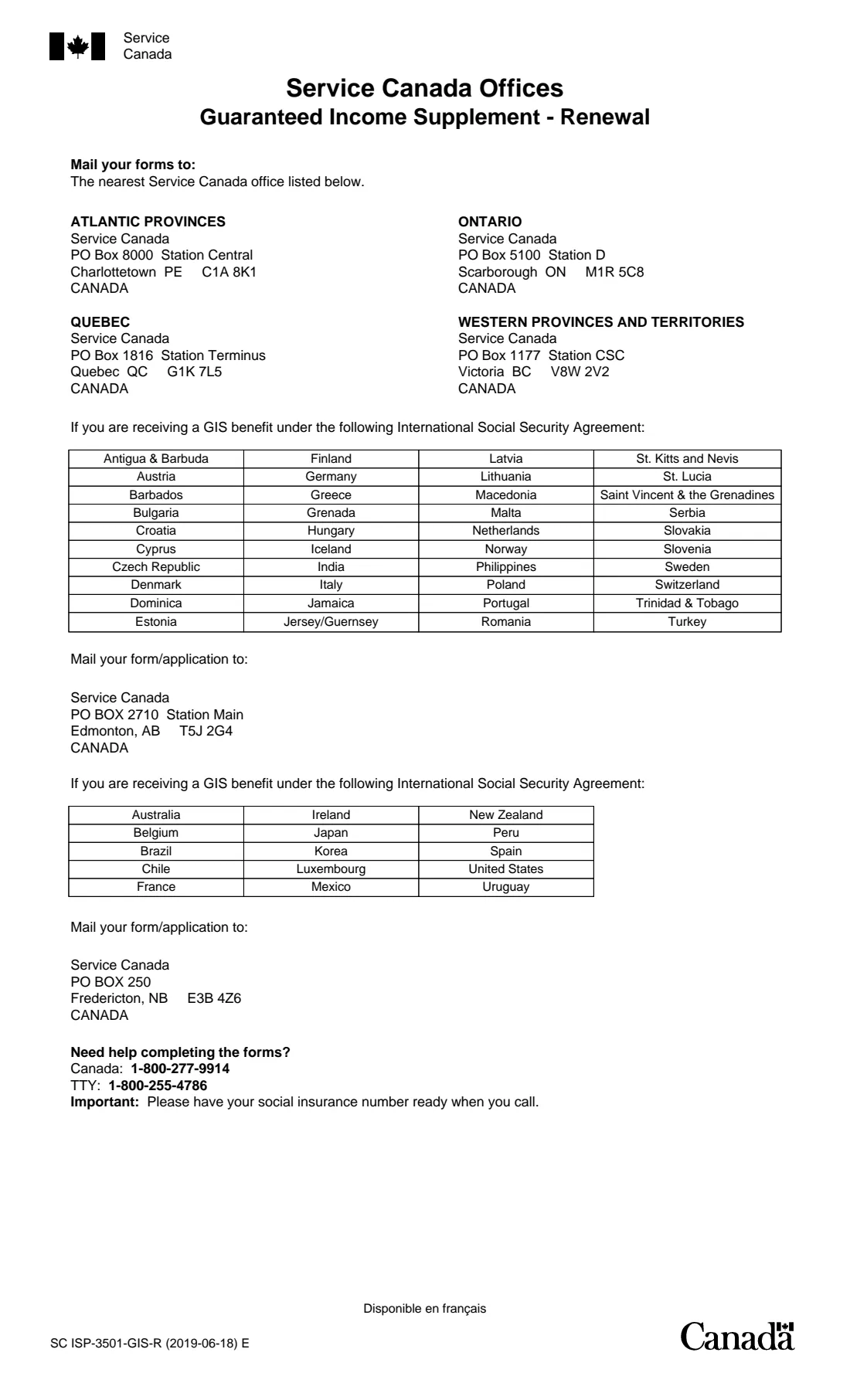
- The Service Canada office for your region listed on page 5, by mail
- When
- For a payment period running July to June, based on the previous calendar year's income
- Signatures
- Signed by hand by the beneficiary and the spouse or common-law partner; a witness if someone signs with a mark
- Edition
- SC ISP-3026 (2026-01-29) E
Who needs to fill out ISP-3026?
- Seniors receiving, or applying to keep receiving, the Guaranteed Income Supplement.
- People receiving the Allowance or the Allowance for the Survivor.
- Spouses and common-law partners of beneficiaries, who report their own income in the second column.
When to use ISP-3026
- When Service Canada asks you for a statement of income for a payment period.
- When you want to report your income directly for one of the payment periods listed on the form.
- If your marital status changed in the last 18 months, include the documents the instructions ask for: a copy of the marriage certificate, or a Statutory Declaration of Common-law Union (ISP3004).
What you need before you start
- Your name, address, social insurance number and telephone number.
- Your marital status, and your spouse's or common-law partner's name, date of birth and SIN if you are married or living common-law.
- Dates and countries of any absence from Canada of more than six consecutive months in the last 18 months.
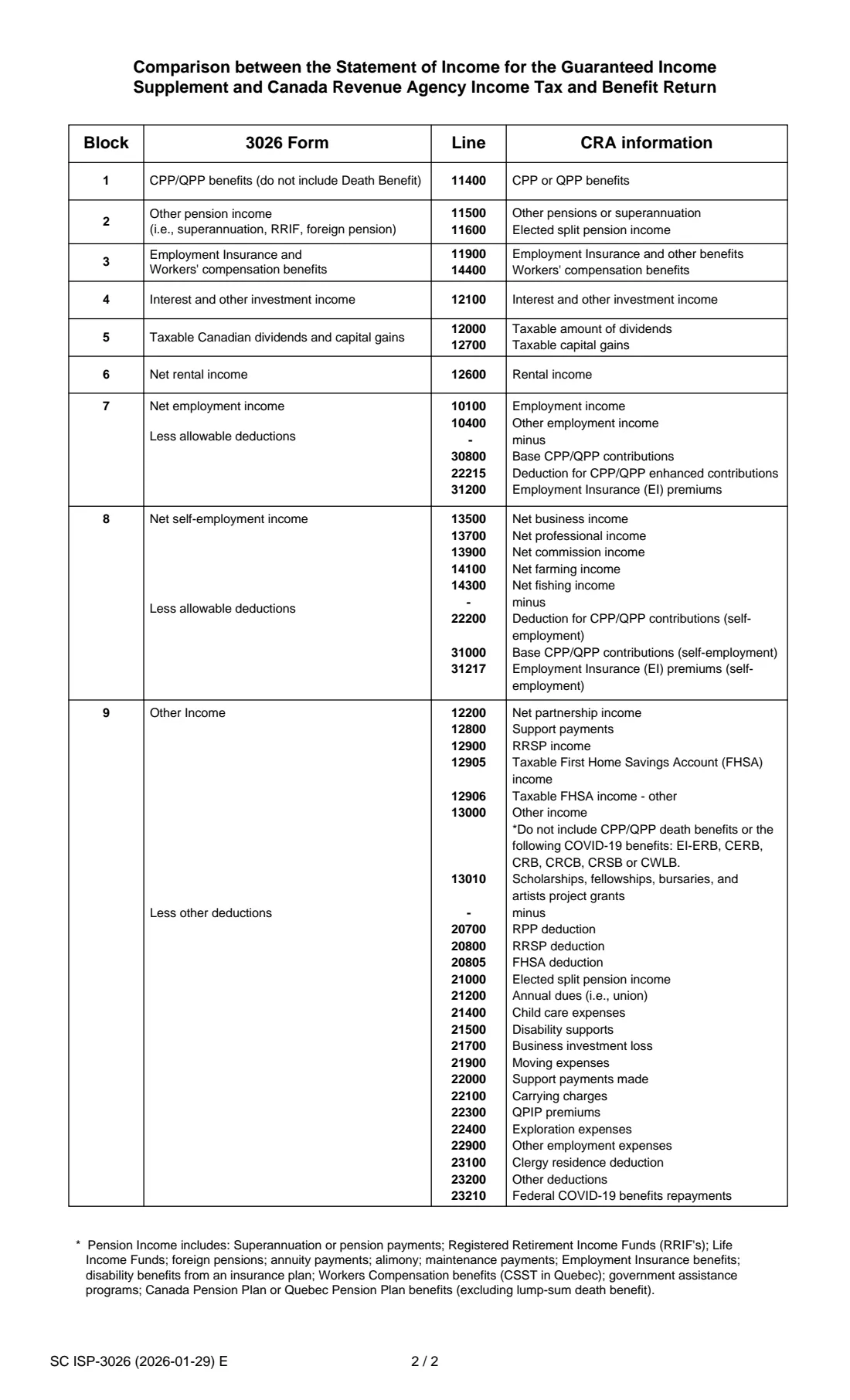
- Your tax slips and federal income tax and benefit return for the year before the payment period, for each of you; page 2 of the form shows which tax return lines go in each block.
What’s on ISP-3026
The 2026 edition has 5 pages. FileIt asks for it in 7 parts:
- Sections A and B – YouBeneficiary
- Section C – Marital statusBeneficiary
- Section D – Residence statementBeneficiary
- Section E – Your incomeBeneficiary
- Section E – Your spouse's or common-law partner's incomeBeneficiary
- Section F – DeclarationBeneficiary
- Section G – Witness (only if someone signs with a mark)Witness
How to fill out ISP-3026, step by step
1 Sections A and B – Name, address, SIN and telephone
Check that your address, telephone number and SIN are correct, and choose the payment period.
2 Section C – Marital status
Tick one status, say whether it changed in the last 18 months (with the date), give your spouse's or partner's details, and say whether you live apart for reasons beyond your control, such as a nursing home.
3 Section D – Residence statement
Whether either of you was absent from Canada for more than six consecutive months in the last 18 months, with the dates, who, and the country.
4 Section E – Income
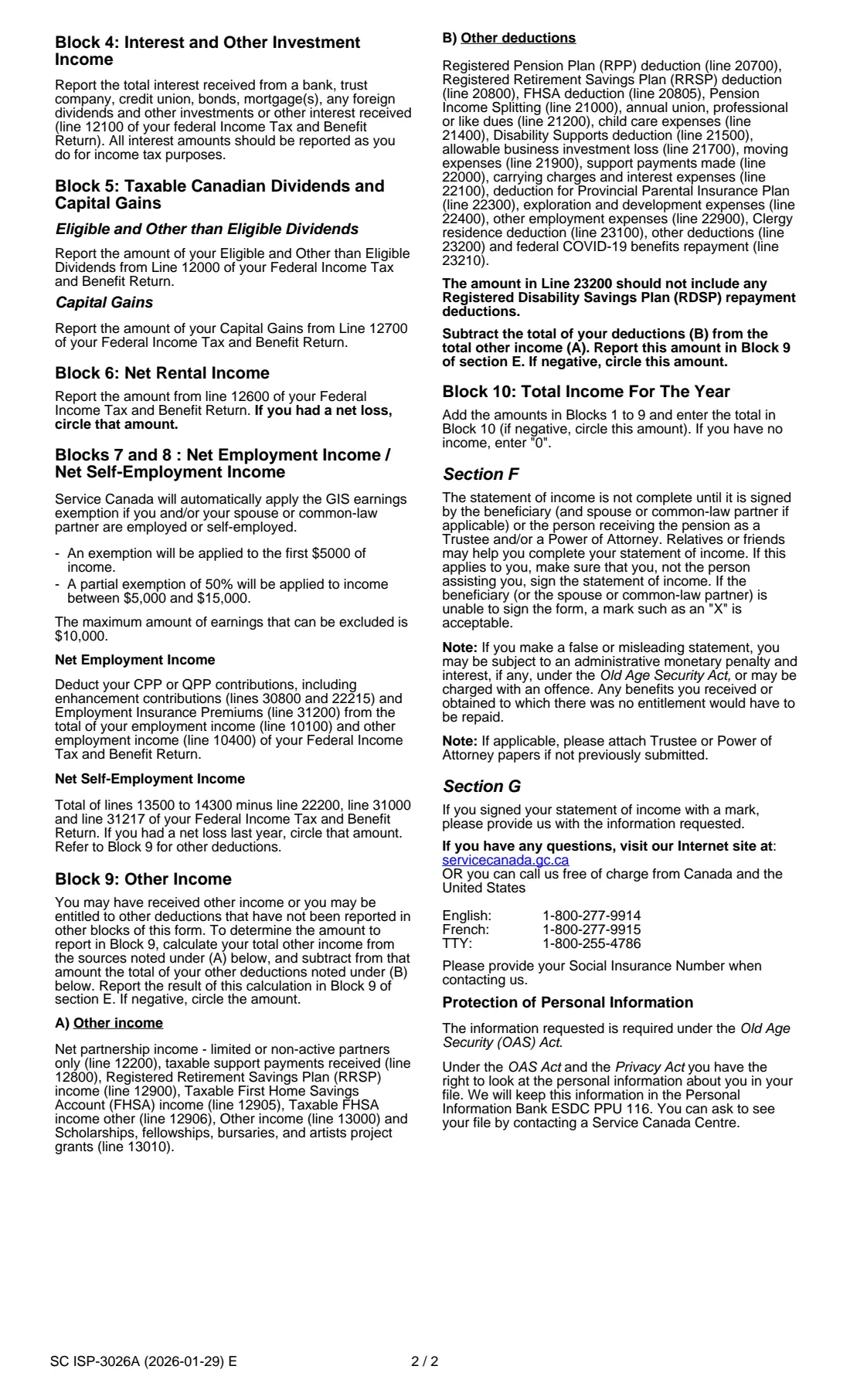
Lines 1 to 9 for you and your spouse or partner: CPP/QPP benefits, other pensions, EI and workers' compensation, interest, dividends and capital gains, net rental income, net employment income, net self-employment income and other income less other deductions. Line 10 is the total, or 0 if there is no income. FileIt adds up line 10.
5 Sections F and G – Declaration and witness
Both of you sign and date the declaration. If someone signs with a mark, a witness fills in section G and signs.
Common mistakes to avoid
- Including Old Age Security, GIS or Allowance payments, veterans' allowances, CPP/QPP death benefits, the Canada child benefit, gifts, lottery winnings, inheritances or the GST credit, which the instructions say not to include.
- Leaving out your spouse's or common-law partner's income when you are married or living common-law.
- Not circling losses on lines 6, 8 or 9; FileIt prints them with a minus sign, and the form asks for them to be circled.
- Forgetting the marriage certificate or ISP3004 declaration after a change in marital status in the last 18 months.
- Leaving line 10 empty when there is no income instead of writing 0.
After you fill it out
Print the PDF, sign and date section F by hand (both of you, if applicable), circle any losses, and mail it with any documents to the Service Canada office for your region listed on page 5. FileIt doesn't mail it for you.
Send copies rather than originals, and write your SIN on any document or copy you send.
File your federal income tax and benefit return by April 30 each year, so future renewals aren't delayed.
Fill out ISP-3026 online with FileIt
- Pick the person. Choose someone from People and FileIt fills in their name, date of birth, address and other details it already knows.
- Answer plain-language questions. One part of the form at a time, with the official help text beside each question — 59 fields in all. Your answers save as you go.
- Check the live preview. Watch your answers land on the real Service Canada (Employment and Social Development Canada) form, and let FileIt do any worksheet arithmetic.
- Generate the official PDF. FileIt prints your answers into the agency’s own PDF and files it in that person’s folder in your vault.
FileIt fills the form — it never files or submits anything for you. Deliver the finished form to whoever asked for it, the way the form’s instructions say.
Start ISP-3026 now — it’s freeISP-3026: frequently asked questions
Which year's income do I report?
GIS and Allowance payments are normally based on the previous year's income: for the July 2025 to June 2026 period, that is your 2024 income.
Does my spouse have to report income too?
Yes. If you are married or living common-law, your spouse or partner completes the second column of section E (or a separate form) and signs.
What income should I leave out?
Old Age Security, GIS and Allowance payments, veterans' allowances and pensions, CPP/QPP death benefits, the Canada child benefit, government assistance payments, gifts, municipal tax rebates, lottery winnings, inheritances and the GST credit, among others listed on the instruction sheet.
Is employment income counted in full?
The instructions say Service Canada applies the GIS earnings exemption automatically: the first $5,000 is exempt and 50% of income between $5,000 and $15,000, up to $10,000 in all (figures from the SC ISP-3026A (2026-01-29) instruction sheet).
Where do I send ISP-3026?
To the Service Canada office for your region listed on page 5 of the form; people receiving GIS under certain international social security agreements use the Edmonton or Fredericton addresses listed there.
Official sources
- Blank form (PDF), published by Service Canada (Employment and Social Development Canada): https://catalogue.servicecanada.gc.ca/apps/EForms/pdf/en/ISP-3026.pdf
- Official instructions and guidance: https://catalogue.servicecanada.gc.ca/content/EForms/en/Detail.html?Form=ISP3026
- Edition shown on this page: SC ISP-3026 (2026-01-29) E (checked 2026-10-01).
FileIt is not affiliated with or endorsed by Service Canada (Employment and Social Development Canada) or any government. This page explains the form in general terms and is not legal, tax or immigration advice. Always read the official instructions, and check that you are using the edition the recipient accepts. Page last reviewed 2026-10-01.