What is Super rollover request (whole balance)?
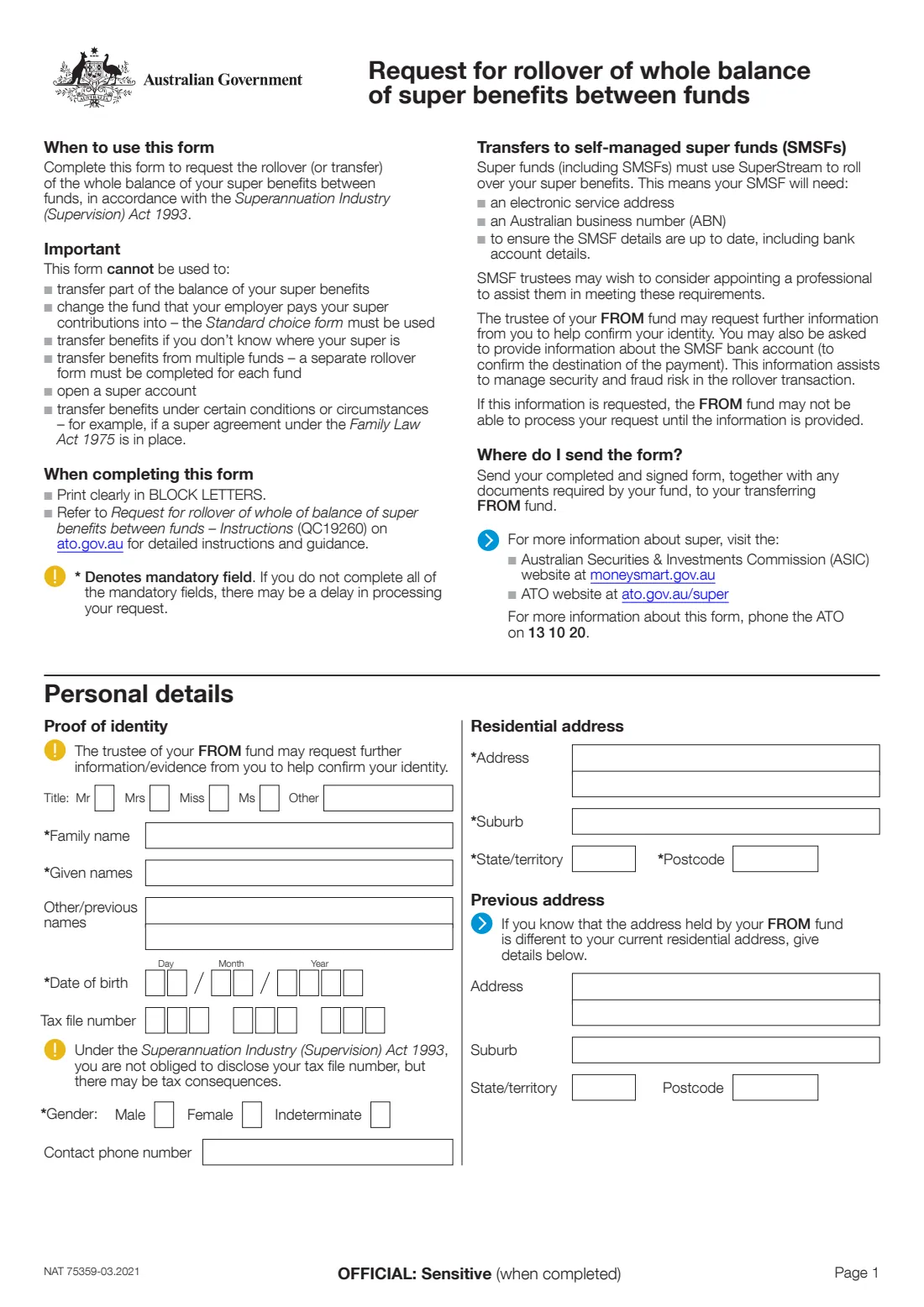
NAT 75359, Request for rollover of whole balance of super benefits between funds, is the standard ATO form for asking a super fund to roll over — transfer — everything you hold with it to a different fund, under the Superannuation Industry (Supervision) Act 1993. It's commonly used to consolidate super or to move your balance into a self-managed super fund (SMSF).
You fill in your personal details, the fund you're leaving (the FROM fund), the fund you're moving to, and bank details if an SMSF is involved, then sign the authorisation and send the form to the FROM fund. It isn't sent to the ATO. The form can't be used to move part of a balance, to change the fund your employer pays into, or to open a new account.
FileIt guides you through the current edition (NAT 75359-03.2021) and prints your answers into the ATO's own PDF. It pre-fills your name and date of birth from your People records, only asks for SMSF bank details when an SMSF is involved, checks the TFN and both funds' ABNs, and saves the completed form in your FileIt vault. Sign it by hand or with FileIt's optional e-signature, then send it to your FROM fund yourself.
- Who fills it
- The fund member
- Given to
- Your transferring (FROM) super fund — not the ATO
- When
- When you want to move the whole balance of one super fund to another
- Signatures
- The member signs the Authorisation
- One fund per form
- Use a separate form for each fund you're rolling over from
- Edition
- NAT 75359-03.2021
Who needs to fill out Super rollover request (whole balance)?
- People with super in more than one fund who want to consolidate into a single account.
- Members moving their whole balance into their own self-managed super fund.
- People switching funds because of fees, investment options or insurance, who want everything moved in one go.
- Anyone who has received a super death benefit and wants to roll the whole balance to another fund.
- SMSF trustees who need to know what details their fund must have ready to receive a rollover through SuperStream.
When to use Super rollover request (whole balance)
- When you want the whole balance moved — for part of a balance, ask your fund about its own process instead.
- After you've opened an account in the receiving fund: this form can't open a super account for you.
- Once you know where your super is — use ATO online services through myGov to find lost or multiple accounts first.
- Not for changing where your employer pays new contributions — that's the Standard choice form (NAT 13080).
- Not where special circumstances apply, for example a super agreement under the Family Law Act 1975.
What you need before you start
- Your name, any previous names, date of birth, gender and contact phone number.
- Your current residential address, and your previous address if the FROM fund may still hold it.
- Your tax file number (optional, but there may be tax consequences if you don't give it).
- For each fund: its name, phone number, ABN and — for funds that aren't SMSFs — your membership or account number and the fund's unique superannuation identifier (USI).
- For an SMSF: the account name, BSB, account number and electronic service address the SMSF uses for SuperStream.
- Any identity documents or extra information your FROM fund asks for.
What’s on Super rollover request (whole balance)
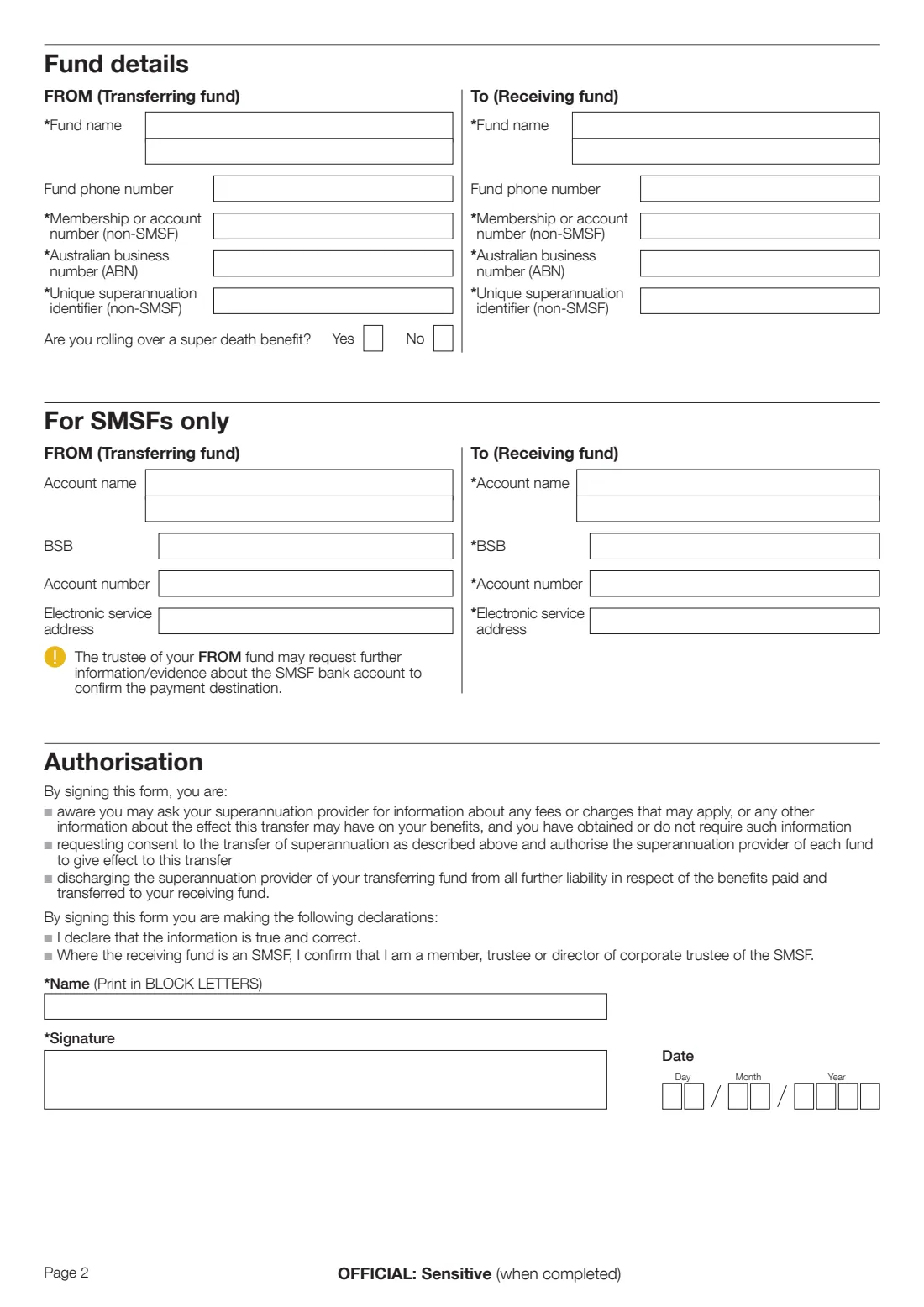
The 2021 edition has 2 pages. FileIt asks for it in 6 parts, and it is signed by Member:
- Personal details — proof of identityMember
- Residential address and previous addressMember
- Fund details — FROM (transferring fund)Member
- Fund details — To (receiving fund)Member
- For SMSFs onlyMember
- AuthorisationMember
How to fill out Super rollover request (whole balance), step by step
1 Personal details — proof of identity
Give your title, family name, given names, any other or previous names, date of birth, TFN, gender and a contact phone number. The FROM fund uses these to find your account and confirm your identity, and may ask for more evidence.
You're not obliged to give your TFN, but the form notes there may be tax consequences if you don't.
2 Residential address and previous address
Enter your current residential address. If you know the FROM fund holds an older address for you, give it under Previous address so the fund can match your records.
3 Fund details — FROM (transferring fund)
The fund your money is leaving: its name, phone number, ABN, and — unless it's an SMSF — your membership or account number and the fund's USI. You'll find these on your member statement or the fund's website. Also say whether you're rolling over a super death benefit.
4 Fund details — To (receiving fund)
The fund your money is going to: name, phone number, ABN, and for funds that aren't SMSFs your membership number and the fund's USI. The receiving account must already exist.
5 For SMSFs only
If an SMSF is involved, give its bank account name, BSB, account number and electronic service address. For a receiving SMSF these are mandatory. Funds must use SuperStream to roll over benefits, so an SMSF needs an electronic service address, an ABN and up-to-date details including bank account details. The FROM fund may ask for evidence about the SMSF bank account before paying.
6 Authorisation
By signing you confirm you're aware you can ask about fees, charges and other effects of the transfer; you request and authorise the transfer; you discharge the transferring fund from further liability for the benefits paid; the information is true and correct; and, for an SMSF, that you're a member, trustee or director of the corporate trustee. Print your name in block letters, sign and date.
Common mistakes to avoid
- Trying to move only part of your balance with this form — it's for the whole balance only.
- Listing several FROM funds on one form — you need a separate form for each fund you're leaving.
- Using this form to change where your employer pays your super — use the Standard choice form instead.
- Leaving out the USI or member number for a non-SMSF fund, which the form marks as mandatory and can delay processing.
- Getting the SMSF's electronic service address or bank details wrong, so the rollover can't be paid through SuperStream.
- Sending the form to the ATO rather than to the FROM fund.
- Not checking with your current fund first about insurance cover you might lose when the account closes.
After you fill it out
Sign and date the Authorisation — by hand on the printed form, or with FileIt's e-signature if your fund accepts an electronic signature — and make sure your printed name matches the name the fund holds.
Send the completed, signed form and any documents your fund needs to the transferring (FROM) fund, as the form instructs. The FROM fund may contact you for more identity information or, for an SMSF, evidence about the bank account, and may not process the request until it has it. FileIt doesn't send the form to any fund or to the ATO.
Keep your copy in your FileIt vault, and check your new fund's statement or ATO online services to confirm the rollover has arrived. Remember to use a separate form for any other fund you're consolidating.
Fill out Super rollover request (whole balance) online with FileIt
- Pick the person. Choose someone from People and FileIt fills in their name, date of birth, address and other details it already knows.
- Answer plain-language questions. One part of the form at a time, with the official help text beside each question — 47 fields in all. Your answers save as you go.
- Check the live preview. Watch your answers land on the real Australian Taxation Office (ATO) form, and let FileIt do any worksheet arithmetic.
- Generate the official PDF. FileIt prints your answers into the agency’s own PDF and files it in that person’s folder in your vault. Sign it, or send it for e-signature.
FileIt fills the form — it never files or submits anything for you. Deliver the finished form to whoever asked for it, the way the form’s instructions say.
Start Super rollover request (whole balance) now — it’s freeSuper rollover request (whole balance): frequently asked questions
What is NAT 75359 used for?
It's the ATO's standard form for asking your super fund to roll over the whole balance of your super to another fund, including an SMSF. It can't be used for a partial transfer or to open a new account.
Where do I send the super rollover form?
Send the completed and signed form, with any documents your fund needs, to your transferring (FROM) fund — the one your money is leaving. You don't send it to the ATO.
Can I fill in the rollover form online?
Yes. FileIt lets you fill in the official NAT 75359 PDF online for free, checks the TFN and ABNs, and saves the completed form to your vault. You then sign it and send it to your FROM fund yourself. Many funds and ATO online services through myGov also offer online consolidation.
Do I need a separate form for each fund?
Yes. The form says a separate rollover form must be completed for each fund you're transferring benefits from.
What is a USI?
A unique superannuation identifier identifies a fund's product for SuperStream. It's mandatory on this form for funds that aren't SMSFs, and you'll usually find it on your member statement or the fund's website.
What do I need to roll over to an SMSF?
Your SMSF needs an ABN, an electronic service address and up-to-date details, including bank account details, because funds must roll over through SuperStream. Give the SMSF's account name, BSB, account number and electronic service address on the form.
Can I use this form to change my employer's super fund?
No. To change the fund your employer pays your contributions into, use the Superannuation standard choice form (NAT 13080).
Do I have to give my tax file number?
No. Under the Superannuation Industry (Supervision) Act 1993 you're not obliged to disclose your TFN, but the form notes there may be tax consequences if you don't.
Official sources
- Blank form (PDF), published by Australian Taxation Office (ATO): https://www.ato.gov.au/api/public/content/e4328cda-0265-4124-aa34-588897334e39_n75359_Request_for_rollover_of_whole_balance_form_pdf
- Official instructions and guidance: https://www.ato.gov.au/forms-and-instructions/superannuation-request-for-rollover-of-whole-balance-between-funds
- Edition shown on this page: NAT 75359-03.2021 (checked 2026-09-26).
FileIt is not affiliated with or endorsed by Australian Taxation Office (ATO) or any government. This page explains the form in general terms and is not legal, tax or immigration advice. Always read the official instructions, and check that you are using the edition the recipient accepts. Page last reviewed 2026-09-26.