What is Super standard choice form?
The Superannuation (super) standard choice form, NAT 13080, is how you tell a new or current employer where your super should go. You pick one of three options — your existing super fund, your employer's default fund, or your own self-managed super fund (SMSF) — fill in the matching section, sign it and hand it to your employer. It is published by the Australian Taxation Office (ATO), but it is not sent to the ATO; it stays between you and your employer.
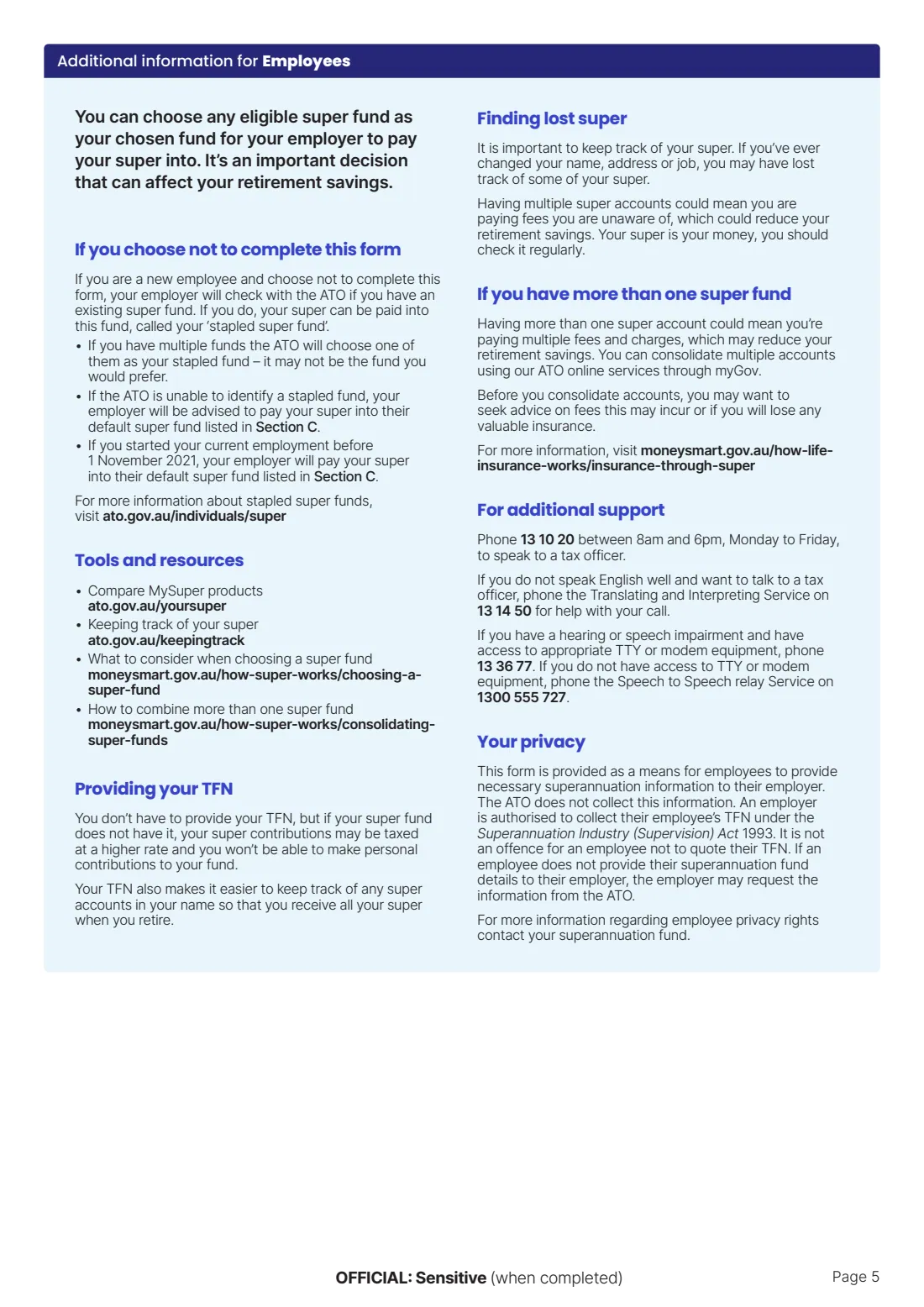
Getting this right matters. If you don't return the form, most employers must ask the ATO for your 'stapled' fund, and if you have several accounts the ATO chooses one for you — it may not be the one you'd prefer. Returning a completed choice form puts you in control of which fund receives your contributions.
FileIt lets you fill in the current edition (NAT 13080-03.2023) through a guided web form. Your answers are printed into the ATO's own PDF, your name can be pre-filled from your People records, and the finished form is saved to your FileIt vault. FileIt does not send the form anywhere — you give it to your employer yourself.
- Who fills it
- The employee (Sections A and B, C or D). The employer completes their default fund details in Section C first.
- Given to
- Your employer — not the ATO
- When
- When you start a new job, or any time you want your employer to pay into a different fund
- Signatures
- The employee signs in the section they chose (B, C or D)
- Edition
- NAT 13080-03.2023
- Issued by
- Australian Taxation Office (ATO)
Who needs to fill out Super standard choice form?
- Employees starting a new job in Australia who want to nominate the super fund their employer pays into.
- Existing employees who want to switch their employer's super payments to a different fund.
- Members and trustees of a self-managed super fund (SMSF) who want their employer contributions paid into it.
- Employees happy to join their employer's default fund, who confirm that choice in Section C.
- Employers, who must fill in their default (nominated) fund details in Section C before handing the form to an employee.
- Parents or partners helping a family member with their first job paperwork, who want the form filled in neatly and a copy kept.
When to use Super standard choice form
- On or shortly after your first day in a new job — the form says to return it to your employer as soon as possible.
- When you want future employer contributions to go to a different fund than the one currently being used.
- After consolidating your super accounts, so your employer pays into the one account you kept.
- When you set up an SMSF and want your employer's contributions to go into it.
- If you don't use the form, your employer can pay into your stapled fund identified by the ATO, or their default fund if you don't have one.
What you need before you start
- Your full name, and your employee number if you know it.
- Your tax file number (TFN) — optional, but see the notes below on why it helps.
- For your existing fund: the fund's name, ABN and unique superannuation identifier (USI), your member account number, and your name exactly as it appears on the account.
- A letter of compliance from your existing fund (most funds publish one on their website).
- For an SMSF: the fund's name, ABN, electronic service address (ESA), bank account name, BSB and account number.
- Evidence from the ATO that your SMSF is a regulated fund (its compliance status is available through Super Fund Lookup).
- For the default fund option: your employer's business name, ABN and default fund details, which the employer fills in.
- Access to your fund's member portal, or ATO online services through myGov, to look up fund details.
What’s on Super standard choice form
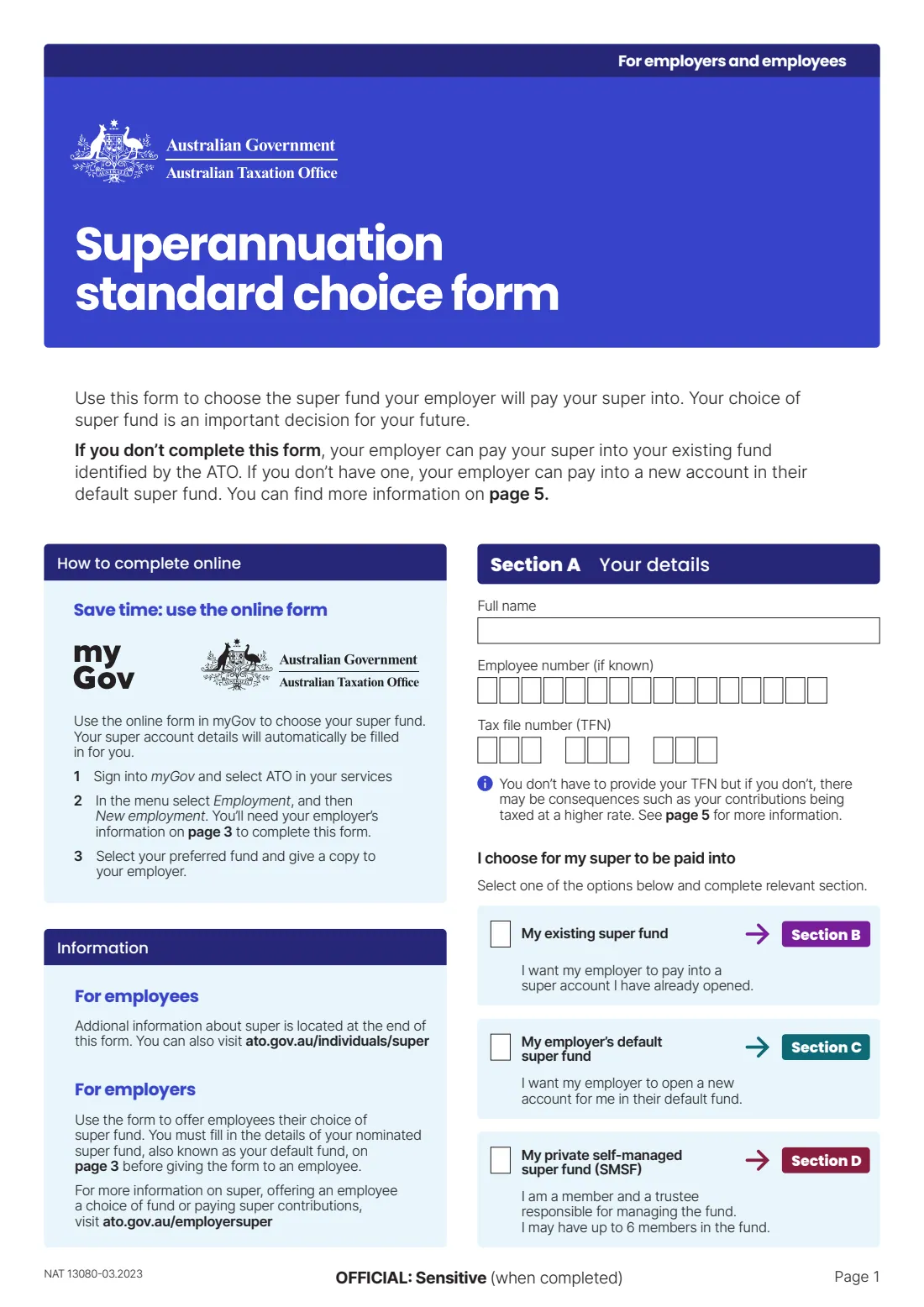
The 2023 edition has 5 pages. FileIt asks for it in 5 parts:
- Section A: Your detailsEmployee
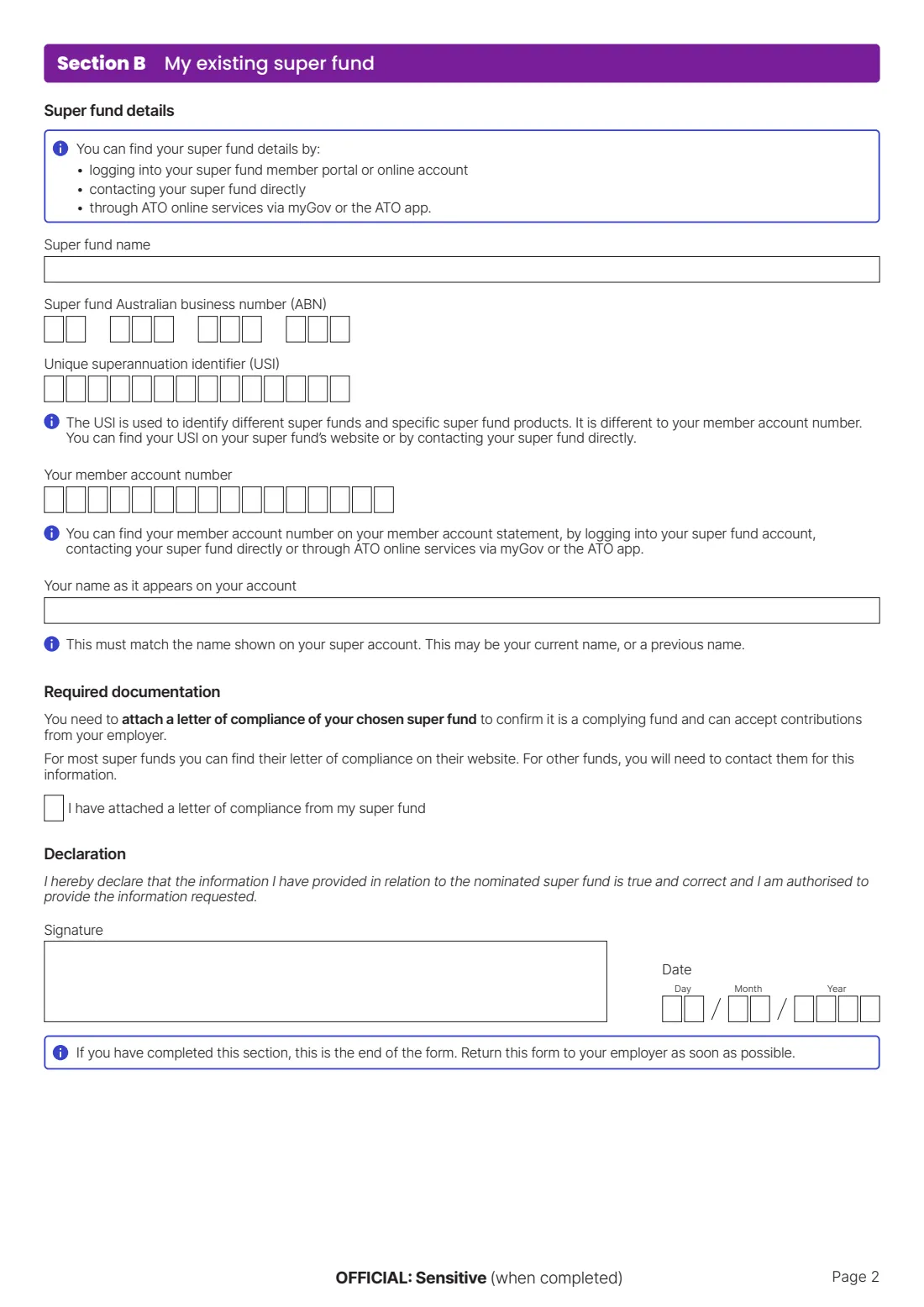
- Section B: My existing super fundEmployee
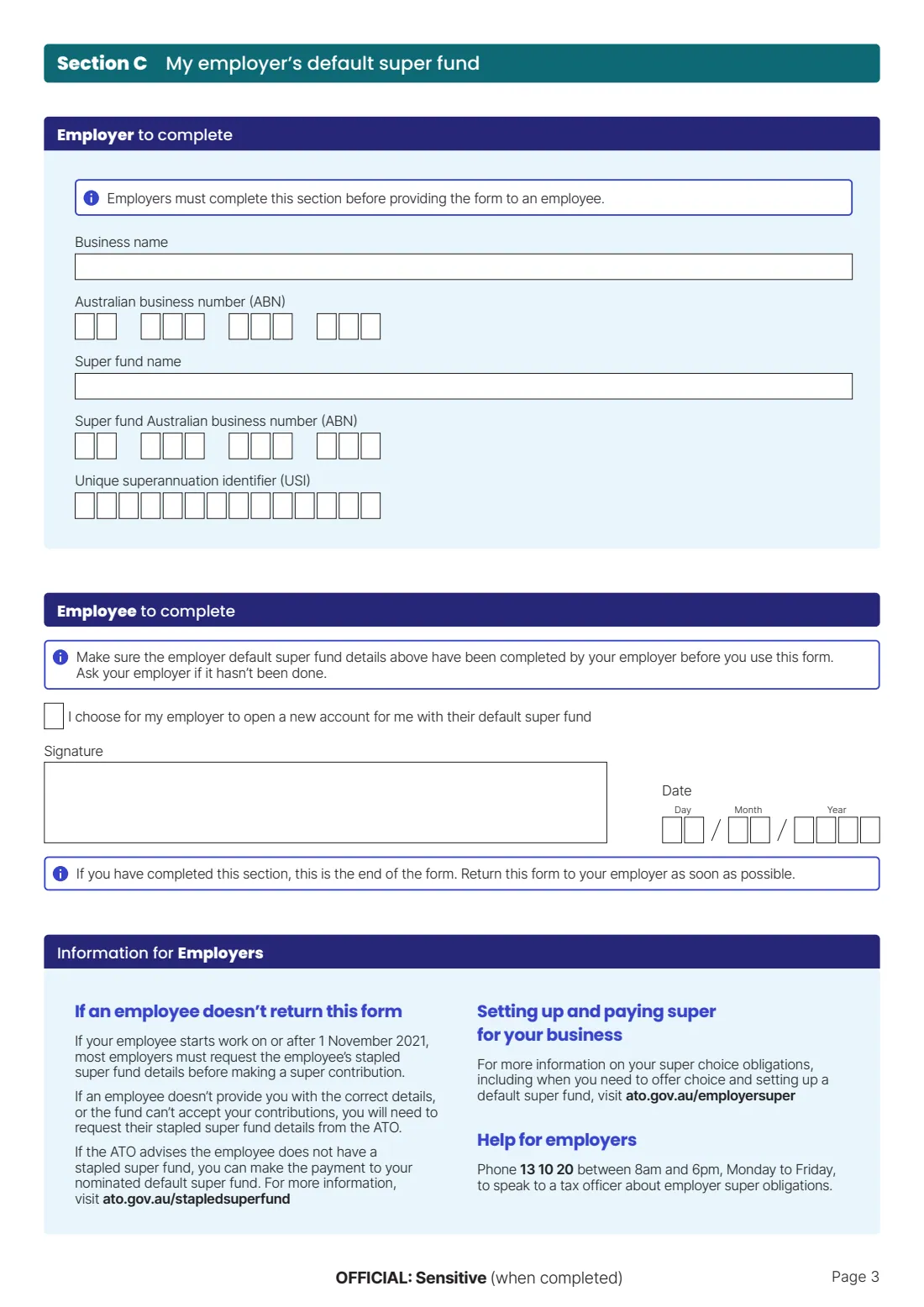
- Section C: My employer's default super fundEmployee
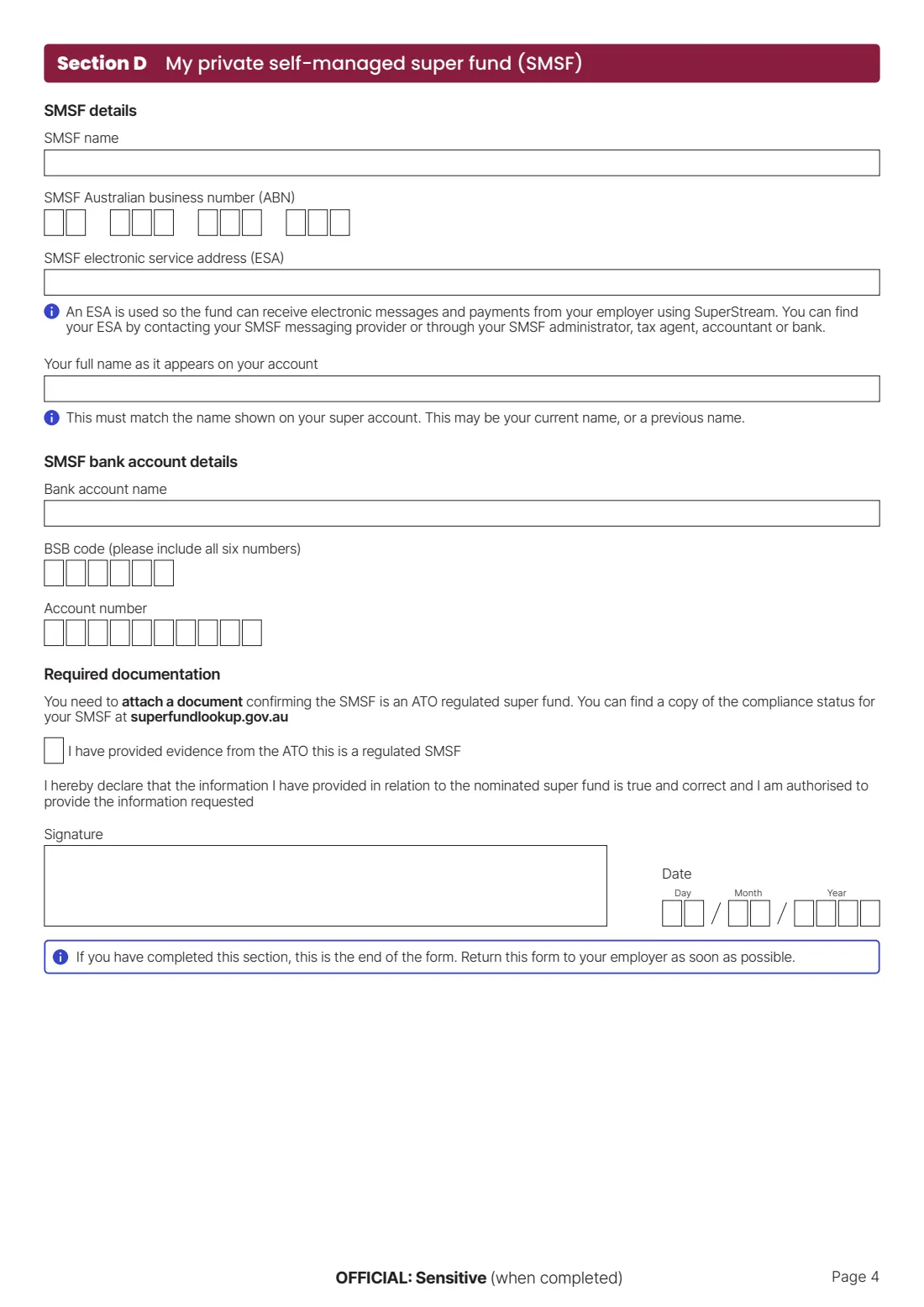
- Section D: My private self-managed super fund (SMSF)Employee
- Section C (employer to complete): Employer's default super fundEmployer
How to fill out Super standard choice form, step by step
1 Section A: Your details
Enter your full name, your employee number if you know it, and your tax file number (TFN). You don't have to give your TFN, but the form warns that if your super fund doesn't have it, your contributions may be taxed at a higher rate and you won't be able to make personal contributions.
Then tick one option under 'I choose for my super to be paid into': your existing super fund (Section B), your employer's default super fund (Section C), or your private self-managed super fund (Section D). Complete only the section that matches your choice.
2 Section B: My existing super fund
Use this if you want your employer to pay into an account you already have. You need the fund's name, its Australian business number (ABN), its unique superannuation identifier (USI), your member account number, and your name as it appears on the account. The USI identifies the fund and product and is different from your member number — look for it on the fund's website or member portal.
The form requires you to attach a letter of compliance from the fund, confirming it is a complying fund that can accept contributions from your employer. Tick the box to confirm you've attached it, read the declaration, then sign and date.
3 Section C: My employer's default super fund (employer to complete)
The top half of Section C belongs to your employer. The form says employers must fill in their business name and ABN, plus the default fund's name, ABN and USI, before giving the form to an employee.
If you're the employer, complete this part for every new starter. You can't recommend a fund or influence the employee's choice — you simply record your nominated fund so it's available as an option.
4 Section C: My employer's default super fund (employee to complete)
If you're happy for your employer to open a new account for you in their default fund, tick the box confirming that choice, then sign and date the section.
Check that your employer has already filled in their fund details above before you choose this option. If the boxes are empty, ask them to complete it — the form says not to use this option until they have.
5 Section D: My private self-managed super fund (SMSF)
Choose this only if you're a member and trustee of your own SMSF. Enter the SMSF's name, ABN and electronic service address (ESA), your full name as it appears on your account, and the fund's bank account name, BSB (all six digits) and account number.
The ESA lets the fund receive contributions and messages from your employer through SuperStream — get it from your SMSF messaging provider, administrator, accountant, tax agent or bank. You must also attach evidence from the ATO that the SMSF is a regulated fund, tick the box confirming you've done so, then sign and date the declaration.
Common mistakes to avoid
- Ticking one choice in Section A but filling in a different section — only complete the section that matches your tick.
- Confusing the USI with your member account number. They are different numbers; the USI identifies the fund product.
- Forgetting the letter of compliance (existing fund) or the ATO evidence of regulated status (SMSF) — without it your employer may not be able to accept the form.
- Using a name that doesn't match your super account. If the account is in a previous name, use that name.
- Choosing the default fund option before the employer has filled in their default fund details.
- Leaving out your TFN without realising your fund may then tax contributions at a higher rate.
- Sending the form to the ATO. It goes to your employer only.
After you fill it out
Sign and date the signature box in the section you completed — Section B, C or D. Attach the required supporting document: the letter of compliance for an existing fund, or the ATO evidence of regulated status for an SMSF.
Give the completed form to your employer as soon as possible. Don't send it to the ATO. Your employer uses it to set up your super payments and keeps it with their records.
Keep a copy for yourself — FileIt saves the finished PDF in your vault, filed under your name, so you can find the fund details later. If you change funds again, simply fill in a new choice form and give it to your employer.
Fill out Super standard choice form online with FileIt
- Pick the person. Choose someone from People and FileIt fills in their name, date of birth, address and other details it already knows.
- Answer plain-language questions. One part of the form at a time, with the official help text beside each question — 27 fields in all. Your answers save as you go.
- Check the live preview. Watch your answers land on the real Australian Taxation Office (ATO) form, and let FileIt do any worksheet arithmetic.
- Generate the official PDF. FileIt prints your answers into the agency’s own PDF and files it in that person’s folder in your vault.
FileIt fills the form — it never files or submits anything for you. Deliver the finished form to whoever asked for it, the way the form’s instructions say.
Start Super standard choice form now — it’s freeSuper standard choice form: frequently asked questions
What is the super standard choice form?
It's the ATO form NAT 13080 that employees use to tell their employer which super fund to pay their superannuation into. You can choose an existing fund, your employer's default fund, or your own SMSF. It's filled in by you (and partly by your employer) and kept by your employer.
Where do I send the super choice form?
Give it to your employer. The form is not lodged with or sent to the ATO — the ATO says it does not collect this information.
Can I fill in the super standard choice form online?
Yes. With FileIt you answer guided questions and your answers are printed into the ATO's official NAT 13080 PDF, ready to print or share with your employer. It's available on every FileIt account, including the free plan. The ATO also offers an online version through ATO online services in myGov.
What happens if I don't fill in a super choice form?
Your employer can pay into your existing 'stapled' fund identified by the ATO. If you have more than one fund, the ATO chooses one, which may not be the one you'd prefer. If there's no stapled fund, your employer can pay into their default fund.
Where do I find my fund's USI and ABN?
They're usually on your fund's website, in your member portal, or available by contacting the fund. You can also see your super accounts in ATO online services through myGov.
What is a letter of compliance?
It's a document from your super fund confirming it's a complying fund that can accept contributions from your employer. Most funds publish it on their website. You attach it when you choose Section B (existing fund).
Do I have to give my TFN on the form?
No, it's not an offence to leave it out. But if your super fund doesn't have your TFN, your contributions may be taxed at a higher rate and you won't be able to make personal contributions.
Who signs the super choice form?
The employee signs and dates the signature box in the section they completed (B, C or D). The employer fills in their default fund details in Section C but doesn't sign the employee's choice.
Official sources
- Blank form (PDF), published by Australian Taxation Office (ATO): https://www.ato.gov.au/forms-and-instructions/superannuation-standard-choice-form
- Official instructions and guidance: https://www.ato.gov.au/forms-and-instructions/superannuation-standard-choice-form
- Edition shown on this page: NAT 13080-03.2023 (checked 2026-09-25).
FileIt is not affiliated with or endorsed by Australian Taxation Office (ATO) or any government. This page explains the form in general terms and is not legal, tax or immigration advice. Always read the official instructions, and check that you are using the edition the recipient accepts. Page last reviewed 2026-09-25.