What is Medicare Safety Net family registration (MS016)?
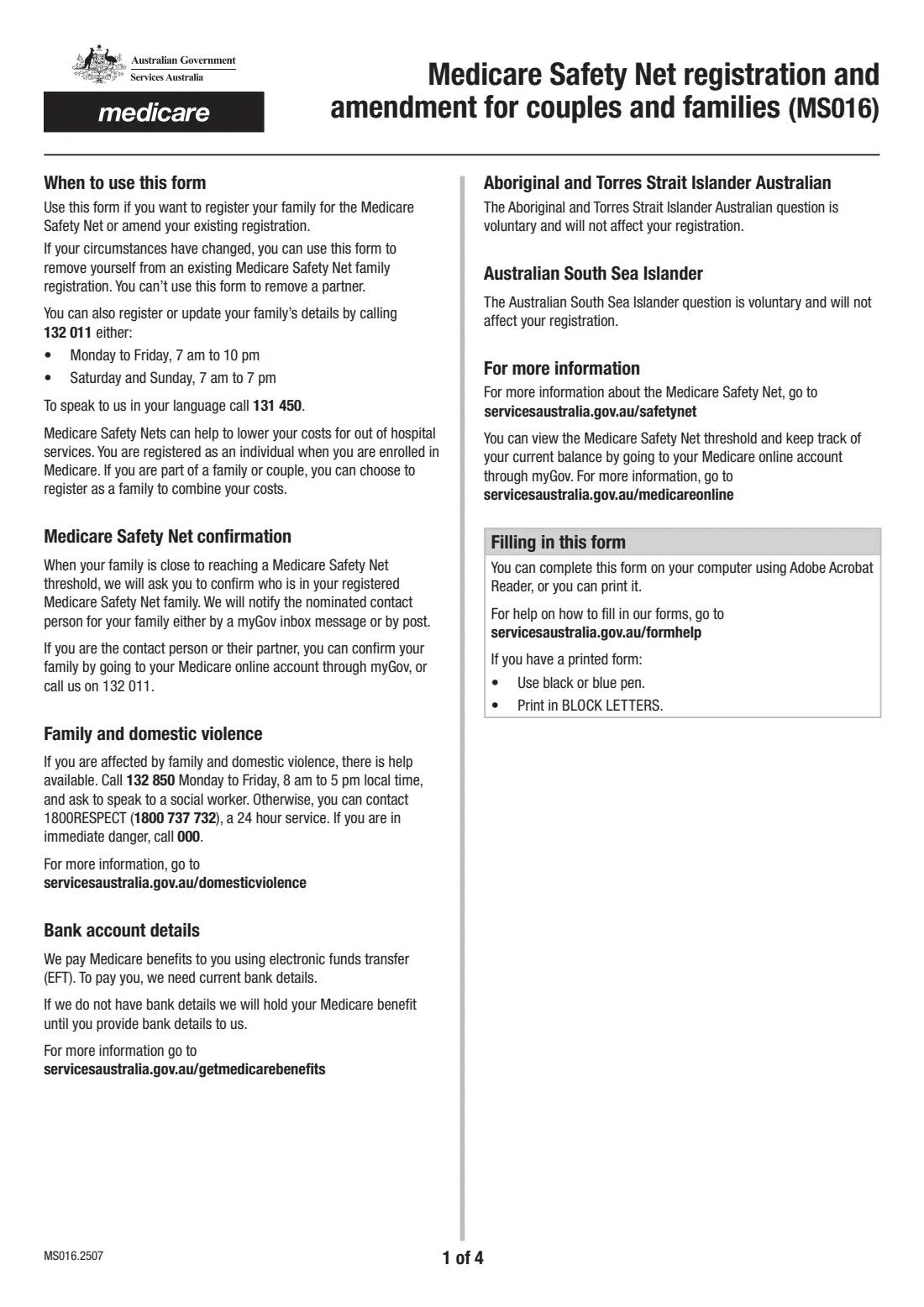
Medicare Safety Nets help lower your costs for out-of-hospital services. You're registered as an individual when you enrol in Medicare. If you're part of a couple or family, registering as a family combines everyone's costs so you reach the threshold sooner. MS016 is the paper form for that registration, and for changing it later.
The form covers four jobs: registering your family, adding a partner or dependant to an existing registration, removing yourself from a family registration, or removing yourself and copying your dependants to a new registration with you. It can't be used to remove a partner. Your partner and any dependant aged 15 or older each complete a short declaration.
FileIt fills in edition MS016.2507. It splits Medicare card numbers and dates into the form's boxes, checks card numbers, and prints names with accents intact. The finished PDF is saved to your vault. You then post it or hand it in. You can also register by phone on 132 011 or through your Medicare online account.
- Who fills it
- You, with declarations from your partner and any dependant 15 or older
- Given to
- Services Australia (Medicare), by post or at a service centre
- Dependants on the form
- Up to 3 (attach a page for more)
- Signatures
- No signature box. Each declaration is a tick, a name and a date
- Other ways
- Phone 132 011, or your Medicare online account through myGov
- Edition
- MS016.2507
Who needs to fill out Medicare Safety Net family registration (MS016)?
- Couples who want their Medicare out-of-hospital costs combined for the Safety Net.
- Families with dependants: children under 16, or full-time students aged 16 to 25, supported by the family.
- People adding a new partner or a dependant to an existing Safety Net family.
- People leaving a Safety Net family registration, with or without taking their dependants to a new one.
When to use Medicare Safety Net family registration (MS016)
- When you first want to register as a couple or family.
- When your circumstances change, for example a new partner, a new baby, or a dependant who stops studying full time.
- When you need to remove yourself from a family registration. To remove a partner, contact Services Australia instead. This form can't do it.
What you need before you start
- Your Medicare card number and your reference number (the digit next to your name).
- Your name, date of birth, postal address, contact phone and email.
- Your partner's Medicare card number, reference number, name and date of birth, if adding them.
- Each dependant's Medicare card number, reference number, name and date of birth, and whether you're adding or removing them.
- Your partner, and any dependant 15 or older, to read the Privacy notice and complete their declaration.
What’s on Medicare Safety Net family registration (MS016)
The 2025 edition has 4 pages. FileIt asks for it in 4 parts:
- What you're doing and your detailsApplicant
- Partner details (questions 9–15)Applicant
- Dependant details (questions 16–37)Applicant
- Declaration (question 39)Applicant
How to fill out Medicare Safety Net family registration (MS016), step by step
1 Question 1: what you want to do
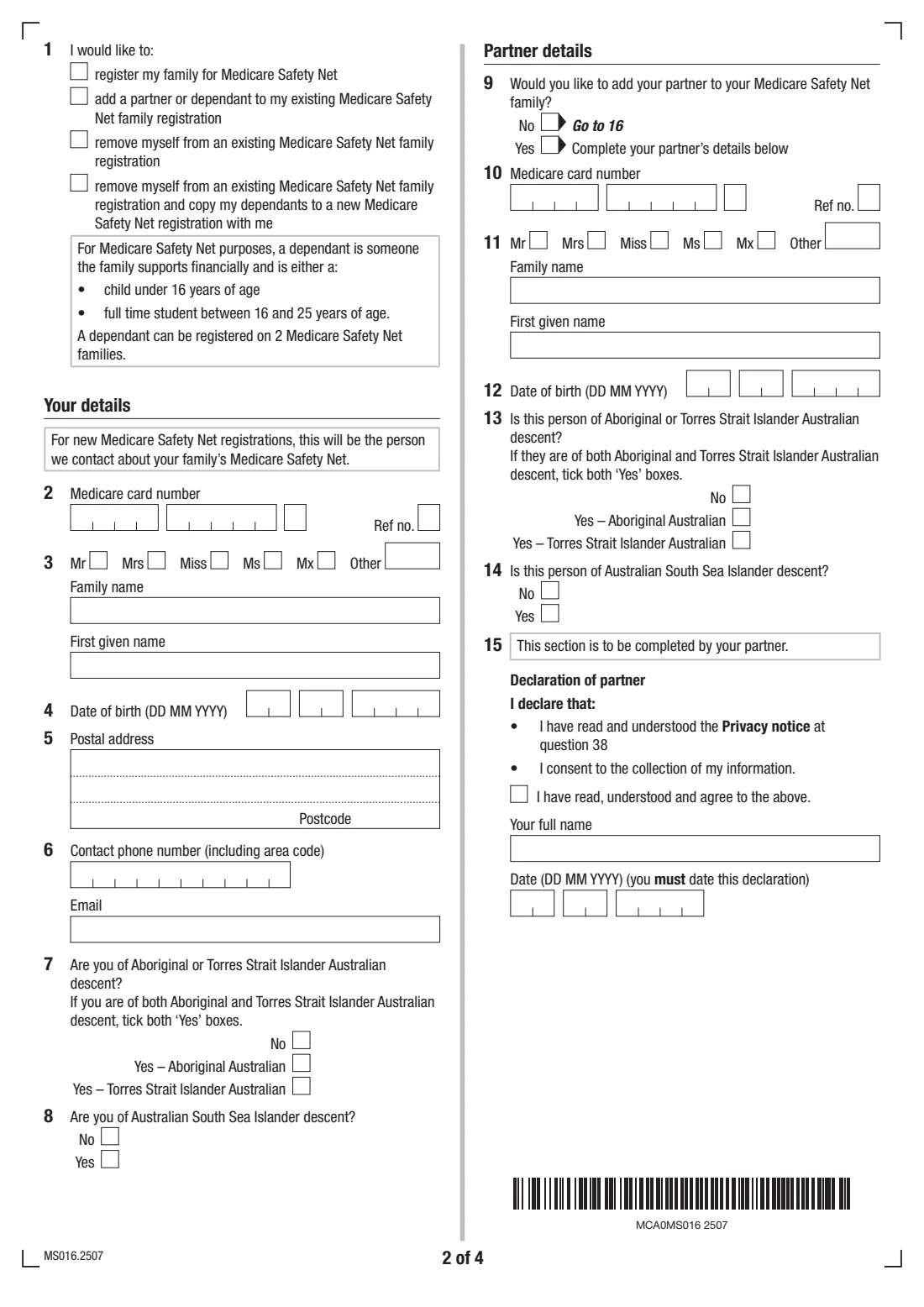
Choose one: register your family for the Medicare Safety Net, add a partner or dependant to your existing registration, remove yourself from an existing family registration, or remove yourself and copy your dependants to a new registration with you. For a new registration, you become the person Services Australia contacts about your family's Safety Net.
2 Your details (questions 2 to 8)
Give your Medicare card number and reference number, title, name, date of birth, postal address, phone and email. Questions 7 and 8 ask about Aboriginal and Torres Strait Islander and Australian South Sea Islander descent. Both are voluntary and won't affect the registration.
3 Partner details (questions 9 to 15)
Answer Yes at question 9 to add your partner, then give their Medicare card number, name and date of birth. Your partner completes the declaration at question 15: they tick that they've read the Privacy notice and consent to the collection of their information, and add their name and the date.
4 Dependants (questions 16 to 37)
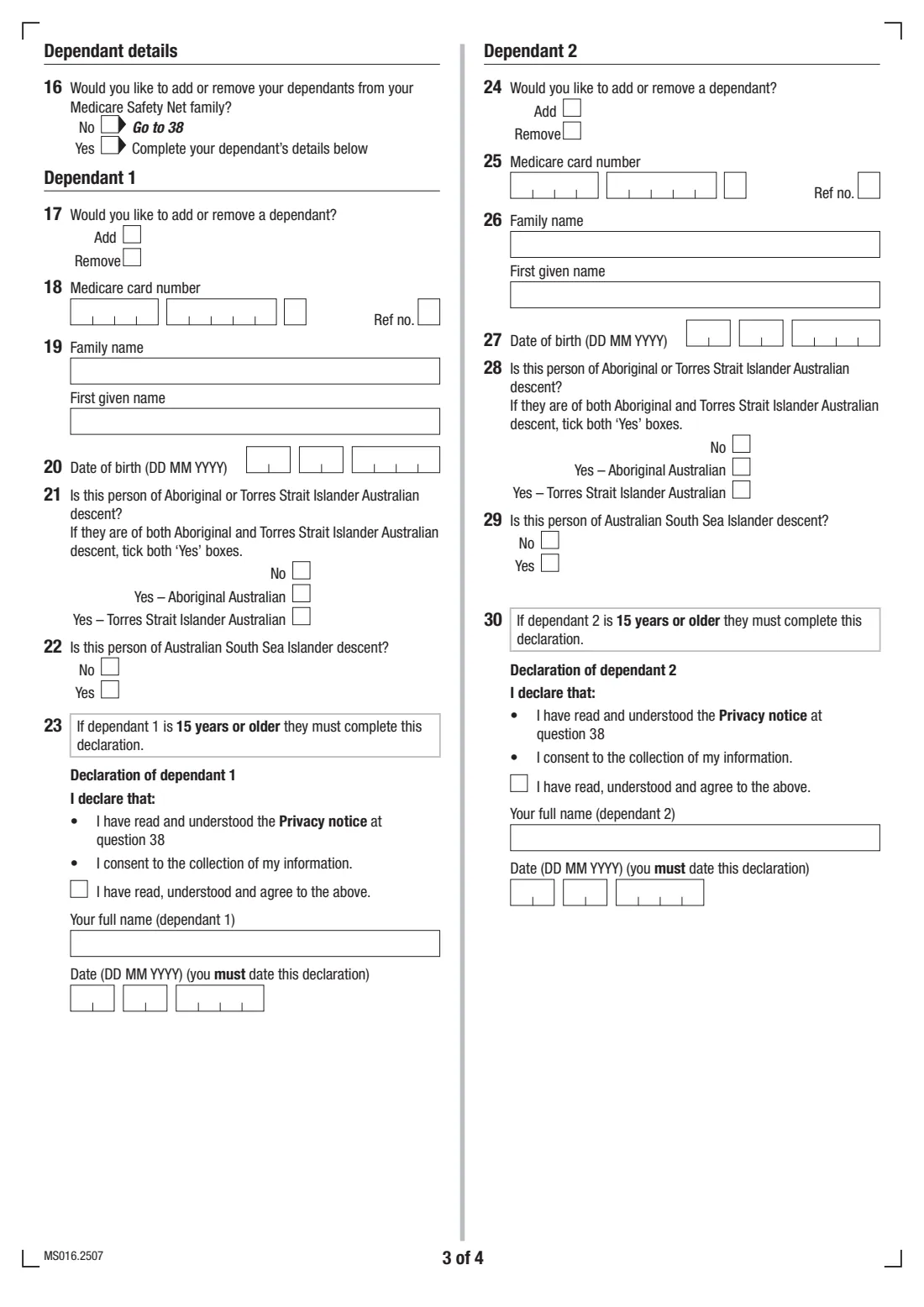
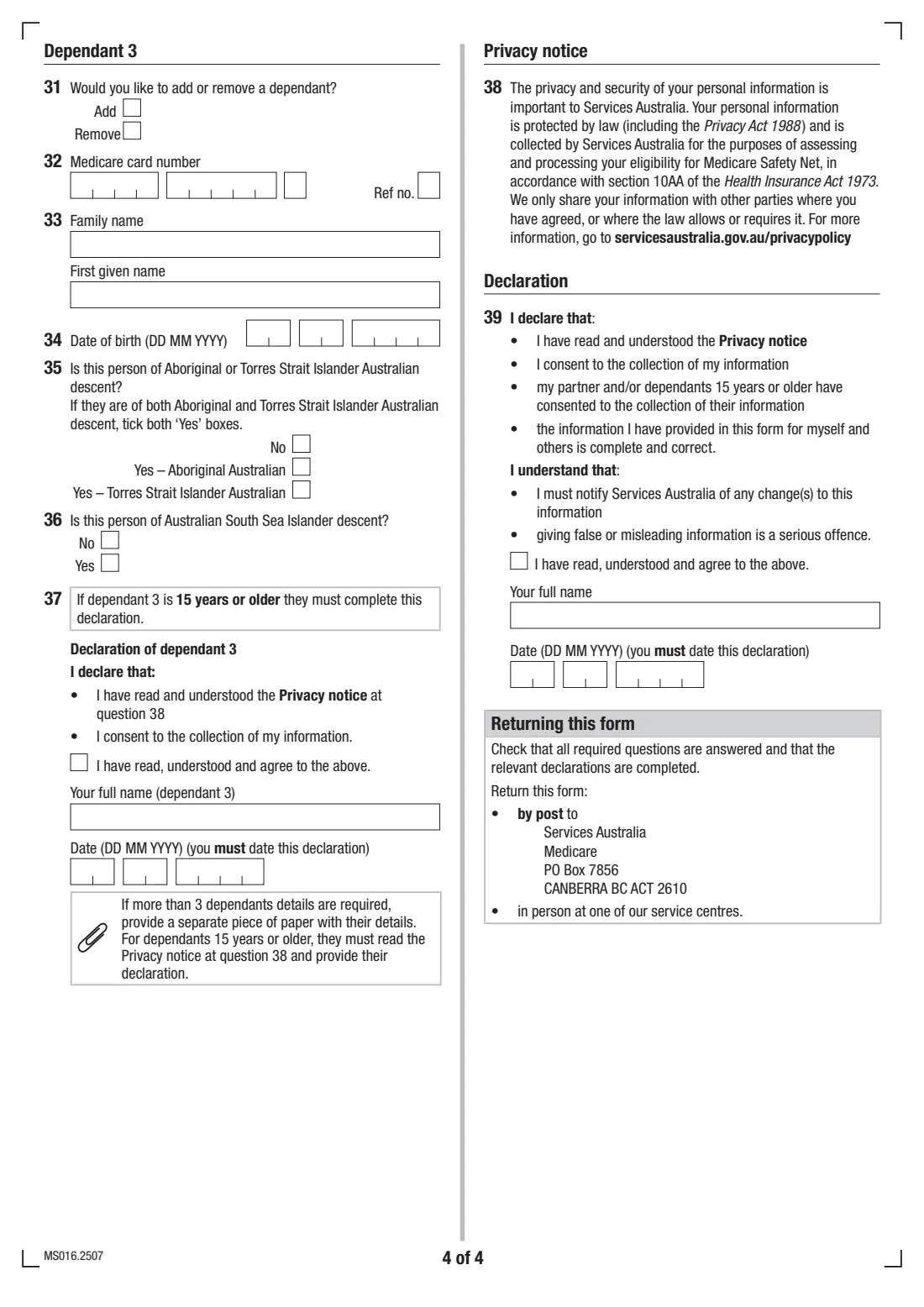
Answer Yes at question 16 to add or remove dependants. For each one, up to 3, say whether you're adding or removing them and give their Medicare card number, name and date of birth. A dependant aged 15 or older completes their own declaration. For more than 3, attach a page with the same details.
5 Declaration (question 39)
Tick that you've read and agree to the declaration, and add your full name and the date. You declare that your partner and any dependants 15 or older have consented to the collection of their information, and that you'll tell Services Australia about changes.
Common mistakes to avoid
- Leaving out the reference number, the single digit next to each person's name on the Medicare card.
- Forgetting the partner's declaration at question 15, or a declaration from a dependant who is 15 or older.
- Listing someone who isn't a dependant for Safety Net purposes. They must be under 16, or a full-time student aged 16 to 25.
- Trying to remove a partner with this form. It can't do that.
- Ticking more than one option at question 1.
After you fill it out
Download the PDF and check every needed declaration is ticked, named and dated. There's no handwritten signature on this form.
Post it to Services Australia, Medicare, PO Box 7856, CANBERRA BC ACT 2610, or hand it in at a service centre, as printed on the form. FileIt doesn't send it for you.
Keep a copy in your FileIt vault with your family's Medicare cards. When your family nears a threshold, Services Australia may ask the contact person to confirm who's in the family, by myGov inbox message or by post.
Fill out Medicare Safety Net family registration (MS016) online with FileIt
- Pick the person. Choose someone from People and FileIt fills in their name, date of birth, address and other details it already knows.
- Answer plain-language questions. One part of the form at a time, with the official help text beside each question — 77 fields in all. Your answers save as you go.
- Check the live preview. Watch your answers land on the real Services Australia (Medicare) form, and let FileIt do any worksheet arithmetic.
- Generate the official PDF. FileIt prints your answers into the agency’s own PDF and files it in that person’s folder in your vault.
FileIt fills the form — it never files or submits anything for you. Deliver the finished form to whoever asked for it, the way the form’s instructions say.
Start Medicare Safety Net family registration (MS016) now — it’s freeMedicare Safety Net family registration (MS016): frequently asked questions
What is the MS016 form?
MS016 is Services Australia's form for registering a couple or family for the Medicare Safety Net, or changing an existing registration by adding a partner or dependants, removing dependants or removing yourself.
Do I need to register my family for the Medicare Safety Net?
Individuals are registered automatically when they enrol in Medicare. Couples and families need to register as a family to combine their out-of-hospital costs toward the Safety Net thresholds.
Who counts as a dependant?
For the Medicare Safety Net, a dependant is someone the family supports financially who is either a child under 16 or a full-time student aged 16 to 25. A dependant can be registered on 2 Safety Net families.
Can I register without the form?
Yes. The form says you can also register or update your family's details by calling 132 011, and you can manage it through your Medicare online account in myGov.
Where do I send MS016?
By post to Services Australia, Medicare, PO Box 7856, CANBERRA BC ACT 2610, or in person at a service centre.
Does MS016 need a signature?
No. Each declaration is an 'I have read, understood and agree' tick, the person's full name and the date.
Official sources
- Blank form (PDF), published by Services Australia (Medicare): https://www.servicesaustralia.gov.au/sites/default/files/2025-07/ms016-2507en-f.pdf
- Official instructions and guidance: https://www.servicesaustralia.gov.au/ms016
- Edition shown on this page: MS016.2507 (checked 2026-09-28).
FileIt is not affiliated with or endorsed by Services Australia (Medicare) or any government. This page explains the form in general terms and is not legal, tax or immigration advice. Always read the official instructions, and check that you are using the edition the recipient accepts. Page last reviewed 2026-09-28.