What is Medicare Entitlement Statement application (MS015)?
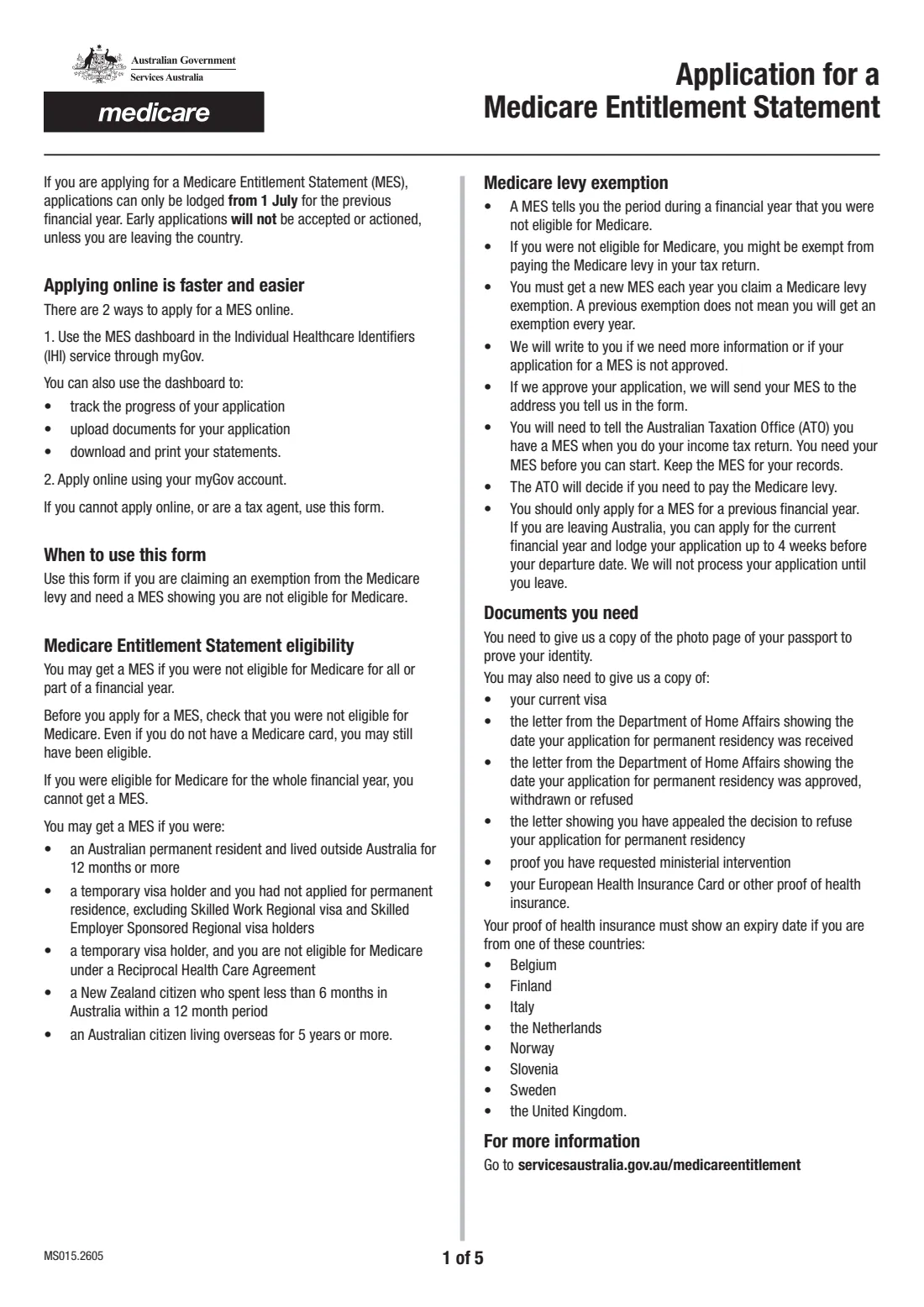
If you weren't eligible for Medicare for all or part of a financial year, you might be exempt from the Medicare levy in your tax return. To claim that exemption you need a Medicare Entitlement Statement (MES) from Services Australia. It tells you, and the ATO, the period when you weren't eligible. MS015 is the paper application for it.
Most people can apply online, through the MES dashboard in the Individual Healthcare Identifiers service in myGov or with their myGov account. The form is for people who can't apply online, and for tax agents applying on a client's behalf. It covers your identity and addresses, where you lived before Australia, any permanent residency applications, the financial year you're claiming, and a checklist of documents.
FileIt fills in edition MS015.2605 and follows the form's 'Go to' routing, so you only answer the questions that apply. It also checks the financial year rule: applications can only be lodged from 1 July after the year ends, unless you're leaving Australia. The finished PDF is saved to your vault for you to post, or for your tax agent to send.
- Who fills it
- The applicant, or a tax agent on their behalf (the applicant completes the declaration)
- Given to
- Services Australia, Medicare Entitlement Statement Unit, GPO Box 9822, Adelaide SA 5001
- When
- From 1 July after the financial year ends, or up to 4 weeks before leaving Australia
- One form covers
- One financial year
- Always attach
- A copy of the photo page of the applicant's passport
- Edition
- MS015.2605
Who needs to fill out Medicare Entitlement Statement application (MS015)?
- Australian permanent residents who lived outside Australia for 12 months or more.
- Temporary visa holders who hadn't applied for permanent residence, excluding Skilled Work Regional and Skilled Employer Sponsored Regional visa holders.
- Temporary visa holders who aren't eligible for Medicare under a Reciprocal Health Care Agreement.
- New Zealand citizens who spent less than 6 months in Australia within a 12-month period.
- Australian citizens who have lived overseas for 5 years or more.
- Tax agents applying for a client who can't use the online service.
When to use Medicare Entitlement Statement application (MS015)
- After the financial year you're claiming for has ended. Applications can only be lodged from 1 July, and early ones won't be accepted or actioned.
- Before you lodge your tax return, since you need the MES before you can start it.
- Every year you claim the exemption. A previous MES doesn't carry over.
- If you're leaving Australia permanently, you can apply for the current financial year up to 4 weeks before your departure date. It won't be processed until you leave.
What you need before you start
- A copy of the photo page of the applicant's passport.
- The applicant's Medicare card number, if they have or had a card.
- Name as on the passport, date of birth, phone, email, residential address in Australia and a postal address for the statement.
- The country the applicant lived in for 6 months or more before arriving, and for how long.
- Health insurance documents showing the expiry date, if insured in Belgium, Finland, Italy, the Netherlands, Norway, Slovenia, Sweden or the United Kingdom.
- For permanent residency applications: the Home Affairs letters showing when each was received, and when it was approved, withdrawn or refused, plus proof of any appeal or request for ministerial intervention.
- Your current visa, if asked for it.
What’s on Medicare Entitlement Statement application (MS015)
The 2026 edition has 5 pages. FileIt asks for it in 6 parts:
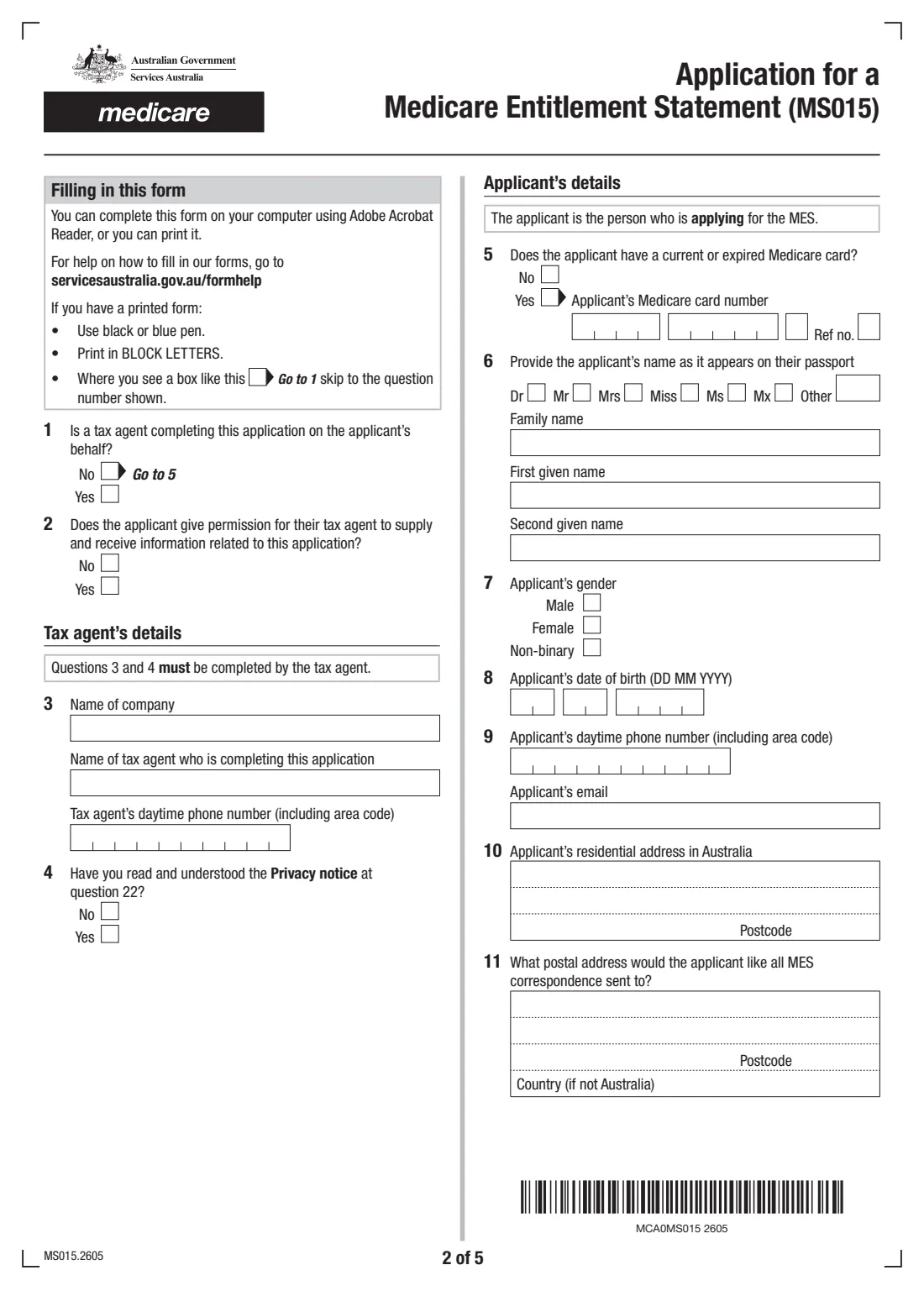
- Tax agent (questions 1–4)Tax agent
- Applicant's details (questions 5–12)Applicant
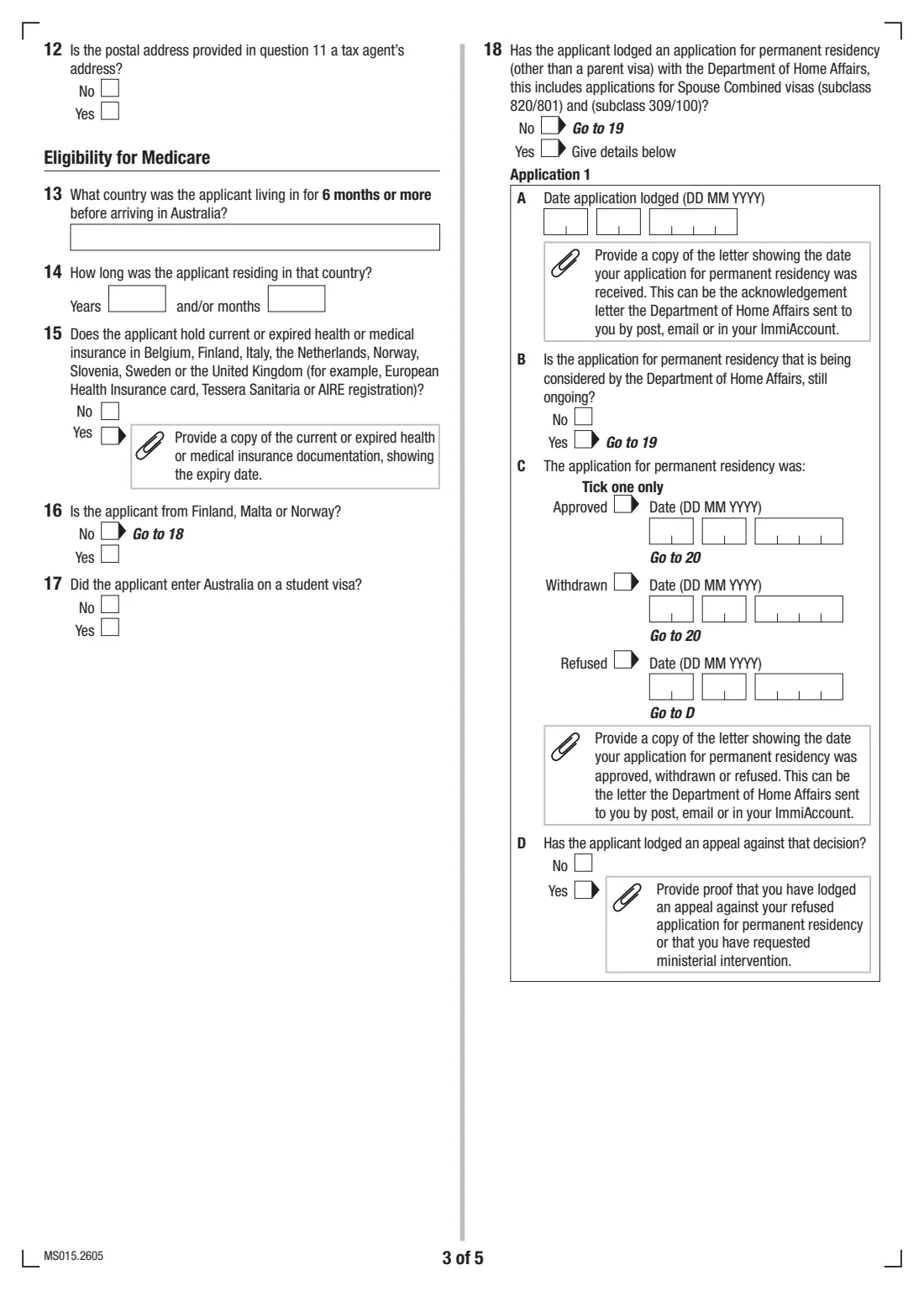
- Eligibility for Medicare (questions 13–18)Applicant
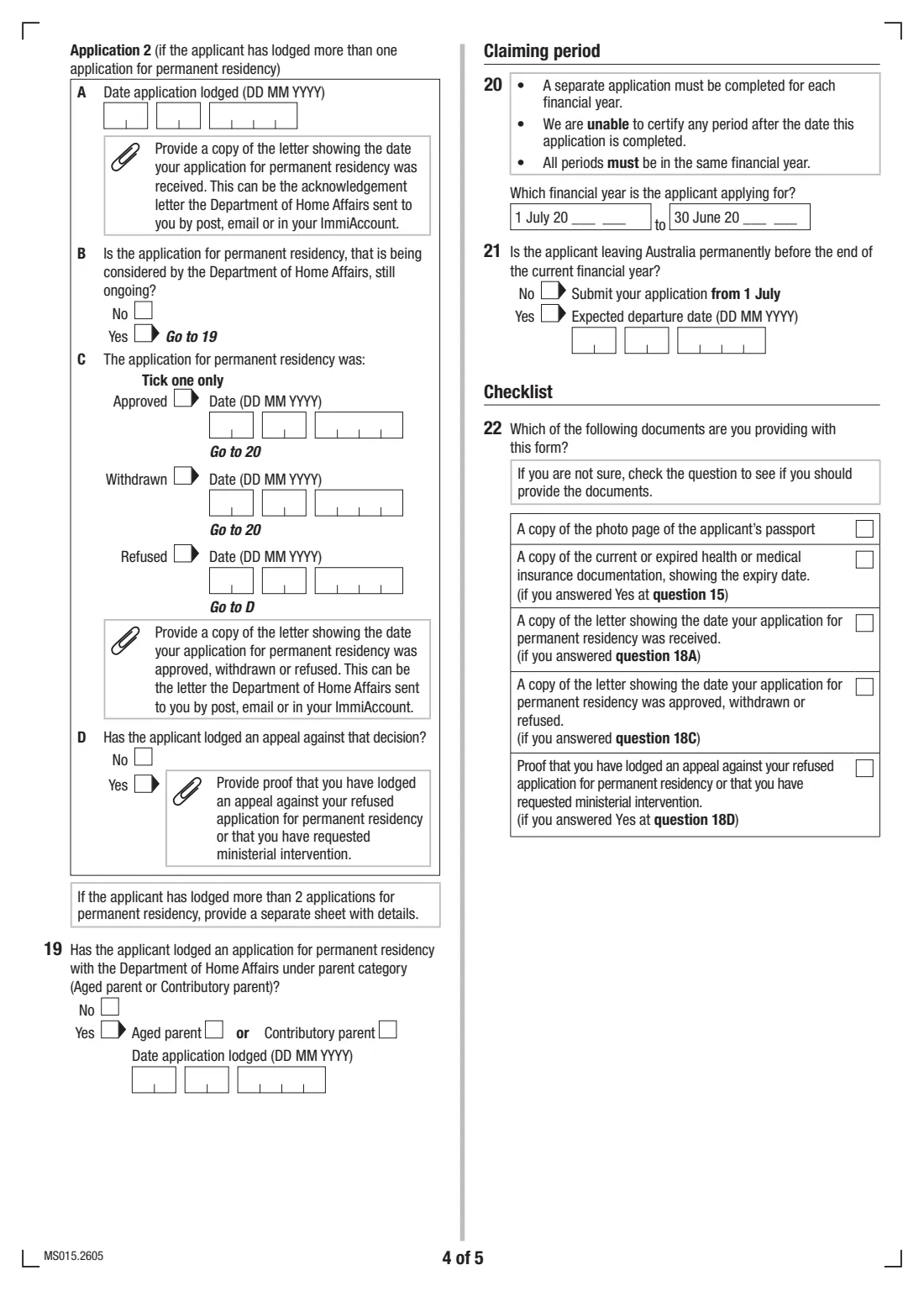
- Question 18 — Application 2Applicant
- Parent visa and claiming period (questions 19–22)Applicant
- Declaration (question 24)Applicant
How to fill out Medicare Entitlement Statement application (MS015), step by step
1 Tax agent (questions 1 to 4)
Say whether a tax agent is completing the form. If so, the applicant says whether the agent may give and receive information about the application, and the agent gives their company name, their own name and phone number, and confirms they've read the Privacy notice. If not, go straight to question 5.
2 Applicant's details (questions 5 to 12)
Give the Medicare card number if the applicant has a current or expired card, then the name exactly as it appears on the passport, gender, date of birth, phone and email. Add the residential address in Australia and the postal address for all MES letters, and say whether that postal address is a tax agent's.
3 Eligibility for Medicare (questions 13 to 17)
Name the country the applicant lived in for 6 months or more before arriving, and how long they lived there. Say whether they hold health insurance in one of the listed countries, and whether they're from Finland, Malta or Norway. If so, question 17 asks whether they entered Australia on a student visa.
4 Permanent residency applications (questions 18 and 19)
Question 18 asks about any application for permanent residency other than a parent visa, including Spouse Combined visas (subclass 820/801 and 309/100). For each one, give the date it was lodged, whether it's still being considered, and if not whether it was approved, withdrawn or refused and when. For a refusal, say whether it was appealed. Question 19 covers Aged parent and Contributory parent applications.
5 Claiming period, checklist and declaration (questions 20 to 24)
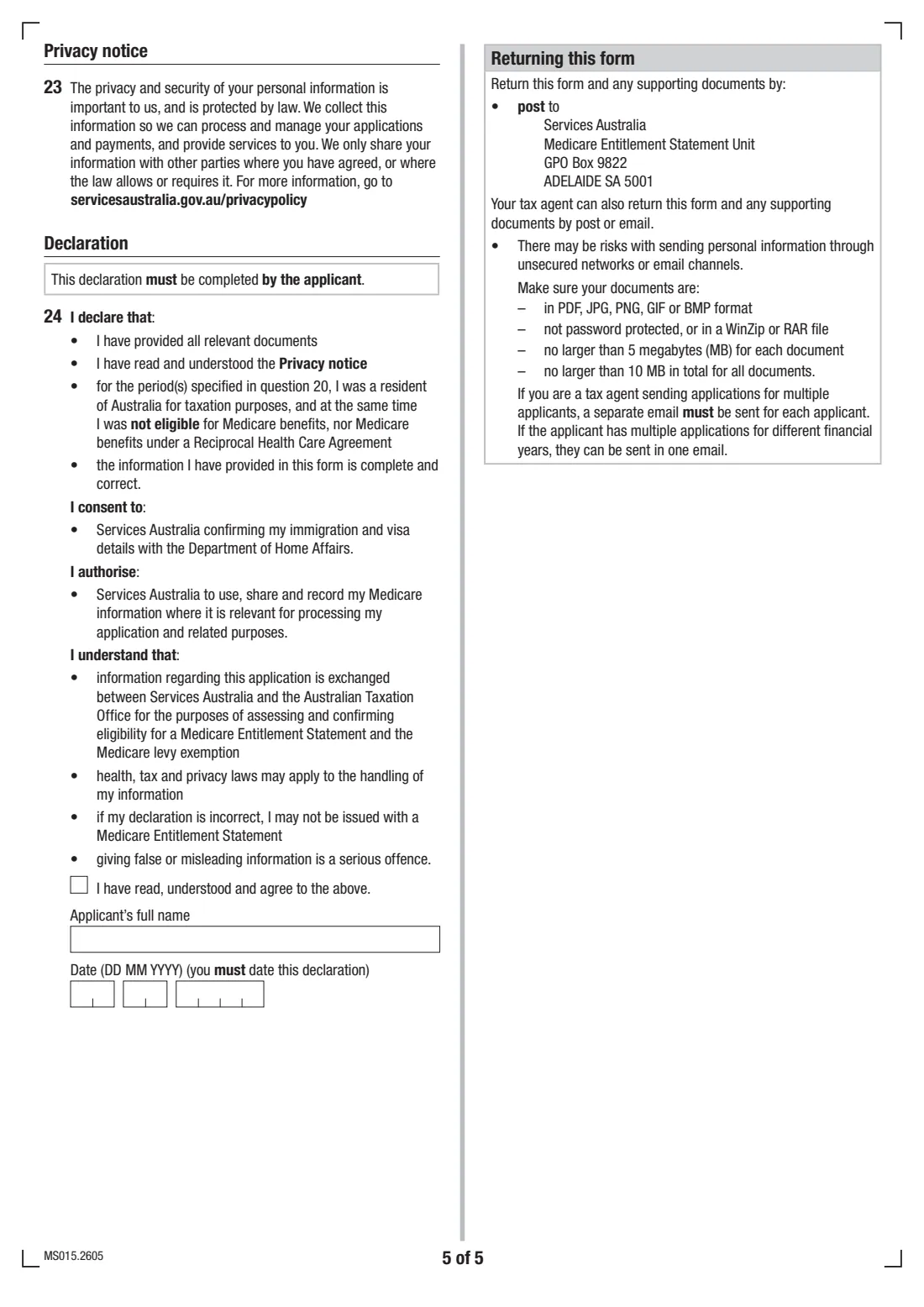
Choose the financial year. A separate application is needed for each one. Question 21 asks if the applicant is leaving Australia permanently before the current financial year ends, and when. Tick the documents you're providing. The applicant, not the tax agent, completes the declaration with a tick, their full name and the date.
Common mistakes to avoid
- Applying before 1 July for a year that hasn't ended. Early applications won't be accepted unless you're leaving Australia.
- Covering two financial years on one form. Each year needs its own application.
- Leaving out the passport photo page copy, or the Home Affairs letters for questions 18A and 18C.
- A tax agent completing the declaration. It must be completed by the applicant.
- Assuming you weren't eligible for Medicare just because you don't have a card. You may still have been eligible, and someone eligible for the whole year can't get a MES.
- Emailing documents that are password-protected, zipped, or too large. The form sets file size limits.
After you fill it out
Download the PDF, check the declaration is ticked, named and dated by the applicant, and gather copies of the documents ticked at question 22.
Post it to Services Australia, Medicare Entitlement Statement Unit, GPO Box 9822, ADELAIDE SA 5001. A tax agent can also return it by email. The form asks for PDF, JPG, PNG, GIF or BMP files that aren't password-protected or zipped, no larger than 5 MB each and 10 MB in total, with one email per applicant. FileIt doesn't send it for you.
If approved, the statement is sent to the postal address you gave. Tell the ATO you have a MES when you do your tax return, and keep it in your FileIt vault with that year's tax records.
Fill out Medicare Entitlement Statement application (MS015) online with FileIt
- Pick the person. Choose someone from People and FileIt fills in their name, date of birth, address and other details it already knows.
- Answer plain-language questions. One part of the form at a time, with the official help text beside each question — 63 fields in all. Your answers save as you go.
- Check the live preview. Watch your answers land on the real Services Australia (Medicare) form, and let FileIt do any worksheet arithmetic.
- Generate the official PDF. FileIt prints your answers into the agency’s own PDF and files it in that person’s folder in your vault.
FileIt fills the form — it never files or submits anything for you. Deliver the finished form to whoever asked for it, the way the form’s instructions say.
Start Medicare Entitlement Statement application (MS015) now — it’s freeMedicare Entitlement Statement application (MS015): frequently asked questions
What is a Medicare Entitlement Statement?
A MES is a statement from Services Australia showing the period in a financial year when you weren't eligible for Medicare. You need one to claim a Medicare levy exemption in your tax return.
When can I apply for a Medicare Entitlement Statement?
From 1 July, for the financial year that has just ended. Early applications won't be accepted or actioned, unless you're leaving Australia. In that case you can apply for the current year up to 4 weeks before you leave.
Can I apply for a MES online?
Yes. Services Australia says applying online is faster and easier, through the MES dashboard in the Individual Healthcare Identifiers service in myGov or with your myGov account. Use MS015 if you can't apply online or you're a tax agent.
Do I need a new MES every year?
Yes. You need a new statement each year you claim a Medicare levy exemption. A previous exemption doesn't mean you'll get one every year.
Who decides whether I pay the Medicare levy?
The ATO. The MES shows when you weren't eligible for Medicare, and the ATO decides whether you need to pay the levy.
Where do I send MS015?
By post to Services Australia, Medicare Entitlement Statement Unit, GPO Box 9822, ADELAIDE SA 5001. Tax agents can also return it by email.
Official sources
- Blank form (PDF), published by Services Australia (Medicare): https://www.servicesaustralia.gov.au/sites/default/files/2026-05/ms015-2605en-f.pdf
- Official instructions and guidance: https://www.servicesaustralia.gov.au/medicareentitlement
- Edition shown on this page: MS015.2605 (checked 2026-09-28).
FileIt is not affiliated with or endorsed by Services Australia (Medicare) or any government. This page explains the form in general terms and is not legal, tax or immigration advice. Always read the official instructions, and check that you are using the edition the recipient accepts. Page last reviewed 2026-09-28.