What is Certification of location overseas (AUS172)?
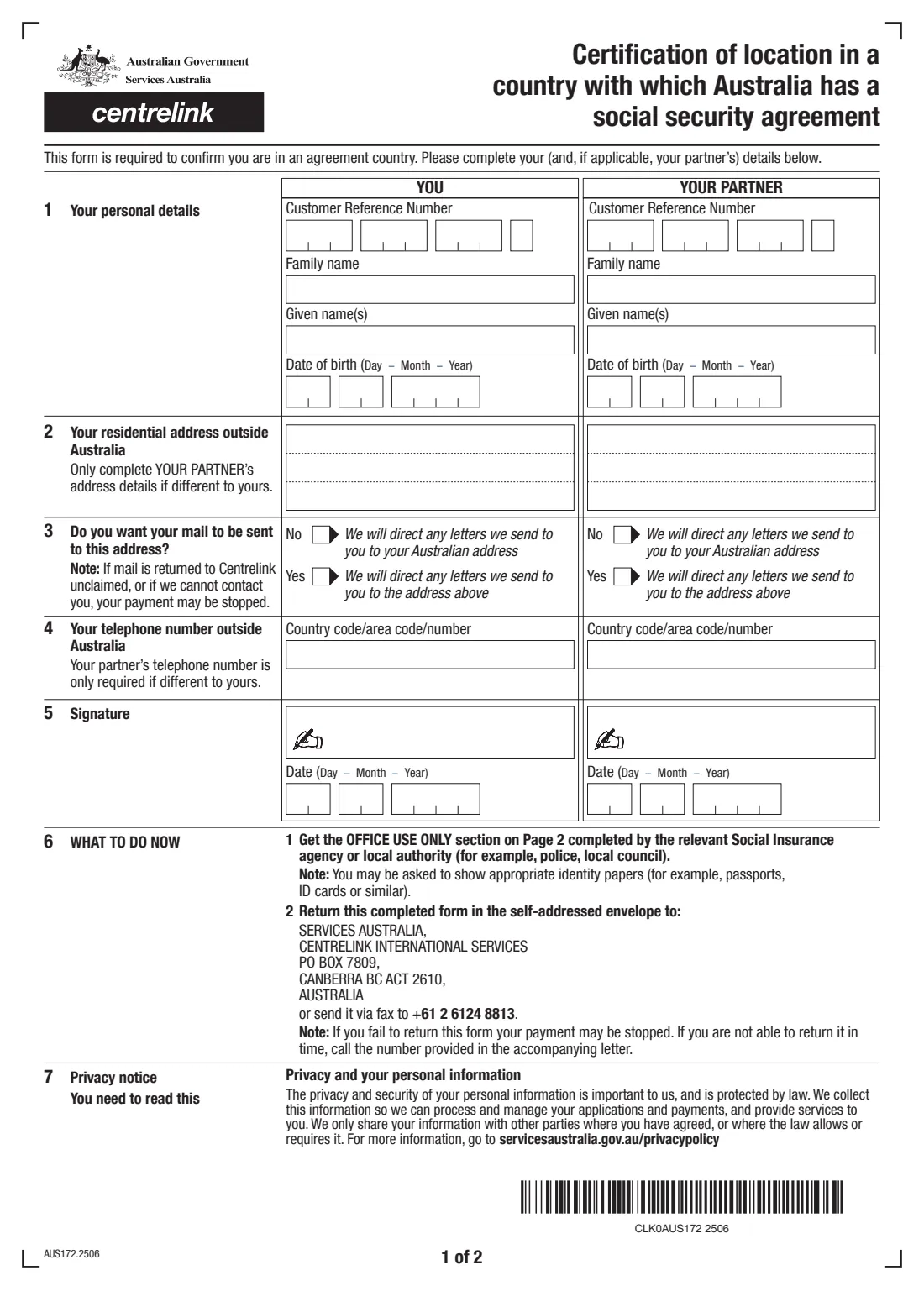
Form AUS172 is sent by Services Australia's Centrelink International Services to people who receive an Australian payment while living in a country Australia has a social security agreement with. It confirms that you are in that country. If you don't return it, your payment may be stopped.
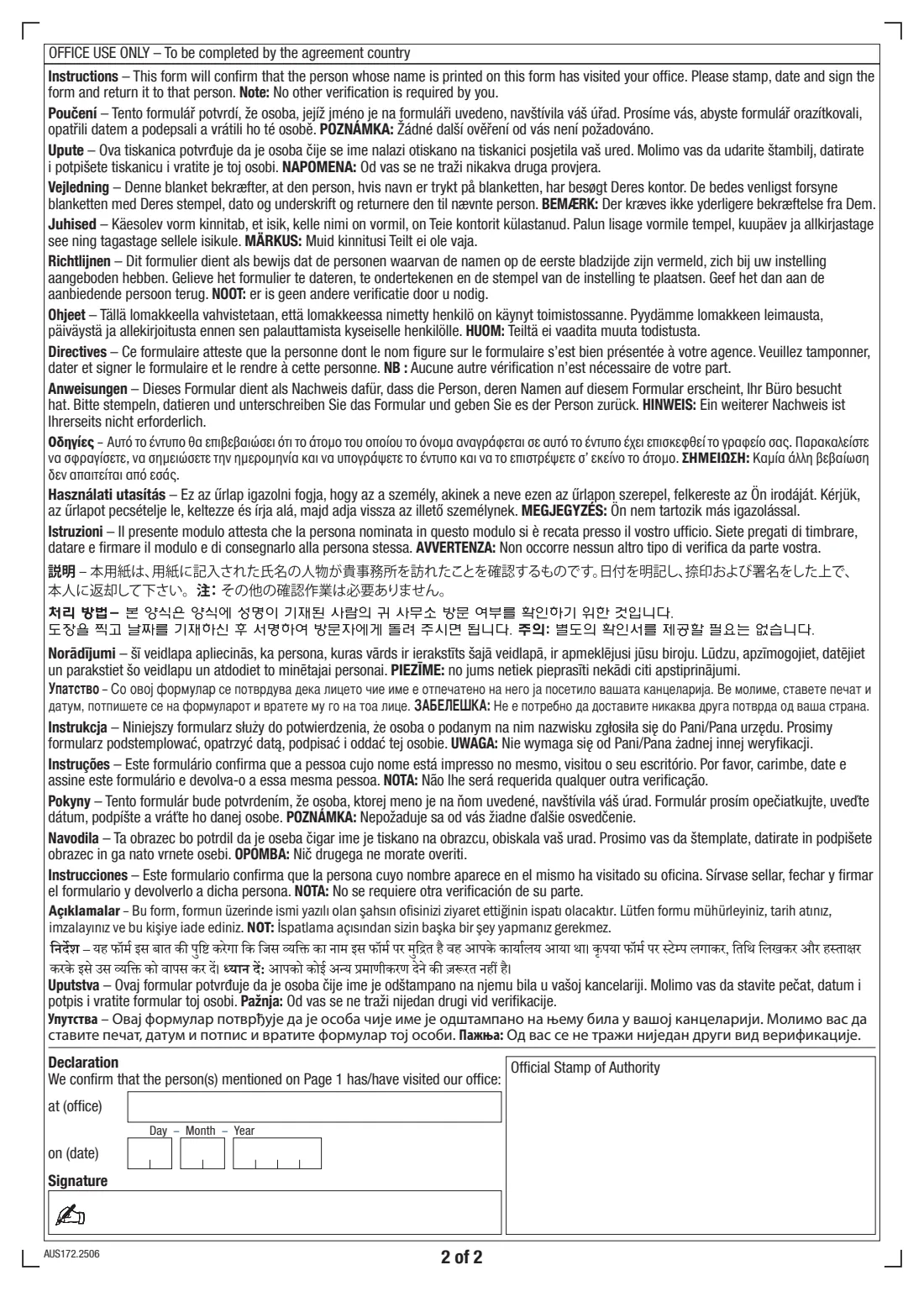
You fill in page 1: your Customer Reference Number, name, date of birth, residential address outside Australia, whether you want your mail sent there, and your phone number outside Australia — with a column for your partner, if applicable. Then you take the form to the social insurance agency or a local authority in that country (for example the police or local council), who complete, stamp, date and sign the Office use section on page 2.
FileIt fills the current edition (AUS172.2506) and prints your answers into Services Australia's own PDF, including names with accents and letters outside English, and saves the form to your FileIt vault. You then return it yourself — FileIt never sends anything.
- Who fills it
- You and, if applicable, your partner (page 1); an official in your country completes page 2
- Given to
- Services Australia, Centrelink International Services — in the self-addressed envelope, or by fax to +61 2 6124 8813
- Certified by
- The social insurance agency or a local authority in the agreement country (for example police or local council)
- If not returned
- Your payment may be stopped
- Signatures
- You, your partner (if applicable), and the certifying office
- Edition
- AUS172.2506
Who needs to fill out Certification of location overseas (AUS172)?
- People receiving an Australian pension or payment while living in a country Australia has a social security agreement with, who have been sent this form.
- Partners of those people, who complete their own column if they also need to confirm their location.
When to use Certification of location overseas (AUS172)
- When Services Australia sends you the AUS172 with a letter asking you to confirm where you live.
- Before the date in the accompanying letter — if you can't return it in time, call the number in that letter.
- When you also want to update your overseas address or tell Centrelink where to send your mail.
What you need before you start
- Your Customer Reference Number (CRN) — and your partner's, if applicable.
- Your full name and date of birth.
- Your residential address outside Australia and a phone number with the country and area codes.
- Identity papers such as your passport or ID card, in case the certifying office asks to see them.
- Access to the social insurance agency or a local authority in your country to complete page 2.
What’s on Certification of location overseas (AUS172)
The 2025 edition has 2 pages. FileIt asks for it in 2 parts, and it is signed by You and Your partner:
- You (questions 1–5)You
- Your partnerYour partner
How to fill out Certification of location overseas (AUS172), step by step
1 1. Your personal details
Give your CRN, family name, given names and date of birth. Your partner fills in the same in the right-hand column, if applicable.
2 2. Your residential address outside Australia
Write your overseas address, including the town or city, postcode and country. Your partner only fills in their address if it's different from yours.
3 3. Where your mail goes
Choose No to keep letters going to your Australian address, or Yes to have them sent to the address above. The form warns that if mail is returned unclaimed, or Centrelink can't contact you, your payment may be stopped.
4 4–5. Phone number and signature
Give your phone number outside Australia with the country and area codes (your partner's only if different), then sign and date the form.
5 6. What to do now
Take the form to the social insurance agency or a local authority in your country, who complete the Office use section on page 2 with their office, date, signature and stamp. Then return the form in the self-addressed envelope or by fax.
Common mistakes to avoid
- Sending the form back without the Office use section on page 2 completed and stamped.
- Leaving out the country or area code from your phone number.
- Asking for mail to go to an overseas address where post is unreliable — returned mail can lead to your payment being stopped.
- Missing the return date in the accompanying letter without calling Services Australia.
After you fill it out
Print the form from FileIt, sign and date it (your partner too, if applicable).
Take it, with your identity papers, to the social insurance agency or a local authority to complete, stamp and sign page 2.
Return it to Services Australia, Centrelink International Services, in the self-addressed envelope, or fax it to +61 2 6124 8813. A copy stays in your FileIt vault.
Fill out Certification of location overseas (AUS172) online with FileIt
- Pick the person. Choose someone from People and FileIt fills in their name, date of birth, address and other details it already knows.
- Answer plain-language questions. One part of the form at a time, with the official help text beside each question — 20 fields in all. Your answers save as you go.
- Check the live preview. Watch your answers land on the real Services Australia (Centrelink International Services) form, and let FileIt do any worksheet arithmetic.
- Generate the official PDF. FileIt prints your answers into the agency’s own PDF and files it in that person’s folder in your vault. Sign it, or send it for e-signature.
FileIt fills the form — it never files or submits anything for you. Deliver the finished form to whoever asked for it, the way the form’s instructions say.
Start Certification of location overseas (AUS172) now — it’s freeCertification of location overseas (AUS172): frequently asked questions
What is the AUS172 form?
It's Services Australia's Certification of location in a country with which Australia has a social security agreement. It confirms that you (and your partner, if applicable) are living in an agreement country.
Who can certify the AUS172?
The relevant social insurance agency or a local authority in your country, for example the police or local council. They complete the Office use section on page 2 — the form's instructions to them are printed in many languages.
What happens if I don't return it?
The form says your payment may be stopped. If you can't return it in time, call the number given in the accompanying letter.
Can I fax the AUS172?
Yes. The form says you can return it in the self-addressed envelope or send it by fax to +61 2 6124 8813.
Does my partner need to fill it in?
Only if applicable — the form has a column for your partner. Their address and phone number are only needed if they're different from yours.
Official sources
- Blank form (PDF), published by Services Australia (Centrelink International Services): https://www.servicesaustralia.gov.au/sites/default/files/2025-06/aus172-2506en-f.pdf
- Official instructions and guidance: https://www.servicesaustralia.gov.au/aus172
- Edition shown on this page: AUS172.2506 (checked 2026-09-28).
FileIt is not affiliated with or endorsed by Services Australia (Centrelink International Services) or any government. This page explains the form in general terms and is not legal, tax or immigration advice. Always read the official instructions, and check that you are using the edition the recipient accepts. Page last reviewed 2026-09-28.