What is the group dinner pre-order form template?
Large group bookings run far more smoothly when the kitchen knows in advance how many of each dish it needs. Usually the organiser collects choices on a spreadsheet, chases half the group, and still turns up with a few guests who forgot what they ordered and a nut allergy nobody mentioned.
With this pre-order form, each guest picks their own courses from your set menu. They say which booking they belong to, choose a starter, main and dessert (or the children's menu for a child), add allergies and dietary needs, and tell you who they'd like to sit with and any seating needs.
Every choice is filed as a PDF in your FileIt vault and listed in the Responses table, where you can export the whole group's order to CSV for the kitchen and floor team.
- Best for
- Restaurants, pubs, hotels and function venues taking group, party and event bookings
- Filled in by
- Each guest in the group, or the organiser on their behalf
- Time to complete
- About 2 minutes per guest
- Includes
- Set menu choices, steak cooking preference, children's menu, dietary follow-ups and seating notes
Who uses a group dinner pre-order form?
- A restaurant collecting pre-orders for office Christmas parties
- A pub taking menu choices for a 40-person birthday dinner
- A hotel handling meal choices for a wedding's rehearsal dinner
- A function venue sending one link to every guest at a club dinner
- An organiser placing orders for guests who don't use email
- A banqueting team planning numbers for a set-menu awards night
Questions on this group dinner pre-order form
19 questions over 3 pages · includes conditional questions, multiple pages.
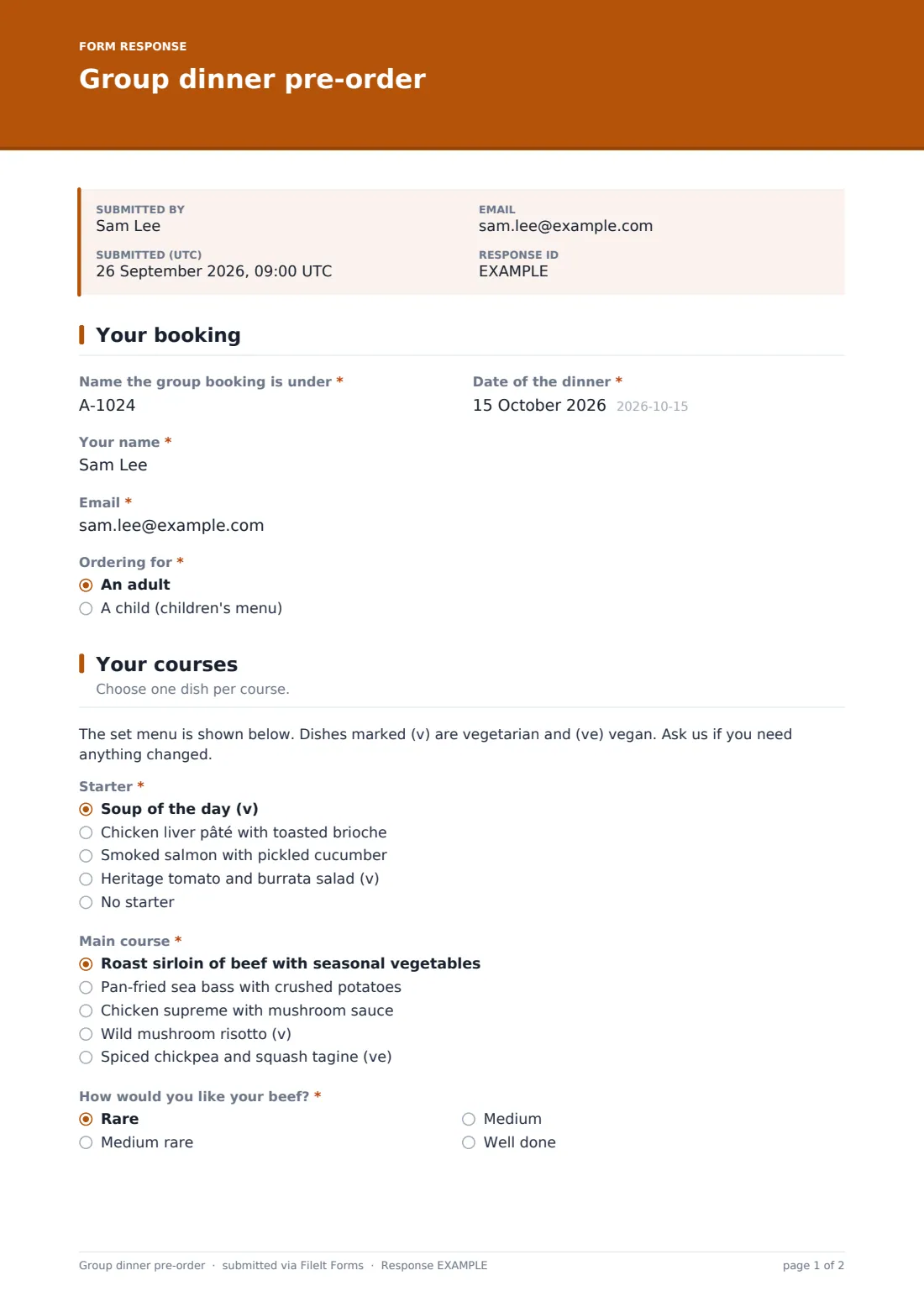
1 Your booking
- Name the group booking is under*
- Date of the dinner*
- Your name*
- Email*
- Ordering for* An adult · A child (children's menu)
- Child's name* asked only when it applies
- Child's age asked only when it applies
2 Your courses
- Starter* asked only when it applies Soup of the day (v) · Chicken liver pâté with toasted brioche · Smoked salmon with pickled cucumber · Heritage tomato and burrata salad (v) · No starter
- Main course* asked only when it applies Roast sirloin of beef with seasonal vegetables · Pan-fried sea bass with crushed potatoes · Chicken supreme with mushroom sauce · Wild mushroom risotto (v) · Spiced chickpea and squash tagine (ve)
- How would you like your beef?* asked only when it applies Rare · Medium rare · Medium · Well done
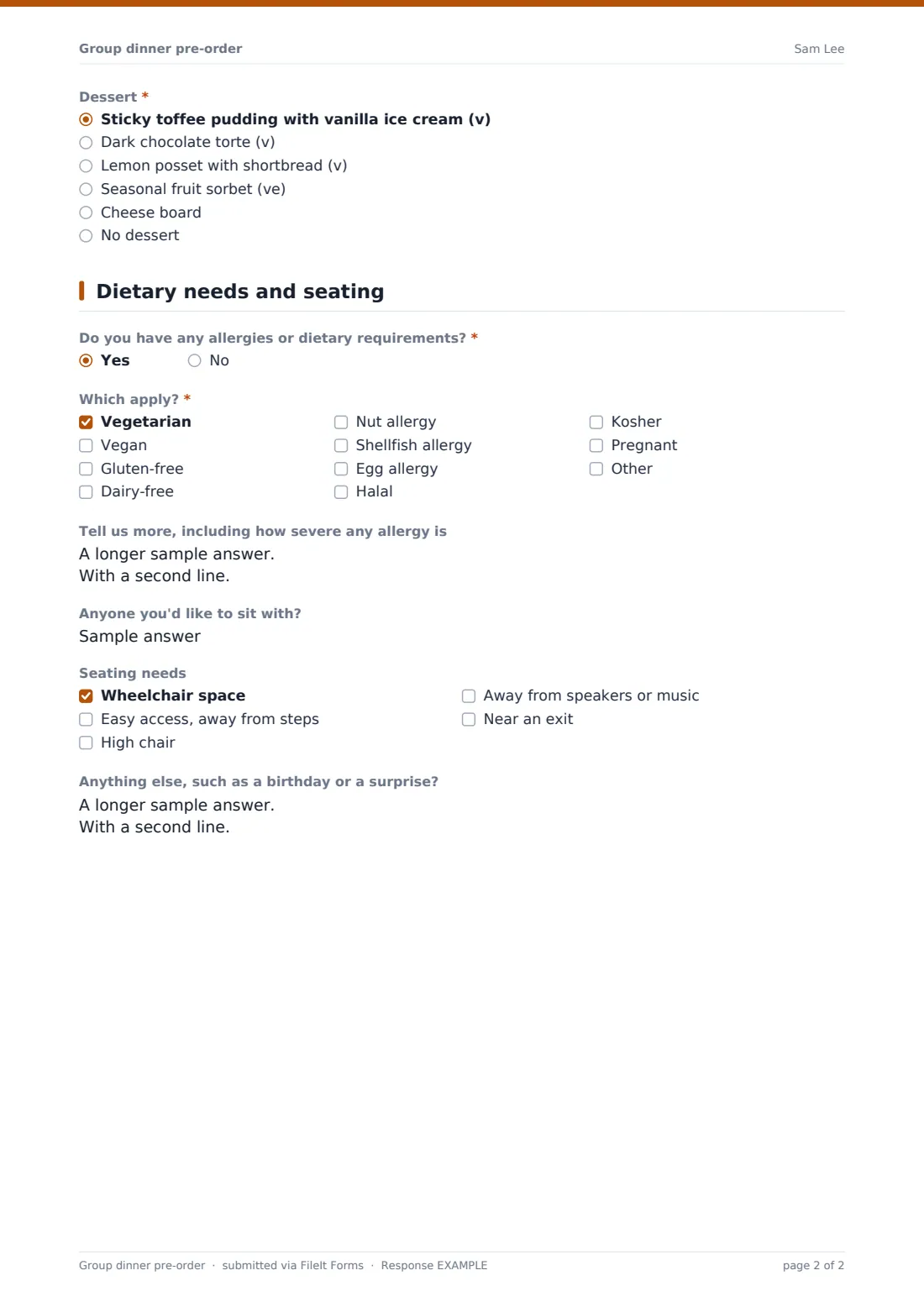
- Dessert* asked only when it applies Sticky toffee pudding with vanilla ice cream (v) · Dark chocolate torte (v) · Lemon posset with shortbread (v) · Seasonal fruit sorbet (ve) · Cheese board · No dessert
- Children's main* asked only when it applies Chicken goujons and chips · Fish and chips · Tomato pasta (v) · Mini roast dinner
- Children's dessert* asked only when it applies Ice cream (v) · Chocolate brownie (v) · Fruit salad (ve) · No dessert
3 Dietary needs and seating
- Do you have any allergies or dietary requirements?*
- Which apply?* asked only when it applies Vegetarian · Vegan · Gluten-free · Dairy-free · Nut allergy · Shellfish allergy · Egg allergy · Halal · Kosher · Pregnant
- Tell us more, including how severe any allergy is asked only when it applies
- Anyone you'd like to sit with?
- Seating needs Wheelchair space · Easy access, away from steps · High chair · Away from speakers or music · Near an exit
- Anything else, such as a birthday or a surprise?
The group dinner pre-order form, page by page
1 Your booking
Guests enter the name the group booking is under, the date of the dinner, their own name and email, and whether they're ordering for an adult or a child. Children's orders ask for the child's name and age.
2 Your courses
Adults choose a starter, main course and dessert from the sample set menu, with no-starter and no-dessert options. Choosing the roast beef asks how they'd like it cooked. Children's orders show a children's main and dessert instead. Edit the dishes to match your own menu.
3 Dietary needs and seating
If a guest has allergies or dietary requirements, they tick which apply and can explain more, including how severe an allergy is. Everyone can say who they'd like to sit with, tick seating needs such as wheelchair space or a high chair, and add notes like a birthday or a surprise.
Make the template yours
- Replace the sample dishes with your own set menu, keeping the (v) and (ve) labels if you use them
- Add a pre-order deadline to the cover text and set the form to close on that date
- Add a drinks package or wine pre-order question
- Make a copy of the form for each large booking so responses stay separate
- Send the organiser a copy of every choice by adding their email to notifications
- Remove the children's menu for adults-only events
Tips for a better group dinner pre-order form
- Set a pre-order deadline a few days before the dinner so the kitchen can order stock
- Ask the organiser to share the link with the whole group rather than collecting choices themselves
- Print the guest list with each person's choices so servers can call dishes at the table
- Confirm severe allergies with the guest directly before the event
- Keep a few spare portions of the most popular main for last-minute changes
Every response becomes a PDF in your vault
Each guest's choices are saved as a PDF in your FileIt vault, and the guest can get a copy of what they ordered by email.
In the Responses table you can filter by booking name or dinner date and export to CSV to count how many of each dish the kitchen needs.
- Start from this template. It opens in the FileIt Forms designer — change any question, add pages, set the rules for when questions appear.
- Share it. Turn on a public link, or send it to people by email, each with their own link. They don’t need a FileIt account.
- Get the answers as PDFs. Each response is saved as a PDF in the vault folder you choose, with uploaded files attached — and listed in a Responses table you can export to CSV.
Group dinner pre-order form: frequently asked questions
Is this group dinner pre-order form free?
Yes. It's one of the ready-made templates in the FileIt Forms app on every account, including the free plan.
Can I use my own menu?
Yes. The dishes are a sample menu. Edit the options for each course in the designer.
Do guests need a FileIt account?
No. Share the link with the organiser, who passes it to the group. Guests order without signing in.
Does the form total up the order for the kitchen?
It doesn't count dishes for you, but you can export the responses to CSV and count each dish in a spreadsheet.
Can a guest order for a child?
Yes. Choosing a child shows the children's main and dessert instead of the adult courses.
Can I stop orders after a deadline?
Yes. Set a closing date in the form's settings and the form stops accepting responses after it.