What is the donor stewardship call log form template?
Thank-you calls are among the simplest things a fundraising team can do, and what donors say on them — why they give, what they care about, what bothers them — is valuable. It's also easily lost when callers jot notes on a printed list or in a spreadsheet nobody reads.
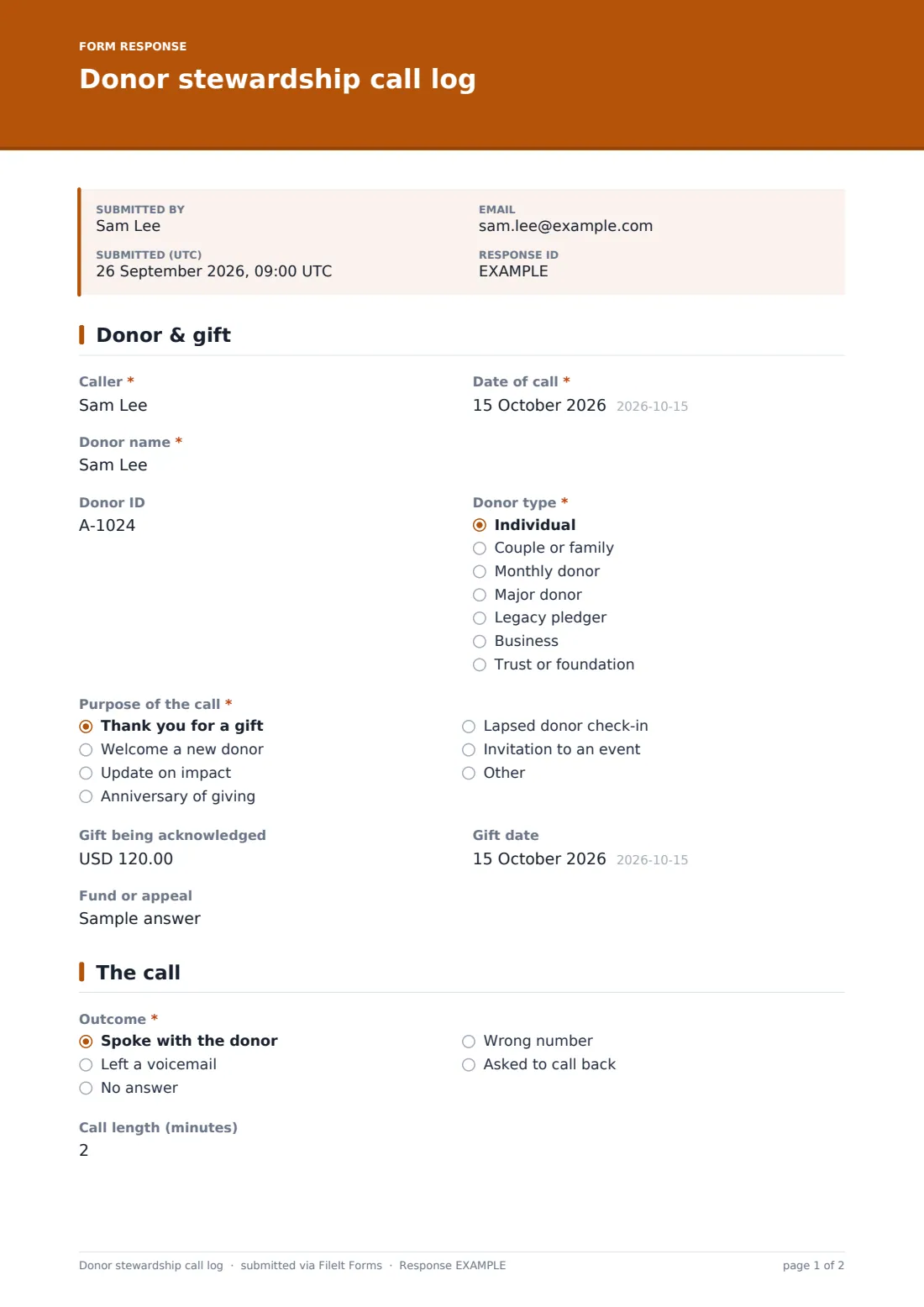
This call log gives every caller, staff or board member, the same short form. They record the donor, the gift being acknowledged and the purpose of the call, then the outcome. When they spoke with the donor, the form asks for the conversation notes, how the donor seemed, why they give, any interests and any concern. The last page sets the follow-up, who owns it and by when, and the next ask.
Each call is filed as a PDF in your FileIt vault, and the Responses table gives you the whole calling campaign in one list.
- Best for
- Fundraising teams, development directors and board thank-you calling campaigns
- Filled in by
- The person who made the call, straight afterwards
- Time to complete
- About 2-4 minutes per call
- Includes
- Gift details, call outcome, conversation notes and interests shown when the donor answered, concern follow-up, contact preferences, follow-up owner and next ask
Who uses a donor stewardship call log form?
- Board members phoning first-time donors after a year-end appeal
- A development officer stewarding major donors through the year
- Volunteers running a thank-you phone evening
- A monthly-giving team calling donors on their giving anniversary
- A charity calling lapsed donors to reconnect before a renewal ask
Questions on this donor stewardship call log form
25 questions over 3 pages · includes conditional questions, multiple pages.
1 Donor & gift
- Caller*
- Date of call*
- Donor name*
- Donor ID
- Donor type* Individual · Couple or family · Monthly donor · Major donor · Legacy pledger · Business · Trust or foundation
- Purpose of the call* Thank you for a gift · Welcome a new donor · Update on impact · Anniversary of giving · Lapsed donor check-in · Invitation to an event
- Gift being acknowledged
- Gift date
- Fund or appeal
2 The call
- Outcome* Spoke with the donor · Left a voicemail · No answer · Wrong number · Asked to call back
- When to call back* asked only when it applies
- Call length (minutes) asked only when it applies
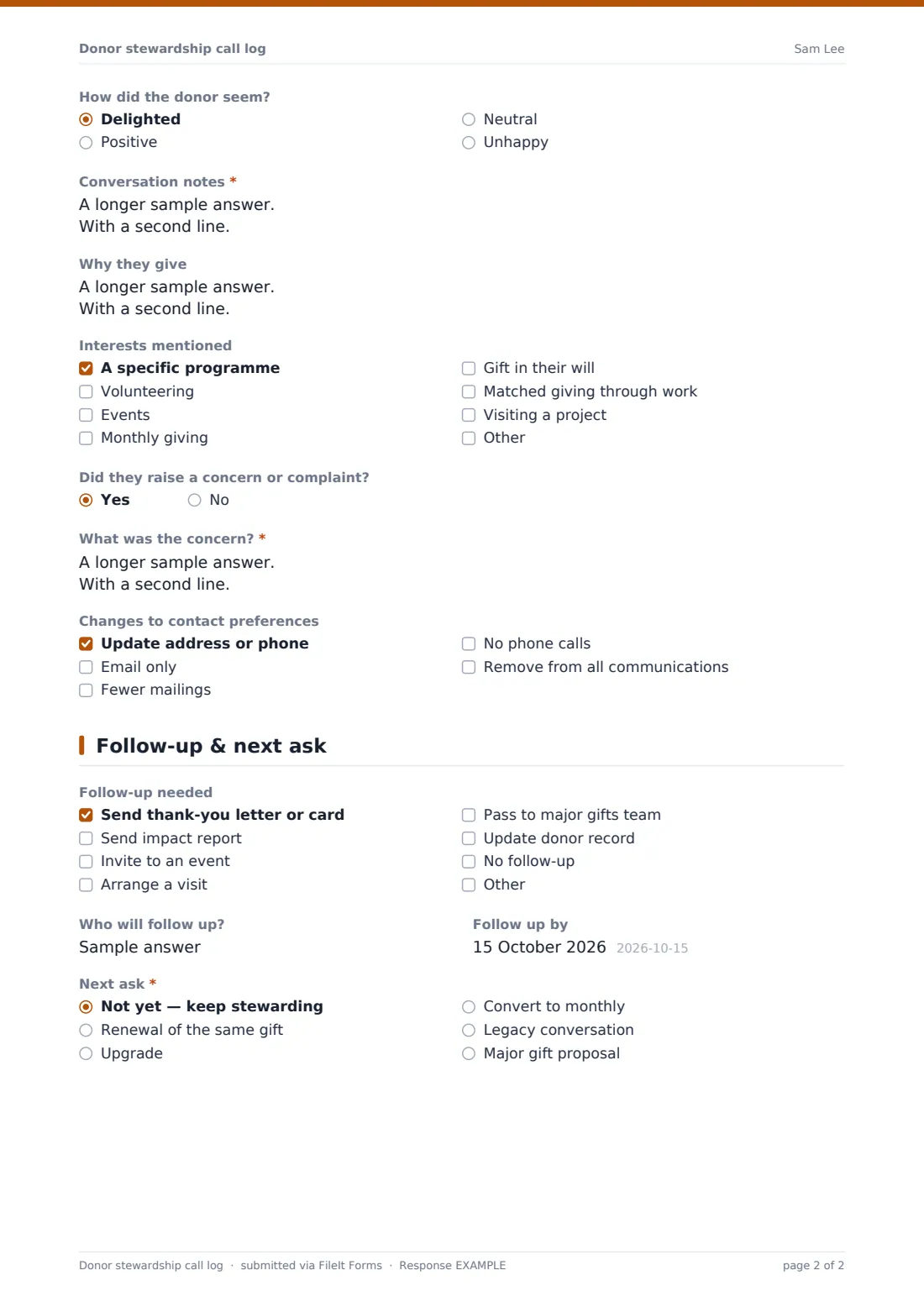
- How did the donor seem? asked only when it applies Delighted · Positive · Neutral · Unhappy
- Conversation notes* asked only when it applies
- Why they give asked only when it applies
- Interests mentioned asked only when it applies A specific programme · Volunteering · Events · Monthly giving · Gift in their will · Matched giving through work · Visiting a project
- Did they raise a concern or complaint? asked only when it applies
- What was the concern?* asked only when it applies
- Changes to contact preferences Update address or phone · Email only · Fewer mailings · No phone calls · Remove from all communications
3 Follow-up & next ask
- Follow-up needed Send thank-you letter or card · Send impact report · Invite to an event · Arrange a visit · Pass to major gifts team · Update donor record · No follow-up
- Who will follow up?
- Follow up by
- Next ask* Not yet — keep stewarding · Renewal of the same gift · Upgrade · Convert to monthly · Legacy conversation · Major gift proposal
- Suggested amount asked only when it applies
- When asked only when it applies
The donor stewardship call log form, page by page
1 Donor & gift
The caller enters their name and the date, then the donor's name, donor ID and type — from individual to trust or foundation. They choose the purpose of the call, such as thanking a gift, welcoming a new donor, sharing impact or reconnecting with a lapsed donor, and can record the gift amount, date and fund or appeal.
2 The call
"Outcome" records whether the caller spoke with the donor, left a voicemail, got no answer, had a wrong number or was asked to call back — the last asks when. When the caller spoke with the donor, the form shows the call length, how the donor seemed, required conversation notes, why they give and interests mentioned, from specific programmes to a gift in their will.
"Did they raise a concern or complaint?" asks what the concern was on a yes. Any changes to contact preferences, including a request to stop all communications, can be ticked so records are updated.
3 Follow-up & next ask
The caller ticks the follow-up needed — a letter, impact report, event invitation, visit or hand-over to the major gifts team — and records who will follow up and by when. "Next ask" is required: keep stewarding, renew, upgrade, convert to monthly, a legacy conversation or a major gift proposal, with a suggested amount and timing for any answer other than keeping stewarding.
Make the template yours
- Replace the donor types and call purposes with your own segments
- Change the currency from US dollars
- Send personal links to each caller with their name filled in
- Add a question for the campaign or calling night the call belongs to
- Turn on notifications to the major gifts lead when a call is logged
- Route logs into a Stewardship folder in your vault
Tips for a better donor stewardship call log form
- Give callers a short script and the donor's giving history before they start
- Log voicemails too — knowing a donor was called is useful even without a conversation
- Act on contact-preference changes promptly
- Pass concerns to the right person the same day
- Don't ask for money on a thank-you call — record the next ask for later instead
Every response becomes a PDF in your vault
Each logged call is saved as a PDF in your FileIt vault and the fundraising lead is emailed, so follow-ups and concerns don't wait. Callers don't get a copy by default, since many log calls in a batch.
The Responses table lists every call in the campaign. Filter by outcome or next ask, and export to a CSV to update your donor database.
- Start from this template. It opens in the FileIt Forms designer — change any question, add pages, set the rules for when questions appear.
- Share it. Turn on a public link, or send it to people by email, each with their own link. They don’t need a FileIt account.
- Get the answers as PDFs. Each response is saved as a PDF in the vault folder you choose, with uploaded files attached — and listed in a Responses table you can export to CSV.
Donor stewardship call log form: frequently asked questions
Is the donor stewardship call log free?
Yes. It's a FileIt Forms starter template, available on every plan.
Does it connect to our donor database?
No. FileIt Forms doesn't sync with donor CRMs. Export the responses to a CSV and import or copy the updates into your database.
Can board members use it on their phones?
Yes. The form works on any phone browser, and no FileIt account is needed.
Why do most questions only appear when the donor answered?
Notes, interests and concerns only make sense after a conversation, so a voicemail or no-answer call takes a few seconds to log.
Can we see all calls by one caller?
Yes. The caller's name is a column in the Responses table, so you can filter or sort by it.
Does it handle donor data securely?
Responses are stored in your FileIt vault. Only log what callers need, and follow your organisation's data protection policy.