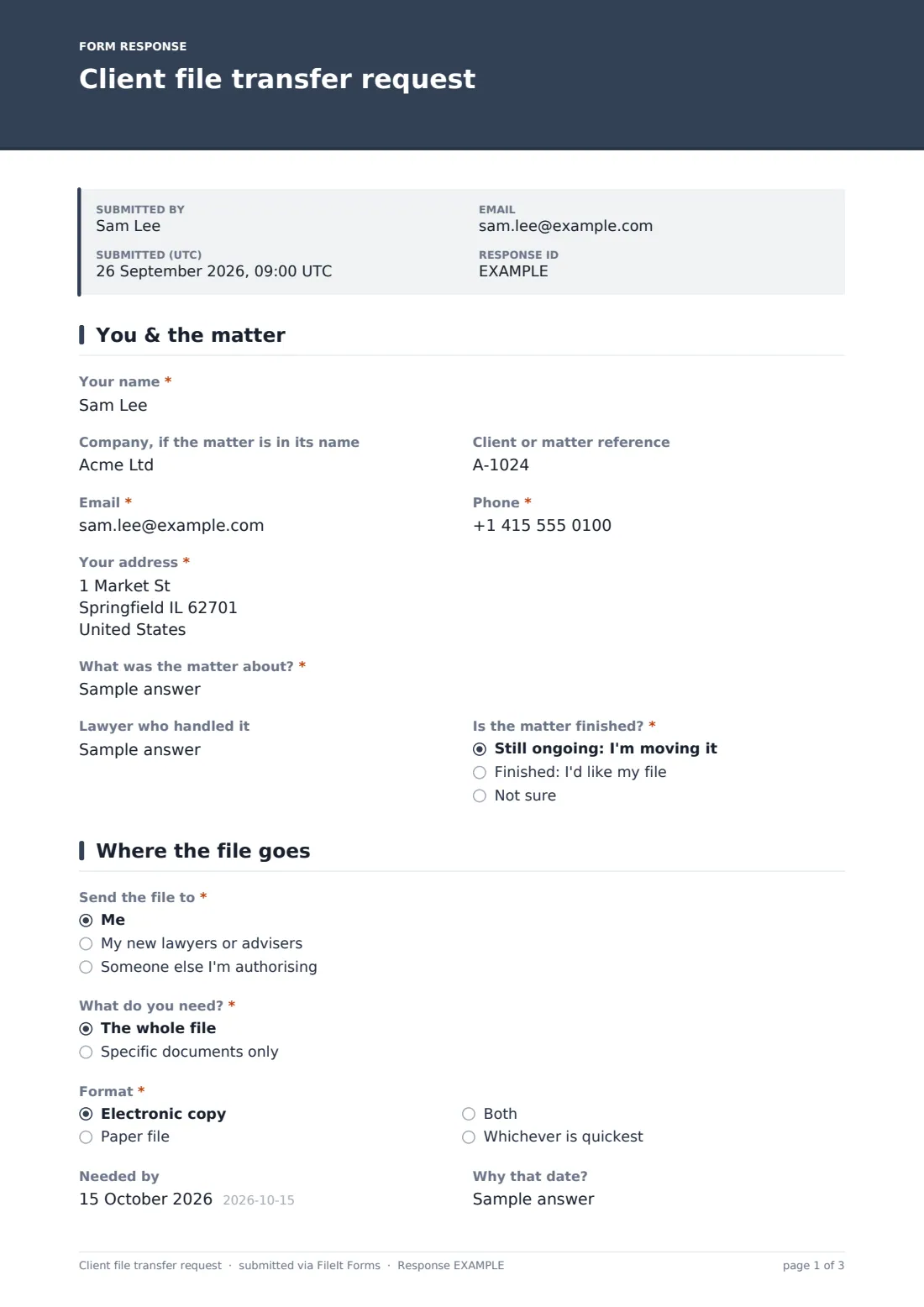
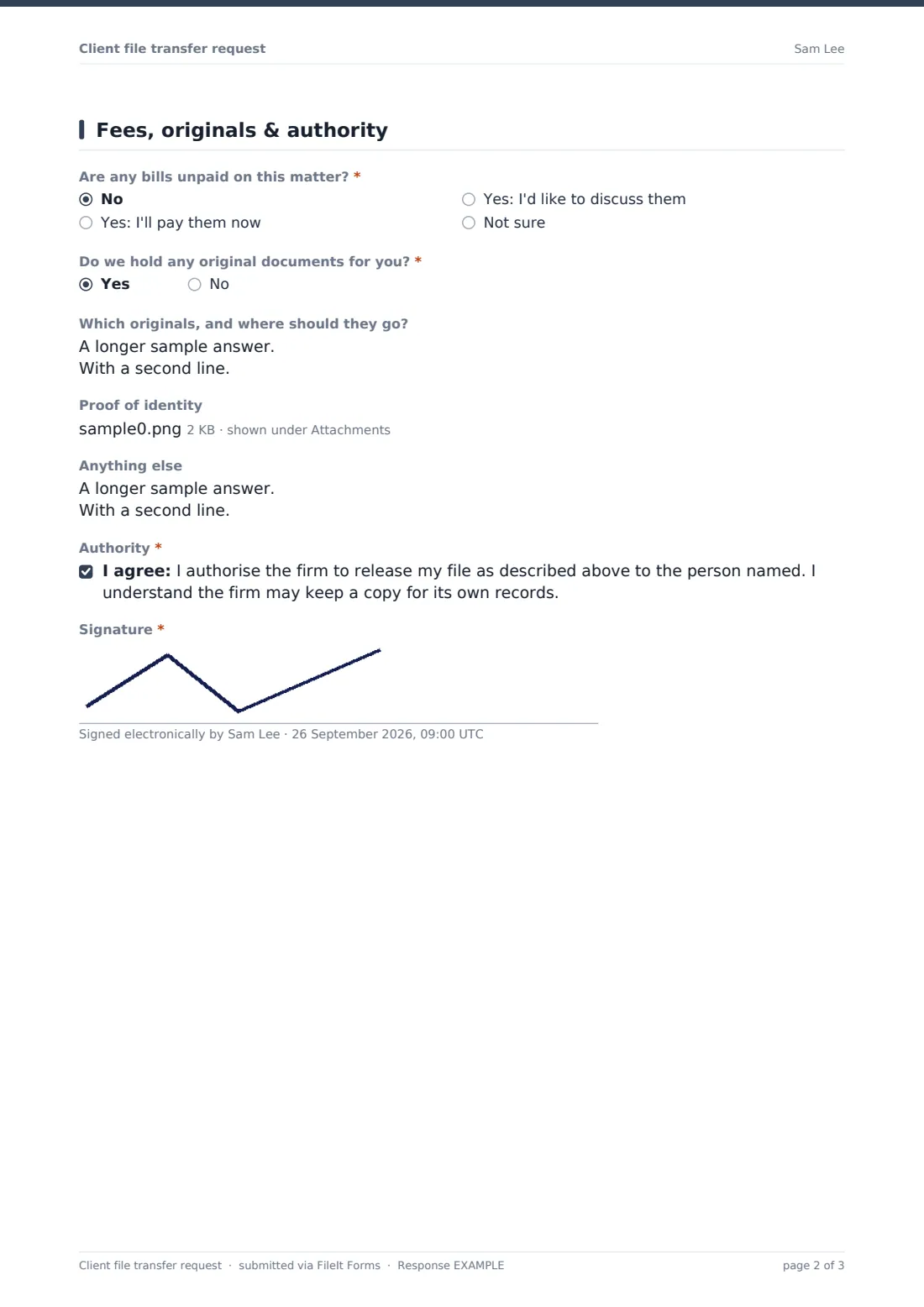

What is the client file transfer request form template?
When a client moves to another firm or simply wants their papers, the firm needs to know who the file goes to, what's included, in what format, and that the client really authorised it. This request covers all of that and ends with a signed authority, so the file isn't released on an unsigned email.
Logic adapts to the recipient. Sending it to new lawyers asks for the firm, contact, email and address. Sending it to someone else asks for their name, relationship and email. Asking for specific documents asks which. If there are unpaid bills, or the client isn't sure, a note explains that the firm may hold the file until they're settled, depending on the rules where it is.
Each signed request is saved as a PDF in FileIt, with any proof of identity attached.
- Best for
- Law firms, conveyancers, accountants and other professional advisers
- Filled in by
- Current or former clients
- Time to complete
- About 5 minutes
- Includes
- Client and matter, status, recipient details, scope, format, deadline, unpaid bills, original documents, proof of identity, authority, signature
Who uses a client file transfer request form?
- A client moving an ongoing case to a new firm
- A former client asking for their completed conveyancing file
- A business moving all its matters to new advisers
- A client authorising an accountant to receive specific documents
- Collecting an original will or title deeds held by the firm
Questions on this client file transfer request form
28 questions over 3 pages · includes signature, file upload, conditional questions, multiple pages, consent checkbox.
1 You & the matter
- Your name*
- Company, if the matter is in its name
- Client or matter reference
- Email*
- Phone*
- Your address*
- What was the matter about?*
- Lawyer who handled it
- Is the matter finished?* Still ongoing: I'm moving it · Finished: I'd like my file · Not sure
2 Where the file goes
- Send the file to* Me · My new lawyers or advisers · Someone else I'm authorising
- New firm's name* asked only when it applies
- Contact at the new firm* asked only when it applies
- Their email* asked only when it applies
- Their address asked only when it applies
- Their name and relationship to you* asked only when it applies
- Their email* asked only when it applies
- What do you need?* The whole file · Specific documents only
- Which documents?* asked only when it applies
- Format* Electronic copy · Paper file · Both · Whichever is quickest
- Needed by
- Why that date? asked only when it applies
3 Fees, originals & authority
- Are any bills unpaid on this matter?* No · Yes: I'll pay them now · Yes: I'd like to discuss them · Not sure
- Do we hold any original documents for you?*
- Which originals, and where should they go? asked only when it applies
- Proof of identity
- Anything else
- Authority*
- Signature*
The client file transfer request form, page by page
1 You & the matter
The client gives their name, company if the matter is in its name, reference, email, phone and address, then "What was the matter about?", the lawyer who handled it and "Is the matter finished?".
2 Where the file goes
"Send the file to" offers the client, new lawyers or advisers, or someone else they're authorising, each with its own contact questions. "What do you need?" chooses the whole file or specific documents. "Format" offers electronic, paper, both or whichever is quickest. A "Needed by" date asks why that date.
3 Fees, originals & authority
"Are any bills unpaid on this matter?" shows a note on file retention unless the answer is no. "Do we hold any original documents for you?" asks which and where they should go. An optional proof of identity upload, a notes box, a signed authority to release the file, and a signature finish the request.
Make the template yours
- Add your firm's file retention period to the cover text
- Make the proof of identity required if your policy needs it every time
- Notify your records or archive team as well as the matter lawyer
- Add a question about copying costs if your terms allow a charge
- Remove the paper option if your files are digital only
Tips for a better client file transfer request form
- Check the signature and identity before releasing anything
- Confirm any unpaid balance with the client before the deadline they gave
- Keep a copy of what was sent and when, with the signed request
- Send originals by tracked delivery or hand them over against a signature
- Tell the new firm about any deadlines in the matter when you transfer it
Every response becomes a PDF in your vault
Each signed request is saved as a PDF in the vault folder you choose, so you have a record of the client's authority. Your team gets an email when it arrives.
The Responses table lists requests by client and matter, so you can see which are still waiting to go out.
- Start from this template. It opens in the FileIt Forms designer — change any question, add pages, set the rules for when questions appear.
- Share it. Turn on a public link, or send it to people by email, each with their own link. They don’t need a FileIt account.
- Get the answers as PDFs. Each response is saved as a PDF in the vault folder you choose, with uploaded files attached — and listed in a Responses table you can export to CSV.
Client file transfer request form: frequently asked questions
Is this file transfer template free?
Yes. It's one of the starter templates in the Forms app, included on every FileIt account, and you can edit any question.
Can a firm refuse to release a file until it's paid?
Sometimes, depending on the rules where the firm practises and the circumstances. The form tells clients the firm will confirm the balance and their options, but it doesn't decide the question.
Does the client need to sign?
Yes. The form ends with an authority statement and an on-screen signature.
Do clients need a FileIt account?
No. They open your link, answer the questions and submit. No account is needed.
Can the client ask for just a few documents?
Yes. Choosing "Specific documents only" asks them to list which ones.