What is the bereavement support group registration form template?
Asking someone to register for a grief group is asking them to write about the hardest thing in their life. The form should be short, gentle and clear about what's optional — while still telling the facilitators enough to place people in the right group and to notice anyone who needs a call straight away.
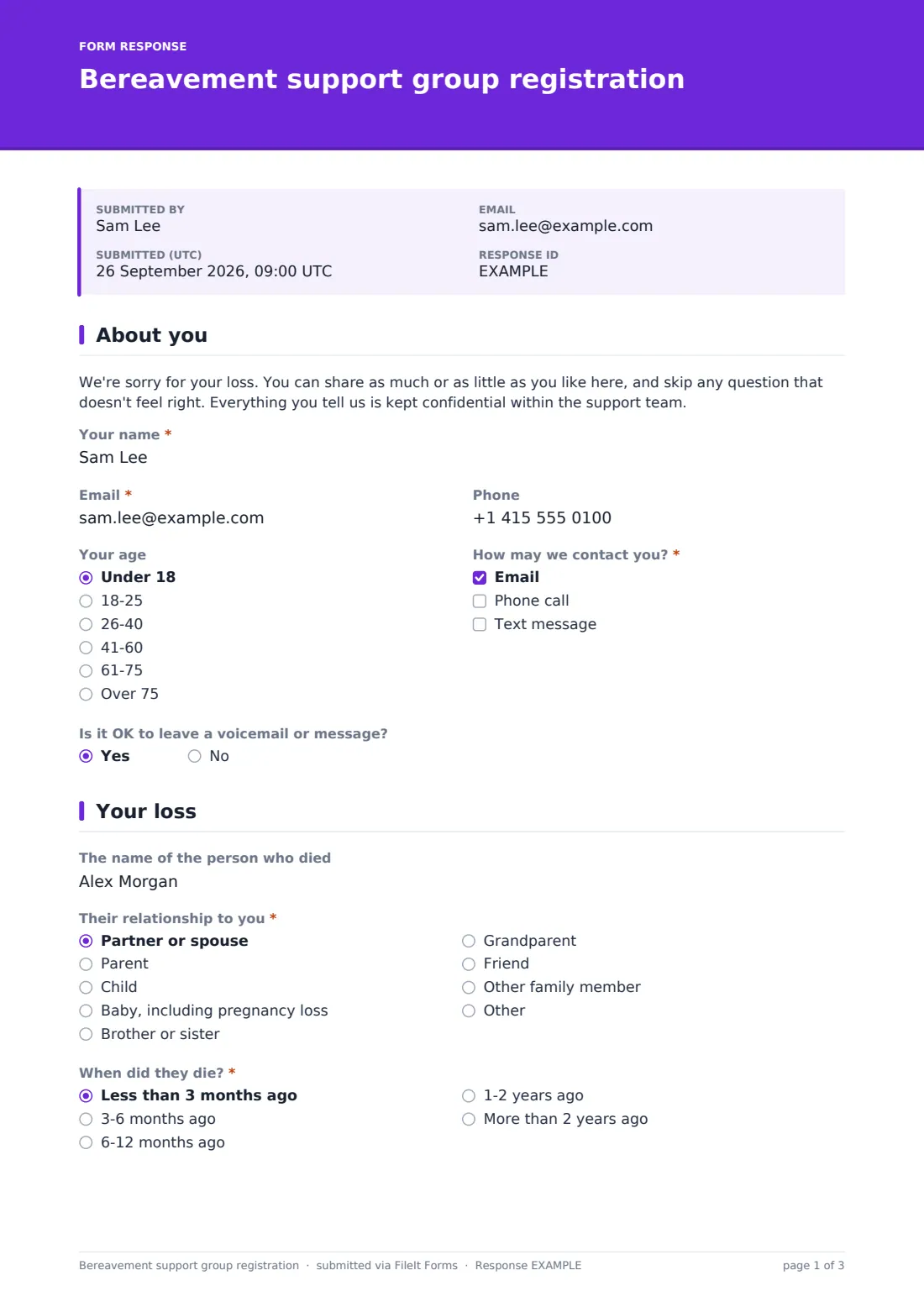
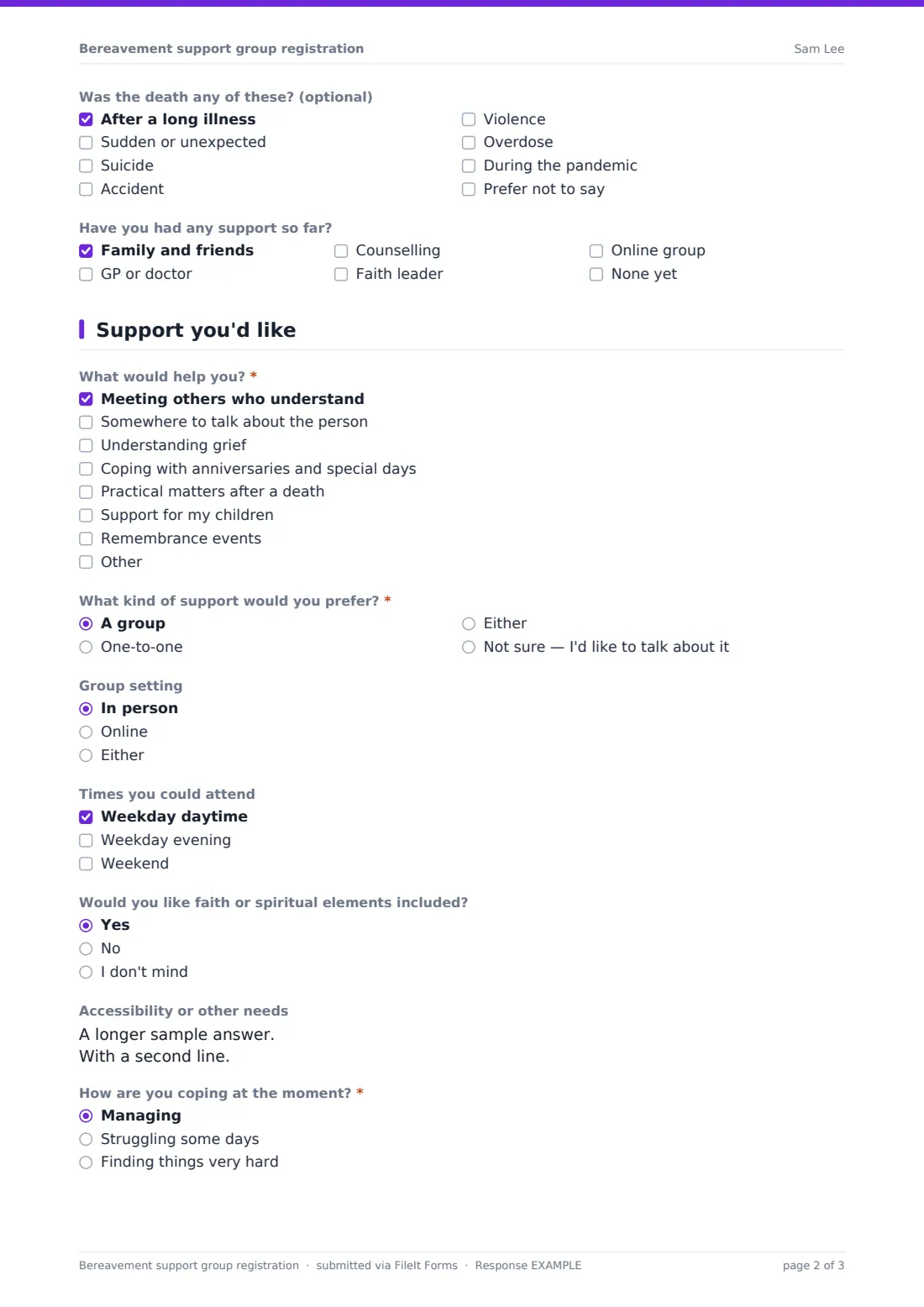
This template opens with a short welcome and asks for contact details and how the person may be contacted. The second page asks about the person who died — their name is optional — the relationship, when they died and, optionally, the circumstances, since some groups are for a particular kind of loss. The third page asks what would help, group or one-to-one, setting, times, faith elements and accessibility needs, and how the person is coping.
Choosing "Finding things very hard" shows a message that someone will call and pointing to emergency help. Each registration is filed as a PDF in your FileIt vault.
- Best for
- Hospices, bereavement charities, churches, funeral homes and community grief groups
- Filled in by
- The bereaved person, or someone helping them
- Time to complete
- About 5 minutes
- Includes
- Optional loss details, support and format preferences, accessibility needs, a coping question with a supportive message, call-back request and confidentiality agreement
Who uses a bereavement support group registration form?
- A hospice inviting families to its bereavement groups after a death
- A church starting a grief support group for its community
- A charity running groups for parents who have lost a child
- A funeral home offering aftercare to the families it serves
- A suicide-bereavement group placing people in a specialist group
Questions on this bereavement support group registration form
20 questions over 3 pages · includes conditional questions, multiple pages, consent checkbox.
1 About you
- Your name*
- Email*
- Phone
- Your age Under 18 · 18-25 · 26-40 · 41-60 · 61-75 · Over 75
- How may we contact you?* Email · Phone call · Text message
- Is it OK to leave a voicemail or message?
2 Your loss
- The name of the person who died
- Their relationship to you* Partner or spouse · Parent · Child · Baby, including pregnancy loss · Brother or sister · Grandparent · Friend · Other family member · Other
- When did they die?* Less than 3 months ago · 3-6 months ago · 6-12 months ago · 1-2 years ago · More than 2 years ago
- Was the death any of these? (optional) After a long illness · Sudden or unexpected · Suicide · Accident · Violence · Overdose · During the pandemic · Prefer not to say
- Have you had any support so far? Family and friends · GP or doctor · Counselling · Faith leader · Online group · None yet
3 Support you'd like
- What would help you?* Meeting others who understand · Somewhere to talk about the person · Understanding grief · Coping with anniversaries and special days · Practical matters after a death · Support for my children · Remembrance events
- What kind of support would you prefer?* A group · One-to-one · Either · Not sure — I'd like to talk about it
- Group setting asked only when it applies In person · Online · Either
- Times you could attend Weekday daytime · Weekday evening · Weekend
- Would you like faith or spiritual elements included? Yes · No · I don't mind
- Accessibility or other needs
- How are you coping at the moment?* Managing · Struggling some days · Finding things very hard
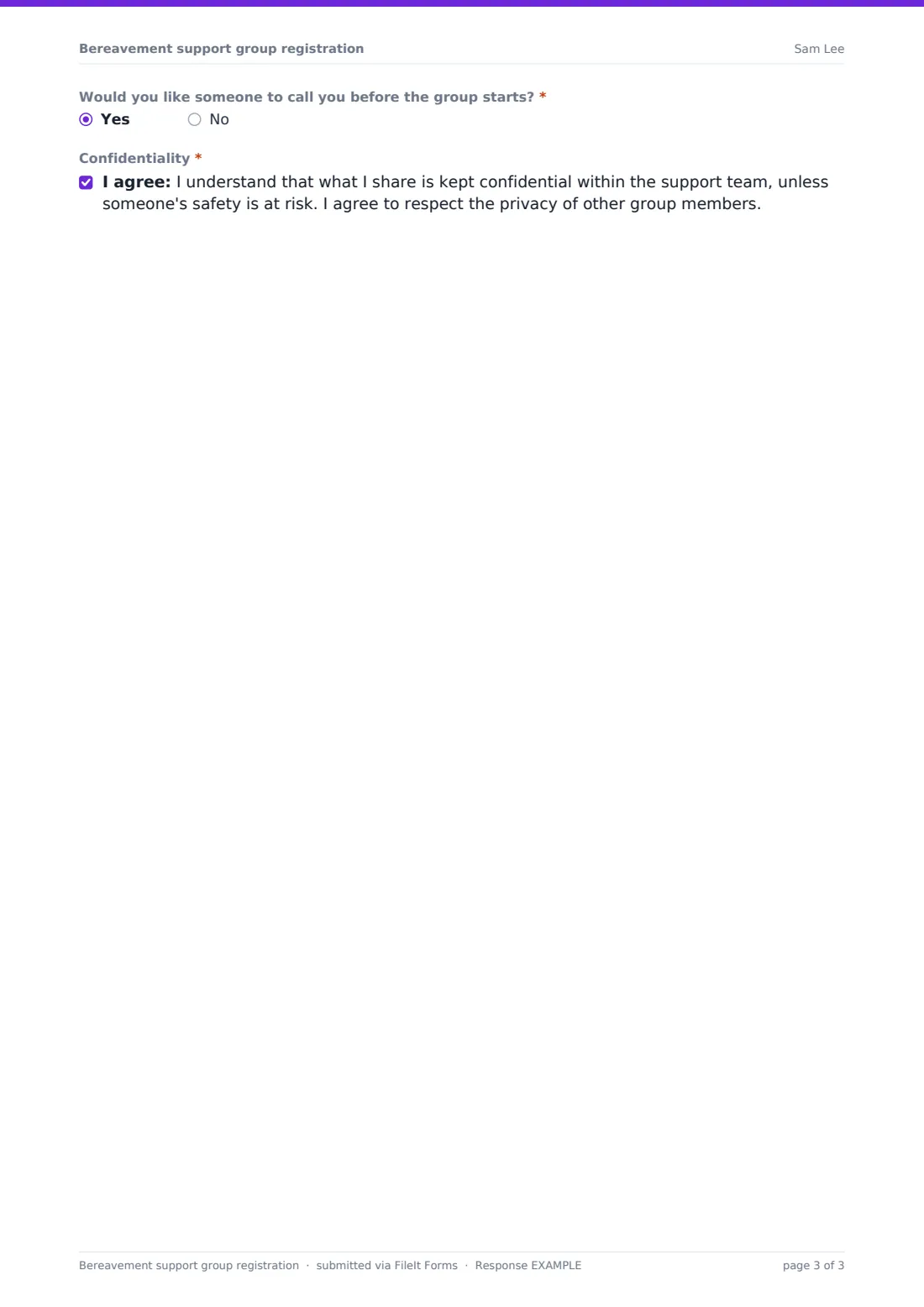
- Would you like someone to call you before the group starts?*
- Confidentiality*
The bereavement support group registration form, page by page
1 About you
A short welcome tells people they can skip anything. They give their name, email, phone and age band, choose how they may be contacted, and say whether a voicemail or message is OK.
2 Your loss
An optional field asks for the name of the person who died. People choose the relationship — including baby and pregnancy loss — and when they died. An optional checklist asks about the circumstances, such as a long illness, a sudden death, suicide or an accident, with help text explaining why. "Have you had any support so far?" covers family, a doctor, counselling, a faith leader or online groups.
3 Support you'd like
"What would help you?" lists meeting others, talking about the person, understanding grief, anniversaries, practical matters, support for children and remembrance events. People choose a group, one-to-one, either or not sure — anything but one-to-one asks about an in-person or online setting — and the times they could attend, whether they'd like faith elements and any accessibility needs.
"How are you coping at the moment?" is required; choosing "Finding things very hard" shows a supportive message and a reminder of emergency help. People say whether they'd like a call before the group starts and agree to the confidentiality statement.
Make the template yours
- Add your group's dates, times and venue in a paragraph
- Put your local crisis line number in the message shown to people who are finding things very hard
- Edit the relationship and circumstance lists for a specialist group
- Remove the faith question for a non-religious service, or rephrase it for your tradition
- Notify your coordinator by email on every registration
- Add a separate question about children's ages if you run children's groups
Tips for a better bereavement support group registration form
- Call anyone who chose "Finding things very hard" as soon as you can
- Keep the circumstances question optional — not everyone is ready to say
- Use the person's name, if given, when you call
- Respect contact preferences carefully, especially about voicemails
- Check your safeguarding policy covers what to do if someone discloses risk
Every response becomes a PDF in your vault
Each registration is saved as a PDF in your FileIt vault, and your coordinator is emailed. The person can receive a copy of their registration.
From the Responses table you can see who wants group or one-to-one support, sort by how people are coping, and export to a CSV to plan groups.
- Start from this template. It opens in the FileIt Forms designer — change any question, add pages, set the rules for when questions appear.
- Share it. Turn on a public link, or send it to people by email, each with their own link. They don’t need a FileIt account.
- Get the answers as PDFs. Each response is saved as a PDF in the vault folder you choose, with uploaded files attached — and listed in a Responses table you can export to CSV.
Bereavement support group registration form: frequently asked questions
Is this bereavement support group registration template free?
Yes. It's a FileIt Forms starter template, available on every plan.
Do people have to say how their loved one died?
No. The circumstances question is optional and includes "Prefer not to say".
Is this form a crisis service?
No. It shows a supportive message to people who are finding things very hard, but it doesn't alert anyone in real time. Add your local crisis line to the message.
Can someone register on behalf of a family member?
Yes, though it's best if the bereaved person answers the coping and support questions themselves.
Can we run separate groups by type of loss?
Yes. Filter registrations by relationship or circumstances in the Responses table.
Who can see the registrations?
Registrations are stored in your FileIt vault and visible only to people you give access to.