What is a vendor registration form?
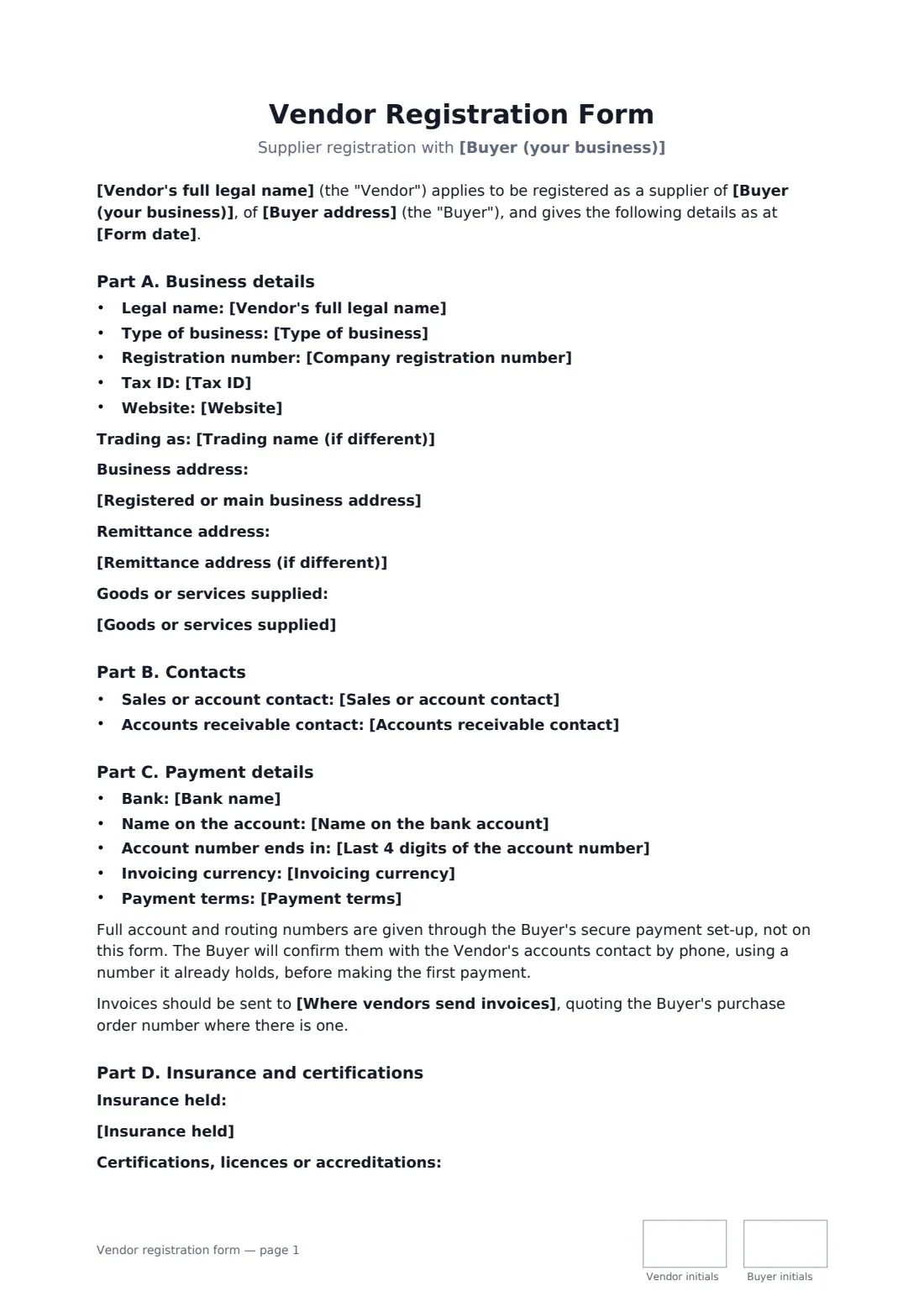
Before you pay a new supplier for the first time, your accounts team needs the basics: the exact legal name to put on the purchase order, a tax ID for reporting, who handles invoices, and where the money goes. Collecting all of that on a form the vendor signs saves chasing emails, gives you a record of who certified the details, and is a simple defence against invoice fraud.
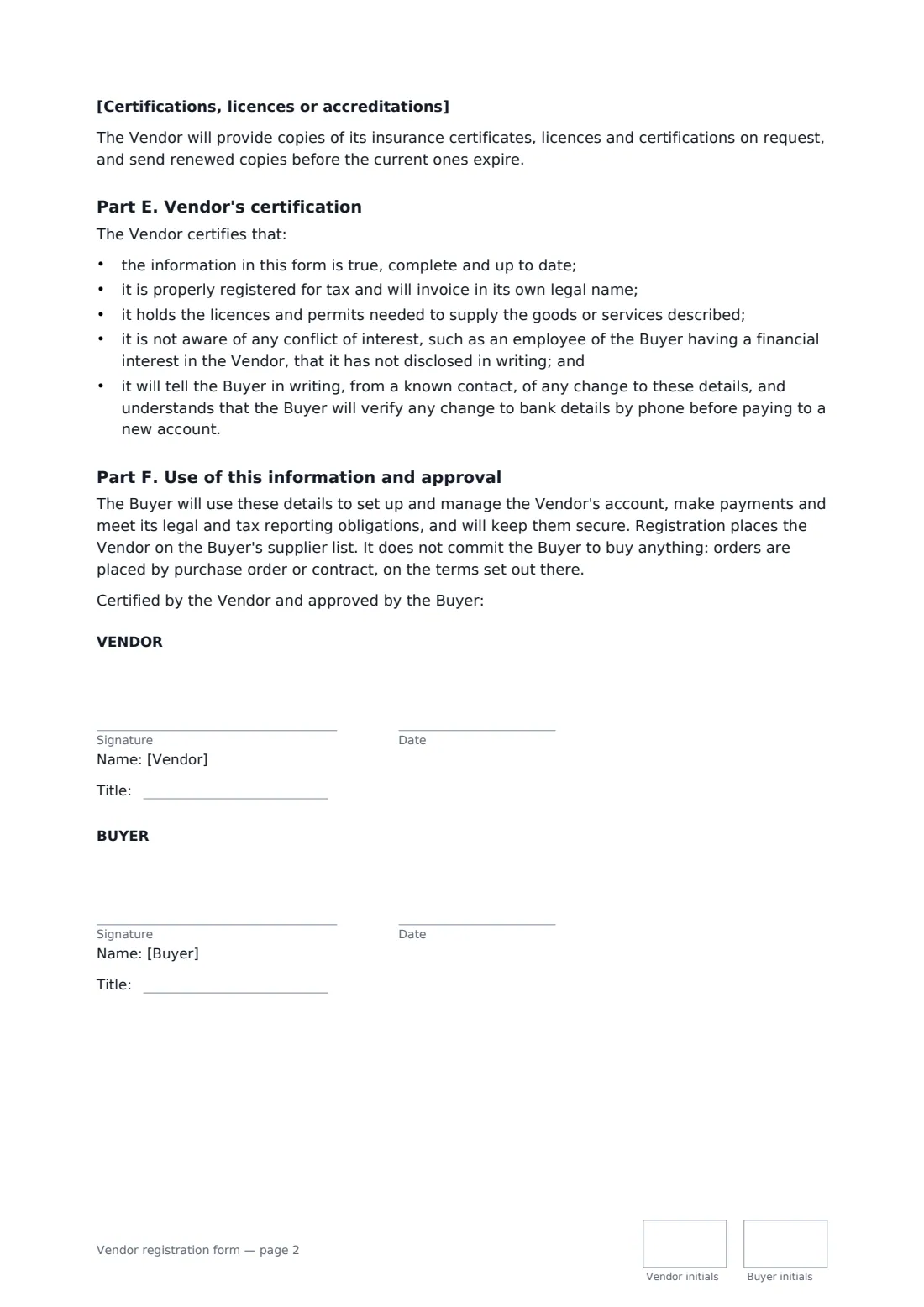
This template gathers business details (legal and trading name, type, registration and tax numbers, addresses, website, what they supply), sales and accounts contacts, payment details (bank, account name, last four digits only), invoicing currency and payment terms, insurance and certifications. The vendor certifies it's accurate, licensed and free of undisclosed conflicts, and agrees to report changes. Full bank numbers stay out of the form and are confirmed by a phone call-back before the first payment. Your signature approves them for your supplier list without committing you to any order.
- Best for
- Adding a new supplier to your approved vendor list
- Signed by
- The vendor, then your business to approve
- Bank details
- Bank, account name and last four digits only — full numbers verified separately
- Length
- 2 pages, initialled by both on every page
When to use a vendor registration form
- A property manager onboarding a new cleaning or maintenance contractor
- A restaurant group setting up a new produce or linen supplier
- A school or nonprofit registering a vendor before a first purchase order
- A manufacturer adding a new parts supplier to its approved list
- Refreshing records for existing suppliers during an annual vendor review
What you fill in
22 blanks, then the name and email of each person who signs: vendor, buyer.
1 Buyer
- Form date*
- Buyer (your business)*
- Buyer address
- Where vendors send invoices
2 Vendor business details
- Vendor's full legal name*
- Trading name (if different)
- Type of business* Company or corporation · Limited liability company (LLC) · Partnership · Sole trader or sole proprietor · Nonprofit or charity · Other organisation
- Company registration number
- Tax ID*
- Registered or main business address*
- Remittance address (if different)
- Website
- Goods or services supplied*
3 Contacts
- Sales or account contact*
- Accounts receivable contact*
4 Payment details
- Bank name*
- Name on the bank account*
- Last 4 digits of the account number
- Invoicing currency*
- Payment terms* 14 days from receipt of a valid invoice · 30 days from receipt of a valid invoice · 45 days from receipt of a valid invoice · 60 days from receipt of a valid invoice · As set in each purchase order or contract
5 Insurance and certifications
- Insurance held
- Certifications, licences or accreditations
6 Who signs
- Vendor signature and date, job title, initials on every page · An owner, director or officer of the supplier who can certify its details.
- Buyer signature and date, job title, initials on every page · Your business. Its signature approves the vendor for your supplier list.
What the vendor registration form covers
- Part A. Business details
- Part B. Contacts
- Part C. Payment details
- Part D. Insurance and certifications
- Part E. Vendor's certification
- Part F. Use of this information and approval
Using the vendor registration form, step by step
1 Collect the vendor's details
Ask the supplier for their legal name, tax ID, addresses and contacts, and enter them. They'll review everything before they sign, so they can catch mistakes.
2 Add payment terms
Enter the bank name and account name, and optionally the last four digits. Pick the invoicing currency and payment terms, and add the email address where invoices should go.
3 Record insurance and certifications
List each policy with insurer, limit and expiry, and any licences or accreditations the work needs.
4 Send for certification
Send the form to the vendor's signer first, then sign to approve. The completed form is filed in your FileIt vault with the rest of your supplier paperwork.
Tips before you send it
- Never accept full bank details by email. Confirm them by calling a number you already hold, and do the same for any later change.
- Upload the vendor's insurance certificate to FileIt with its expiry date, so you get a reminder before it lapses.
- Check the legal name and tax ID against an official register where you can — mismatches cause payment and reporting problems.
- Ask vendors to complete the form again every year or two, so contacts and insurance stay current.
Sign it online in minutes
- Fill in the blanks. Names, dates and amounts go straight into the agreement — the preview shows exactly where.
- Name who signs. Tick “This is me” for your own part. FileIt builds the PDF with every signature, date and initials box on the right line, and you can check or move anything before sending.
- Send it. Each signer gets a secure link and signs from any device — no account needed. The signed PDF, with an audit trail and a Certificate of Completion, is filed in your vault and emailed to everyone.
Vendor registration form: frequently asked questions
Why doesn't the form ask for full bank account numbers?
Bank details in documents and emails are a favourite target for invoice fraud. The form records the bank and account name, and the full numbers go through your secure payment set-up and are confirmed by phone before the first payment.
Does registering the vendor commit us to buying from them?
No. The form says registration only places the vendor on your supplier list. Orders are placed by purchase order or contract on their own terms.
Is this a contract?
Mostly it's a signed record of the vendor's details and promises that they're accurate. The commercial terms of each purchase sit in your purchase orders or a supply or service agreement.
Can it be signed electronically?
Yes. In most countries, including the US (ESIGN Act and UETA), the UK, the EU (eIDAS) and Canada, an electronic signature is generally valid for a business form like this one. FileIt keeps an audit trail and a Certificate of Completion with the signed PDF.
Is this template free?
Yes. The template is free to use with the eSignature app in FileIt, and the people you send it to don't need a FileIt account to sign.