What is a pre-construction agreement?
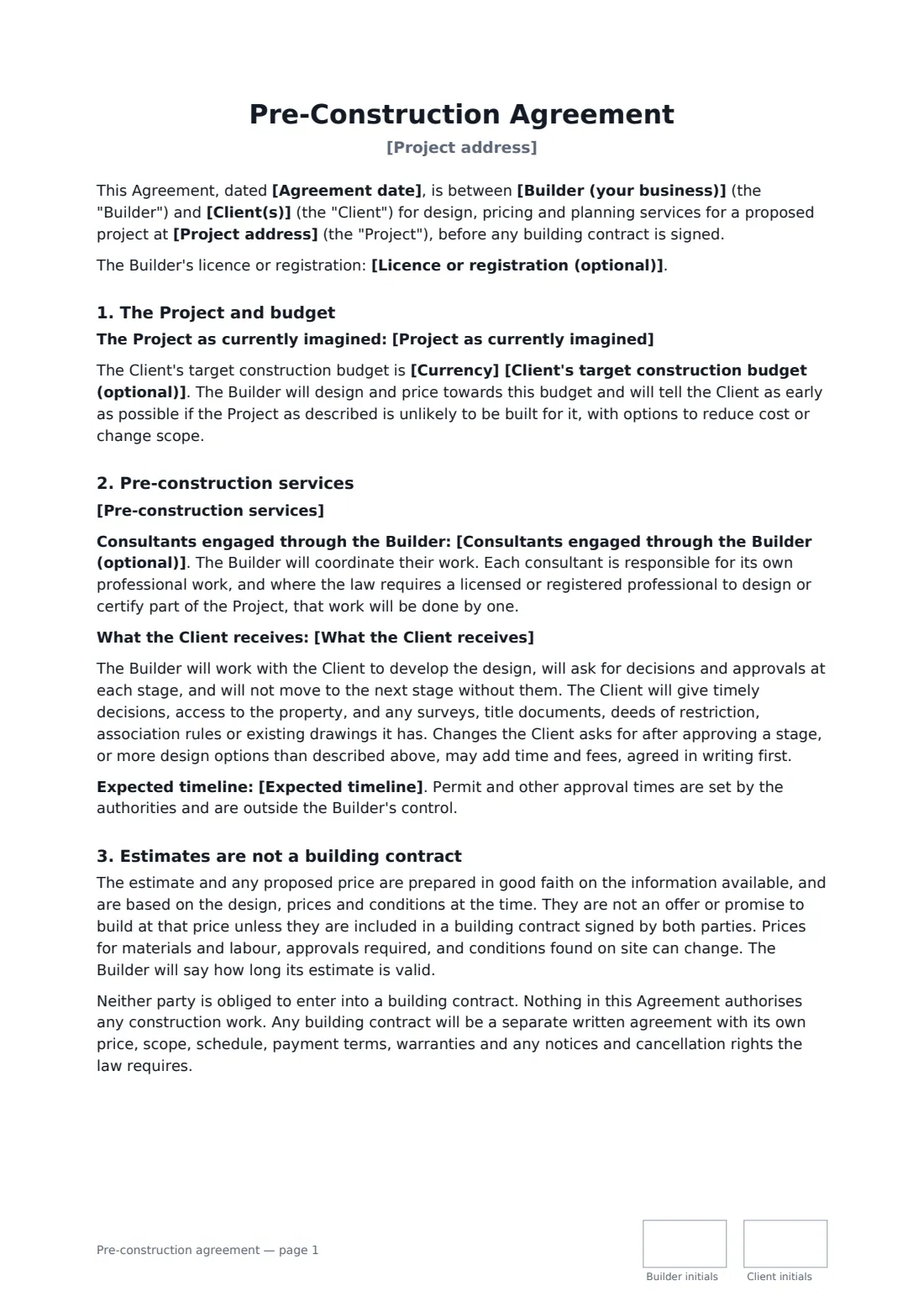
Builders and design-build firms spend weeks on surveys, design options, engineering and detailed estimates before anyone signs a building contract. Without a pre-construction agreement, that work is often unpaid, the client may take the plans and the itemised estimate to a cheaper builder, and nobody is sure whether the estimate was a promise.
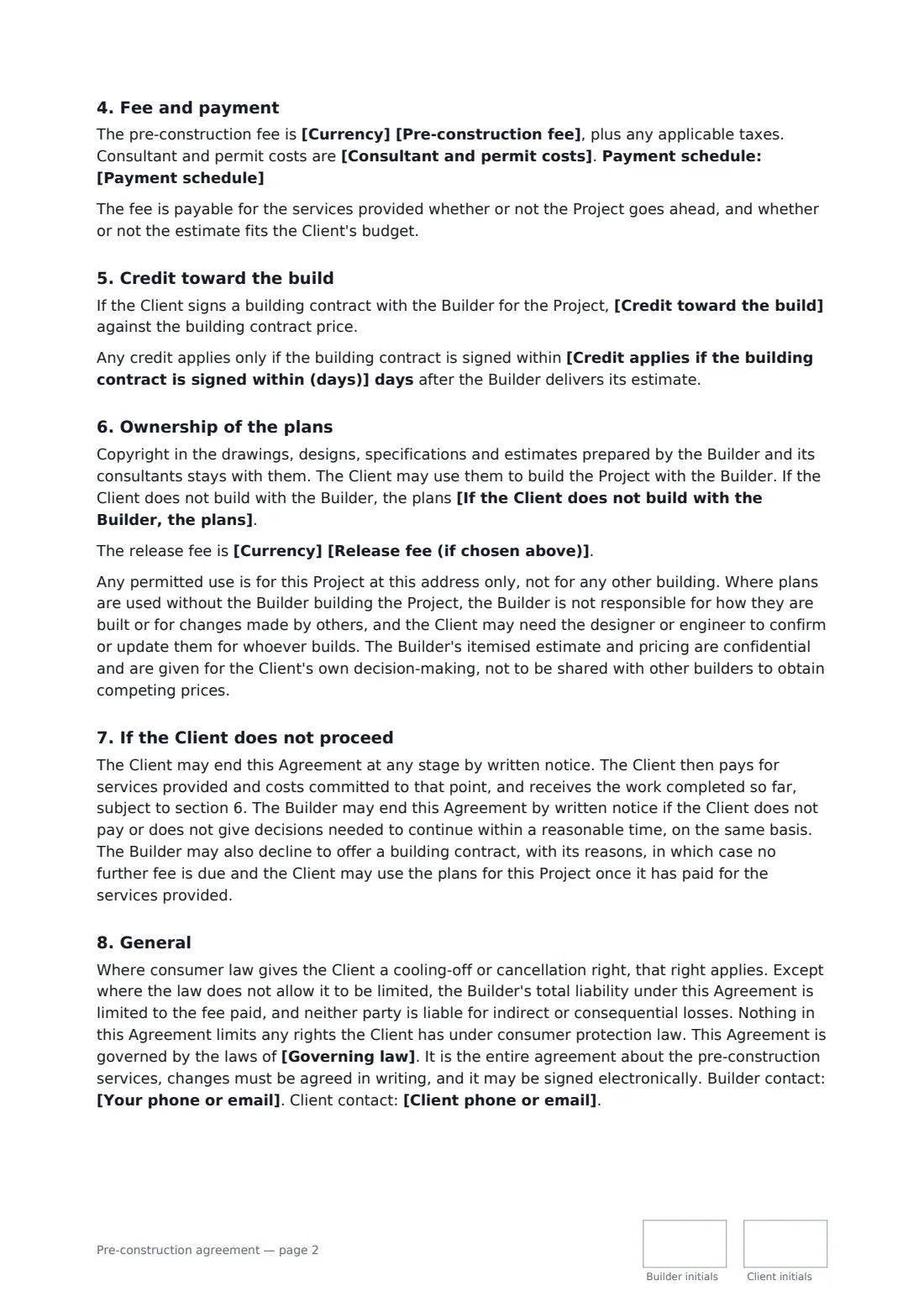
This template records the project as currently imagined and an optional target budget the builder designs towards, with early warning if it looks unrealistic. It lists the pre-construction services, consultants coordinated through the builder, what the client receives and the expected timeline, with stage approvals and paid extra changes. It states that estimates are not a building contract and that neither side must build. It sets the fee, who pays consultant and permit costs, a payment schedule, credit toward the build within a set number of days, copyright and three options for the plans if the client builds elsewhere, confidentiality of pricing, and what each side pays if the client does not proceed or the builder declines.
- Best for
- Custom home builders, design-build firms and renovation contractors
- Signed by
- The builder and the property owner
- Credit
- Full, half or none of the fee credited if the client builds with you
- Length
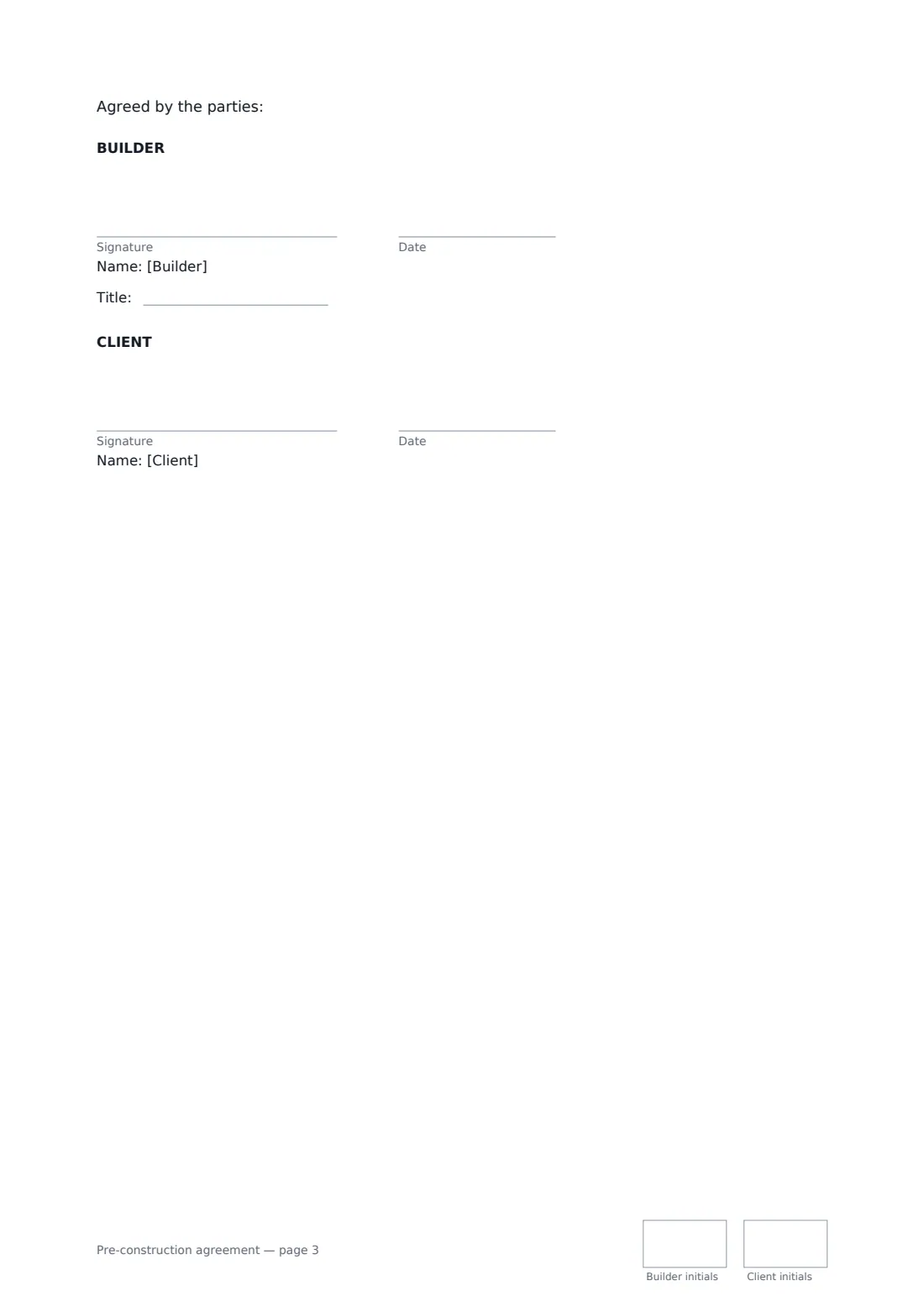
- 3 pages, initialled on every page, signatures on the last page
When to use a pre-construction agreement
- Designing and pricing a custom home before a fixed-price contract
- A rear extension and kitchen remodel taken from concept to permit
- A design-build firm's paid feasibility and estimate stage
- Pricing a major renovation where the client has a fixed budget
- Preparing permit drawings with a structural engineer before building
What you fill in
22 blanks, then the name and email of each person who signs: builder, client.
1 The parties
- Agreement date*
- Builder (your business)*
- Licence or registration (optional)
- Your phone or email*
- Client(s)*
- Client phone or email*
2 The project
- Project address*
- Project as currently imagined*
- Client's target construction budget (optional)
3 Services
- Pre-construction services*
- Consultants engaged through the Builder (optional)
- What the Client receives*
- Expected timeline*
4 Fee
- Currency*
- Pre-construction fee*
- Consultant and permit costs* included in the fee · paid by the Client in addition to the fee, at cost · paid by the Client directly to the consultants and authorities
- Payment schedule*
- Credit toward the build* the full fee is credited · half the fee is credited · no part of the fee is credited
- Credit applies if the building contract is signed within (days)
5 Plans
- If the Client does not build with the Builder, the plans* may be used by the Client for this project once the fee is paid in full · may be used by the Client for this project after a further release fee is paid · remain the Builder's and may not be used to build
- Release fee (if chosen above)
- Governing law*
6 Who signs
- Builder signature and date, job title, initials on every page · The builder or design-build firm.
- Client signature and date, initials on every page · The property owner planning the project (all owners should sign where possible).
What the pre-construction agreement covers
- The Project and budget
- Pre-construction services
- Estimates are not a building contract
- Fee and payment
- Credit toward the build
- Ownership of the plans
- If the Client does not proceed
- General
Using the pre-construction agreement, step by step
1 Describe the project
Enter the address, the project as currently imagined and an optional target construction budget.
2 List the services
List each pre-construction service, any consultants you engage, what the client will receive and the expected timeline.
3 Set the fee and credit
Enter the fee, who pays consultant and permit costs, the payment schedule, how much is credited toward the build and how long the credit lasts.
4 Decide on the plans and send
Choose what happens to the plans if the client builds elsewhere, add a release fee if you chose one, enter the governing law and send it.
Tips before you send it
- Tell the client early if their budget and design don't match. The agreement commits you to it, and it saves both sides time.
- Say how long your estimate is valid. Material and labour prices can move quickly.
- If you charge a release fee for the plans, set it now. It is easier to agree before anyone is disappointed.
- Where the law requires a licensed architect or engineer for part of the design, make sure one does that work.
Sign it online in minutes
- Fill in the blanks. Names, dates and amounts go straight into the agreement — the preview shows exactly where.
- Name who signs. Tick “This is me” for your own part. FileIt builds the PDF with every signature, date and initials box on the right line, and you can check or move anything before sending.
- Send it. Each signer gets a secure link and signs from any device — no account needed. The signed PDF, with an audit trail and a Certificate of Completion, is filed in your vault and emailed to everyone.
Pre-construction agreement: frequently asked questions
Is the builder's estimate a fixed price?
No. The agreement says estimates are prepared in good faith but are not an offer to build at that price unless they are put into a signed building contract.
Does the client get the fee back if they build with the builder?
If you choose a credit, all or half of the fee is credited against the building contract price, provided the contract is signed within the number of days you set.
Can the client take the plans to another builder?
You choose: once the fee is paid, after a release fee, or not at all. Any permitted use is for this project only, and the itemised estimate stays confidential.
What if the client decides not to build?
The client can end the agreement at any stage, pays for services and costs committed so far, and receives the work completed, subject to the plans terms.
Can it be signed electronically?
Yes. E-signatures are generally valid for agreements like this in the US, UK, EU and Canada. FileIt keeps an audit trail with the signed PDF.