What is a office sharing agreement?
Plenty of small firms have more office than they need: an accountant with an empty room, a design studio with two spare desks, a clinic with a quiet suite on Fridays. Sharing it with another business can cut costs for both. But without terms, it's easy to drift into arguments about the internet bill, the meeting room, who left the door unlocked, or how much notice is fair when one side wants to leave.
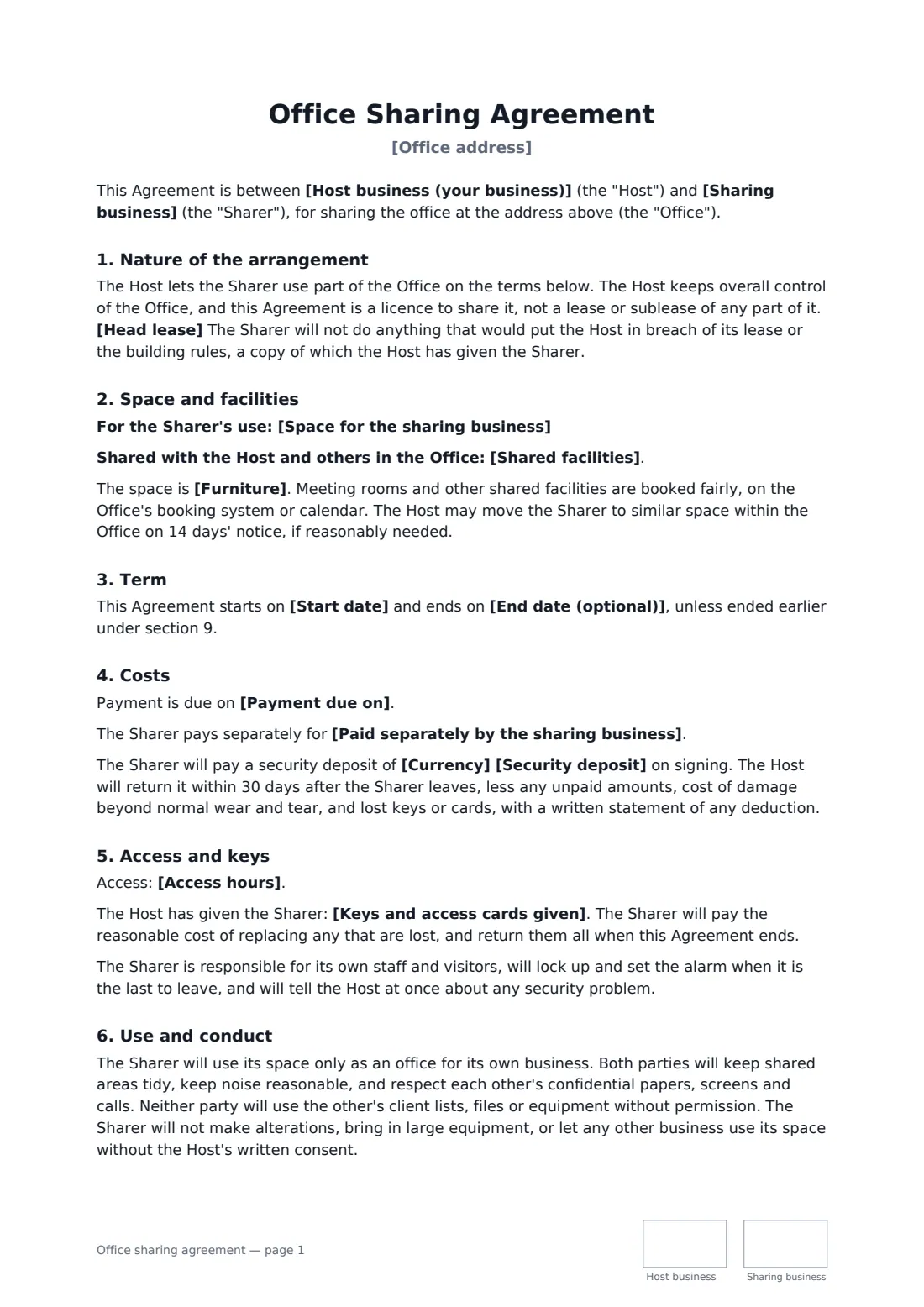
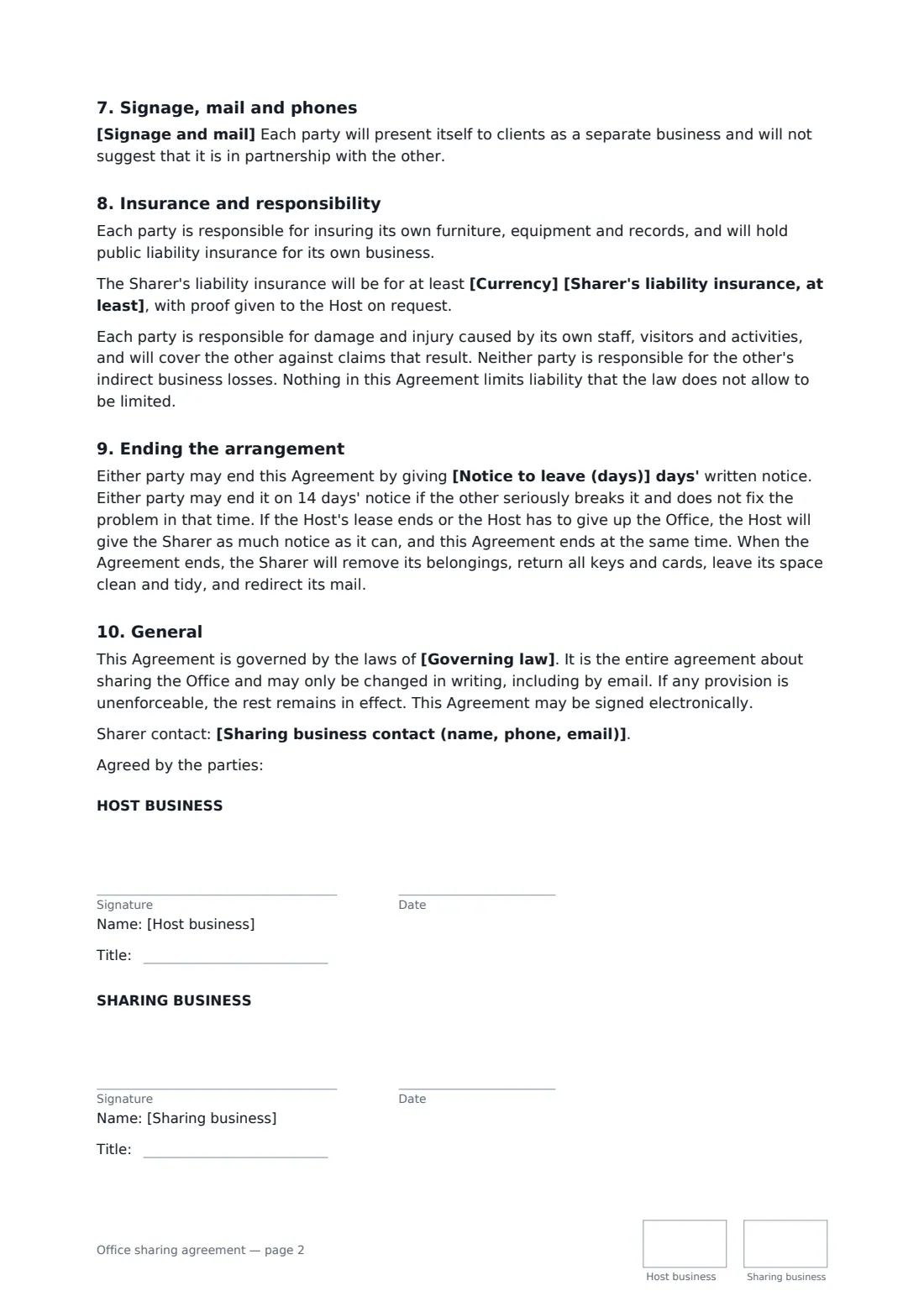
This agreement sets the arrangement up as a licence to share, with the host keeping control of the office and confirming the head lease allows it. It lists the sharer's own space and the shared facilities, furnished or not, and a fixed end date or rolling term. Costs can be a fixed monthly fee or a percentage of the actual bills, with an optional deposit. It covers access hours and keys, use and conduct (including respecting each other's confidential work), signage and mail, insurance and responsibility for each side's own people, and notice to end — including what happens if the host's own lease ends.
- Best for
- Small firms sharing spare rooms or desks in their office
- Signed by
- The host business and the sharing business, with job titles
- Costs
- A fixed monthly fee, or a percentage of the actual office costs
- Length
- About 3 pages, initialled on every page
When to use a office sharing agreement
- A law firm letting a spare office to a financial planner
- Two therapists sharing a suite with a common waiting room
- A design studio renting two desks to a freelance developer
- An accountant sharing reception and meeting rooms with a bookkeeper
- A start-up taking a room in a larger company's office while it grows
What you fill in
24 blanks, then the name and email of each person who signs: host business, sharing business.
1 The parties
- Host business (your business)*
- Sharing business*
- Sharing business contact (name, phone, email)
2 The space
- Office address*
- Space for the sharing business*
- Shared facilities*
- Furniture* furnished by the Host · unfurnished — the Sharer brings its own furniture
3 Term
- Start date*
- End date (optional)
- Notice to leave (days)*
4 Costs
- Currency*
- How costs are split* a fixed monthly fee covering the space and shared costs · a percentage share of the actual office costs
- Fixed monthly fee
- Sharing business's share of costs (%)
- Costs included or shared*
- Paid separately by the sharing business
- Payment due on*
- Security deposit
5 Access and use
- Access hours*
- Keys and access cards given
- Signage and mail* The Sharer may put its name on the door and directory, and receive mail at the office. · The Sharer may receive mail at the office but not put up signs. · No signage or mail address for the Sharer.
6 Other terms
- Head lease* The Host's landlord has consented to this sharing, or the Host's lease allows it. · The Host owns the office, so there is no head lease.
- Sharer's liability insurance, at least
- Governing law*
7 Who signs
- Host business signature and date, job title, initials on every page · The business that leases or owns the office and is sharing it.
- Sharing business signature and date, job title, initials on every page · The business moving into part of the office.
What the office sharing agreement covers
- Nature of the arrangement
- Space and facilities
- Term
- Costs
- Access and keys
- Use and conduct
- Signage, mail and phones
- Insurance and responsibility
- Ending the arrangement
- General
Using the office sharing agreement, step by step
1 Describe the space
Enter the office address, the room or desks the sharer will use, and the shared facilities. Say whether you provide furniture.
2 Term and costs
Set the start date and an optional end date, then choose a fixed monthly fee or a percentage share of the actual bills. List what's covered, what the sharer pays separately, the due date and any deposit.
3 Access and signage
Set access hours, the keys and cards handed over, and whether the sharer can put up a sign and receive mail. Confirm your lease allows sharing.
4 Insurance and send
Add a minimum liability insurance amount if you want one, set the notice period and the governing law, and send it for signature.
Tips before you send it
- Read your own lease first. Most office leases restrict sharing or subletting, and some need the landlord's written consent.
- If you split actual costs, send copies of the bills each month — transparency keeps a percentage split friendly.
- Agree how the meeting room is booked before the first clash, ideally on a shared calendar.
- Keep client files and screens out of shared areas, and talk about it on day one. The agreement asks both sides to respect confidentiality.
Sign it online in minutes
- Fill in the blanks. Names, dates and amounts go straight into the agreement — the preview shows exactly where.
- Name who signs. Tick “This is me” for your own part. FileIt builds the PDF with every signature, date and initials box on the right line, and you can check or move anything before sending.
- Send it. Each signer gets a secure link and signs from any device — no account needed. The signed PDF, with an audit trail and a Certificate of Completion, is filed in your vault and emailed to everyone.
Office sharing agreement: frequently asked questions
Is an office sharing agreement a sublease?
It is written as a licence to share space, with the host keeping control of the office, rather than a lease or sublease of a defined part. Whether the law treats it that way depends on the facts and on local law, so check your own lease and, if in doubt, take advice.
How should we split the costs?
You choose: a fixed monthly fee that covers the space and shared costs, or a percentage of the actual bills with a monthly statement. A fixed fee is simpler; a percentage is fairer when costs change a lot.
What happens if the host's own lease ends?
The host gives the sharer as much notice as it can, and the sharing agreement ends at the same time. Otherwise either side can leave on the notice period you set.
Can an office sharing agreement be signed electronically?
For an ordinary commercial agreement like this, electronic signatures are generally valid in the US (ESIGN Act and UETA), the UK, the EU (eIDAS) and Canada. FileIt keeps an audit trail and a Certificate of Completion with the signed PDF.
Is this template free?
Yes. It's free with FileIt's eSignature app, and the sharing business signs from a link without an account.