What is Wisconsin Form MV1?
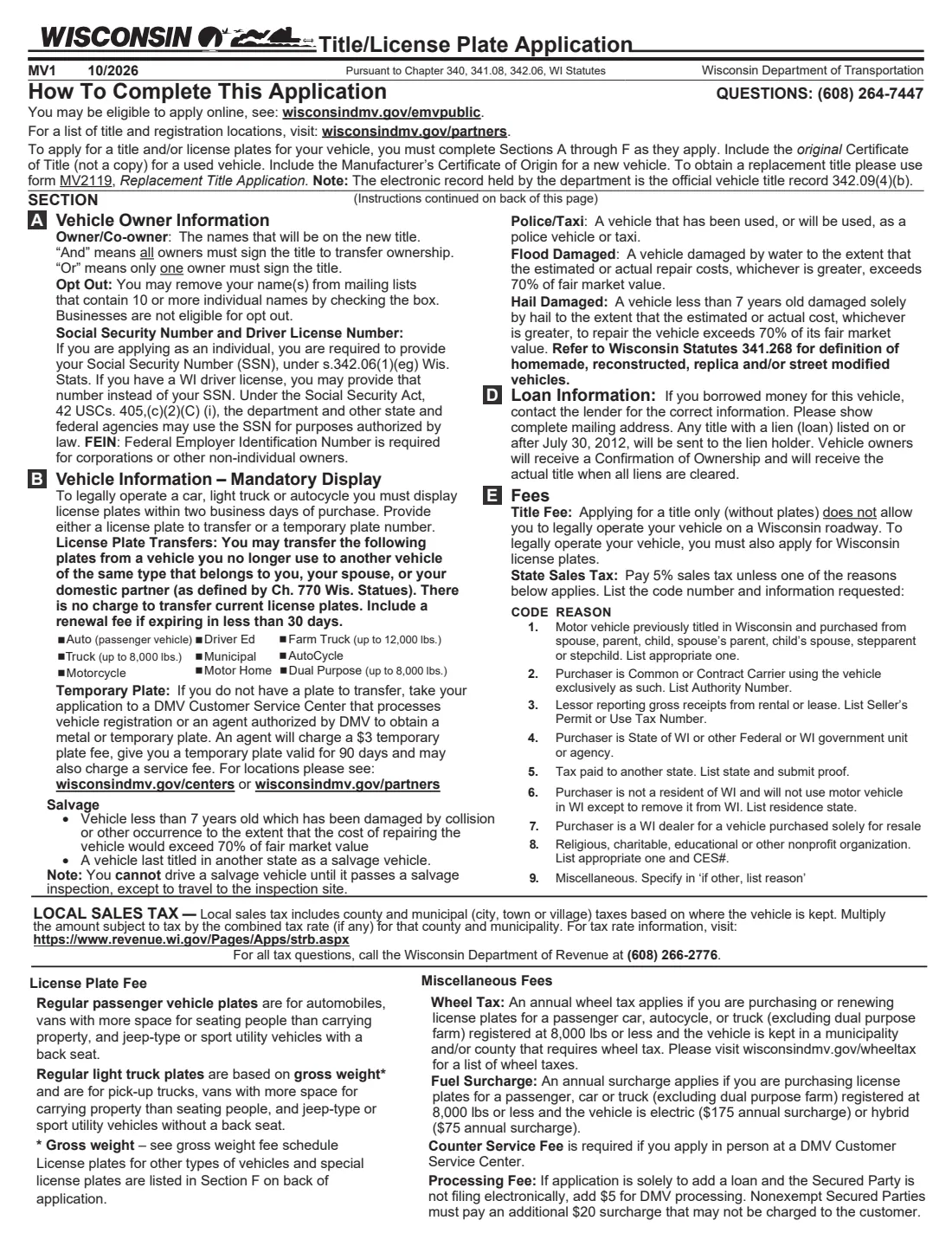
Form MV1 is the Wisconsin Department of Transportation's Title & License Plate Application. You use it when you buy a vehicle from a private seller, bring a vehicle to Wisconsin, add an owner or a new loan, or need plates for a vehicle you already own. It covers the title and the registration together: the new owner or owners, the vehicle, any lien, the fees and sales tax, and the kind of plates. Some people can apply online through the DMV instead; the form points to wisconsindmv.gov/emvpublic.
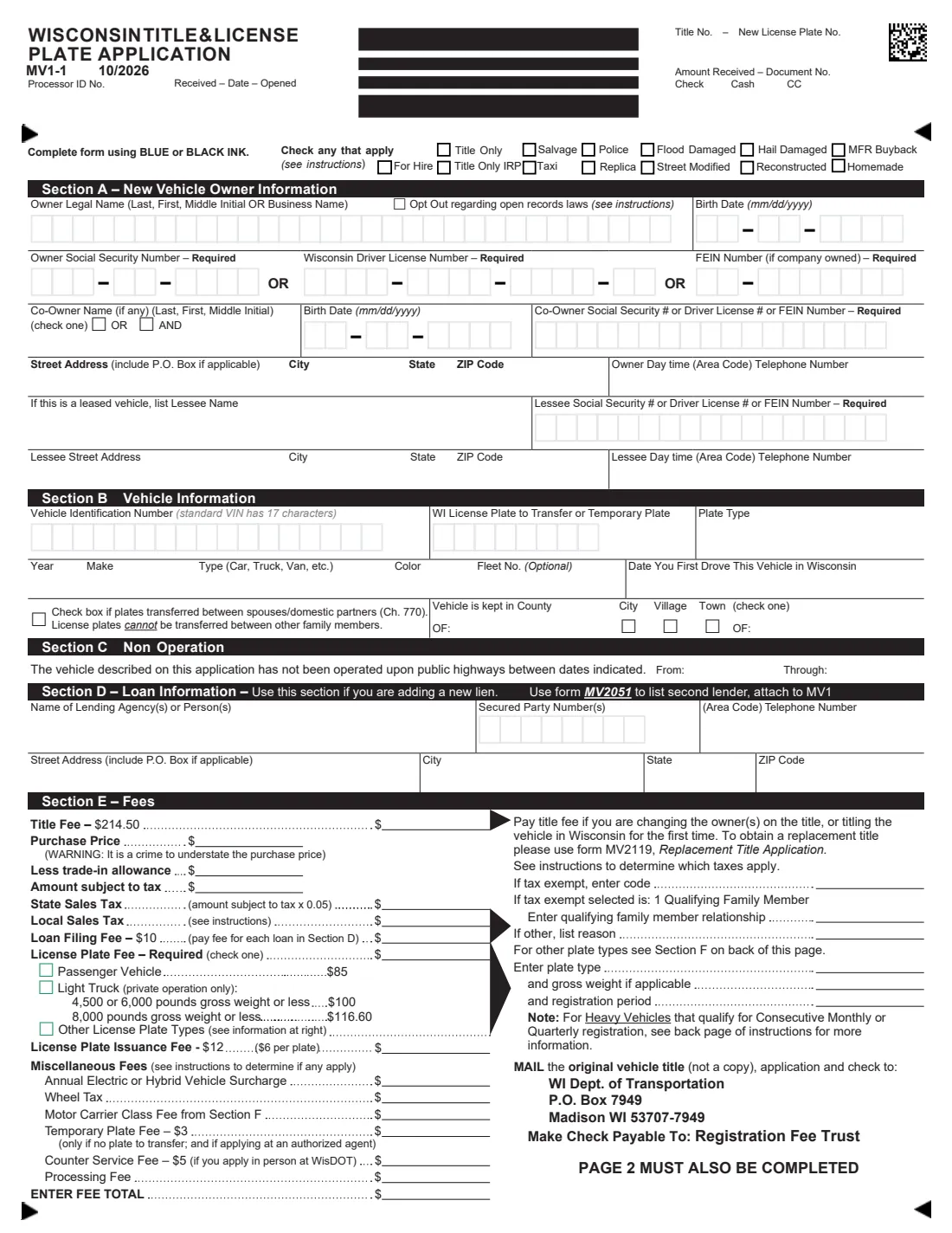
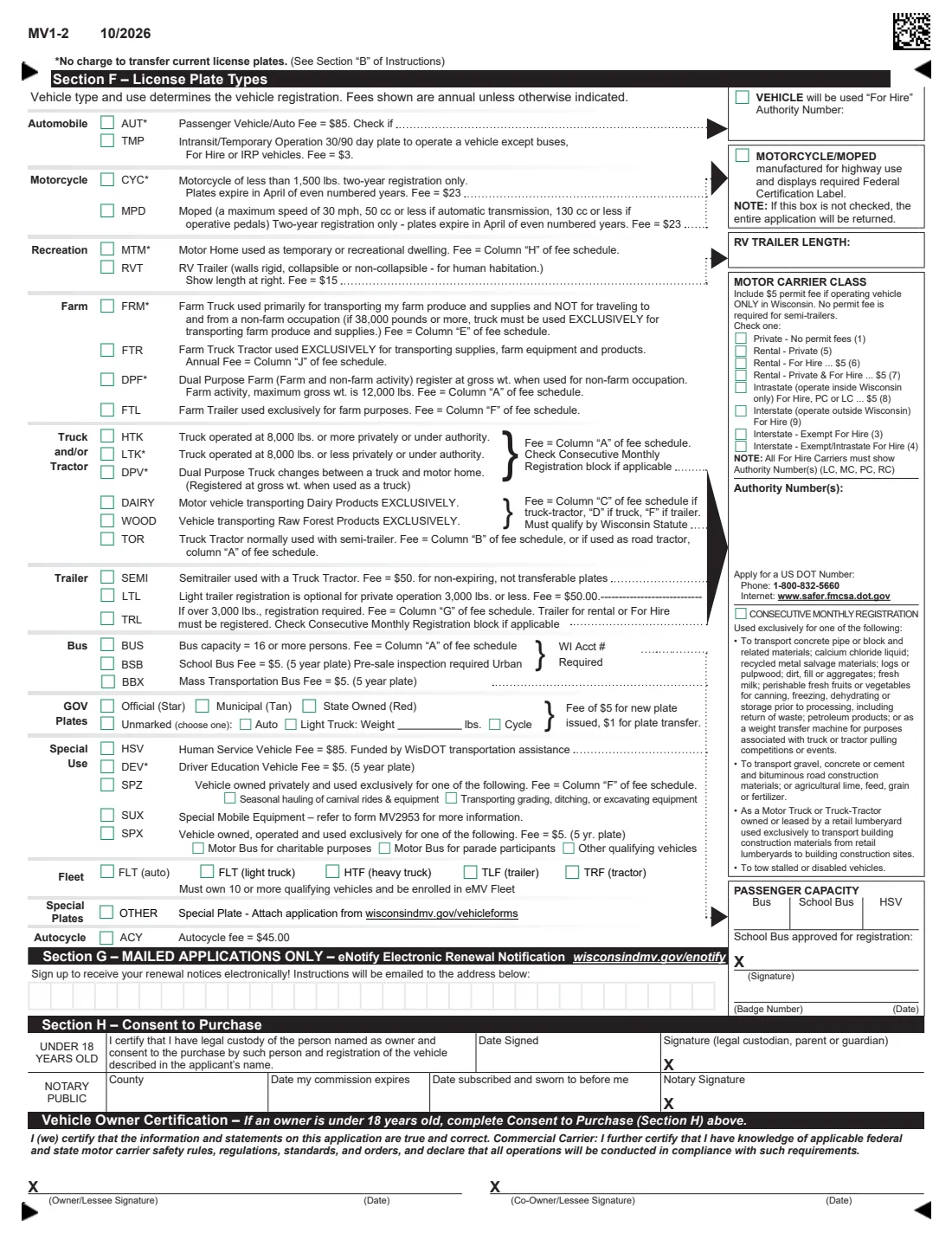
The application is pages 3 and 4 of the PDF, after two pages of instructions. Page 3 has Section A (owners, with SSN or Wisconsin driver license number, and any co-owner or lessee), Section B (VIN, year, make, color, plate to transfer, where the vehicle is kept), Section C (non-operation dates), Section D (a new loan) and Section E (fees). Page 4 has Section F (special plate types, for-hire and motor carrier details), Section G (eNotify renewal emails), Section H (consent for an owner under 18) and the owners' signatures.
FileIt asks each section in plain language, pre-fills names and birth dates from the People in your vault, and puts each letter and digit in its own box on the DMV's PDF. In Section E it adds up the title fee, the 5% state sales tax on the price after trade-in, the loan filing fee, the regular plate fee and the total, so you can check them before you write the check. The PDF is saved in your vault and can be sent to co-owners for e-signature. FileIt doesn't file anything with the DMV.
- Who fills it
- The new owner, plus any co-owner or lessee. A parent, guardian or legal custodian completes Section H for an owner under 18.
- Where it goes
- Mail with the original title and a check payable to Registration Fee Trust to WI Dept. of Transportation, P.O. Box 7949, Madison WI 53707-7949, or take it to a DMV service center or authorized agent.
- Attach
- The original Certificate of Title for a used vehicle (not a copy), or the Manufacturer's Certificate of Origin for a new one.
- Fees
- Title $214.50, state sales tax 5% plus any local tax, plates from $85 (passenger), loan filing $10, and other fees that apply.
- Edition
- MV1 10/2026, 4 pages (2 pages of instructions)
- Agency
- Wisconsin Department of Transportation, Division of Motor Vehicles
Who needs to fill out Wisconsin Form MV1?
- Anyone who bought a car, truck, motorcycle or trailer from a private seller in Wisconsin.
- New Wisconsin residents titling and plating a vehicle from another state.
- Owners adding a co-owner, a lessee, or a new loan to a vehicle's title.
- Drivers transferring their current plates to another vehicle, including between spouses or domestic partners.
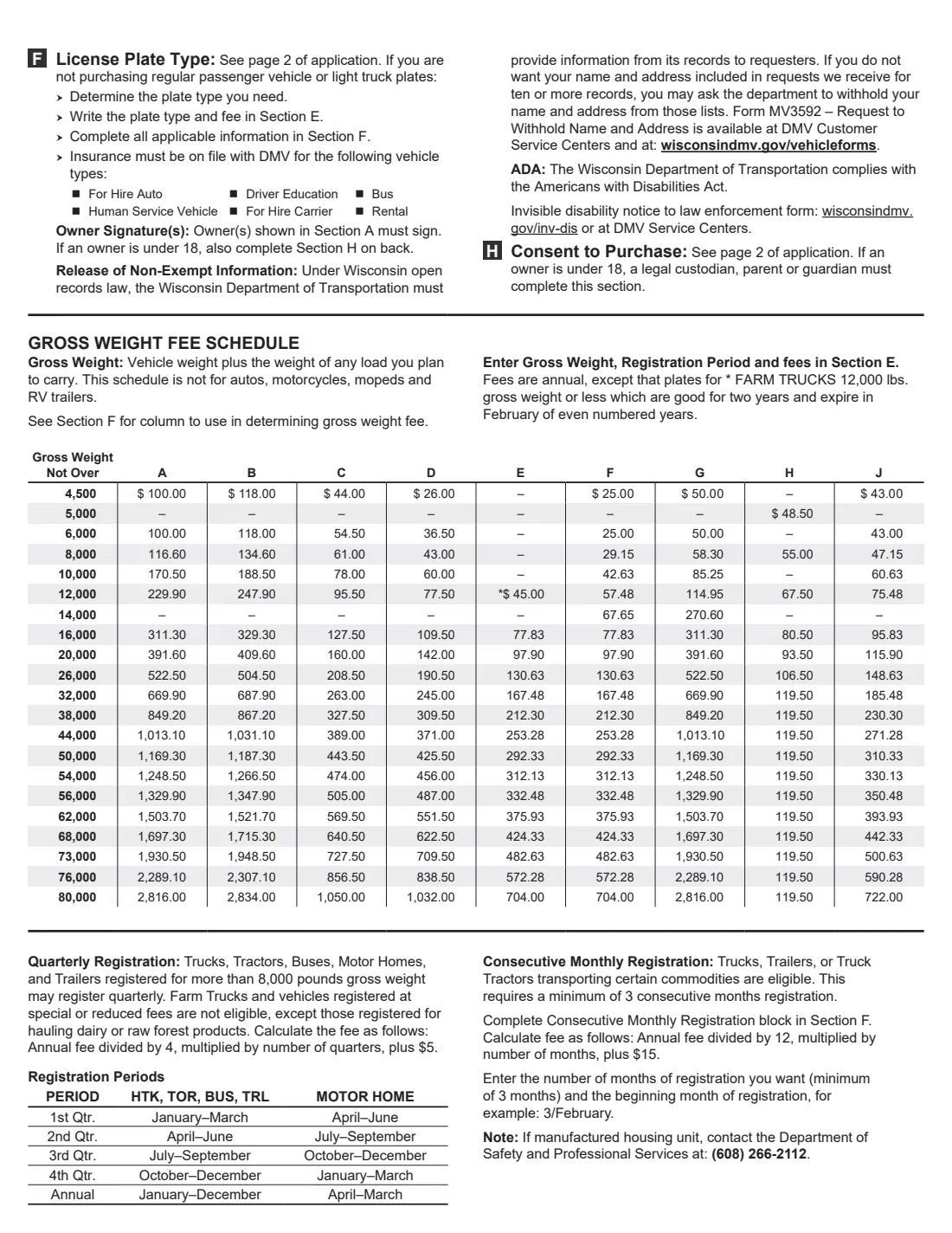
- Owners of special vehicles: farm trucks, motor homes, RV trailers, buses, for-hire vehicles, fleets and more.
When to use Wisconsin Form MV1
- Right after buying a vehicle. A car, light truck or autocycle must display plates (transferred or temporary) within two business days of purchase.
- When you title a vehicle in Wisconsin for the first time or change the owners on the title.
- For a replacement title only, use form MV2119 instead; to list a second lender, attach form MV2051.
- If the vehicle wasn't driven on public highways for a period, Section C records the dates.
What you need before you start
- The original title (or Manufacturer's Certificate of Origin) and the purchase price and any trade-in allowance.
- Each owner's legal name, birth date and SSN or Wisconsin driver license number (a company's FEIN), plus your address and phone.
- The VIN, year, make, body type, color, and the plate number you're transferring or your temporary plate number.
- The county and city, village or town where the vehicle is kept, to work out local sales tax and any wheel tax.
- The lender's name, secured party number and address if you financed the vehicle.
What’s on Wisconsin Form MV1
The 2026 edition has 4 pages. FileIt asks for it in 10 parts, and it is signed by Owner and Co-owner:
- Check any that applyOwner
- Section A: New vehicle ownerOwner
- Co-ownerCo-owner
- Leased vehicleOwner
- Section B: VehicleOwner
- Section C: Non-operationOwner
- Section D: Loan informationOwner
- Section E: FeesOwner
- Section F: Other license plate typesOwner
- Section G: eNotify renewal emailsOwner
How to fill out Wisconsin Form MV1, step by step
1 Check any that apply
Tick any brand or special status, such as title only, salvage, flood or hail damaged, manufacturer buyback, police, taxi, for hire, replica, street modified, reconstructed or homemade. Most applications tick none.
2 Section A — Owners
The names that will be on the title, last name first, in the 31-letter box. Individuals give an SSN or Wisconsin driver license number; companies give an FEIN. With a co-owner, choose "and" (all owners must sign to transfer) or "or" (any one owner can). A leased vehicle also lists the lessee.
3 Section B — Vehicle
VIN (a standard VIN has 17 characters), the plate you're transferring or a temporary plate, year, make, type, color, optional fleet number, the date you first drove it in Wisconsin, and where it's kept. Tick the box if plates move between spouses or domestic partners; plates can't move between other relatives.
4 Sections C and D — Non-operation and loan
Give the dates the vehicle wasn't driven, if that applies. For a new loan, give the lender's name, secured party number, phone and address. A title with a lien goes to the lienholder, and you get a Confirmation of Ownership.
5 Section E — Fees
Title fee, purchase price, trade-in, amount subject to tax, state sales tax (5%) or an exemption code, local sales tax, loan fee, plate fee (passenger $85, light truck $100 or $116.60, or another type), plate issuance fee, and any electric or hybrid surcharge, wheel tax, temporary plate, counter service or processing fee. FileIt adds the total.
6 Section F and signatures
For other plate types, tick the plate, and add for-hire authority numbers, motor carrier class, RV trailer length or passenger capacity as needed. Section G signs you up for renewal emails on mailed applications. Every owner signs at the bottom of page 4.
Common mistakes to avoid
- Sending a copy of the title. The DMV needs the original Certificate of Title.
- Understating the purchase price; the form warns this is a crime.
- Forgetting local sales tax or wheel tax for the county and municipality where the vehicle is kept.
- Leaving the license plate fee box unticked. The form marks it as required.
- Transferring plates between relatives other than a spouse or domestic partner.
- Not signing, or leaving off a co-owner's signature. Every owner in Section A signs.
After you fill it out
Check the fee figures, then sign and date page 4 (each owner). FileIt can send the PDF to a co-owner for e-signature and keeps a copy in your vault.
Mail the application with the original title and your check to WisDOT, or take it to a DMV service center or an authorized agent, who can issue metal or temporary plates.
A salvage vehicle can't be driven until it passes a salvage inspection, except to get to the inspection site.
Fill out Wisconsin Form MV1 online with FileIt
- Pick the person. Choose someone from People and FileIt fills in their name, date of birth, address and other details it already knows.
- Answer plain-language questions. One part of the form at a time, with the official help text beside each question — 102 fields in all. Your answers save as you go.
- Check the live preview. Watch your answers land on the real Wisconsin Department of Transportation, Division of Motor Vehicles form, and let FileIt do any worksheet arithmetic.
- Generate the official PDF. FileIt prints your answers into the agency’s own PDF and files it in that person’s folder in your vault. Sign it, or send it for e-signature.
FileIt fills the form — it never files or submits anything for you. Deliver the finished form to whoever asked for it, the way the form’s instructions say.
Start Wisconsin Form MV1 now — it’s freeWisconsin Form MV1: frequently asked questions
Can I fill out the Wisconsin MV1 online?
Yes. FileIt walks you through each section and prints your answers into the official MV1 PDF, which you then sign and mail or take to the DMV. Some transactions can also be done on the DMV's own online service.
How much is the Wisconsin title fee?
The 10/2026 edition lists a title fee of $214.50. Sales tax, plate and other fees are added in Section E.
Do I pay sales tax on a private sale?
The form charges 5% state sales tax on the price after any trade-in, plus local tax where the vehicle is kept, unless one of the exemption codes applies, such as buying from a qualifying family member.
Can I keep my old plates?
You can transfer current plates to another vehicle of the same type that belongs to you, your spouse or your domestic partner, at no charge for the transfer. Include a renewal fee if they expire within 30 days.
What if the owner is under 18?
A parent, guardian or legal custodian completes and signs Section H, Consent to Purchase, with the notary block, on page 4.
Where do I mail it?
To WI Dept. of Transportation, P.O. Box 7949, Madison WI 53707-7949, with the original title and a check payable to Registration Fee Trust.
Official sources
- Blank form (PDF), published by Wisconsin Department of Transportation, Division of Motor Vehicles: https://wisconsindot.gov/Documents/formdocs/mv1.pdf
- Official instructions and guidance: https://wisconsindmv.gov/vehicleforms
- Edition shown on this page: MV1 10/2026 (checked 2026-10-19).
FileIt is not affiliated with or endorsed by Wisconsin Department of Transportation, Division of Motor Vehicles or any government. This page explains the form in general terms and is not legal, tax or immigration advice. Always read the official instructions, and check that you are using the edition the recipient accepts. Page last reviewed 2026-10-19.