What is Wisconsin Form A-222?
Form A-222 is how you give someone the right to act for you before the Wisconsin Department of Revenue and to receive your confidential Wisconsin tax information. The representative can be a whole firm, such as a law or accounting firm (any of its employees can then discuss your account), or one or two named individuals, such as your accountant or a sibling. The same form also revokes a representative you named earlier. Using A-222 isn't mandatory, but it's the department's own written authorization, and it stays in force until you revoke it.
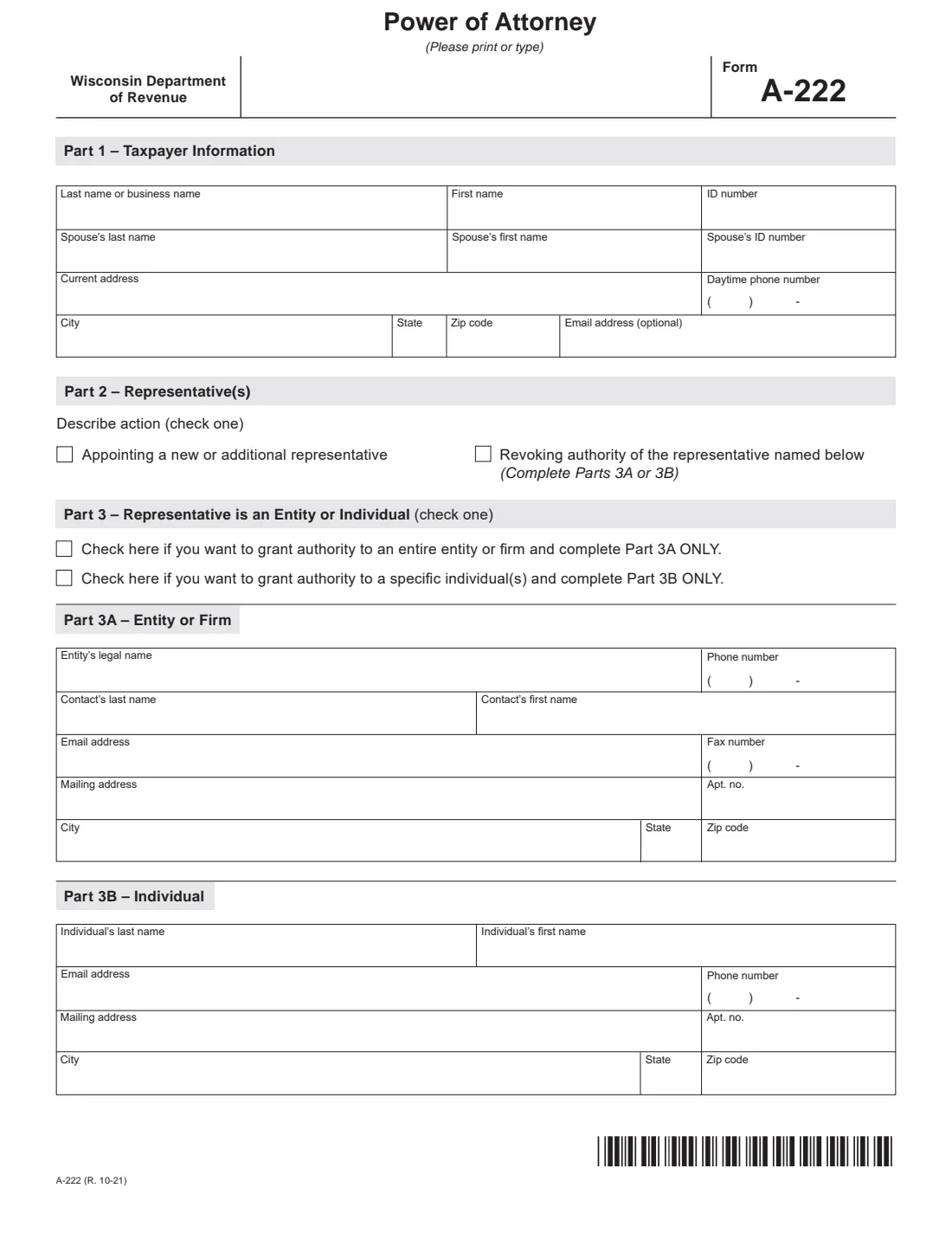
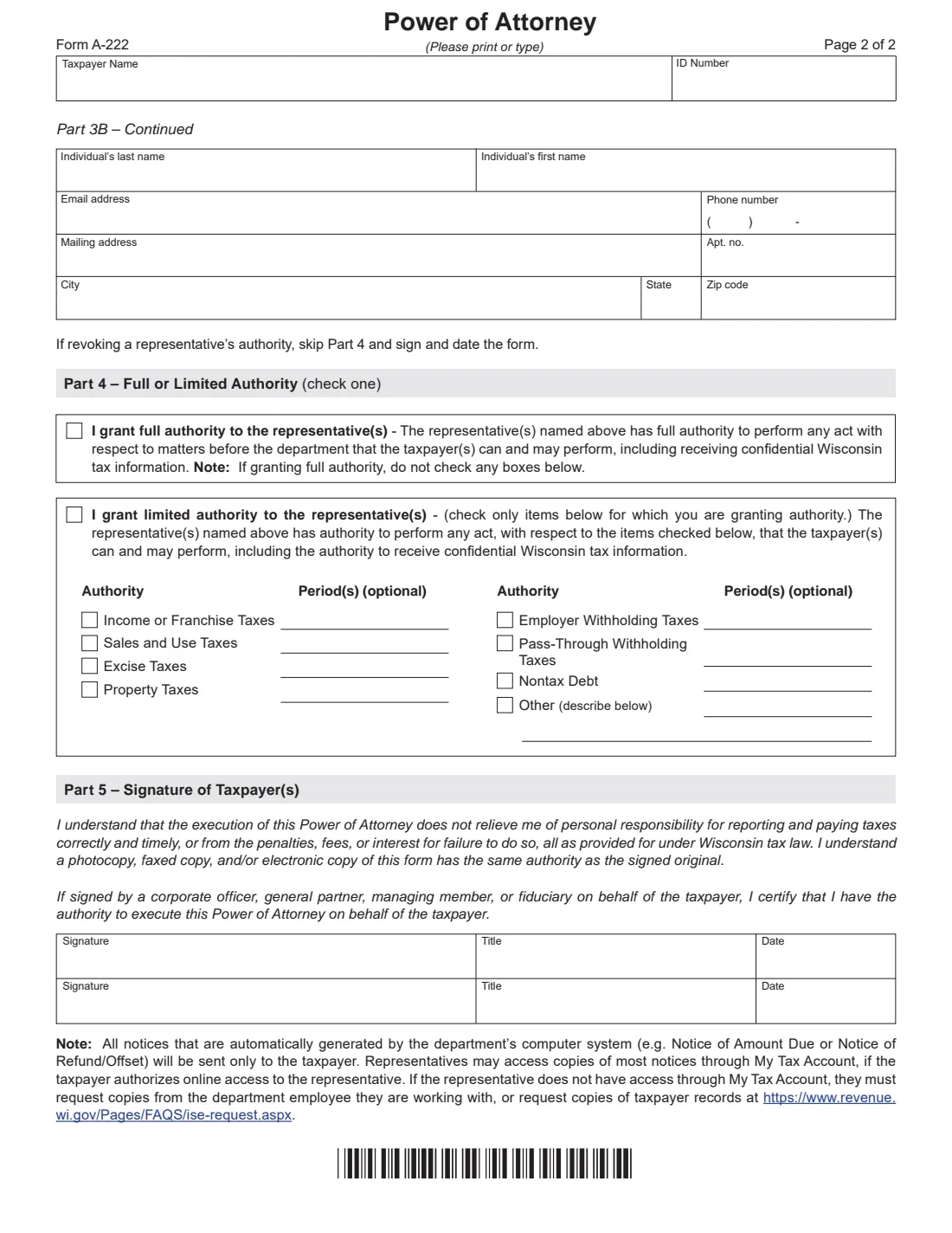
The form is two pages. Part 1 is you, the taxpayer, with your spouse if a joint return is involved and you're both naming the same representative. Part 2 says whether you're appointing or revoking, Part 3 whether the representative is an entity (Part 3A) or individuals (Part 3B, continued on page 2), and Part 4 whether you grant full authority or only for the tax types you tick, such as income or franchise, sales and use, excise, property, employer withholding, pass-through withholding, nontax debt or other matters, each optionally limited to periods. Part 5 is your signature.
FileIt asks each part in plain English, pre-fills your name and email from the People in your vault, and shows the official PDF filling in as you answer, with Part 4 hidden when you're revoking. The finished PDF is saved in your vault and can be sent for e-signature to you and your spouse. FileIt doesn't send anything to the department: you send the signed form yourself.
- Who signs
- The taxpayer, and both spouses for a joint matter. For a business, an officer, partner, member or fiduciary with authority, who adds their title.
- Where it goes
- The department employee or unit you're working with; otherwise the instructions list [email protected], fax 608-267-1030 or mail (Mail Stop 5-77, PO Box 8949, Madison WI 53708-8949).
- Effective
- From the date the department receives it, until you revoke it.
- Copies
- Photocopies, faxes and electronic copies are accepted; the instructions allow an electronic signature.
- Edition
- A-222 (R. 10-21), 2 pages; instructions I-222
- Agency
- Wisconsin Department of Revenue
Who needs to fill out Wisconsin Form A-222?
- Wisconsin taxpayers who want an accountant, tax preparer or attorney to talk to the Department of Revenue for them.
- People letting a family member handle a Wisconsin tax question, notice or audit on their behalf.
- Married couples with a joint return who want the same representative for both of them.
- Businesses, partnerships, trusts and estates authorizing a firm for sales, withholding, excise or income tax matters.
- Anyone who wants to cancel a representative's authority, which also removes that person's access to their My Tax Account.
When to use Wisconsin Form A-222
- Before your representative contacts the department without you, for example to discuss a notice, an audit or a refund.
- When you change accountants and want to revoke the old firm or individual.
- Use a separate A-222 for each representative who should have different authority; one form grants one kind of authority.
- It isn't needed when you attend with your representative, and generally not for trustees, receivers, guardians, executors or court-appointed representatives, according to the instructions.
What you need before you start
- Your name, address, daytime phone, email, and SSN (or a business's federal ID number or Wisconsin tax account number).
- Your spouse's name and SSN if a joint return is involved.
- The representative's details: a firm's legal name, contact person, phone, fax, email and mailing address, or each individual's name, email, phone and address.
- Which tax types the representative may handle, and any specific years, quarters or months.
- The signer's title if you're signing for a corporation, partnership or other entity.
What’s on Wisconsin Form A-222
The 2021 edition has 2 pages. FileIt asks for it in 8 parts, and it is signed by Taxpayer and Spouse:
- Part 1: Taxpayer informationTaxpayer
- SpouseSpouse
- Parts 2 and 3: Action and type of representativeTaxpayer
- Part 3A: Entity or firmTaxpayer
- Part 3B: IndividualTaxpayer
- Part 3B continued: Second individualTaxpayer
- Part 4: Full or limited authorityTaxpayer
- Part 5: SignatureTaxpayer
How to fill out Wisconsin Form A-222, step by step
1 Part 1 — Taxpayer
Your last name or business name, first name and ID number; your spouse's name and SSN if a joint matter is involved; your current address, daytime phone and (optionally) email. The instructions say to use the middle 10 digits of a Wisconsin tax account number.
2 Part 2 — Appoint or revoke
Tick whether you're appointing a new or additional representative, or revoking the authority of the one you name below. A revocation skips Part 4.
3 Part 3 — Entity or individual
Choose an entire entity or firm and fill in Part 3A (legal name, phone, contact person, email, fax and mailing address), or specific individuals and fill in Part 3B. A second individual goes on page 2.
4 Part 4 — Full or limited authority
Full authority lets the representative do anything before the department that you can, including receiving confidential information; leave the boxes below it blank. Limited authority covers only the items you tick, each with optional periods. Leaving a period blank means all periods; vague words like "prior" aren't accepted.
5 Part 5 — Signature
Sign and date, and have your spouse sign if included. An officer, general partner, managing member or fiduciary signing for the taxpayer adds a title and certifies they have the authority to do so.
Common mistakes to avoid
- Ticking items under limited authority after choosing full authority. The form says not to.
- Writing "previous", "prior" or "future" as a period instead of specific years, quarters or months.
- Leaving out your spouse's name and signature when a joint return is involved.
- Filling in both Part 3A and Part 3B. Pick one.
- Trying to give different representatives different authority on one form.
- Expecting the representative to get your automated notices. The department sends those only to you.
After you fill it out
Sign and date it (and your spouse, if included). FileIt can send it for e-signature, and the PDF stays in your vault.
Send it to the department employee or unit you're working with, or to the email, fax or mail address in the instructions.
Your representative can see most notices through your My Tax Account if you allow online access, or request copies of your records from the department.
Fill out Wisconsin Form A-222 online with FileIt
- Pick the person. Choose someone from People and FileIt fills in their name, date of birth, address and other details it already knows.
- Answer plain-language questions. One part of the form at a time, with the official help text beside each question — 63 fields in all. Your answers save as you go.
- Check the live preview. Watch your answers land on the real Wisconsin Department of Revenue form, and let FileIt do any worksheet arithmetic.
- Generate the official PDF. FileIt prints your answers into the agency’s own PDF and files it in that person’s folder in your vault. Sign it, or send it for e-signature.
FileIt fills the form — it never files or submits anything for you. Deliver the finished form to whoever asked for it, the way the form’s instructions say.
Start Wisconsin Form A-222 now — it’s freeWisconsin Form A-222: frequently asked questions
Can I fill out Wisconsin Form A-222 online?
Yes. FileIt guides you through each part, prints your answers into the department's official PDF, and saves it in your vault for signing.
Is this the same as the IRS Form 2848?
No. Form 2848 authorizes a representative before the IRS for federal taxes. A-222 covers matters before the Wisconsin Department of Revenue.
Can I name more than one person?
Yes. Part 3B has room for two individuals, and the instructions say to attach pages for more. Or name a whole firm in Part 3A.
How long does it last?
The instructions say it stays valid until you revoke it. It takes effect on the date the department receives it.
How do I revoke a representative?
File a new A-222, tick "Revoking authority" in Part 2, name the representative in Part 3A or 3B, then sign and date. The department also removes their access to your My Tax Account.
Will my representative get my tax notices?
Not automatically. The form notes that automated notices go only to the taxpayer, though a representative can see most of them through your My Tax Account if you allow it.
Official sources
- Blank form (PDF), published by Wisconsin Department of Revenue: https://www.revenue.wi.gov/DORForms/a-222f.pdf
- Official instructions and guidance: https://www.revenue.wi.gov/dorforms/i-222.pdf
- Edition shown on this page: A-222 (R. 10-21) (checked 2026-10-19).
FileIt is not affiliated with or endorsed by Wisconsin Department of Revenue or any government. This page explains the form in general terms and is not legal, tax or immigration advice. Always read the official instructions, and check that you are using the edition the recipient accepts. Page last reviewed 2026-10-19.