What is Form VTR-346?
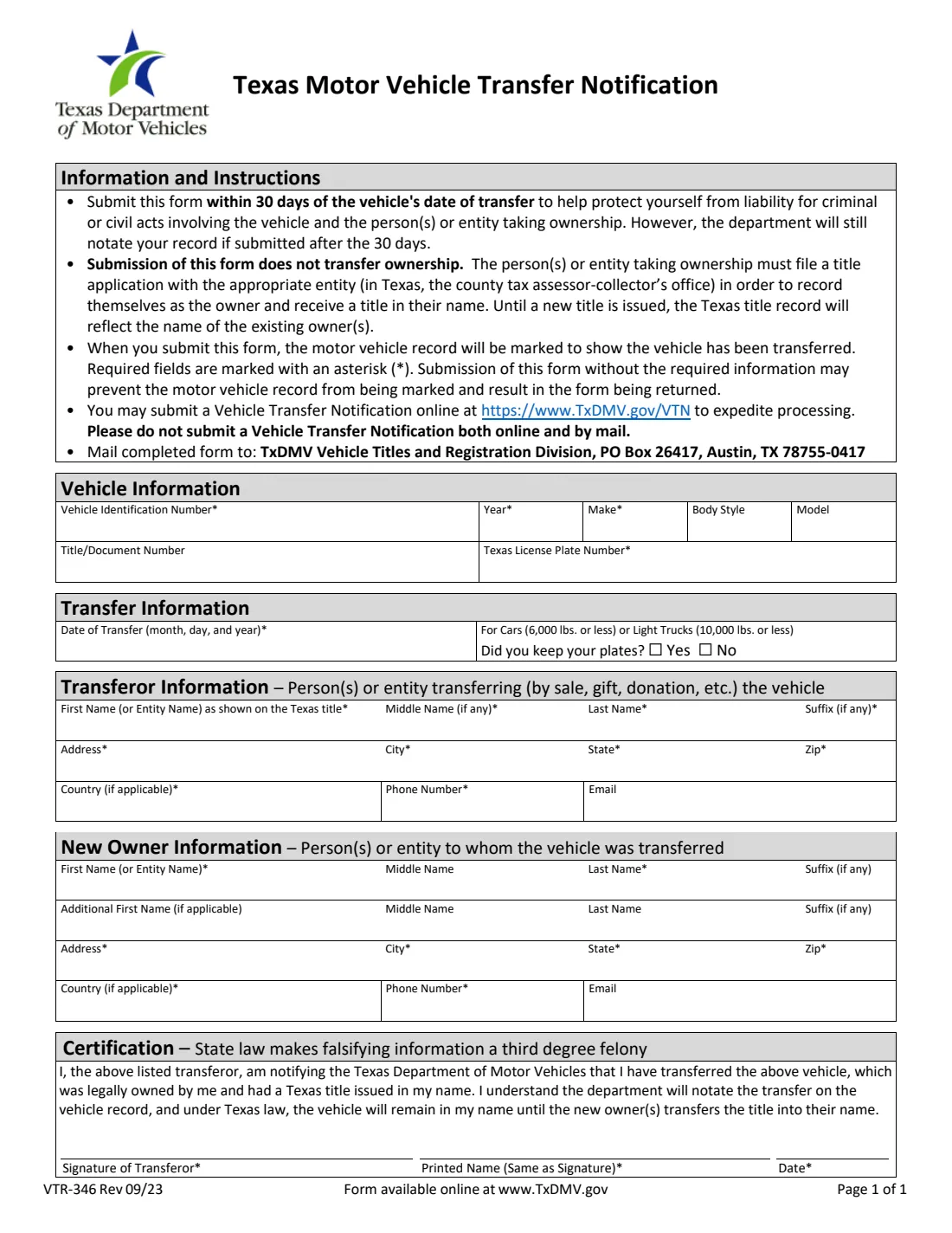
When you sell, trade, gift or donate a vehicle that has a Texas title in your name, the title stays in your name until the new owner applies for one. Until then, the Texas record still points at you. Form VTR-346, the Motor Vehicle Transfer Notification from the Texas Department of Motor Vehicles, lets you tell TxDMV the vehicle has been transferred. The form says the motor vehicle record will then be marked to show the transfer, which helps protect you from liability for criminal or civil acts involving the vehicle and the person or entity who took it.
It is a one-page form with four parts: the vehicle (VIN, year, make, body style, model, title number and Texas plate), the transfer (date and whether you kept the plates), the transferor, which is you, and the new owner, plus a short certification you sign. The form is clear that submitting it does not transfer ownership. The buyer still has to file a title application, in Texas with the county tax assessor-collector's office. The current edition is VTR-346 Rev 09/23.
FileIt lets you fill in the notice online with your name pre-filled from the person in your vault, prints each answer under its own heading on TxDMV's PDF, and saves the result in your vault so you have proof of what you sent. TxDMV also accepts the notice online. Pick one: the form asks you not to submit it both online and by mail. FileIt doesn't submit anything for you.
- Who fills it
- The transferor: the person or entity who sold, traded, gifted or donated the vehicle.
- Sent to
- TxDMV Vehicle Titles and Registration Division, PO Box 26417, Austin, TX 78755-0417 (the address printed on the form), or online instead.
- Deadline
- Within 30 days of the date of transfer. The form says TxDMV will still notate the record if it arrives later.
- Signatures
- The transferor signs and prints their name, which must match the signature.
- Edition
- VTR-346 Rev 09/23
- Cost
- The form lists no fee.
Who needs to fill out Form VTR-346?
- Private sellers who sold a car, truck or motorcycle titled in Texas in their name.
- People who gave a vehicle to a family member or friend, or donated it to a charity.
- Owners who traded a vehicle in privately or handed it over to settle a debt.
- Businesses and other entities that transferred a vehicle titled in the entity's name.
- Anyone who sold a vehicle and is waiting for the buyer to title it, and wants the record to show the transfer meanwhile.
When to use Form VTR-346
- Right after the vehicle changes hands, and within 30 days of the date of transfer.
- When the buyer hasn't yet applied for a new title, which is the gap this notice is meant to cover.
- If you prefer paper to TxDMV's online Vehicle Transfer Notification. Use one or the other, not both.
- Late is still worth doing: the form says the department will still notate your record after the 30 days.
What you need before you start
- The vehicle's VIN, model year and make, plus body style and model if you have them.
- The title or document number and the Texas license plate number.
- The date of transfer, and for a car of 6,000 lbs. or less or a light truck of 10,000 lbs. or less, whether you kept the plates.
- Your name exactly as shown on the Texas title, your address and phone number.
- The new owner's full name (and a second owner's, if there is one), address and phone number.
- An email address for each side is optional.
What’s on Form VTR-346
The 2023 edition has 1 page. FileIt asks for it in 5 parts, and it is signed by Transferor (seller):
- Vehicle informationTransferor (seller)
- Transfer informationTransferor (seller)
- Transferor informationTransferor (seller)
- New owner informationTransferor (seller)
- CertificationTransferor (seller)
How to fill out Form VTR-346, step by step
1 Vehicle information
Enter the vehicle identification number, year and make, which the form marks as required, and the body style and model if you know them. Add the title or document number from the title and the Texas license plate number, which is also required. FileIt prints the VIN and plate in capitals.
2 Transfer information
Give the date of transfer as the day the vehicle changed hands. For cars of 6,000 lbs. or less and light trucks of 10,000 lbs. or less, the form also asks whether you kept your plates: answer yes or no.
3 Transferor information
This is you, the person or entity transferring the vehicle. The first name, or the entity's name, must be as shown on the Texas title, followed by middle name, last name and any suffix. Then your address, city, state and ZIP, a country if you live outside the U.S., your phone number and, if you like, an email.
4 New owner information
Enter the person or entity the vehicle went to. There's a second name line for an additional new owner, such as a spouse buying together. Their address and phone number are required, and the email is optional.
5 Certification and signature
By signing, you state that you transferred the vehicle, that it was legally owned by you and had a Texas title in your name, and you acknowledge that under Texas law it stays in your name until the new owner titles it. Print your name the same way you sign, add the date, and sign. FileIt prints the name and date and can send the PDF for e-signature.
Common mistakes to avoid
- Thinking the notice transfers ownership. It only marks the record; the buyer must still apply for a title.
- Sending the notice both online and by mail, which the form asks you not to do.
- Leaving out a required field marked with an asterisk, which the form warns may stop the record being marked and get the form returned.
- Writing your name differently from how it appears on the Texas title.
- Mistyping the VIN. Check it letter by letter against the title.
- Using a printed name that doesn't match your signature.
- Waiting months to send it, when the protection is meant to start right after the transfer.
After you fill it out
Sign the form and mail it to TxDMV Vehicle Titles and Registration Division, PO Box 26417, Austin, TX 78755-0417, the address on the form. Don't also submit the same transfer online.
Keep the copy FileIt saves in your vault together with any bill of sale, so you have a record of the date and the buyer if questions come up later.
Remind the new owner that they still need to file a title application with their county tax assessor-collector's office. Until they do, the Texas title record continues to show you as the owner.
Fill out Form VTR-346 online with FileIt
- Pick the person. Choose someone from People and FileIt fills in their name, date of birth, address and other details it already knows.
- Answer plain-language questions. One part of the form at a time, with the official help text beside each question — 39 fields in all. Your answers save as you go.
- Check the live preview. Watch your answers land on the real Texas Department of Motor Vehicles (TxDMV) form, and let FileIt do any worksheet arithmetic.
- Generate the official PDF. FileIt prints your answers into the agency’s own PDF and files it in that person’s folder in your vault. Sign it, or send it for e-signature.
FileIt fills the form — it never files or submits anything for you. Deliver the finished form to whoever asked for it, the way the form’s instructions say.
Start Form VTR-346 now — it’s freeForm VTR-346: frequently asked questions
What is Form VTR-346?
It's TxDMV's Motor Vehicle Transfer Notification. A seller or other transferor uses it to tell the department that a Texas-titled vehicle has changed hands, so the vehicle record is marked as transferred.
Does Form VTR-346 transfer the title to the buyer?
No. The form says plainly that submitting it does not transfer ownership. The buyer has to file a title application, in Texas with the county tax assessor-collector's office.
How long do I have to send it?
The form asks for it within 30 days of the date of transfer. It also says the department will still notate your record if it's submitted after the 30 days.
Can I submit the transfer notification online instead?
Yes, the form points to TxDMV's online Vehicle Transfer Notification. It asks you not to submit the same notification both online and by mail, so choose one.
Do I need to fill this out if I gave the car away?
The form covers transfers by sale, gift, donation and similar, so a gift counts as a transfer too.
Can I fill out Form VTR-346 online with FileIt?
Yes. FileIt guides you through each part, prints your answers into TxDMV's official PDF and saves it in your vault. You sign it, by hand or e-signature, and mail it yourself.
Official sources
- Blank form (PDF), published by Texas Department of Motor Vehicles (TxDMV): https://www.txdmv.gov/sites/default/files/form_files/VTR-346.pdf
- Official instructions and guidance: https://www.txdmv.gov/motorists/buying-or-selling-a-vehicle
- Edition shown on this page: VTR-346 Rev 09/23 (checked 2026-10-19).
FileIt is not affiliated with or endorsed by Texas Department of Motor Vehicles (TxDMV) or any government. This page explains the form in general terms and is not legal, tax or immigration advice. Always read the official instructions, and check that you are using the edition the recipient accepts. Page last reviewed 2026-10-19.