What is Form VSA 17A?
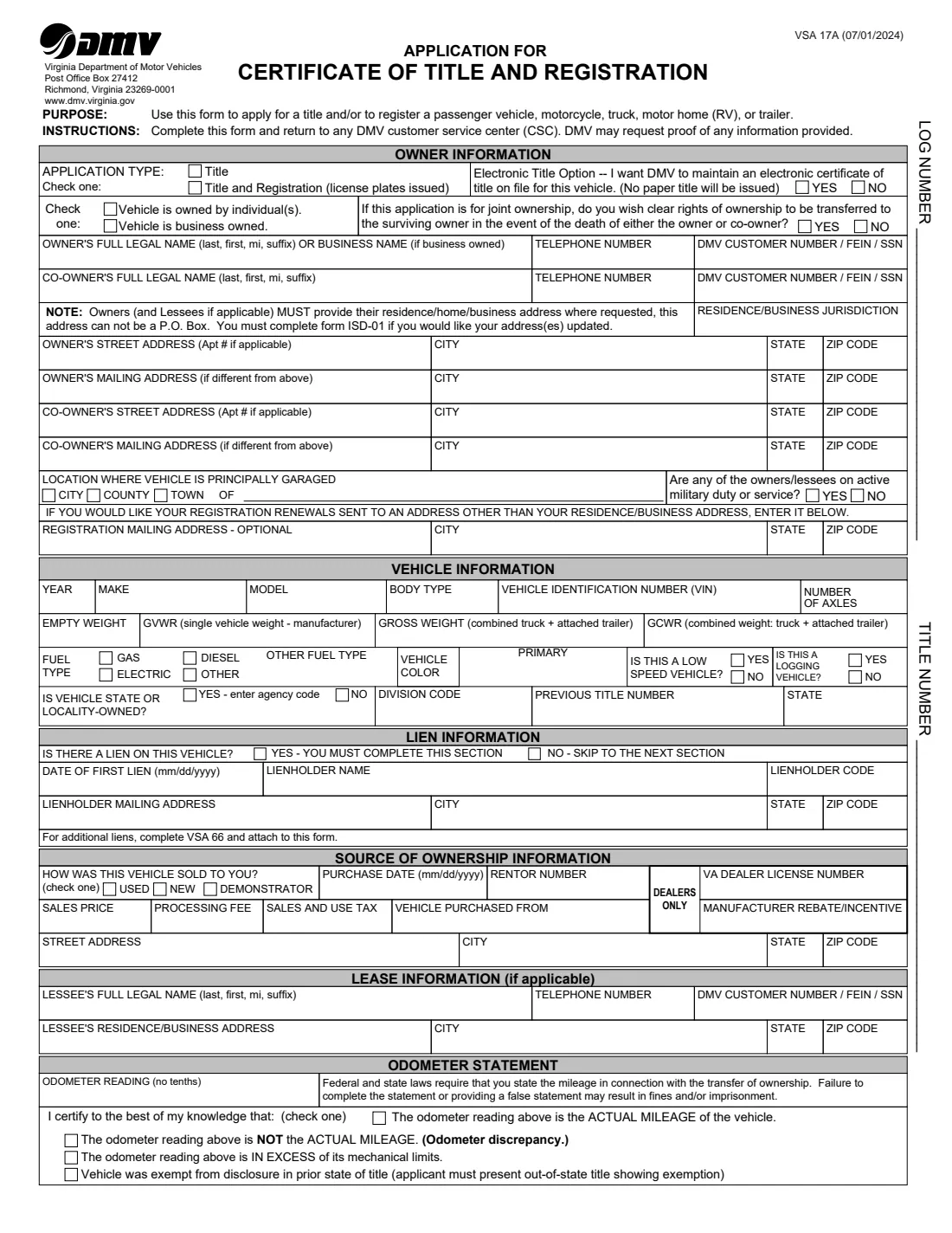
Whether you bought a car from a private seller, moved to Virginia with a vehicle titled elsewhere, or need a new title after a change in ownership, the Virginia Department of Motor Vehicles uses Form VSA 17A, the Application for Certificate of Title and Registration. It works for passenger vehicles, motorcycles, trucks, motor homes (RVs) and trailers. You complete it and take it to any DMV customer service center, and DMV may ask for proof of anything on it. The current edition is VSA 17A (07/01/2024).
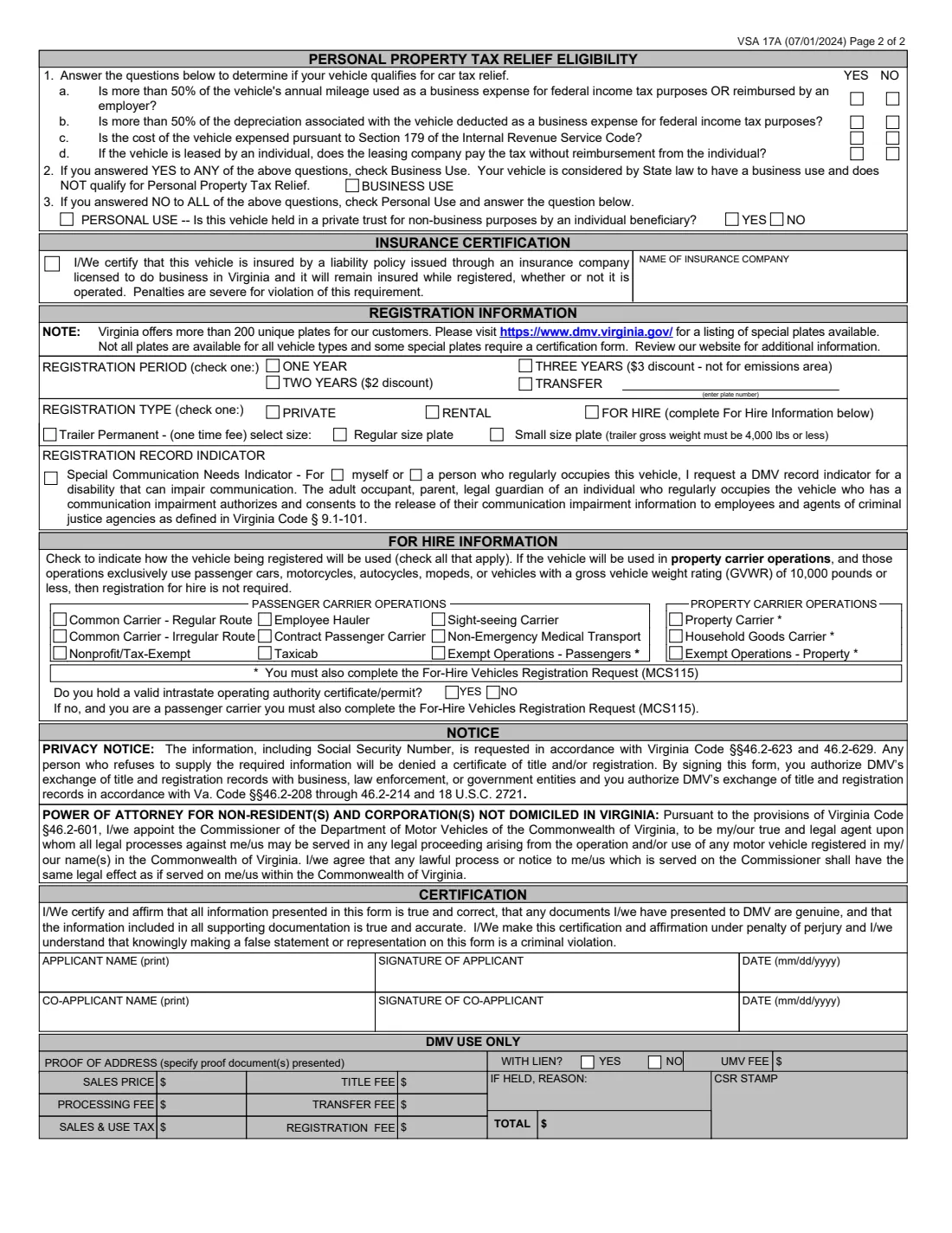
Page 1 asks whether you want a title only or a title with plates, whether DMV should keep an electronic title instead of mailing a paper one, and who owns the vehicle: one or two individuals or a business, with addresses that can't be a P.O. Box, and the survivorship choice for joint owners. It then covers where the vehicle is garaged, the vehicle details, any lien, how and from whom you bought it, any lease, and the odometer statement. Page 2 has four car tax relief questions that decide business or personal use, the insurance certification, the registration period and type, the special communication needs indicator, the for-hire section for commercial carriers, and the signatures.
FileIt walks you through each part, prints your name in the "last, first, mi" order the form asks for, and puts every answer in its box on DMV's own PDF, including the edition line the PDF only shows in some readers. The finished form is saved in your vault and can be sent for e-signature. You take it to DMV yourself, since FileIt never files anything with DMV.
- Who fills it
- The owner (applicant), plus a co-owner or lessee where they apply.
- Submitted to
- Any Virginia DMV customer service center (the form's instructions).
- Covers
- Passenger vehicles, motorcycles, trucks, motor homes (RVs) and trailers.
- Signatures
- The applicant and any co-applicant print their names, sign and date page 2.
- Edition
- VSA 17A (07/01/2024)
- Extra liens
- Use form VSA 66 for liens beyond the first one.
Who needs to fill out Form VSA 17A?
- Buyers of a vehicle from a private seller in Virginia.
- New Virginia residents titling and registering a vehicle from another state.
- Couples or family members titling a vehicle together who want to choose survivorship rights.
- Businesses titling company vehicles, and lessees of leased vehicles.
- Owners of trucks, trailers and motor homes, including for-hire passenger and property carriers.
- Anyone who wants an electronic title held by DMV instead of a paper one.
When to use Form VSA 17A
- After buying a vehicle, to put the title in your name, with or without plates.
- When moving to Virginia and bringing a vehicle titled in another state.
- When transferring your existing Virginia plates to a different vehicle.
- When a lien needs to be recorded on the new title.
- When registering a vehicle for hire or as a rental, together with any other forms the for-hire section points to.
What you need before you start
- Each owner's full legal name, phone number, and DMV customer number, FEIN or SSN.
- The residence or business address (not a P.O. Box), the Virginia jurisdiction, and where the vehicle is garaged.
- The vehicle's year, make, model, body type, VIN, color, fuel type, axles and weights if they apply.
- Any previous title number and its state, and the lienholder's name, address and lien date if there's a loan.
- The purchase date, price and seller's name and address, and the odometer reading.
- Your insurance company's name if you're registering, and the registration period and type you want.
What’s on Form VSA 17A
The 2024 edition has 2 pages. FileIt asks for it in 14 parts, and it is signed by Applicant and Co-applicant:
- Application typeApplicant
- OwnerApplicant
- Co-ownerApplicant
- Where the vehicle is keptApplicant
- Vehicle informationApplicant
- Lien informationApplicant
- Source of ownershipApplicant
- Lease informationApplicant
- Odometer statementApplicant
- Personal property tax relief eligibilityApplicant
- Insurance certificationApplicant
- Registration informationApplicant
- For hire informationApplicant
- CertificationApplicant
How to fill out Form VSA 17A, step by step
1 Application type and owners
Choose title only, or title and registration with plates, and say yes or no to an electronic title held by DMV. Tick whether the vehicle is owned by individuals or a business. Give the owner's full legal name (last, first, mi, suffix) or the business name, phone, DMV customer number, FEIN or SSN, the residence jurisdiction and addresses. Add the co-owner if there is one, and for joint ownership, whether the surviving owner should get clear rights of ownership.
2 Garaging and renewals
Give the city, county or town where the vehicle is principally garaged, and say whether any owner or lessee is on active military duty. If you want renewal notices sent somewhere other than your residence or business, add a registration mailing address.
3 Vehicle and lien
Enter the year, make, model, body type and VIN, the number of axles and weights for trucks and trailers, the primary fuel type and color. Answer whether it's a low speed vehicle, a logging vehicle, or state or locality owned, and give any previous title number and state. If there's a lien, enter the date of the first lien, the lienholder's name, code and mailing address.
4 Source of ownership, lease and odometer
Say whether the vehicle was sold to you used, new or as a demonstrator, the purchase date and price, any processing fee and sales and use tax, and who you bought it from. Complete the lease section if the vehicle is leased. Then give the odometer reading without tenths and tick the one statement that's true: actual mileage, not actual mileage, in excess of mechanical limits, or exempt in the prior state.
5 Car tax relief and insurance
Answer the four questions about business mileage, depreciation, Section 179 expensing and lease tax payments. Any yes means business use; all no means personal use, followed by the private trust question. To register, certify that the vehicle is insured by a liability policy from a company licensed in Virginia and give the company's name.
6 Registration, for hire and signatures
Pick a one, two or three year registration, or a transfer of existing plates, and the registration type: private, rental or for hire. Trailers can get a permanent plate in regular or small size. You can ask for the special communication needs indicator. For-hire carriers tick their type of operations and answer the operating authority question. Finally, print your name, sign and date, and so does any co-applicant.
Common mistakes to avoid
- Giving a P.O. Box as the residence or business address, which the form says it can't be.
- Writing the owner's name in the wrong order: the form asks for last, first, middle initial, suffix.
- Ticking Personal Use after answering yes to one of the car tax relief questions.
- Leaving the lien section blank when there's a loan, or listing a second lien here instead of on VSA 66.
- Ticking more than one odometer statement, or giving the reading with tenths.
- Asking for plates without certifying insurance.
- Forgetting the co-owner's signature when two people will own the vehicle.
After you fill it out
Sign and date the form, and have any co-applicant do the same. Take it to a Virginia DMV customer service center with the current title or certificate of origin, proof of address and any other documents DMV asks for. FileIt saves the filled PDF in your vault.
DMV collects the title fee and any registration, transfer and sales and use tax at the counter. Those figures go in the DMV Use Only box, which stays blank on your copy.
If you chose an electronic title, DMV keeps it on file and no paper title is mailed. Otherwise watch for the title in the mail, and keep a scan of it in your FileIt vault.
Fill out Form VSA 17A online with FileIt
- Pick the person. Choose someone from People and FileIt fills in their name, date of birth, address and other details it already knows.
- Answer plain-language questions. One part of the form at a time, with the official help text beside each question — 123 fields in all. Your answers save as you go.
- Check the live preview. Watch your answers land on the real Virginia Department of Motor Vehicles (DMV) form, and let FileIt do any worksheet arithmetic.
- Generate the official PDF. FileIt prints your answers into the agency’s own PDF and files it in that person’s folder in your vault. Sign it, or send it for e-signature.
FileIt fills the form — it never files or submits anything for you. Deliver the finished form to whoever asked for it, the way the form’s instructions say.
Start Form VSA 17A now — it’s freeForm VSA 17A: frequently asked questions
What is Virginia Form VSA 17A?
It's the Virginia DMV Application for Certificate of Title and Registration, used to title a vehicle and, if you choose, register it and get license plates.
Can I get a title without registering the vehicle?
Yes. The application type at the top lets you choose Title only, or Title and Registration with license plates.
What is the electronic title option?
If you choose it, DMV keeps an electronic certificate of title on file for the vehicle and no paper title is issued.
How do the car tax relief questions work?
If you answer yes to any of the four questions, the vehicle has a business use under Virginia law and doesn't qualify for Personal Property Tax Relief. If you answer no to all four, you check Personal Use.
Where do I submit Form VSA 17A?
The instructions say to complete it and return it to any DMV customer service center.
Can I fill out Form VSA 17A online?
Yes. FileIt guides you through both pages and prints your answers into DMV's official PDF, saved in your vault. You sign it and take it to DMV yourself.
Official sources
- Blank form (PDF), published by Virginia Department of Motor Vehicles (DMV): https://www.dmv.virginia.gov/sites/default/files/forms/vsa17a.pdf
- Official instructions and guidance: https://www.dmv.virginia.gov/vehicles/title
- Edition shown on this page: VSA 17A (07/01/2024) (checked 2026-10-19).
FileIt is not affiliated with or endorsed by Virginia Department of Motor Vehicles (DMV) or any government. This page explains the form in general terms and is not legal, tax or immigration advice. Always read the official instructions, and check that you are using the edition the recipient accepts. Page last reviewed 2026-10-19.