What is Form SSA-131?
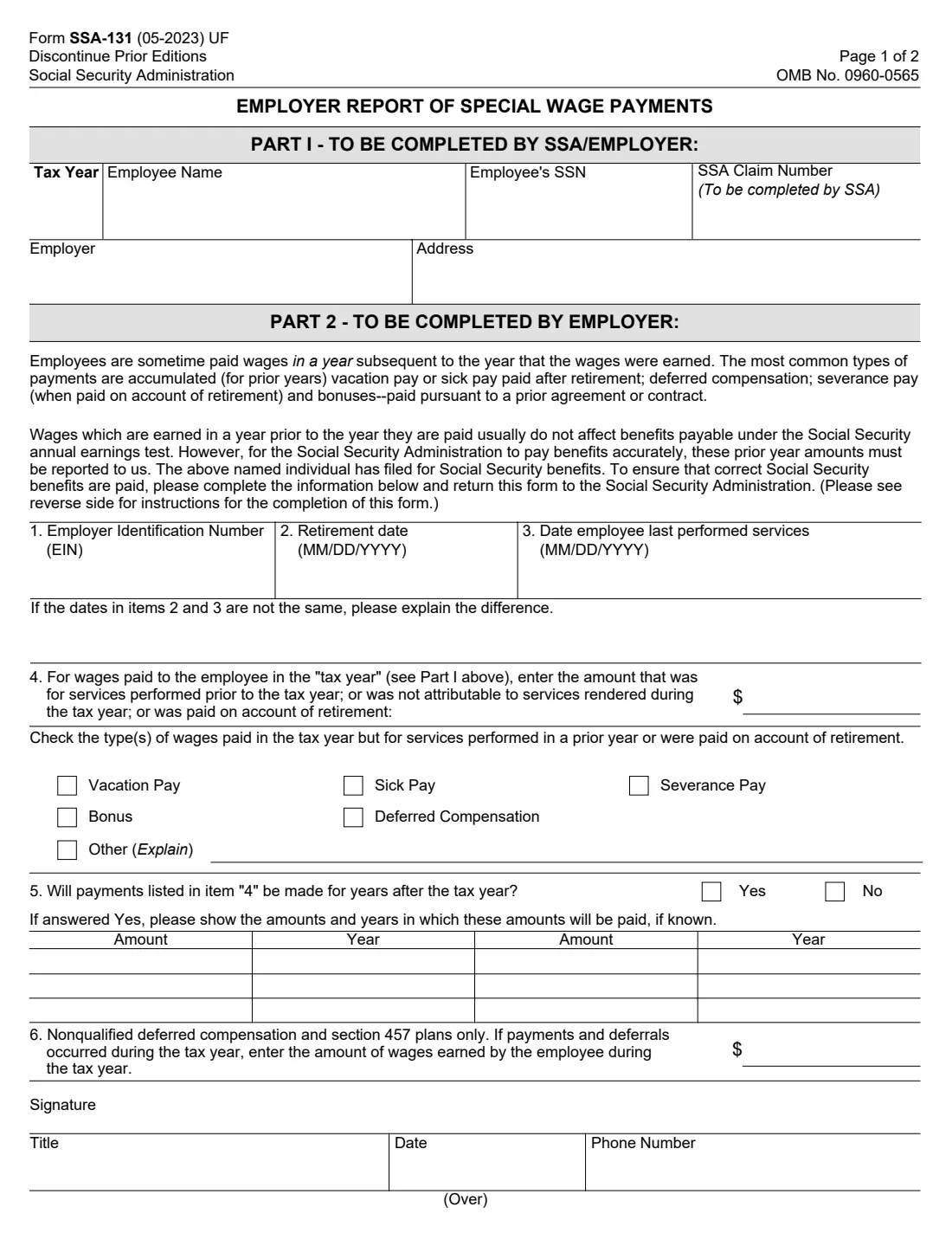
Employees are sometimes paid wages in a year after the year they earned them: accumulated vacation or sick pay paid after retirement, deferred compensation, severance pay on account of retirement, and bonuses paid under a prior agreement or contract. Social Security calls these special wage payments.
Wages earned in an earlier year usually don't affect benefits under Social Security's annual earnings test, but SSA can only leave them out if it knows about them. When an employee or former employee files for benefits, SSA asks the employer to complete Form SSA-131 and return it: the employer's EIN, the retirement date and the last day worked, the amount of special payments in the tax year and their types, any payments due in later years, and, for nonqualified deferred compensation and section 457 plans, the wages actually earned in the tax year.
FileIt walks the employer through Part 2 with the form's own instructions alongside, prints "Not Retired" where the instructions ask for it, checks the dates and years, and saves SSA's official PDF in your vault, ready to sign with FileIt eSignature. You return it to Social Security yourself.
- Who fills it
- The employer (Part 2), after SSA completes Part I or the employer fills it in.
- Sent to
- The Social Security Administration, as the request that came with it says.
- When
- When SSA asks, usually after the employee has filed for Social Security benefits.
- Signatures
- Someone authorized to sign for the employer, with title, date and phone number.
- Edition
- Form SSA-131 (05-2023)
- Agency
- Social Security Administration (SSA)
Who needs to fill out Form SSA-131?
- Employers whose retired or retiring employee has filed for Social Security benefits and who received an SSA-131 request.
- Payroll and HR departments paying out accrued vacation or sick leave after retirement.
- Employers paying severance, dismissal or termination pay because of retirement.
- Employers paying bonuses under a prior contract or promise, or deferred compensation, including nonqualified and section 457 plans.
When to use Form SSA-131
- When Social Security sends you the form about an employee who has filed for benefits.
- For the tax year shown in Part I: one report for each year SSA asks about.
- When you know of payments for the same services that will be made in later years (item 5).
What you need before you start
- The employee's name and SSN, and the tax year, as on the form SSA sent.
- The EIN used to report the employee's wages on Form W-2.
- The retirement date and the date the employee last performed services, or that the employee hasn't retired.
- Payroll records of what was paid in the tax year for services in earlier years or on account of retirement, by type.
- Any amounts and years of future payments, and for nonqualified or section 457 plans, the wages earned in the tax year.
- The name, title and phone number of the person signing.
What’s on Form SSA-131
The 2023 edition has 2 pages. FileIt asks for it in 6 parts, and it is signed by Employer:
- Part I: Employee and employerEmployer
- Part 2: Items 1–3Employer
- Item 4: Special wage payments in the tax yearEmployer
- Item 5: Payments in later yearsEmployer
- Item 6: Nonqualified deferred compensation and section 457 plansEmployer
- SignatureEmployer
How to fill out Form SSA-131, step by step
1 Part I: Employee and employer
SSA usually fills in the tax year, the employee's name and SSN, and assigns the claim number. Check them and add the employer's name and address.
2 Item 1: EIN
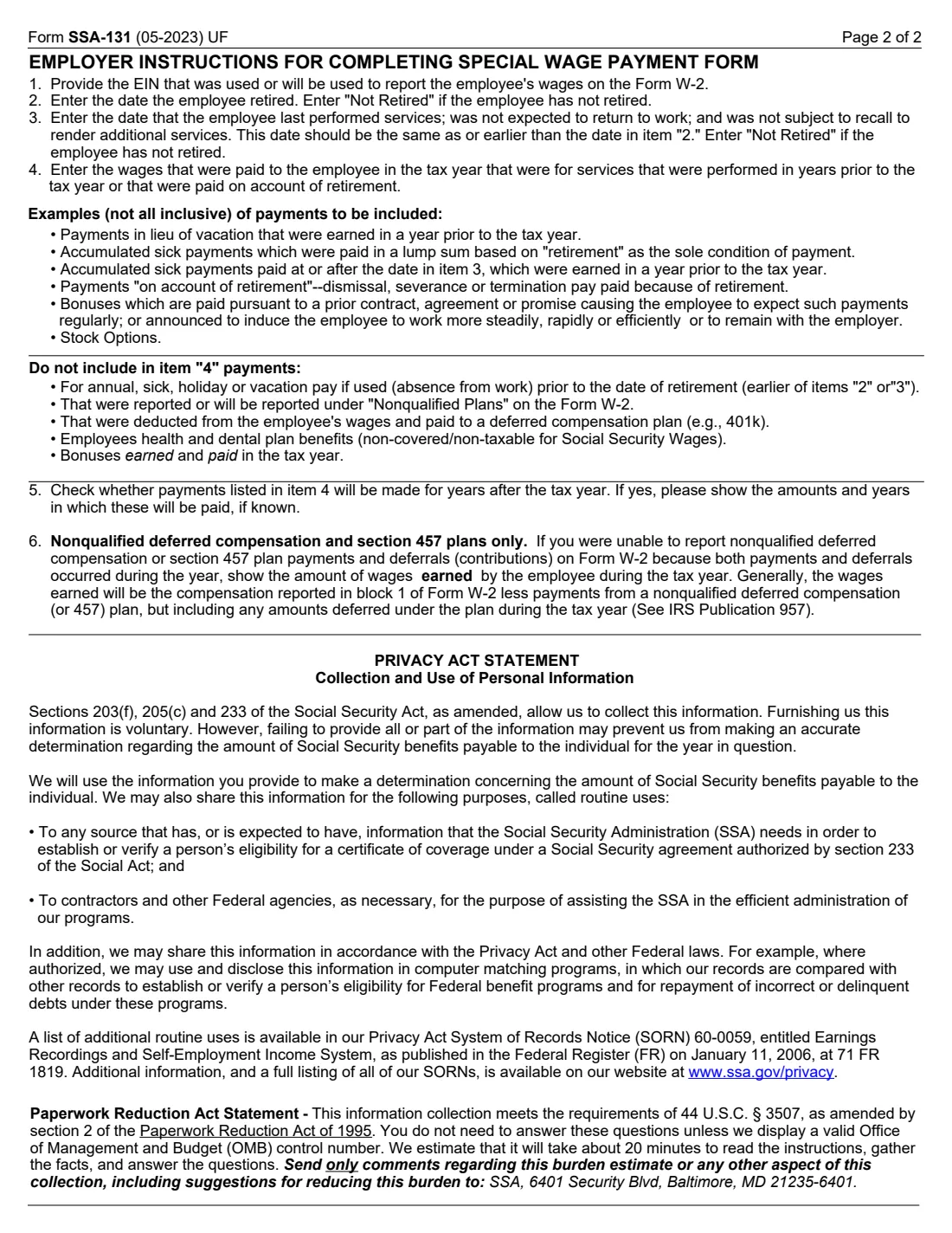
Enter the EIN that was used, or will be used, to report the employee's wages on Form W-2.
3 Items 2 and 3: Retirement and last day of work
Enter the date the employee retired, and the date the employee last performed services, wasn't expected to return to work and wasn't subject to recall. The second date should be the same as or earlier than the first. Enter "Not Retired" in both if the employee hasn't retired. If the dates differ, explain why, for example accrued leave used before the retirement date.
4 Item 4: Special wage payments
Enter the wages paid in the tax year for services in earlier years or paid on account of retirement, and check each type: vacation pay, sick pay, severance pay, bonus, deferred compensation or other (explain). The instructions list examples to include (such as payments in lieu of vacation earned before the tax year, retirement severance, stock options) and to leave out (such as leave used before retirement, amounts reported under Nonqualified Plans on Form W-2, 401(k) deferrals, health and dental benefits, and bonuses earned and paid in the tax year).
5 Item 5: Later payments
Say whether payments listed in item 4 will be made for years after the tax year, and if so show the amounts and years, if known.
6 Item 6: Nonqualified deferred compensation and section 457 plans
Only if payments and deferrals both happened in the tax year, so you couldn't report them on Form W-2: enter the wages the employee earned in the tax year. Generally that's Form W-2 box 1 compensation less payments from the plan, plus amounts deferred under the plan in the tax year (see IRS Publication 957).
7 Signature
The person reporting for the employer signs and adds a title, the date and a phone number SSA can call with questions.
Common mistakes to avoid
- Including leave the employee used before retiring, or bonuses earned and paid in the same tax year.
- Including 401(k) deferrals or amounts already reported under Nonqualified Plans on Form W-2.
- Giving a last-worked date that's later than the retirement date.
- Leaving the dates blank for an employee who hasn't retired, instead of writing "Not Retired".
- Forgetting to check the type of each payment in item 4.
- Not mentioning payments due in later years in item 5.
After you fill it out
Sign it (by hand or with FileIt eSignature) and return it to the Social Security office that asked for it.
SSA uses it to work out the employee's benefits for the year. Furnishing it is voluntary, but the form says that without it SSA may not be able to determine the benefit accurately.
FileIt keeps the finished PDF in your vault as the employer's record.
Fill out Form SSA-131 online with FileIt
- Pick the person. Choose someone from People and FileIt fills in their name, date of birth, address and other details it already knows.
- Answer plain-language questions. One part of the form at a time, with the official help text beside each question — 34 fields in all. Your answers save as you go.
- Check the live preview. Watch your answers land on the real Social Security Administration (SSA) form, and let FileIt do any worksheet arithmetic.
- Generate the official PDF. FileIt prints your answers into the agency’s own PDF and files it in that person’s folder in your vault. Sign it, or send it for e-signature.
FileIt fills the form — it never files or submits anything for you. Deliver the finished form to whoever asked for it, the way the form’s instructions say.
Start Form SSA-131 now — it’s freeForm SSA-131: frequently asked questions
What are special wage payments?
Wages paid in a year after they were earned, or paid because the employee retired: for example accumulated vacation or sick pay paid after retirement, deferred compensation, retirement severance pay and bonuses paid under a prior agreement.
Why does Social Security need this?
Wages earned in an earlier year usually don't count under the annual earnings test. SSA needs the employer's report to leave them out and pay the right benefit.
Who fills out Form SSA-131?
The employer. SSA usually fills in Part I and asks the employer to complete Part 2 and return the form.
What if the employee hasn't retired?
Enter "Not Retired" for the retirement date and the date last worked, as the instructions say.
Does the employee sign it?
No. Someone authorized to report for the employer signs it, with a title, the date and a phone number.
Can I fill out Form SSA-131 with FileIt?
Yes. FileIt prints the answers into SSA's official PDF and saves it in your vault, ready to sign. You return it to Social Security yourself.
Official sources
- Blank form (PDF), published by Social Security Administration (SSA): https://www.ssa.gov/forms/ssa-131.pdf
- Official instructions and guidance: https://www.ssa.gov/forms/ssa-131.pdf
- Edition shown on this page: Form SSA-131 (05-2023) UF, OMB No. 0960-0565; discontinue prior editions (checked 2026-10-25).
FileIt is not affiliated with or endorsed by Social Security Administration (SSA) or any government. This page explains the form in general terms and is not legal, tax or immigration advice. Always read the official instructions, and check that you are using the edition the recipient accepts. Page last reviewed 2026-10-25.