What is Form IT-2104.1?
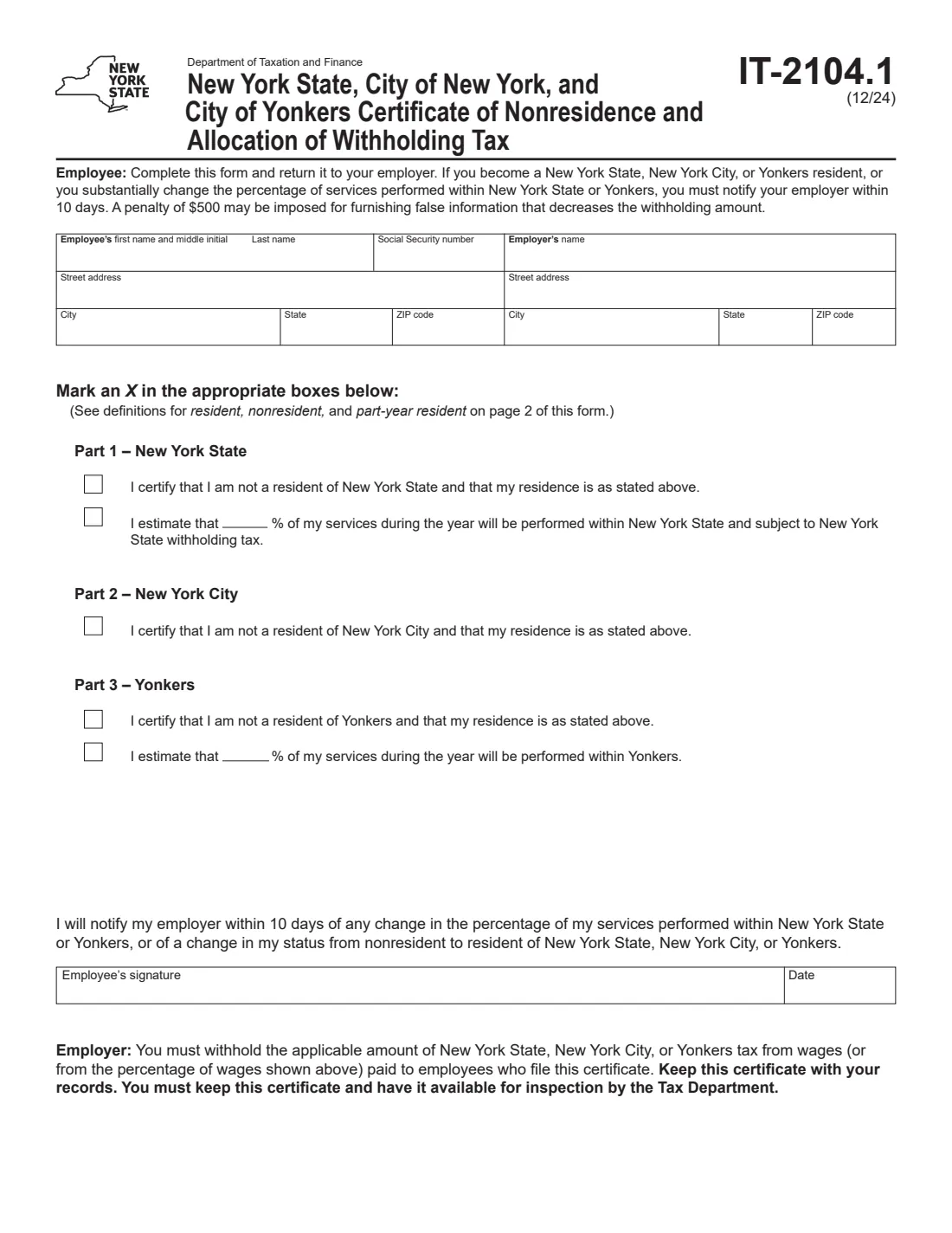
Form IT-2104.1 is the New York State Department of Taxation and Finance certificate employees use to say they are not residents of New York State, New York City or Yonkers. It sits alongside Form IT-2104: the IT-2104 sets allowances, while the IT-2104.1 tells the employer where you live and, if you work partly in New York State or Yonkers, what share of your work is done there.
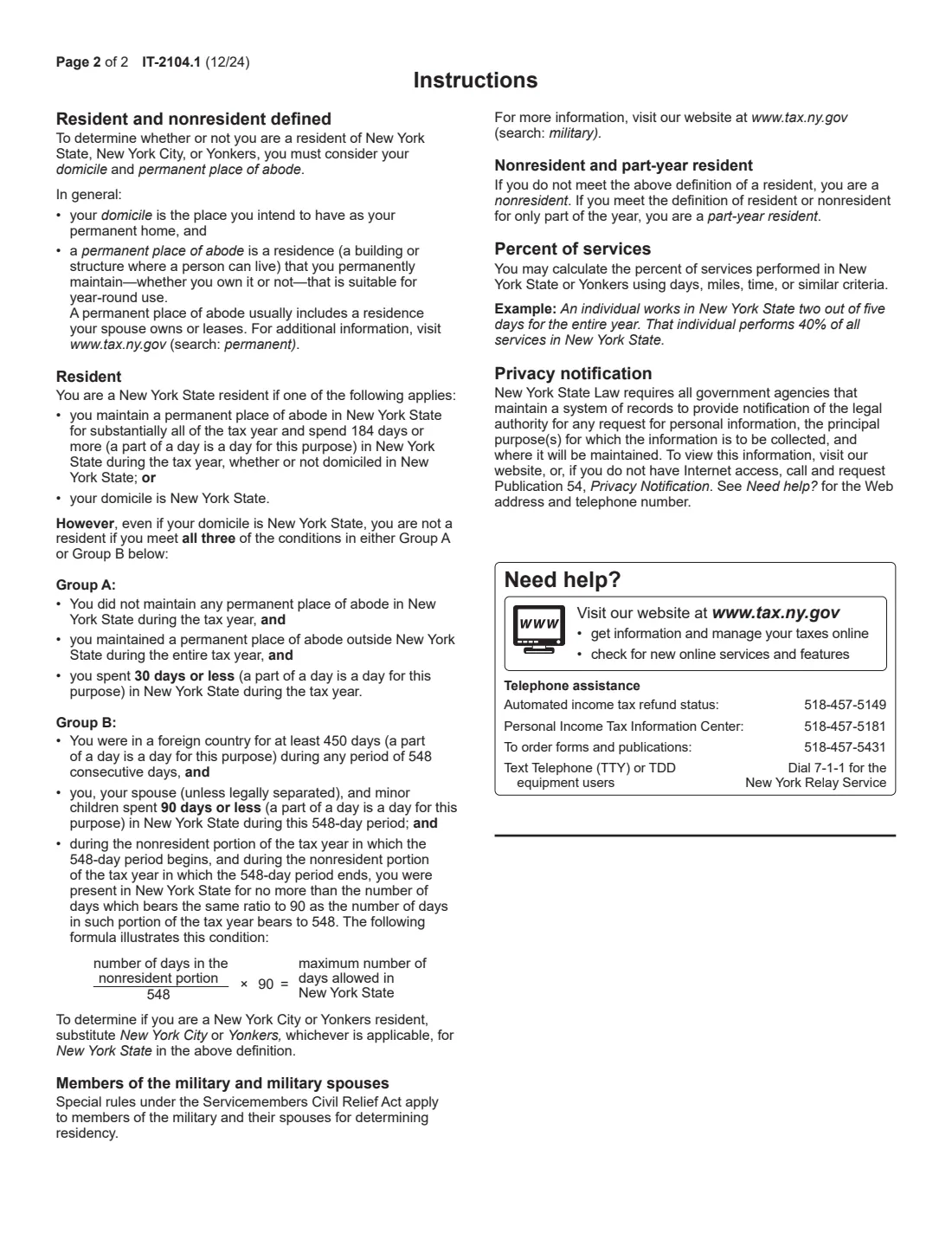
Nonresidents of New York City owe no city income tax, so Part 2 is a single certification. For New York State and Yonkers, nonresidents are taxed on the wages earned for work done there, so Parts 1 and 3 also let you estimate the percentage of your services performed in the state or in Yonkers, measured by days, miles, time or similar criteria. If you become a resident, or your percentage changes substantially, you must tell your employer within 10 days, and a $500 penalty may apply to false information that lowers your withholding.
FileIt lets you fill out the IT-2104.1 online. It pre-fills your name from the People records in your vault, checks that each allocation goes with its nonresident certification, and prints your answers on the Tax Department's own fill-in PDF. You can sign with FileIt's eSignature or by hand, and the filled form is saved in your vault. FileIt doesn't submit it: you give it to your employer.
- Who fills it
- The employee, who lives outside New York State, New York City or Yonkers.
- Given to
- Your employer, who keeps it on file for inspection by the Tax Department.
- Parts
- Part 1 New York State (with an optional percentage), Part 2 New York City, Part 3 Yonkers (with an optional percentage).
- Changes
- Tell your employer within 10 days of becoming a resident or of a substantial change in your percentage.
- Penalty
- $500 may be imposed for false information that decreases the withholding.
- Edition
- IT-2104.1 (12/24), two pages with the residency definitions.
Who needs to fill out Form IT-2104.1?
- Employees who commute into New York State from New Jersey, Connecticut, Pennsylvania or elsewhere.
- New York State residents who live outside New York City but work for an employer that withholds city tax.
- Nonresidents who do part of their work in Yonkers.
- Employees who split their working days between New York and another state and want withholding on the New York share only.
When to use Form IT-2104.1
- When you start a job with an employer that withholds New York tax and you don't live in New York State, New York City or Yonkers.
- When the share of your work done in New York State or Yonkers changes, for example after a move to more remote days.
- Within 10 days of becoming a resident, to tell your employer (by giving it updated forms).
What you need before you start
- Your name, Social Security number and home address.
- Your employer's name and address.
- An estimate of the percentage of your services during the year performed in New York State, and in Yonkers if that applies.
- Page 2's definitions of resident, nonresident and part-year resident, to check where you stand.
What’s on Form IT-2104.1
The 2024 edition has 2 pages. FileIt asks for it in 5 parts, and it is signed by Employee:
- Employee and employerEmployee
- Part 1 - New York StateEmployee
- Part 2 - New York CityEmployee
- Part 3 - YonkersEmployee
- SignatureEmployee
How to fill out Form IT-2104.1, step by step
1 You and your employer
Enter your first name and middle initial, last name, Social Security number and home address, then your employer's name and address.
2 Part 1: New York State
Mark the first box to certify you are not a New York State resident. If part of your work is done in the state, mark the second box and enter the percentage, for example 40 if you work two days out of five in New York.
3 Part 2: New York City
Mark the box if you aren't a resident of New York City. There is no allocation, because the city taxes residents only.
4 Part 3: Yonkers
Mark the first box if you aren't a Yonkers resident, and the second with a percentage if part of your work is performed in Yonkers.
5 Sign and date
You promise to notify your employer within 10 days of a change. FileIt prints the date; sign with FileIt's eSignature or by hand.
Common mistakes to avoid
- Claiming nonresidence while your domicile is still New York, or while you keep a home there and spend 184 days or more in the state.
- Entering an allocation percentage without also certifying nonresidence in that part.
- Not updating the form when your days in New York change.
- Sending it to the Tax Department instead of keeping it with your employer.
After you fill it out
Sign it and give it to your employer, which withholds New York State or Yonkers tax on the share you gave and keeps the certificate on file.
Keep a record of your days or hours worked in New York: your return's allocation is based on the actual figures.
FileIt keeps the filled PDF in your vault, so you can update it when your work pattern changes.
Fill out Form IT-2104.1 online with FileIt
- Pick the person. Choose someone from People and FileIt fills in their name, date of birth, address and other details it already knows.
- Answer plain-language questions. One part of the form at a time, with the official help text beside each question — 21 fields in all. Your answers save as you go.
- Check the live preview. Watch your answers land on the real New York State Department of Taxation and Finance form, and let FileIt do any worksheet arithmetic.
- Generate the official PDF. FileIt prints your answers into the agency’s own PDF and files it in that person’s folder in your vault. Sign it, or send it for e-signature.
FileIt fills the form — it never files or submits anything for you. Deliver the finished form to whoever asked for it, the way the form’s instructions say.
Start Form IT-2104.1 now — it’s freeForm IT-2104.1: frequently asked questions
What does Form IT-2104.1 do?
It certifies to your employer that you are not a resident of New York State, New York City or Yonkers, and lets you estimate the percentage of your work done in New York State or Yonkers so withholding matches that share.
How do I work out the percentage?
The instructions say you may use days, miles, time or similar criteria. Their example: working in New York State two out of five days for the whole year is 40%.
Why is there no percentage for New York City?
New York City income tax applies to residents. A nonresident only certifies nonresidence in Part 2.
Do I still need Form IT-2104?
Usually yes. Form IT-2104 sets your allowances and filing status; Form IT-2104.1 adds your residency and allocation.
What if I move to New York?
Tell your employer within 10 days of becoming a resident.
Can I fill out the IT-2104.1 online?
Yes. FileIt fills it out online and prints your answers on the official PDF. You sign it and give it to your employer; FileIt doesn't submit it.
Official sources
- Blank form (PDF), published by New York State Department of Taxation and Finance: https://www.tax.ny.gov/pdf/current_forms/it/it2104_1_fill_in.pdf
- Official instructions and guidance: https://www.tax.ny.gov/forms/current-forms/it/it2104_1.htm
- Edition shown on this page: IT-2104.1 (12/24) (checked 2026-10-19).
FileIt is not affiliated with or endorsed by New York State Department of Taxation and Finance or any government. This page explains the form in general terms and is not legal, tax or immigration advice. Always read the official instructions, and check that you are using the edition the recipient accepts. Page last reviewed 2026-10-19.