What is Form G-1450?
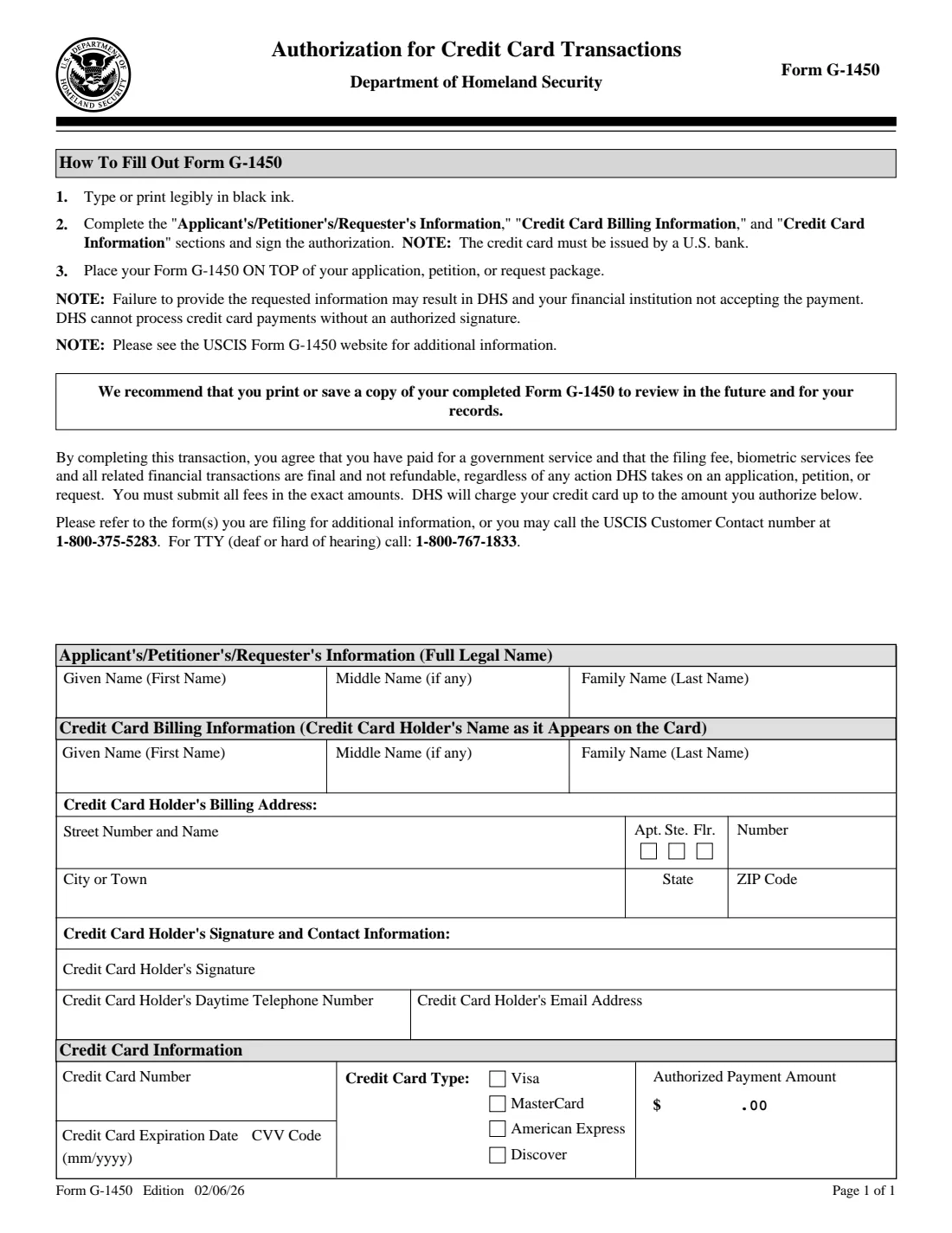
Form G-1450 authorizes the Department of Homeland Security to charge a credit card for the fees of an application, petition or request you mail to USCIS. It names the applicant, the cardholder as shown on the card and their billing address, the card type, and the amount you authorize. The cardholder signs it, and it goes on top of the package.
The 02/06/26 edition says the card must be issued by a U.S. bank, that DHS will charge up to the amount you authorize, and that the filing fee, biometric services fee and related transactions are final and not refundable whatever USCIS decides. It also warns that DHS can't process a card payment without an authorized signature.
FileIt fills the names, address, contact details, card type and amount onto the official PDF and saves it in the person's vault folder. It deliberately never asks for or stores the card number, expiration date or CVV: you write those three in by hand on the printed page before mailing.
- Who signs
- The credit card holder, who may be someone other than the applicant.
- Length
- 1 page, placed on top of the application, petition or request.
- Card
- Visa, MasterCard, American Express or Discover, issued by a U.S. bank.
- Refunds
- The form says fees paid are final and not refundable.
- Edition
- 02/06/26
- Agency
- U.S. Citizenship and Immigration Services (Department of Homeland Security)
Who needs to fill out Form G-1450?
- Anyone mailing a USCIS form who wants to pay the fee by credit card instead of check or money order.
- Parents or relatives paying the fees for someone else's application.
- Families sending several forms who want the fees charged to one card.
When to use Form G-1450
- With a paper filing that accepts card payment; the instructions of each form, and USCIS's G-1450 page, say where it can be used.
- When the card has enough available credit for the full fee: the form warns that failing to give the requested information can lead DHS or your bank to refuse the payment.
What you need before you start
- The applicant's, petitioner's or requester's full legal name.
- The cardholder's name exactly as on the card and the card's billing address.
- The cardholder's daytime phone and email.
- The exact total of the fees for the forms in the package.
- The card itself, to write in its number, expiration date and CVV by hand.
What’s on Form G-1450
The 2026 edition has 1 page. FileIt asks for it in 4 parts, and it is signed by Credit card holder:
- Applicant's, petitioner's or requester's informationCredit card holder
- Credit card billing informationCredit card holder
- Cardholder's signature and contact informationCredit card holder
- Credit card informationCredit card holder
How to fill out Form G-1450, step by step
1 Applicant's information
The full legal name of the person the filing is for. FileIt fills it from the person you picked.
2 Cardholder and billing address
If the applicant is the cardholder, tick the box and FileIt copies the name. Otherwise enter the cardholder's name as it appears on the card, then the street, apartment, suite or floor, city, state and ZIP of the billing address.
3 Contact and signature
The cardholder's daytime phone and email. The cardholder signs on the signature line, by hand or with the eSignature box.
4 Card type and amount
Choose the card network and enter the whole-dollar amount to charge; the form prints .00 after it. Then, on paper, write the card number, expiration date (mm/yyyy) and CVV in their boxes.
Common mistakes to avoid
- Authorizing an amount that doesn't match the total fees exactly.
- Using a card not issued by a U.S. bank.
- Forgetting to write in the card number, expiration date or CVV after printing.
- Leaving the authorization unsigned.
- Stapling it behind the package instead of placing it on top.
After you fill it out
Print the page, write in the card number, expiration date and CVV, sign, and place it on top of your application, petition or request.
Mail the package as the form's own instructions say.
USCIS recommends keeping a copy. FileIt keeps the filled page (without the card number) in the vault next to the application.
Fill out Form G-1450 online with FileIt
- Pick the person. Choose someone from People and FileIt fills in their name, date of birth, address and other details it already knows.
- Answer plain-language questions. One part of the form at a time, with the official help text beside each question — 17 fields in all. Your answers save as you go.
- Check the live preview. Watch your answers land on the real U.S. Citizenship and Immigration Services (USCIS) form, and let FileIt do any worksheet arithmetic.
- Generate the official PDF. FileIt prints your answers into the agency’s own PDF and files it in that person’s folder in your vault. Sign it, or send it for e-signature.
FileIt fills the form — it never files or submits anything for you. Deliver the finished form to whoever asked for it, the way the form’s instructions say.
Start Form G-1450 now — it’s freeForm G-1450: frequently asked questions
Can I pay USCIS fees with a credit card?
For many paper filings, yes: Form G-1450 authorizes DHS to charge a U.S.-issued credit card up to the amount you enter.
Why doesn't FileIt ask for my card number?
FileIt doesn't store card numbers, expiration dates or security codes. It prints everything else, and you add those by hand before mailing.
Can someone else pay with their card?
Yes. The form has separate sections for the applicant and the cardholder, and the cardholder signs.
Is the fee refundable if my case is denied?
The form says the filing fee, biometric services fee and related transactions are final and not refundable, regardless of any action DHS takes.
Where does the form go?
On top of your application, petition or request package, as item 3 of the form's instructions says.
Does FileIt submit the payment?
No. FileIt only fills the PDF. DHS processes the charge when it receives your package.
Official sources
- Blank form (PDF), published by U.S. Citizenship and Immigration Services (USCIS): https://www.uscis.gov/sites/default/files/document/forms/g-1450.pdf
- Official instructions and guidance: https://www.uscis.gov/g-1450
- Edition shown on this page: 02/06/26 (checked 2026-10-19).
FileIt is not affiliated with or endorsed by U.S. Citizenship and Immigration Services (USCIS) or any government. This page explains the form in general terms and is not legal, tax or immigration advice. Always read the official instructions, and check that you are using the edition the recipient accepts. Page last reviewed 2026-10-19.