What is Form CMS-1696?
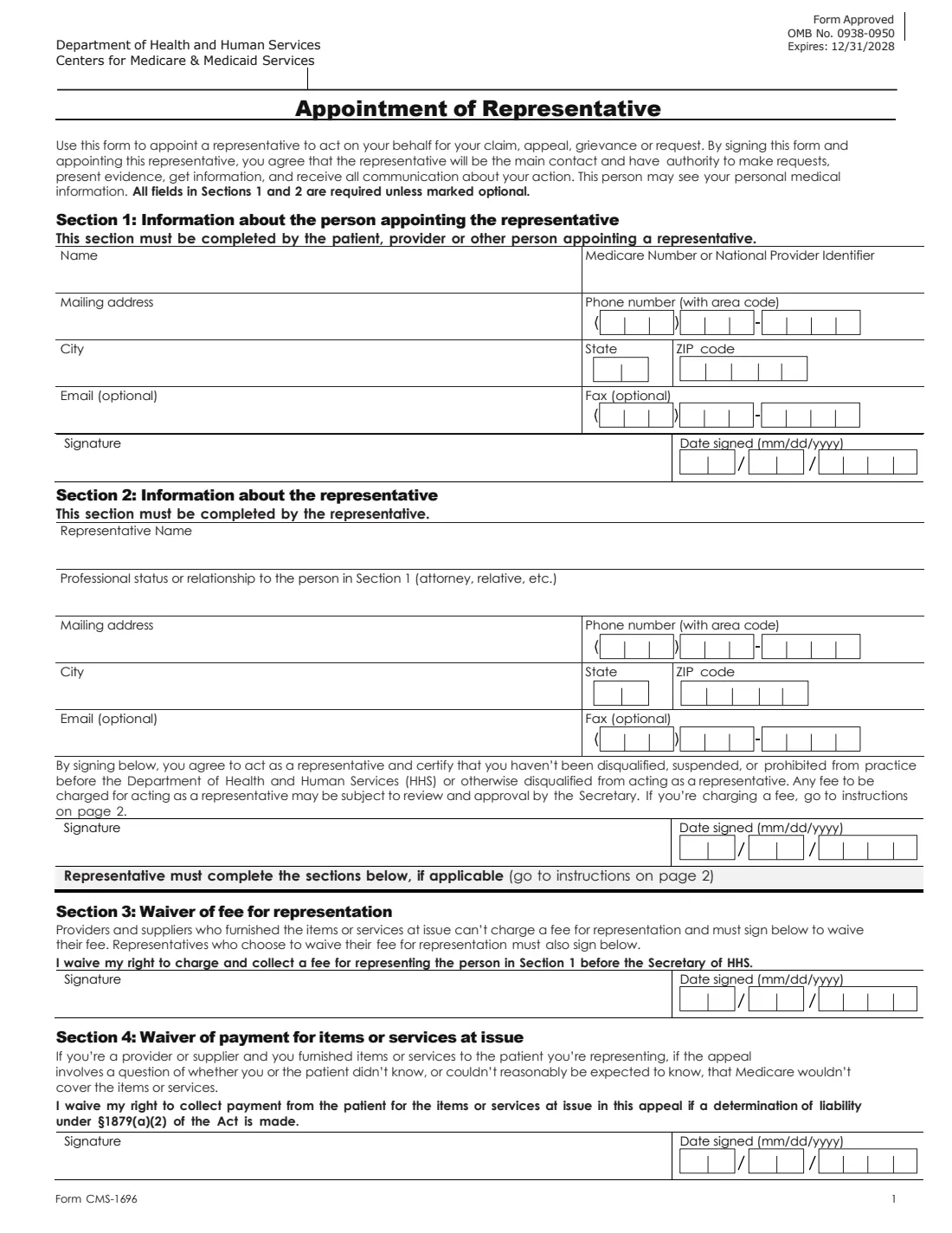
Form CMS-1696 appoints a representative to act on your behalf for your Medicare claim, appeal, grievance or request. The form says that by signing it you agree the representative will be the main contact and has authority to make requests, present evidence, get information and receive all communication about your action, and that they may see your personal medical information.
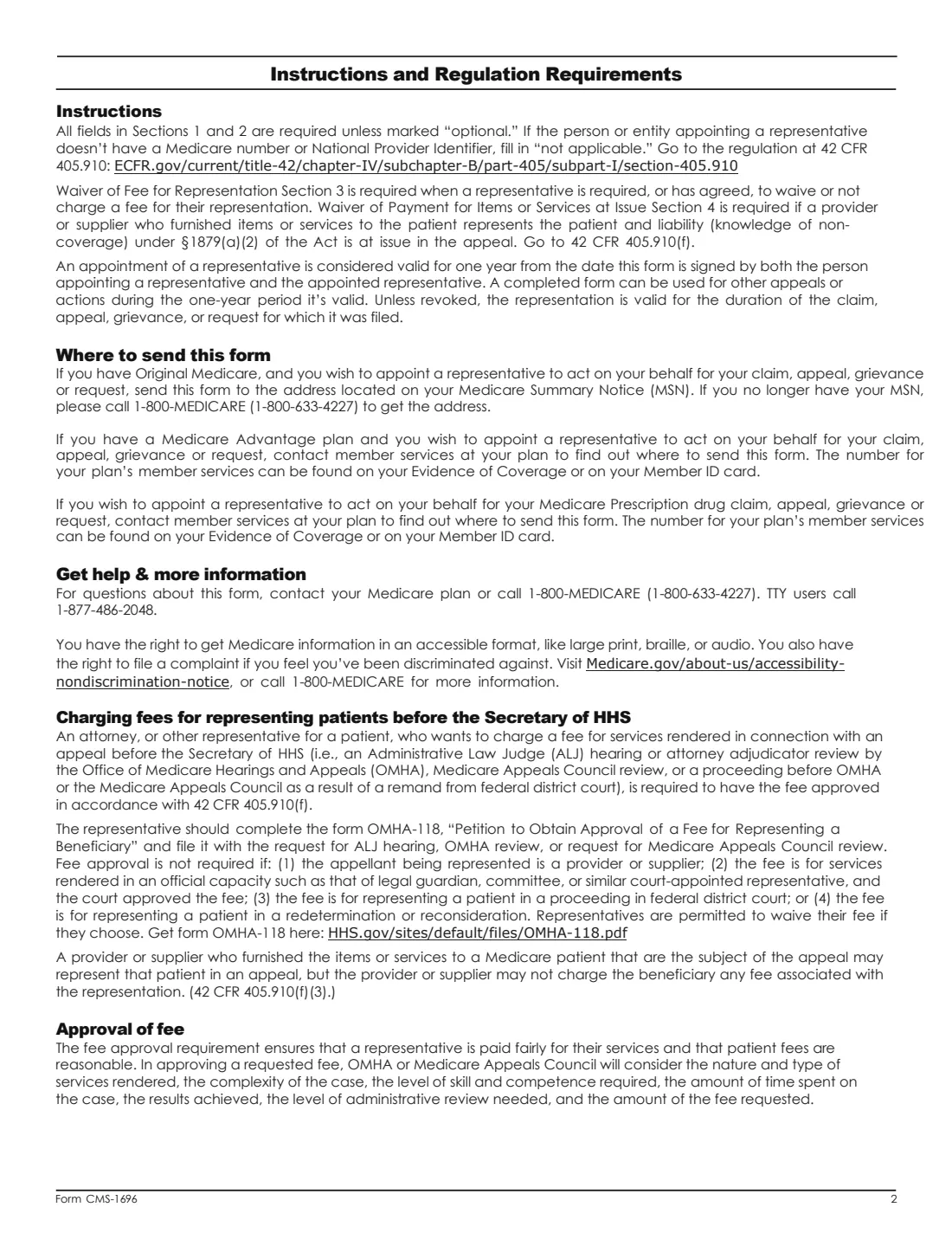
Section 1 is completed by the patient, provider or other person appointing the representative; Section 2 by the representative, who certifies they haven't been disqualified, suspended or prohibited from practice before the Department of Health and Human Services. Sections 3 and 4 are fee and payment waivers the representative signs when they apply. The instructions say the appointment is valid for one year from the date both of you sign, and can be used for other appeals or actions in that year.
FileIt pre-fills your name and email from your vault record, splits phone numbers, ZIP codes and dates into the form's boxes, and prints everything on CMS's own PDF (revised 10/01/2026). You and your representative can sign by hand or with FileIt's eSignature. FileIt doesn't send it anywhere.
- Who fills it
- Section 1: the person appointing (patient, provider or other). Section 2: the representative.
- Signatures
- Both: the person appointing and the representative. Sections 3 and 4 are signed by the representative only if they apply.
- Valid for
- One year from the date both have signed, unless revoked (from the instructions).
- Where to send it
- Original Medicare: the address on your Medicare Summary Notice. Medicare Advantage or drug plan: ask your plan's member services.
- Edition
- Form CMS-1696, revised 10/01/2026 (OMB No. 0938-0950, expires 12/31/2028)
Who needs to fill out Form CMS-1696?
- People with Medicare who want a relative, friend, advocate or attorney to handle an appeal or request for them.
- Providers or suppliers appointing a representative for their own claim or appeal.
- Representatives who need to be appointed in writing before Medicare will deal with them.
When to use Form CMS-1696
- Before someone else files or pursues a Medicare claim, appeal, grievance or request for you, for example a redetermination or reconsideration.
- When a provider or supplier who furnished the items or services will represent the patient (Sections 3 and 4 then apply).
What you need before you start
- Your name and Medicare Number (or a provider's National Provider Identifier). The instructions say to write "not applicable" if there is none.
- Your mailing address and phone number, and optionally an email and fax.
- The representative's name, professional status or relationship to you, address, phone and optionally email and fax.
What’s on Form CMS-1696
The 2026 edition has 3 pages. FileIt asks for it in 2 parts, and it is signed by Person appointing (patient, provider or other) and Representative:
- Section 1: The person appointing the representativePerson appointing (patient, provider or other)
- Section 2: The representativeRepresentative
How to fill out Form CMS-1696, step by step
1 Section 1: The person appointing
Name, Medicare Number or NPI, mailing address, city, state, ZIP, phone, optional email and fax, then signature and date.
2 Section 2: The representative
The representative's name, professional status or relationship (attorney, relative, etc.), contact details, signature and date. Any fee may be subject to the Secretary's review and approval.
3 Sections 3 and 4: Waivers, if applicable
Section 3: providers and suppliers who furnished the items or services at issue can't charge a fee for representation and sign to waive it; other representatives who choose to waive their fee sign too. Section 4: a provider or supplier waives collecting payment from the patient if liability under section 1879(a)(2) is at issue.
Common mistakes to avoid
- Leaving the Medicare Number or NPI blank instead of writing "not applicable".
- Only one of you signing: the appointment is valid from the date both have signed.
- Sending it to CMS: the form says not to send it directly to CMS but to follow the "Where to send this form" instructions.
- A representative who wants to charge a fee before the Secretary not getting it approved: the instructions point to form OMHA-118.
After you fill it out
Both sign and date it, by hand or with FileIt's eSignature. The representative also signs Section 3 or 4 by hand if they apply.
Send it with your claim, appeal, grievance or request to the address on your Medicare Summary Notice, or where your plan's member services tells you.
Keep a copy. FileIt files the finished PDF in the person's vault folder.
Fill out Form CMS-1696 online with FileIt
- Pick the person. Choose someone from People and FileIt fills in their name, date of birth, address and other details it already knows.
- Answer plain-language questions. One part of the form at a time, with the official help text beside each question — 20 fields in all. Your answers save as you go.
- Check the live preview. Watch your answers land on the real Centers for Medicare & Medicaid Services (CMS), U.S. Department of Health and Human Services form, and let FileIt do any worksheet arithmetic.
- Generate the official PDF. FileIt prints your answers into the agency’s own PDF and files it in that person’s folder in your vault. Sign it, or send it for e-signature.
FileIt fills the form — it never files or submits anything for you. Deliver the finished form to whoever asked for it, the way the form’s instructions say.
Start Form CMS-1696 now — it’s freeForm CMS-1696: frequently asked questions
What can my representative do?
The form says they become the main contact and can make requests, present evidence, get information and receive all communication about your claim, appeal, grievance or request, and may see your personal medical information.
How long does the appointment last?
The instructions say one year from the date it is signed by both of you, and it can be used for other appeals or actions in that time. Unless revoked, it stays valid for the duration of the claim, appeal, grievance or request it was filed with.
Where do I send Form CMS-1696?
With Original Medicare, to the address on your Medicare Summary Notice (call 1-800-MEDICARE if you no longer have it). With a Medicare Advantage or prescription drug plan, ask your plan's member services.
Can a representative charge a fee?
For representation before the Secretary of HHS, the fee must be approved under 42 CFR 405.910(f); the instructions point to form OMHA-118. Providers and suppliers who furnished the items or services can't charge the beneficiary a fee.
Is this the same as the Social Security form SSA-1696?
No. SSA-1696 appoints a representative before the Social Security Administration. CMS-1696 is for Medicare claims, appeals, grievances and requests.
Official sources
- Blank form (PDF), published by Centers for Medicare & Medicaid Services (CMS), U.S. Department of Health and Human Services: https://www.cms.gov/medicare/cms-forms/cms-forms/downloads/cms1696.pdf
- Official instructions and guidance: https://www.cms.gov/medicare/cms-forms/cms-forms/cms-forms-items/cms012207
- Edition shown on this page: Form CMS-1696, revised 10/01/2026 (OMB No. 0938-0950, expires 12/31/2028) (checked 2026-10-25).
FileIt is not affiliated with or endorsed by Centers for Medicare & Medicaid Services (CMS), U.S. Department of Health and Human Services or any government. This page explains the form in general terms and is not legal, tax or immigration advice. Always read the official instructions, and check that you are using the edition the recipient accepts. Page last reviewed 2026-10-25.