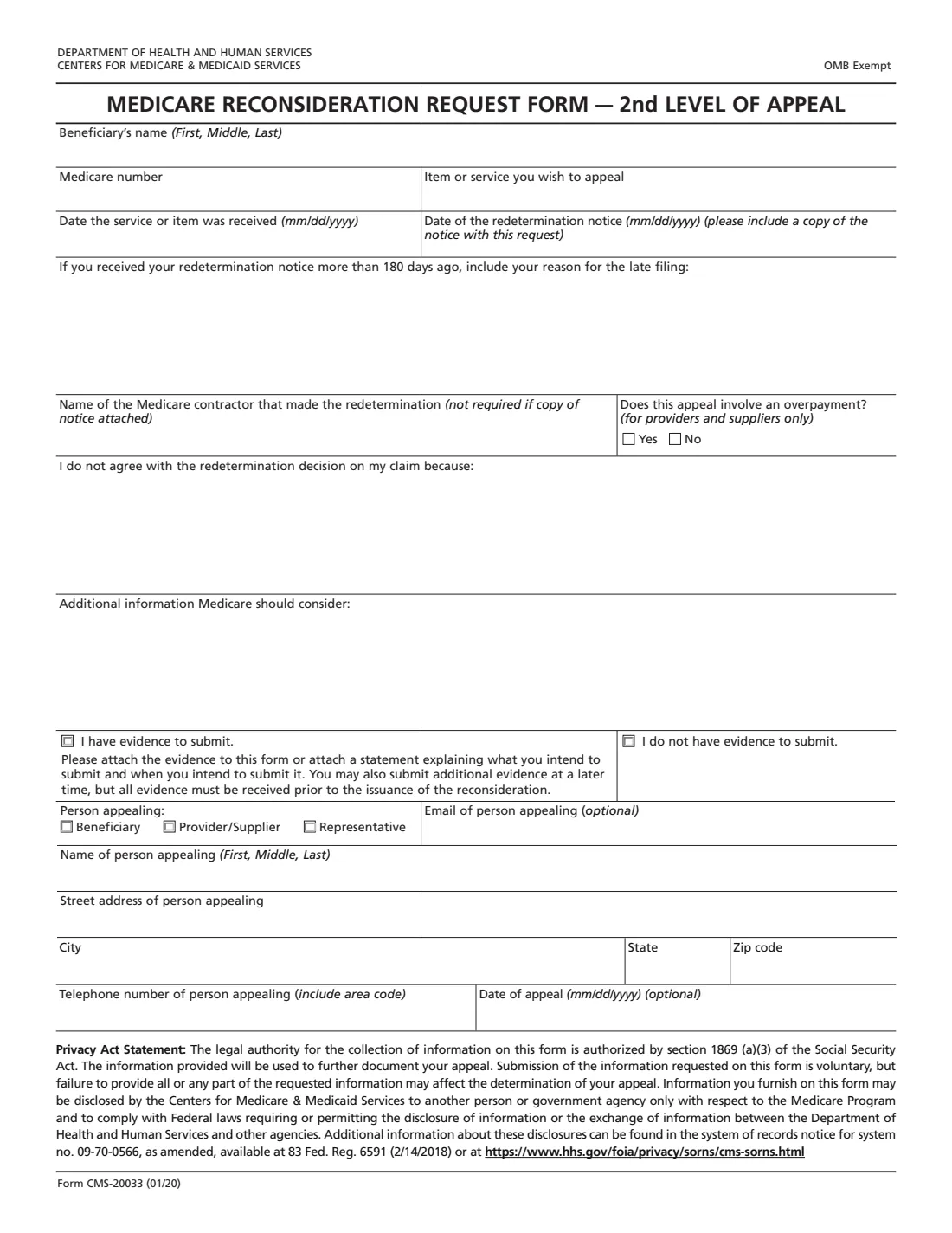
What is Form CMS-20033?
Form CMS-20033 is the Medicare Reconsideration Request Form, the second level of appeal in Original Medicare (Part A and Part B). After you've asked for a redetermination and received a decision you still disagree with, this form asks a Qualified Independent Contractor (QIC) to reconsider the claim. The QIC is a separate reviewer from the Medicare contractor that made the earlier decisions.
The questions mirror the first-level form: the beneficiary's name and Medicare number, the item or service, the date of service and the date of the redetermination notice, your reasons for disagreeing, any additional information, whether you have evidence, and the details of the person appealing. The difference is the timing: the form refers to 180 days from receiving the redetermination notice, and asks for a reason if you're filing later than that. It also asks you to include a copy of the redetermination notice.
FileIt lets you fill it in step by step, flags dates that are out of order, asks for your late-filing reason once 180 days have passed, keeps each explanation to the space the form gives, and prints your answers onto CMS's own PDF (the 01/20 edition). You send it to the QIC yourself; FileIt doesn't submit appeals.
- Who fills it
- The beneficiary, their representative, or the provider or supplier that appealed at the first level.
- Appeal level
- Second level of the Original Medicare appeals process: a reconsideration by a Qualified Independent Contractor.
- Deadline on the form
- Within 180 days of receiving the redetermination notice, or explain why you're late.
- Sent to
- The Qualified Independent Contractor named in your redetermination notice.
- Attach
- A copy of the redetermination notice and any evidence you want considered.
- Edition
- Form CMS-20033 (01/20)
Who needs to fill out Form CMS-20033?
- People with Original Medicare whose redetermination was denied or only partly in their favor.
- Appointed representatives continuing an appeal for a parent, spouse or client.
- Providers and suppliers taking a claim or overpayment dispute to the second level.
- Anyone who has new evidence, such as a fuller doctor's statement, that wasn't part of the first appeal.
When to use Form CMS-20033
- After you receive a Medicare Redetermination Notice and still disagree with the decision.
- Within the 180-day window the form refers to, counting from when you received that notice.
- When you can explain what the redetermination got wrong, or add records the first reviewer didn't see.
- Only after a redetermination: the first step is always Form CMS-20027 (or a written request to the contractor).
What you need before you start
- The redetermination notice you're appealing, and its date.
- The beneficiary's name and Medicare number.
- The item or service and the date it was received.
- The name of the contractor that made the redetermination (not required if you attach the notice).
- Your reasons for disagreeing with the redetermination, and anything else the reviewer should know.
- Evidence such as medical records or a doctor's letter, or a note of what's coming and when.
- The name, address and phone number of the person appealing.
What’s on Form CMS-20033
The 2020 edition has 1 page. FileIt asks for it in 3 parts:
- The claim you're appealingPerson appealing
- Why you disagreePerson appealing
- Person appealingPerson appealing
How to fill out Form CMS-20033, step by step
1 The claim and the notice
Give the beneficiary's name and Medicare number, the item or service, the date of service and the date of the redetermination notice. Include a copy of the notice with the form.
2 Filing after 180 days
If you received the redetermination notice more than 180 days ago, explain what kept you from filing on time. FileIt asks for this only when the dates show it's needed.
3 Contractor and overpayment
Name the contractor that made the redetermination if you're not attaching the notice. Providers and suppliers also say whether the appeal involves an overpayment.
4 Why the redetermination is wrong
Explain the specific reasons you disagree, then add any additional information. Point to the evidence that supports you. For more than the six lines each box holds, attach a page.
5 Evidence
Tick whether you have evidence to submit. Attach it, or a statement saying what you'll send and when; the form says it must be received before the reconsideration is issued.
6 Who is appealing
Choose beneficiary, provider/supplier or representative, and give the appellant's name, street address, city, state, ZIP code and phone number. The email and date of appeal are optional.
Common mistakes to avoid
- Sending the request to the original contractor instead of the QIC named in the redetermination notice.
- Leaving out the copy of the redetermination notice.
- Repeating the first appeal word for word without addressing why the redetermination was wrong.
- Filing after 180 days with no reason given.
- Holding back evidence: the form says evidence must arrive before the reconsideration is issued.
- Using this form before getting a redetermination decision.
After you fill it out
Print the form, attach the redetermination notice and your evidence, and send it to the Qualified Independent Contractor at the address in your notice. Keep copies.
The QIC reviews the claim and sends a reconsideration decision. The notice it sends explains any further appeal level and its deadline.
Your filled CMS-20033 stays in your FileIt vault beside the first-level request and the notices, so the whole appeal is in one place.
Fill out Form CMS-20033 online with FileIt
- Pick the person. Choose someone from People and FileIt fills in their name, date of birth, address and other details it already knows.
- Answer plain-language questions. One part of the form at a time, with the official help text beside each question — 20 fields in all. Your answers save as you go.
- Check the live preview. Watch your answers land on the real Centers for Medicare & Medicaid Services (CMS) form, and let FileIt do any worksheet arithmetic.
- Generate the official PDF. FileIt prints your answers into the agency’s own PDF and files it in that person’s folder in your vault.
FileIt fills the form — it never files or submits anything for you. Deliver the finished form to whoever asked for it, the way the form’s instructions say.
Start Form CMS-20033 now — it’s freeForm CMS-20033: frequently asked questions
What's the difference between CMS-20027 and CMS-20033?
CMS-20027 asks the Medicare contractor to redetermine its own decision (the first level). CMS-20033 asks a Qualified Independent Contractor to reconsider the redetermination (the second level).
How long do I have to request a reconsideration?
The form refers to 180 days from receiving the redetermination notice. If you're past that, it asks you to explain the late filing.
Where do I send Form CMS-20033?
To the Qualified Independent Contractor shown in your Medicare Redetermination Notice, with a copy of that notice.
Do I have to name the contractor?
Not if you attach a copy of the notice: the form marks the contractor's name as not required in that case.
Can I send new evidence?
Yes. Tick that you have evidence and attach it, or attach a statement of what you'll send and when. The form says all evidence must be received before the reconsideration is issued.
Is there a signature line?
No. The 01/20 edition asks for the appellant's details and an optional date of appeal, with no signature box.
Can FileIt send it to the QIC for me?
No. FileIt fills the official PDF and keeps it in your vault; you mail or send it to the QIC yourself.
Official sources
- Blank form (PDF), published by Centers for Medicare & Medicaid Services (CMS): https://www.cms.gov/Medicare/CMS-Forms/CMS-Forms/downloads/CMS20033.pdf
- Official instructions and guidance: https://www.medicare.gov/providers-services/claims-appeals-complaints/appeals/original-medicare
- Edition shown on this page: Form CMS-20033 (01/20), OMB Exempt (checked 2026-10-19).
FileIt is not affiliated with or endorsed by Centers for Medicare & Medicaid Services (CMS) or any government. This page explains the form in general terms and is not legal, tax or immigration advice. Always read the official instructions, and check that you are using the edition the recipient accepts. Page last reviewed 2026-10-19.