What is Form CMS-20027?
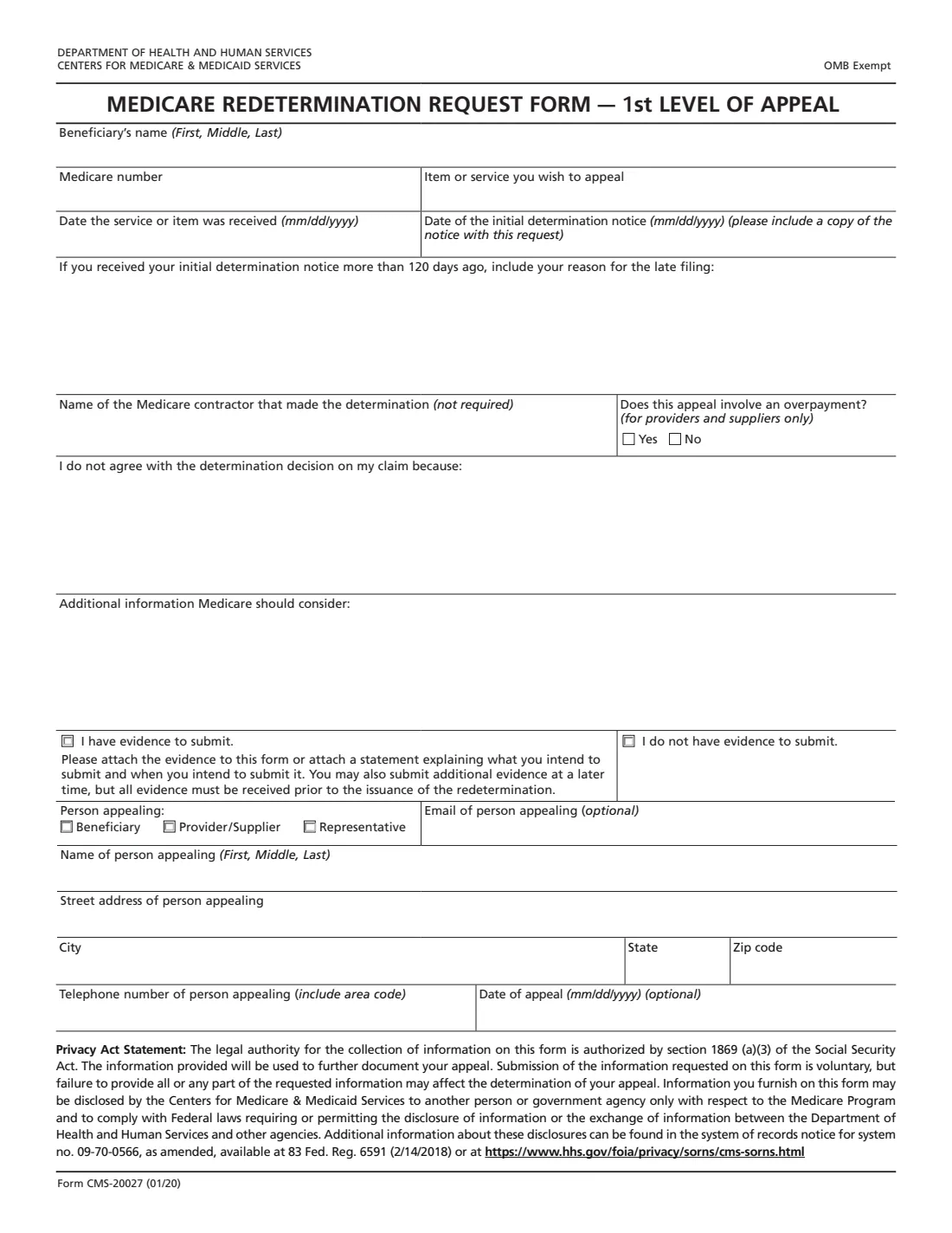
Form CMS-20027 is the Medicare Redetermination Request Form, the first level of appeal in Original Medicare (Part A and Part B). You use it when you disagree with a decision shown on your Medicare Summary Notice (MSN) or another initial determination notice, for example when a service, test or piece of equipment was denied or paid less than you expected.
The form asks for the beneficiary's name and Medicare number, the item or service you're appealing, the date you received it and the date of the notice, and, in your own words, why you disagree with the decision. You also say whether you have evidence to send, who is filing the appeal (the beneficiary, a provider or supplier, or a representative) and how to reach them. The form says to include a copy of the notice, and if you received the notice more than 120 days ago, to give your reason for the late filing.
FileIt walks you through each box in plain English, checks the dates and the Medicare number format, warns you when the 120-day window has passed and asks for your reason, and prints everything onto CMS's own PDF (the 01/20 edition cms.gov serves). The finished form is saved in your vault next to your Medicare records. You send it yourself: FileIt doesn't file appeals.
- Who fills it
- A person with Medicare, their representative, or the provider or supplier appealing the claim.
- Appeal level
- First level of the Original Medicare (Part A and Part B) appeals process: a redetermination.
- Deadline on the form
- Within 120 days of receiving the initial determination notice, or give a reason for filing late.
- Sent to
- The Medicare contractor that made the decision, at the address on your notice.
- Attach
- A copy of the notice you're appealing, plus any evidence you have.
- Edition
- Form CMS-20027 (01/20)
Who needs to fill out Form CMS-20027?
- People with Original Medicare whose claim for a service, test, supply or piece of equipment was denied or only partly paid.
- Family members, friends or lawyers appealing as the beneficiary's appointed representative.
- Doctors, hospitals, suppliers and other providers appealing a claim decision, including overpayment determinations.
- Caregivers helping a parent or relative make sense of a Medicare Summary Notice they disagree with.
When to use Form CMS-20027
- After a Medicare Summary Notice, Remittance Advice or other initial determination shows a claim was denied or paid less than you think it should be.
- As soon as you can after receiving the notice: the form points to a 120-day window.
- When you have a letter from your doctor, test results or other records that support the claim, or know what you'll send later.
- Before any later level of appeal: a reconsideration (Form CMS-20033) comes only after a redetermination decision.
What you need before you start
- The beneficiary's full name and Medicare number from the Medicare card.
- The notice you're appealing (the Medicare Summary Notice or other initial determination), and its date.
- The item or service you're appealing and the date it was received.
- The name of the Medicare contractor that made the decision (optional on the form).
- Your explanation of why the decision is wrong, in a few clear sentences.
- Any evidence, such as a doctor's letter or medical records, or a note of what you'll send and when.
- The appellant's name, address, phone number and, if you like, an email address.
What’s on Form CMS-20027
The 2020 edition has 1 page. FileIt asks for it in 3 parts:
- The claim you're appealingPerson appealing
- Why you disagreePerson appealing
- Person appealingPerson appealing
How to fill out Form CMS-20027, step by step
1 The claim
Copy the beneficiary's name and Medicare number from the Medicare card, describe the item or service as it appears on the notice, and give the date it was received and the date of the notice.
2 Late filing
If you received the notice more than 120 days ago, explain why you couldn't file sooner. FileIt compares the notice date with today (or your date of appeal) and asks for the reason when it's needed.
3 The contractor and overpayments
Name the Medicare contractor if you know it. Only providers and suppliers answer whether the appeal involves an overpayment, so FileIt shows that question only to them.
4 Why you disagree
Explain in your own words why Medicare should pay or change its decision, and add anything else Medicare should consider. Each box holds about six lines; for more, write "see attached" and attach pages.
5 Evidence
Tick whether you have evidence to submit. If you do, attach it, or attach a statement saying what you'll send and when. The form says all evidence must arrive before the redetermination is issued.
6 Person appealing
Choose beneficiary, provider/supplier or representative, then give the name, address and phone number of the person filing, plus an optional email and date of appeal.
Common mistakes to avoid
- Forgetting to include a copy of the notice you're appealing.
- Missing the 120-day window without explaining why.
- Describing the item or service differently from the notice, which makes it harder to match the claim.
- Writing a general complaint instead of specific reasons the decision is wrong.
- Appealing as a representative without the appointment paperwork (such as Form CMS-1696) when none is on file.
- Sending the form to the wrong place instead of the contractor address on the notice.
After you fill it out
Print the form from FileIt, attach a copy of the notice and your evidence, and send it to the Medicare contractor at the address on your notice. Keep a copy of everything you send.
The contractor reviews the claim and sends you a redetermination decision. If you still disagree, the next level is a reconsideration, requested on Form CMS-20033.
FileIt keeps the filled form in your vault, so the next level of appeal starts from the same details.
Fill out Form CMS-20027 online with FileIt
- Pick the person. Choose someone from People and FileIt fills in their name, date of birth, address and other details it already knows.
- Answer plain-language questions. One part of the form at a time, with the official help text beside each question — 20 fields in all. Your answers save as you go.
- Check the live preview. Watch your answers land on the real Centers for Medicare & Medicaid Services (CMS) form, and let FileIt do any worksheet arithmetic.
- Generate the official PDF. FileIt prints your answers into the agency’s own PDF and files it in that person’s folder in your vault.
FileIt fills the form — it never files or submits anything for you. Deliver the finished form to whoever asked for it, the way the form’s instructions say.
Start Form CMS-20027 now — it’s freeForm CMS-20027: frequently asked questions
What is a Medicare redetermination?
It's the first level of appeal in Original Medicare: the contractor that processed your Part A or Part B claim reviews its own decision. Form CMS-20027 is the request for that review.
How long do I have to file CMS-20027?
The form refers to 120 days from receiving your initial determination notice. If more time has passed, the form asks you to give your reason for the late filing.
Where do I send the redetermination request?
To the Medicare contractor that made the decision, at the address on your Medicare Summary Notice or other initial determination notice. Include a copy of that notice.
Does the form need a signature?
The CMS-20027 (01/20) edition has no signature line. It asks for the name, address and phone number of the person appealing and an optional date of appeal.
Can someone else file the appeal for me?
Yes. A provider or supplier can appeal, and so can a representative such as a family member, friend or lawyer. A representative generally also sends an Appointment of Representative form unless one is already on file.
What if I don't have evidence yet?
Tick that you have evidence and attach a statement saying what you intend to submit and when. The form says evidence can follow later, but must arrive before the redetermination is issued.
Is this the form for Medicare Advantage or Part D appeals?
No. CMS-20027 is for Original Medicare (Part A and Part B) claims. Medicare Advantage and Part D plans have their own appeal processes, explained in your plan's notice.
Official sources
- Blank form (PDF), published by Centers for Medicare & Medicaid Services (CMS): https://www.cms.gov/Medicare/CMS-Forms/CMS-Forms/downloads/CMS20027.pdf
- Official instructions and guidance: https://www.medicare.gov/providers-services/claims-appeals-complaints/appeals/original-medicare
- Edition shown on this page: Form CMS-20027 (01/20), OMB Exempt (checked 2026-10-19).
FileIt is not affiliated with or endorsed by Centers for Medicare & Medicaid Services (CMS) or any government. This page explains the form in general terms and is not legal, tax or immigration advice. Always read the official instructions, and check that you are using the edition the recipient accepts. Page last reviewed 2026-10-19.