What is Form 96-0236?
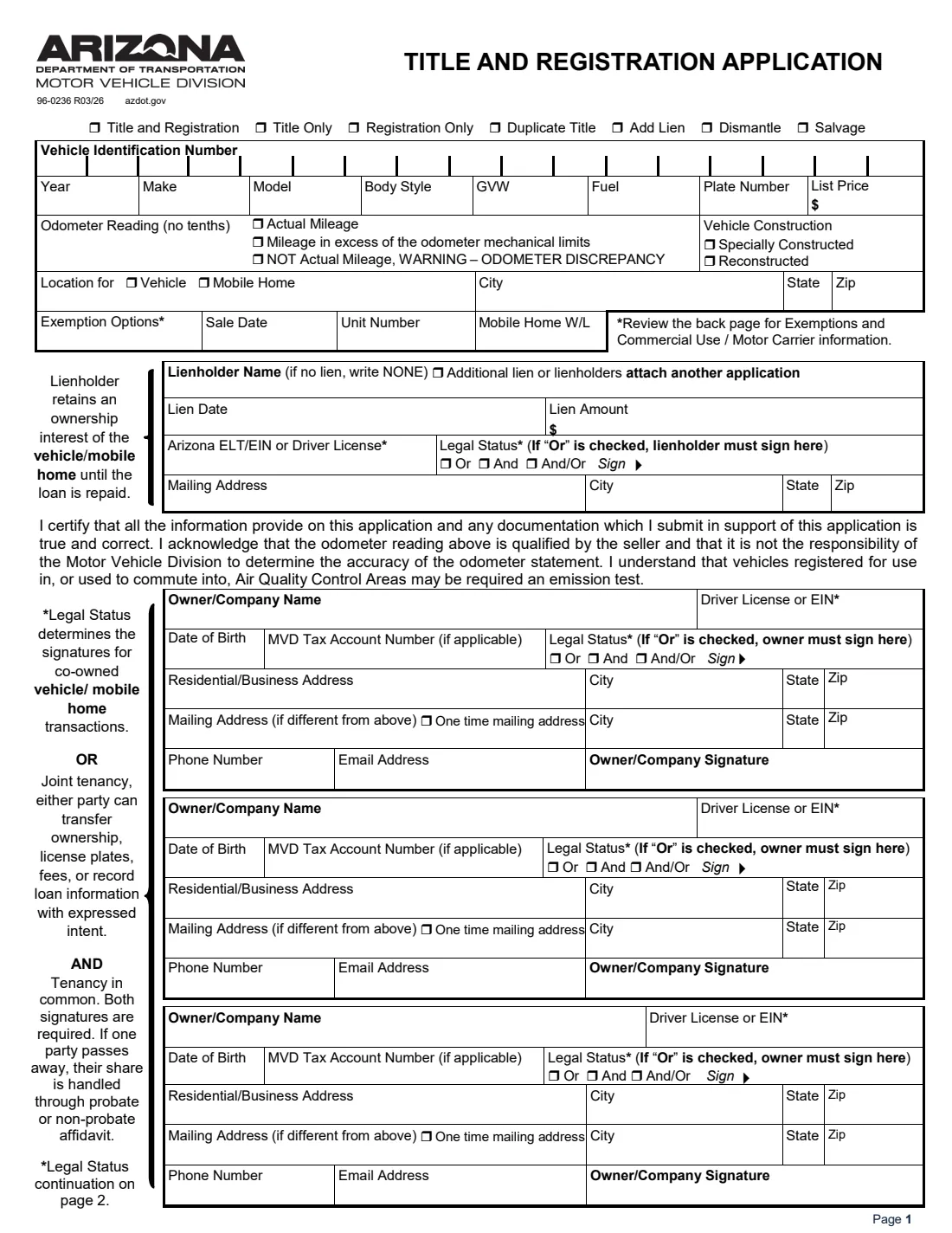
Form 96-0236 is the Arizona Department of Transportation Motor Vehicle Division's Title and Registration Application. You use it to title and register a vehicle or mobile home, or for title only, registration only, a duplicate title, adding a lien, or a dismantle or salvage transaction. It's the form behind most changes of ownership in Arizona.
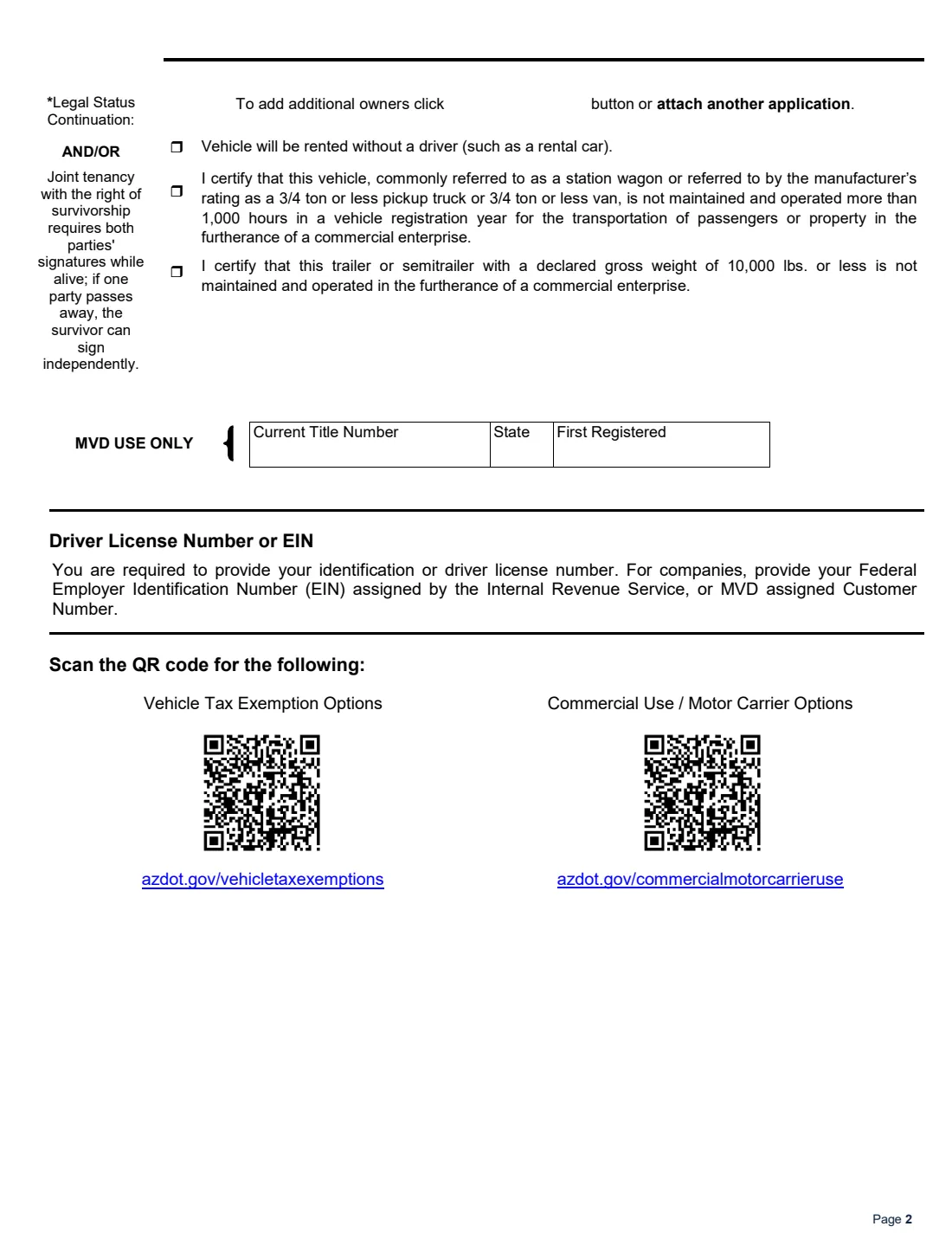
Page 1 records the vehicle (VIN, year, make, model, body style, GVW, fuel, plate and list price), the odometer reading and whether it's actual mileage, any special or reconstructed build, where the vehicle or mobile home is kept, any exemption, the sale date, and the lienholder, or NONE. Then come up to three owners, each with their name, driver license or EIN, date of birth, addresses, phone, email and signature, joined by a legal status: Or, And, or And/Or. Page 2 has the rental and commercial-use certifications.
FileIt asks the lien question first and writes NONE for you when there's no loan, explains what Or, And and And/Or mean for whose signatures MVD needs, and prints your answers on ADOT's own PDF (96-0236 R03/26). Each owner can sign with eSignature in their own signature box. FileIt doesn't file anything with MVD: you take or send the application with your documents.
- Who fills it
- The owner or owners of a vehicle or mobile home being titled or registered in Arizona.
- Used for
- Title and registration, title only, registration only, duplicate title, adding a lien, dismantle, salvage.
- Owners
- Up to three on one application; attach another application for more.
- Signatures
- Each owner signs; the legal status (Or, And, And/Or) decides whose signatures are needed.
- Lienholder
- Named on the form, or NONE if there's no lien.
- Edition
- 96-0236 R03/26
Who needs to fill out Form 96-0236?
- Buyers of a used vehicle in a private sale in Arizona.
- New Arizona residents titling and registering a vehicle brought from another state.
- Owners who need a duplicate title, or to add a lien after financing.
- Mobile home owners recording a title or location.
- Owners dismantling a vehicle or taking it through salvage.
When to use Form 96-0236
- When you buy a vehicle and need it titled in your name and registered.
- When you move to Arizona and register your vehicle here.
- When the title is lost or damaged and you need a duplicate.
- When a lender needs to be recorded as lienholder, or a co-owner is added.
What you need before you start
- The VIN, year, make, model and body style from the current title or certificate of origin.
- The odometer reading the seller certified, and whether it's actual mileage.
- The sale date and, for a mobile home, its location and width and length.
- The lienholder's name, lien date and amount, Arizona ELT number or EIN, and mailing address, if there's a loan.
- Each owner's name as it should appear on the title, driver license number or EIN, date of birth and address.
- How co-owners will hold the title: Or, And, or And/Or.
- Whatever else MVD asks for with the application, such as the signed-over title.
What’s on Form 96-0236
The 2026 edition has 2 pages. FileIt asks for it in 7 parts, and it is signed by Owner and Second owner and Third owner:
- What this application is forOwner
- Vehicle or mobile homeOwner
- LienholderOwner
- OwnerOwner
- Second ownerSecond owner
- Third ownerThird owner
- Commercial use and rentalOwner
How to fill out Form 96-0236, step by step
1 What it's for
Tick the transactions this application is for: title and registration, title only or registration only, plus duplicate title, add lien, dismantle or salvage as they apply.
2 The vehicle
Copy the VIN, year, make, model, body style, GVW, fuel type, plate number and list price. Give the odometer reading without tenths and choose actual mileage, over the odometer's mechanical limits, or not actual mileage.
3 Location and exemptions
Say where the vehicle or mobile home is located, any vehicle tax exemption you're claiming, the sale date, a unit number and, for mobile homes, the width and length.
4 Lienholder
With a loan, give the lienholder's name, lien date and amount, Arizona ELT/EIN or driver license, and mailing address. With no loan, FileIt prints NONE as the form asks.
5 Owners
Enter each owner's name, driver license or EIN, date of birth, MVD tax account number if any, addresses, phone and email. For a second or third owner, choose the legal status that joins them to the owner above.
6 Use and certification
On page 2, tick whether the vehicle will be rented without a driver, and the certifications for light pickups, vans and small trailers not used commercially. Every owner then signs the certification.
Common mistakes to avoid
- Choosing more than one of title and registration, title only and registration only.
- Leaving the lienholder line blank instead of writing NONE when there's no loan.
- A VIN typed with the letters I, O or Q, which 17-character VINs never use.
- Picking a legal status without knowing what it means: with And, both owners must sign to transfer.
- Missing a co-owner's signature where the legal status requires it.
- Ticking a commercial-use certification that doesn't apply to how the vehicle is used.
After you fill it out
Have each owner sign, then bring or send the application to ADOT MVD with your title or other ownership documents and payment, as MVD directs.
The certification notes that vehicles registered in, or commuting into, Air Quality Control Areas may need an emissions test.
When the title and registration arrive, add them to FileIt: the registration's expiry date goes on your reminder schedule.
Fill out Form 96-0236 online with FileIt
- Pick the person. Choose someone from People and FileIt fills in their name, date of birth, address and other details it already knows.
- Answer plain-language questions. One part of the form at a time, with the official help text beside each question — 89 fields in all. Your answers save as you go.
- Check the live preview. Watch your answers land on the real Arizona Department of Transportation, Motor Vehicle Division (ADOT MVD) form, and let FileIt do any worksheet arithmetic.
- Generate the official PDF. FileIt prints your answers into the agency’s own PDF and files it in that person’s folder in your vault. Sign it, or send it for e-signature.
FileIt fills the form — it never files or submits anything for you. Deliver the finished form to whoever asked for it, the way the form’s instructions say.
Start Form 96-0236 now — it’s freeForm 96-0236: frequently asked questions
What is ADOT Form 96-0236?
Arizona MVD's Title and Registration Application, used to title and register a vehicle or mobile home and for related transactions such as a duplicate title or adding a lien.
What do Or, And and And/Or mean on the form?
The form explains: with Or (joint tenancy), either party can transfer ownership, plates, fees or loan information. With And (tenancy in common), both signatures are required. With And/Or (joint tenancy with the right of survivorship), both sign while alive; if one dies, the survivor can sign alone.
What if there's no loan on the vehicle?
The form asks you to write NONE as the lienholder name. FileIt does this when you answer that there's no lien.
How many owners can I list?
Three on one application. The form says to attach another application for additional owners.
What ID number do owners give?
The form asks individuals for their identification or driver license number, and companies for their federal EIN or MVD-assigned customer number.
Can owners sign electronically?
FileIt can place each owner's signature in their signature box with eSignature, or you can print the form and sign by hand.
Does FileIt submit the application to MVD?
No. FileIt fills ADOT's official PDF and keeps it in your vault; you submit it to MVD yourself.
Official sources
- Blank form (PDF), published by Arizona Department of Transportation, Motor Vehicle Division (ADOT MVD): https://apps.azdot.gov/files/mvd/mvd-forms-lib/96-0236.pdf
- Official instructions and guidance: https://azdot.gov/mvd/services/vehicle-services/vehicle-title-and-registration
- Edition shown on this page: 96-0236 R03/26 (checked 2026-10-19).
FileIt is not affiliated with or endorsed by Arizona Department of Transportation, Motor Vehicle Division (ADOT MVD) or any government. This page explains the form in general terms and is not legal, tax or immigration advice. Always read the official instructions, and check that you are using the edition the recipient accepts. Page last reviewed 2026-10-19.