What is Form 941-X?
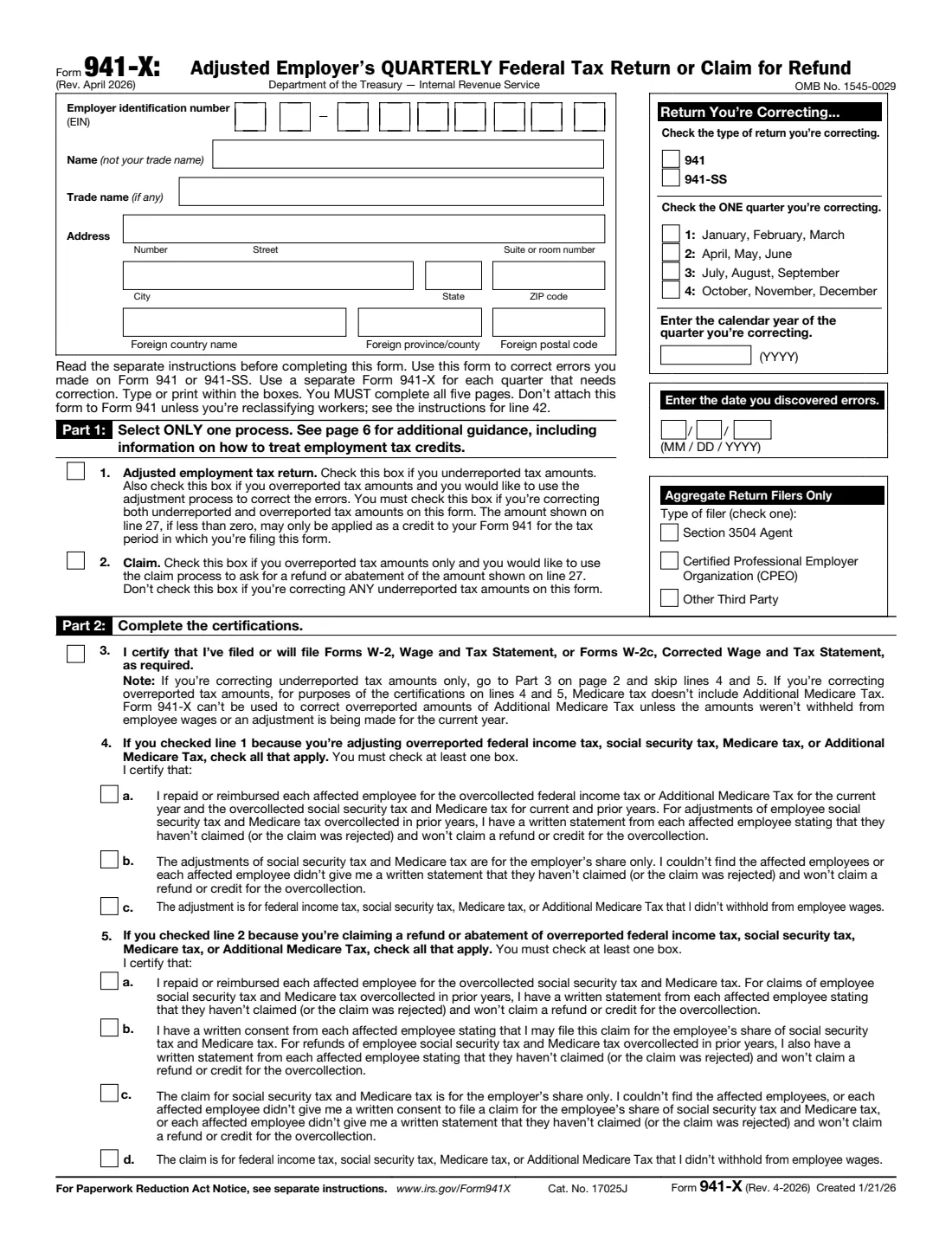
Form 941-X is how an employer corrects a Form 941 (or 941-SS) that has already been filed: wages, federal income tax withheld, social security and Medicare wages and tips, Additional Medicare Tax, tax adjustments and the payroll credits. You file one Form 941-X for each quarter you're correcting, and you don't file a new Form 941 to fix an old one.
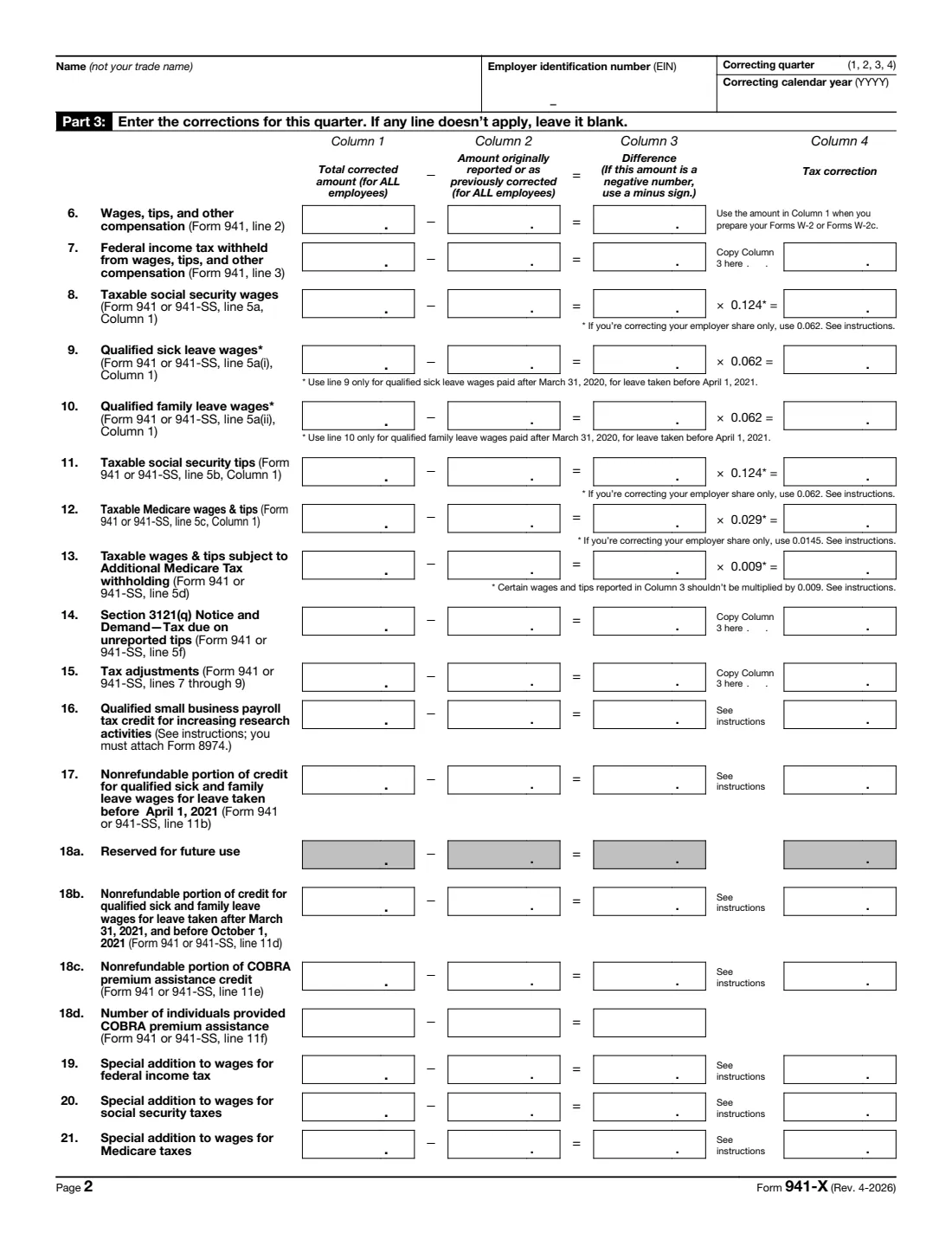
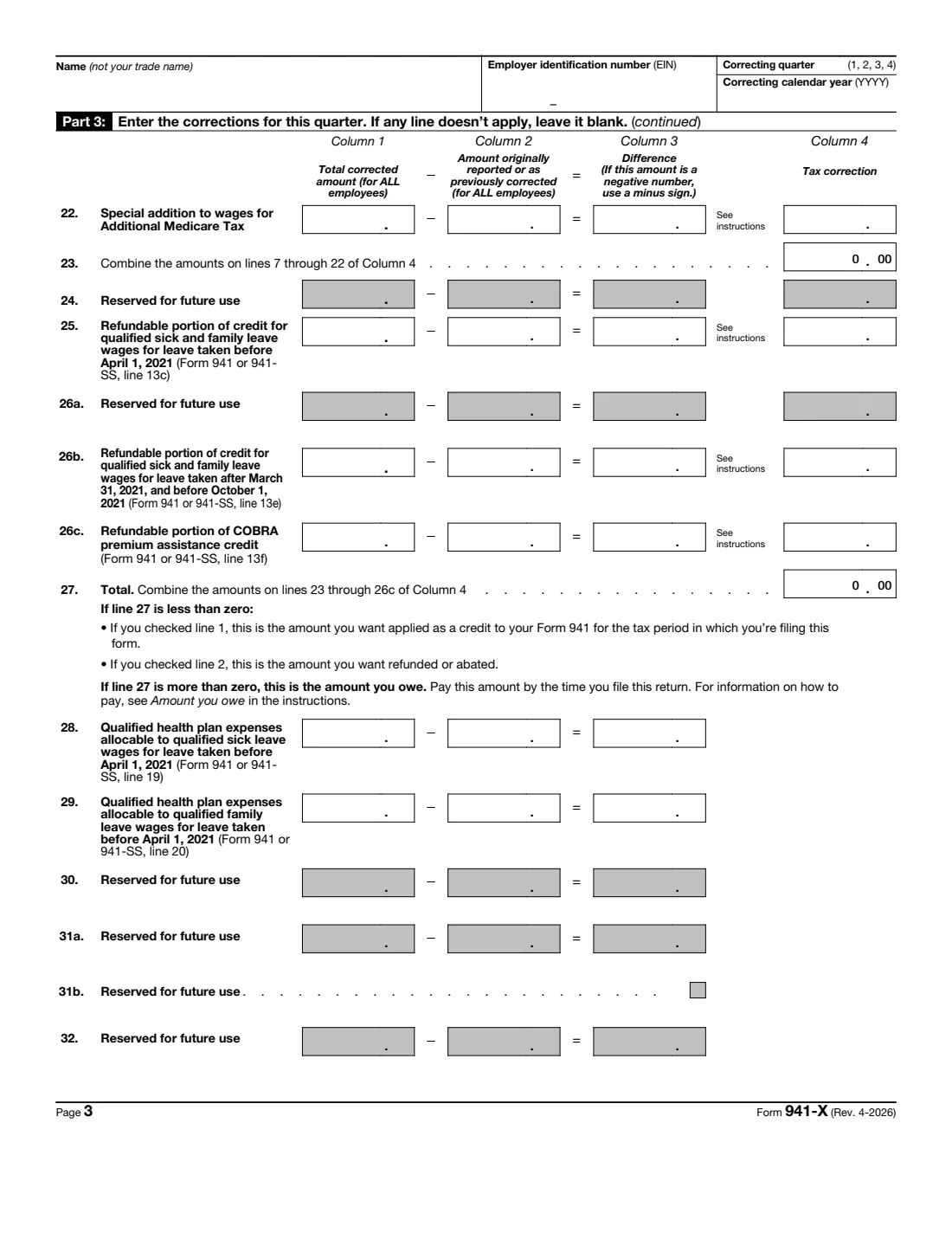
Every correction line has the same shape: column 1 is the full corrected amount for all employees, column 2 is what you originally reported (or last corrected), column 3 is the difference, and column 4 is the tax correction, worked out with the rate printed on the line or copied from column 3. Line 27 totals the corrections: more than zero is what you owe, less than zero is a credit or refund. Before that you choose a process (an adjusted return, or a claim for refund or abatement of overreported tax only), certify how you handled the affected employees, and on page 5 explain in detail how you found and worked out each correction.
FileIt does the column arithmetic for you, including the employer-share-only rates, the sign reversal on credit lines and the totals on lines 23 and 27, checks that the process you chose fits the corrections, and keeps the 2020 and 2021 COVID-era lines in a separate part you switch on only when they apply. It prints everything on the IRS's own April 2026 PDF, with the name, EIN, quarter and year repeated on every page. You sign and file it yourself.
- Who files it
- Employers correcting a Form 941 or 941-SS they already filed.
- One form per
- Quarter: use a separate Form 941-X for each quarter that needs a correction.
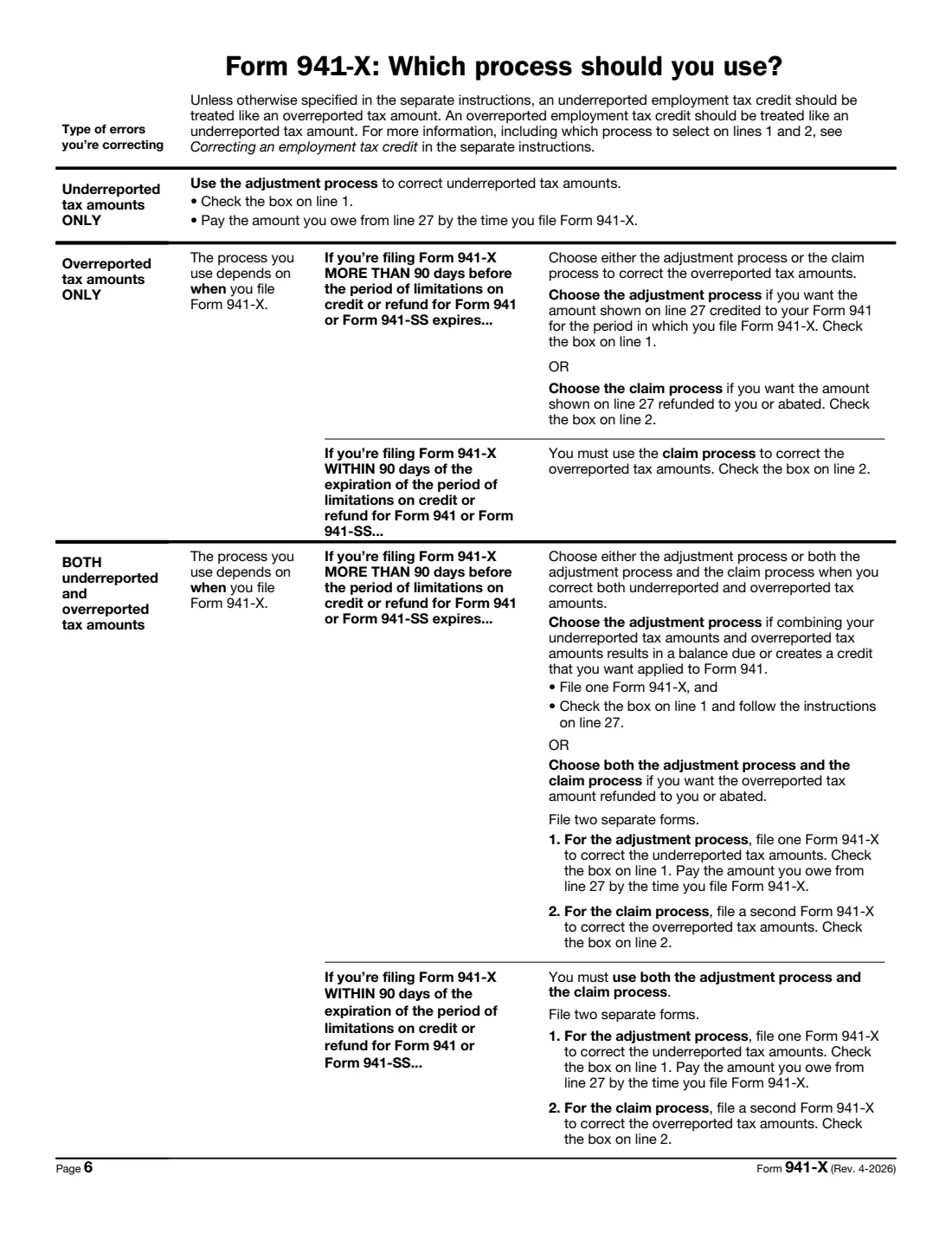
- Two processes
- Adjusted employment tax return, or claim for refund or abatement (overreported amounts only).
- Explanation
- Required: line 43 must explain how you determined every correction.
- Signatures
- The owner, an officer, a partner or member, a fiduciary or an authorized agent, on page 5.
- Edition
- Form 941-X (Rev. April 2026)
Who needs to fill out Form 941-X?
- Employers who left wages, a bonus or tips out of a filed Form 941.
- Employers who reported too much social security or Medicare tax and want a credit or refund.
- Businesses correcting federal income tax withheld after an administrative error.
- Employers reclassifying workers as employees.
- Payroll providers and accountants correcting returns for clients.
When to use Form 941-X
- When you discover an error on a Form 941 you've already filed. The date you discovered it goes on the form.
- For underreported tax, as the instructions direct: generally by the due date of the return for the quarter in which you discovered the error.
- For overreported tax, within the time limits explained in the instructions; a claim or adjustment filed too late can't be allowed.
- Separately for each quarter that needs a correction.
What you need before you start
- The Form 941 you're correcting: its quarter, year and the amounts you reported.
- The corrected totals for all employees for each line you're changing.
- The date you discovered the errors.
- Whether you've repaid or reimbursed affected employees, or have their written statements or consents.
- Whether you've filed or will file Forms W-2 or W-2c for the corrected wages.
- A clear explanation of each correction and how you worked it out.
- For reclassified workers, the section 3509 figures from the instructions.
What’s on Form 941-X
The 2026 edition has 6 pages. FileIt asks for it in 9 parts, and it is signed by Employer:
- Employer and the return you're correctingEmployer
- Aggregate return filers onlyEmployer
- Part 1: Select ONLY one processEmployer
- Part 2: CertificationsEmployer
- Part 3: The corrections for this quarterEmployer
- 2020 and 2021 credits and wages (COVID-era lines)Employer
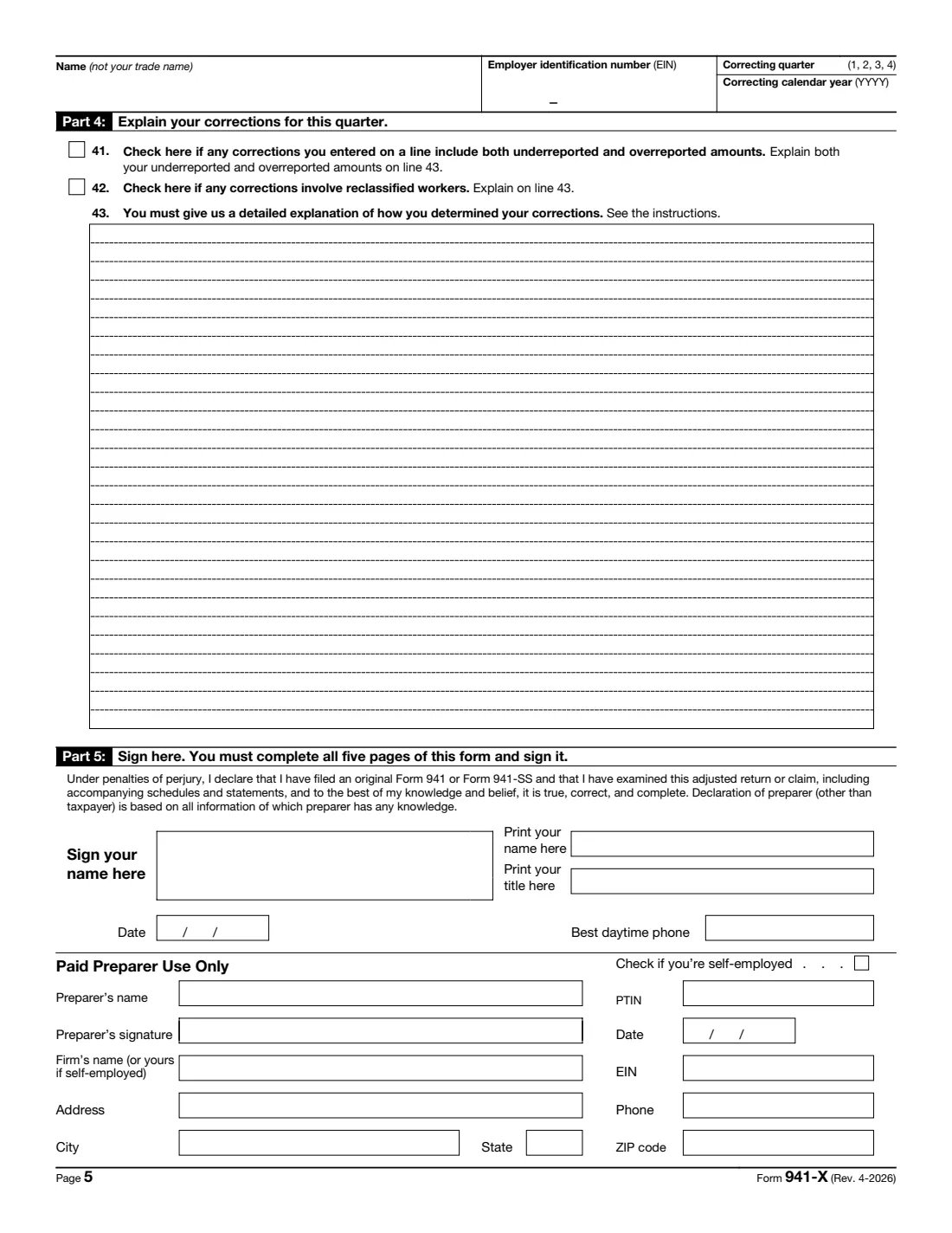
- Part 4: Explain your correctionsEmployer
- Part 5: Sign hereEmployer
- Paid preparer use onlyPaid preparer
How to fill out Form 941-X, step by step
1 The return you're correcting
Enter the employer's EIN, name and address, tick 941 or 941-SS, the one quarter, its calendar year, and the date you discovered the errors. Aggregate filers also give their filer type.
2 Part 1: the process
Choose the adjusted employment tax return (for underreported tax, or overreported tax you want credited) or the claim (only for overreported tax you want refunded or abated). If you're correcting both under- and overreported amounts, it must be the adjusted return.
3 Part 2: certifications
Always tick line 3 about Forms W-2 and W-2c. With overreported federal income tax, social security, Medicare or Additional Medicare Tax, tick the line 4 boxes (adjusted return) or line 5 boxes (claim) that apply.
4 Part 3: the corrections
For each line you're changing, give column 1 and column 2. FileIt works out column 3 and column 4, using 0.062 and 0.0145 on lines 8, 11 and 12 if you're correcting the employer share only, then lines 23 and 27. Lines 19 to 22 take column 4 from the instructions.
5 Part 4: the explanation
Tick line 41 if a line mixes under- and overreported amounts, and line 42 for reclassified workers. Then explain on line 43 what was wrong, how you found it and how you calculated each correction.
6 Part 5: sign
Print your name, title and phone, and sign and date page 5. A paid preparer completes their section and signs by hand.
Common mistakes to avoid
- Correcting two quarters on one Form 941-X.
- Putting only the change in column 1 instead of the full corrected amount.
- Choosing the claim process while also correcting underreported tax.
- Skipping the line 4 or line 5 certifications when correcting overreported tax.
- A vague explanation on line 43. The IRS asks for a detailed one.
- Forgetting Forms W-2c for employees whose wages changed.
After you fill it out
Sign page 5 and file Form 941-X with the IRS at the address in its instructions. If line 27 shows an amount you owe, pay it by the time you file.
If you used the adjusted return process and line 27 is less than zero, the credit is applied to your Form 941 for the period in which you file this form.
Keep the 941-X with the original return and your workpapers. FileIt stores the signed PDF in the business's vault next to the Form 941 it corrects.
Fill out Form 941-X online with FileIt
- Pick the person. Choose someone from People and FileIt fills in their name, date of birth, address and other details it already knows.
- Answer plain-language questions. One part of the form at a time, with the official help text beside each question — 156 fields in all. Your answers save as you go.
- Check the live preview. Watch your answers land on the real Internal Revenue Service (IRS) form, and let FileIt do any worksheet arithmetic.
- Generate the official PDF. FileIt prints your answers into the agency’s own PDF and files it in that person’s folder in your vault. Sign it, or send it for e-signature.
FileIt fills the form — it never files or submits anything for you. Deliver the finished form to whoever asked for it, the way the form’s instructions say.
Start Form 941-X now — it’s freeForm 941-X: frequently asked questions
What is Form 941-X used for?
To correct errors on a Form 941 or 941-SS you already filed, for one quarter per form, either as an adjusted return or as a claim for refund or abatement.
Do I enter the corrected amount or just the difference?
Column 1 is the total corrected amount for all employees and column 2 is the amount originally reported or as previously corrected. The difference goes in column 3, which FileIt works out.
Adjusted return or claim: which do I choose?
The form says to use the claim process only if you overreported tax amounts only and want a refund or abatement. Underreported amounts, or a mix, use the adjusted employment tax return.
What does 'employer share only' mean?
When you can't repay or get statements or consents from affected employees, you may correct only the employer's share of social security and Medicare tax. The form then uses 0.062 instead of 0.124, and 0.0145 instead of 0.029.
Why are some lines 'Reserved for future use'?
The April 2026 revision keeps those line numbers but no longer uses them, so they stay blank.
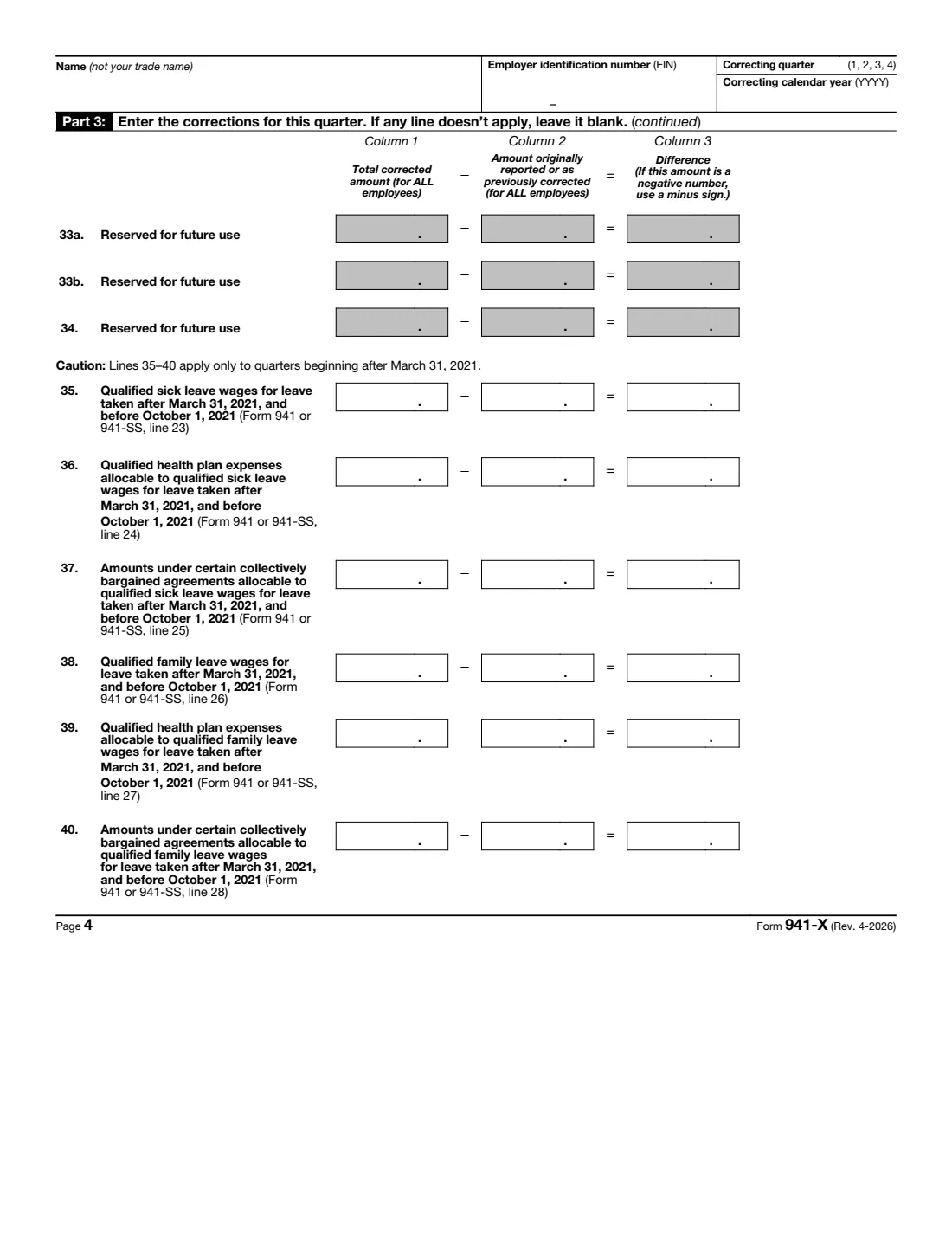
Can I still correct 2020 or 2021 sick and family leave credits?
The form keeps lines for those credits. FileIt puts them in a separate part for 2020 and 2021 quarters; check the instructions for the time limits that apply.
Does FileIt file Form 941-X?
No. FileIt fills and checks the IRS's PDF and keeps it in your vault. You sign and file it with the IRS yourself.
Official sources
- Blank form (PDF), published by Internal Revenue Service (IRS): https://www.irs.gov/pub/irs-pdf/f941x.pdf
- Official instructions and guidance: https://www.irs.gov/forms-pubs/about-form-941-x
- Edition shown on this page: Form 941-X (Rev. April 2026), created 1/21/26 (checked 2026-10-19).
FileIt is not affiliated with or endorsed by Internal Revenue Service (IRS) or any government. This page explains the form in general terms and is not legal, tax or immigration advice. Always read the official instructions, and check that you are using the edition the recipient accepts. Page last reviewed 2026-10-19.