What is Form 8952?
The Voluntary Classification Settlement Program (VCSP) lets a business that has treated workers as independent contractors start treating them as employees for federal employment taxes (income tax withholding, FICA and FUTA) for future tax periods. In return it pays a settlement worked out at the reduced section 3509(a) rates: 10% of the employment tax on one year's compensation, with relief for earlier years. Form 8952 is the application, and the program ends with a closing agreement with the IRS.
To qualify, the business must be treating the workers as nonemployees now and have done so consistently. It must have filed all required Forms 1099 for them for the 3 preceding calendar years, and have no current dispute with the IRS about their status. It can't be under IRS employment tax examination, or a Department of Labor or state examination about the workers' classification. If it was examined about them before, it must have complied with the results. The taxpayer signs these representations itself; a representative may not sign them.
FileIt fills in the IRS's own PDF, Rev. November 2024, and works out Part IV for you: 3.24% of line 18, 7.44% of compensation under the Social Security wage base, and the 10% payment on line 24. The finished form is saved in your vault, and you can sign it with FileIt's optional e-signature. Don't send payment with the form.
- Who files
- A business, tax-exempt organization or government entity that wants to reclassify workers it has treated as nonemployees.
- When
- At any time, but at least 120 days before the date you want to start treating the workers as employees.
- Payment
- Not with the form. You pay the line 24 amount later, with the signed closing agreement.
- Attach
- A list of the workers' names and SSNs, any extra sheets, and Form 2848 if the contact person can't bind the taxpayer.
- Signature
- The taxpayer: the owner, a corporate officer, a partner or a fiduciary. A representative may not sign.
- Edition
- Form 8952 (Rev. November 2024); instructions Rev. November 2025
Who needs to fill out Form 8952?
- Businesses that pay workers on Form 1099-NEC but now believe they should be employees.
- Sole proprietors, partnerships, corporations, cooperatives, tax-exempt organizations and state or local governments (for workers not covered by a section 218 agreement).
- Individuals with a household worker they have treated as a contractor. The instructions explain how to figure line 18 for them.
- Not a business already under employment tax examination: the VCSP is only for taxpayers who come forward first.
When to use Form 8952
- When you want to fix worker misclassification going forward, before the IRS raises it.
- At least 120 days before the start of the calendar quarter in which you want the workers to become employees.
- Use Form SS-8 instead when you want the IRS to decide whether a worker is an employee.
What you need before you start
- The business's legal name, EIN, address and phone number.
- If it's in an affiliated group, the common parent's name, EIN and address.
- A contact person, with a Form 2848 if they can't legally bind the business.
- The number of workers being reclassified, their names and SSNs, and a description of each class of workers.
- The total compensation paid to them in the most recently completed calendar year, usually from box 1 of their Forms 1099-NEC.
- The amount any worker earned over that year's Social Security wage base.
What’s on Form 8952
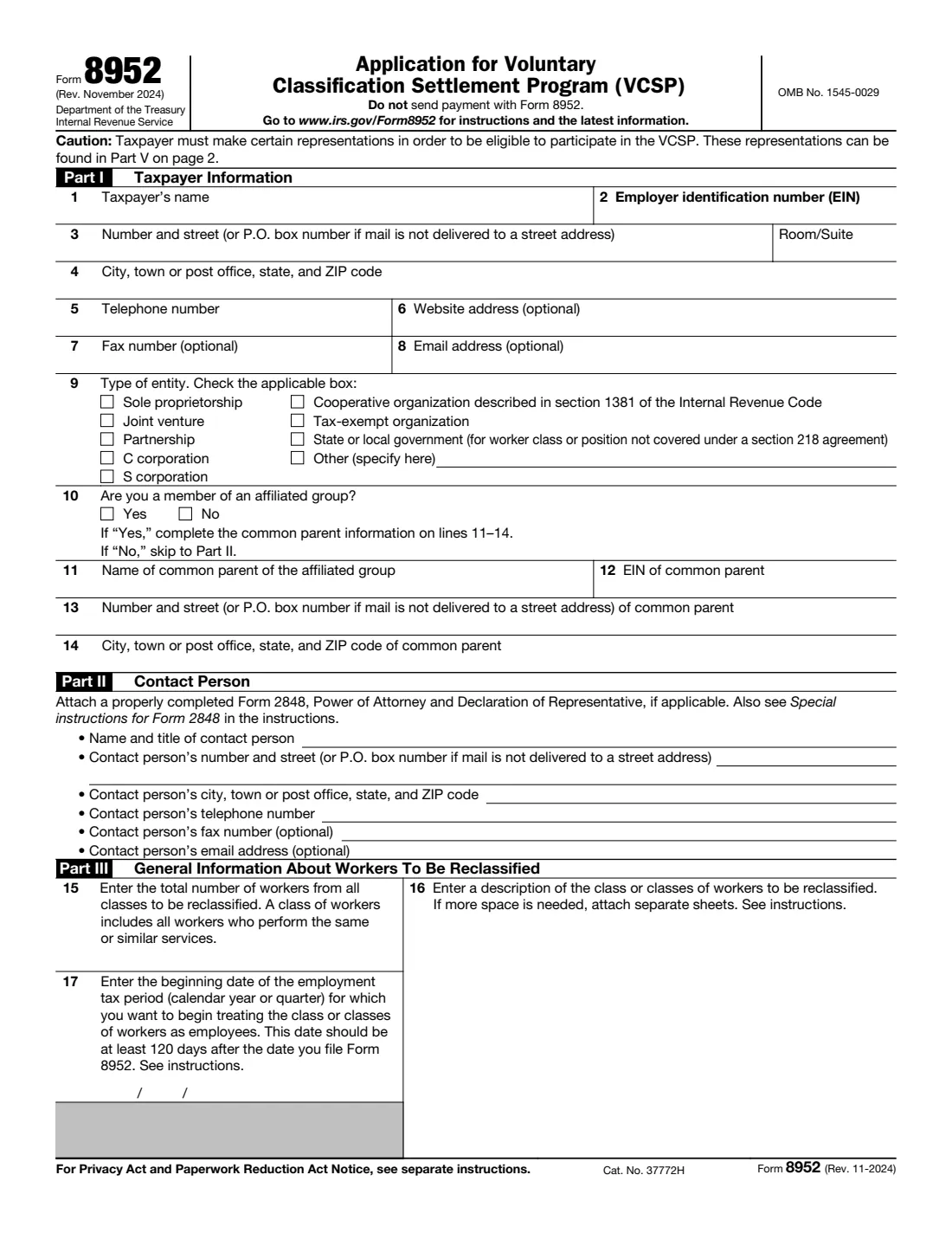
The 2024 edition has 2 pages. FileIt asks for it in 7 parts, and it is signed by Taxpayer (the employer):
- Part I: Taxpayer informationTaxpayer (the employer)
- Lines 11-14: Common parent of the affiliated groupTaxpayer (the employer)
- Part II: Contact personTaxpayer (the employer)
- Part III: Workers to be reclassifiedTaxpayer (the employer)
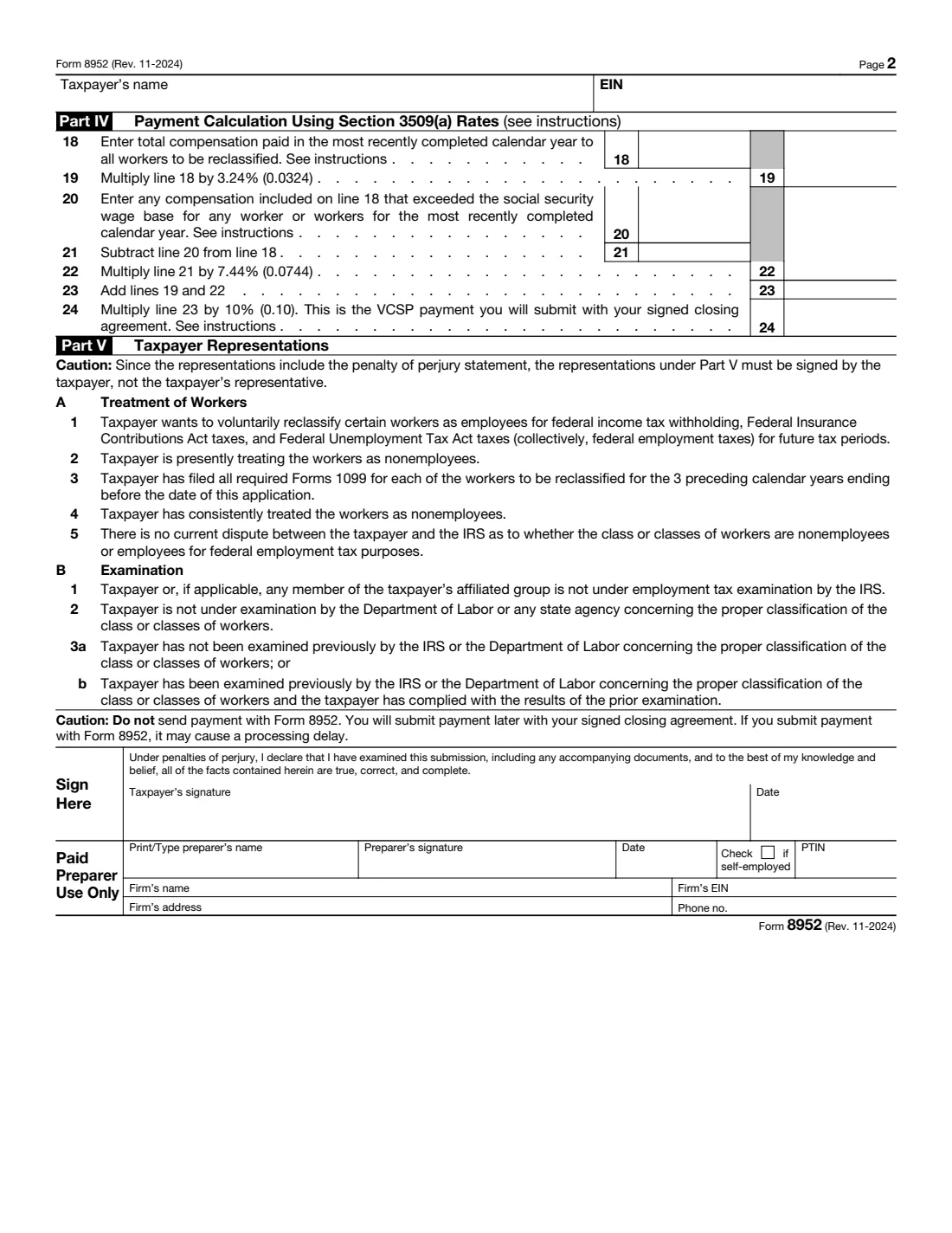
- Part IV: Payment calculation (section 3509(a) rates)Taxpayer (the employer)
- Part V: Taxpayer representationsTaxpayer (the employer)
- Paid preparerPaid preparer
How to fill out Form 8952, step by step
1 Part I: Taxpayer information
Enter the taxpayer's name, EIN, address and phone number, and tick the type of entity. The business must already have an EIN when it files. If it belongs to an affiliated group of corporations, answer Yes on line 10 and give the common parent's details on lines 11-14.
2 Part II: Contact person
The person the IRS may contact about the application. If they don't have legal authority to bind the taxpayer, attach Form 2848. On it, describe the matter as 'Voluntary Classification Settlement Program', leave the form number and years blank, and check line 4.
3 Lines 15-16: The workers
Give the total number of workers in all the classes you're reclassifying, and describe each class. A class is all the workers who perform the same or similar services. Attach a list of their names and SSNs: leaving it out delays processing.
4 Line 17: Start date
The first day of the calendar year or quarter in which you'll start treating the workers as employees, such as January 1, 2027 for the first quarter of 2027. It should be at least 120 days after you file.
5 Part IV: The payment
Line 18 is the compensation paid to all the workers in the most recently completed calendar year. Line 20 is the part of it above the Social Security wage base, worked out worker by worker. FileIt computes lines 19 and 21-24. Line 24 is what you'll pay with the closing agreement.
6 Part V and signature
Read the representations. The taxpayer, not a representative, signs under penalties of perjury: the owner of a sole proprietorship, an authorized corporate officer, a partner or authorized LLC member, or the fiduciary of an estate or trust. A paid preparer fills in and signs the Paid Preparer section.
Common mistakes to avoid
- Sending the payment with the form, which can delay processing.
- Leaving out the list of workers' names and SSNs.
- Having a representative sign. The taxpayer must sign the Part V representations.
- Applying while under IRS employment tax examination, or a Department of Labor or state examination about the same workers.
- Writing 'See attached' instead of filling in each entry space. The instructions ask you to complete every applicable space and attach extra sheets only for more room.
After you fill it out
Sign the form, attach the list of workers, any extra sheets and Form 2848 if needed, in the order the instructions give, and mail it to the IRS address in the Form 8952 instructions.
If the IRS accepts the application, it sends you a closing agreement. You pay the line 24 amount when you sign it, and then treat the workers as employees from the date on line 17.
FileIt keeps the filled form in your vault. Once the workers are employees, they'll need Forms W-4 and I-9 like any new hire.
Fill out Form 8952 online with FileIt
- Pick the person. Choose someone from People and FileIt fills in their name, date of birth, address and other details it already knows.
- Answer plain-language questions. One part of the form at a time, with the official help text beside each question — 47 fields in all. Your answers save as you go.
- Check the live preview. Watch your answers land on the real Internal Revenue Service (IRS) form, and let FileIt do any worksheet arithmetic.
- Generate the official PDF. FileIt prints your answers into the agency’s own PDF and files it in that person’s folder in your vault. Sign it, or send it for e-signature.
FileIt fills the form — it never files or submits anything for you. Deliver the finished form to whoever asked for it, the way the form’s instructions say.
Start Form 8952 now — it’s freeForm 8952: frequently asked questions
How much does the VCSP cost?
Line 24: 10% of the employment tax figured at reduced rates on the most recently completed year's compensation. That is 3.24% of all of it plus 7.44% of the part below the Social Security wage base, times 10%. FileIt works it out for you.
Do I send the payment with Form 8952?
No. The form and instructions say not to. You pay later, with the signed closing agreement.
Can my accountant sign it?
No. The representations must be signed by the taxpayer, not the taxpayer's representative. A paid preparer can prepare it and signs the Paid Preparer section.
What's the difference between Form 8952 and Form SS-8?
Form SS-8 asks the IRS to decide whether a worker is an employee. Form 8952 is for a business that has already decided to treat its workers as employees and wants to settle the past at a reduced cost.
Can FileIt file it for me?
No. FileIt fills in the official PDF and keeps a copy in your vault. You mail it to the IRS yourself.
Official sources
- Blank form (PDF), published by Internal Revenue Service (IRS): https://www.irs.gov/pub/irs-pdf/f8952.pdf
- Official instructions and guidance: https://www.irs.gov/pub/irs-pdf/i8952.pdf
- Edition shown on this page: Form 8952 (Rev. November 2024), OMB No. 1545-0029 (checked 2026-10-25).
FileIt is not affiliated with or endorsed by Internal Revenue Service (IRS) or any government. This page explains the form in general terms and is not legal, tax or immigration advice. Always read the official instructions, and check that you are using the edition the recipient accepts. Page last reviewed 2026-10-25.