What is Form 8655?
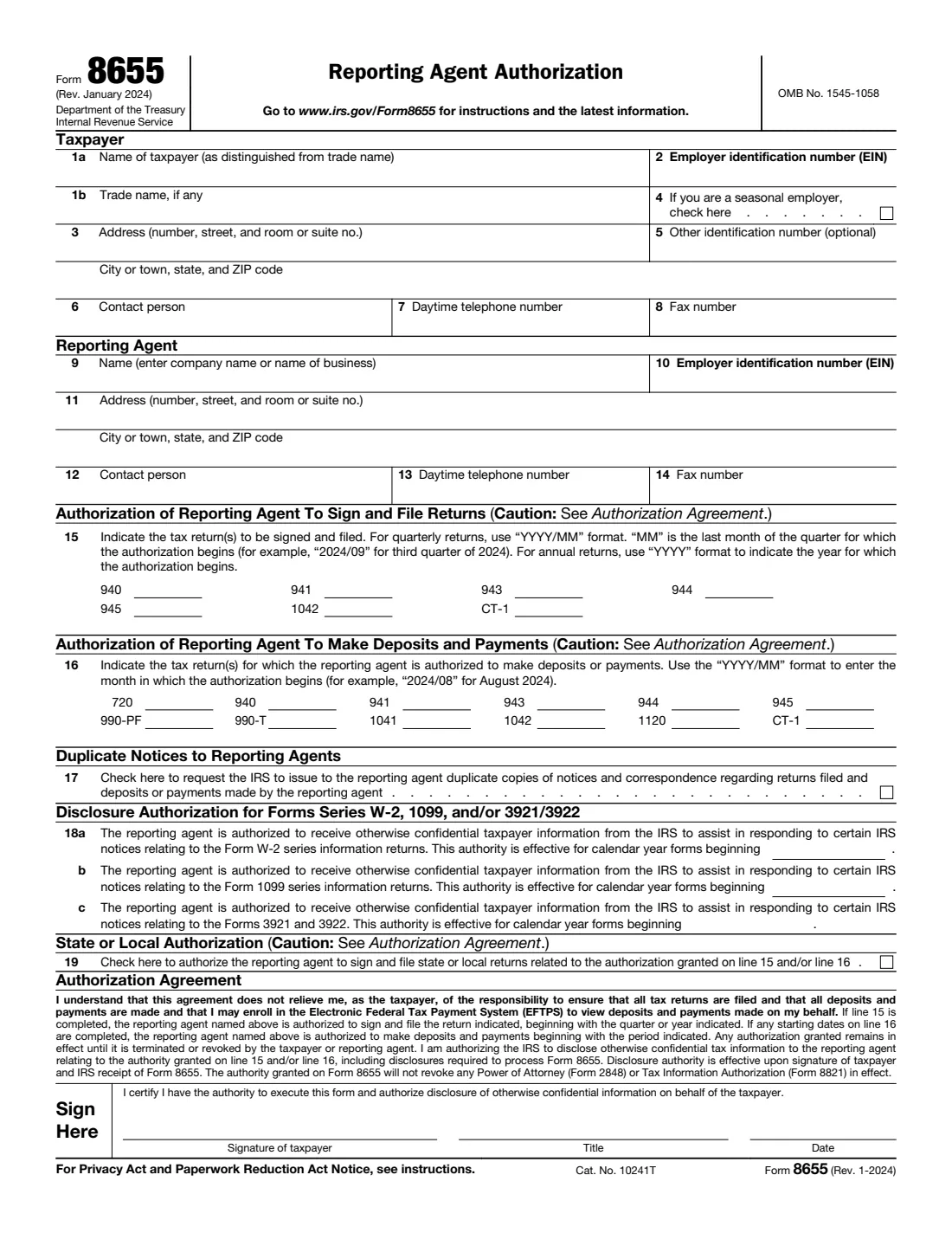
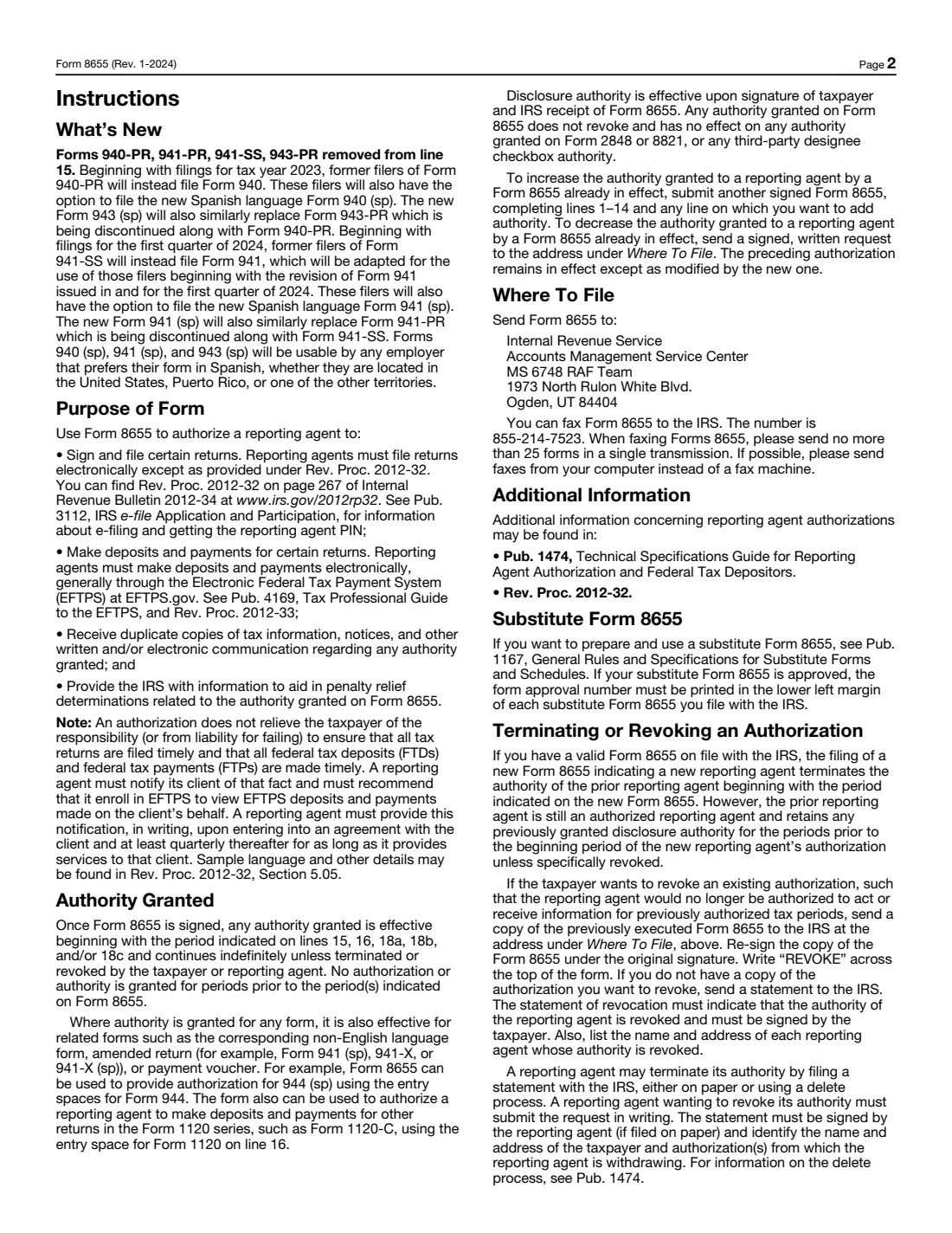
Form 8655, Reporting Agent Authorization, lets a business authorize a reporting agent, usually a payroll service, to sign and file returns such as Forms 941, 940, 943, 944 and 945, to make deposits and payments for those and other returns, and to receive duplicate copies of IRS notices. Reporting agents must file these returns electronically and generally make deposits through EFTPS.
The authorization starts with the period you enter on lines 15 and 16 and continues until it is revoked by you or ended by the agent. It doesn't relieve the business of its responsibility to make sure every return is filed and every deposit is made, and it doesn't revoke any Form 2848 or 8821 in effect. The current revision is Rev. January 2024.
Payroll providers often send a pre-filled Form 8655 for the client to sign. FileIt lets you fill or check every line, prints it into the IRS's own PDF, and keeps a copy in your vault.
- Who signs
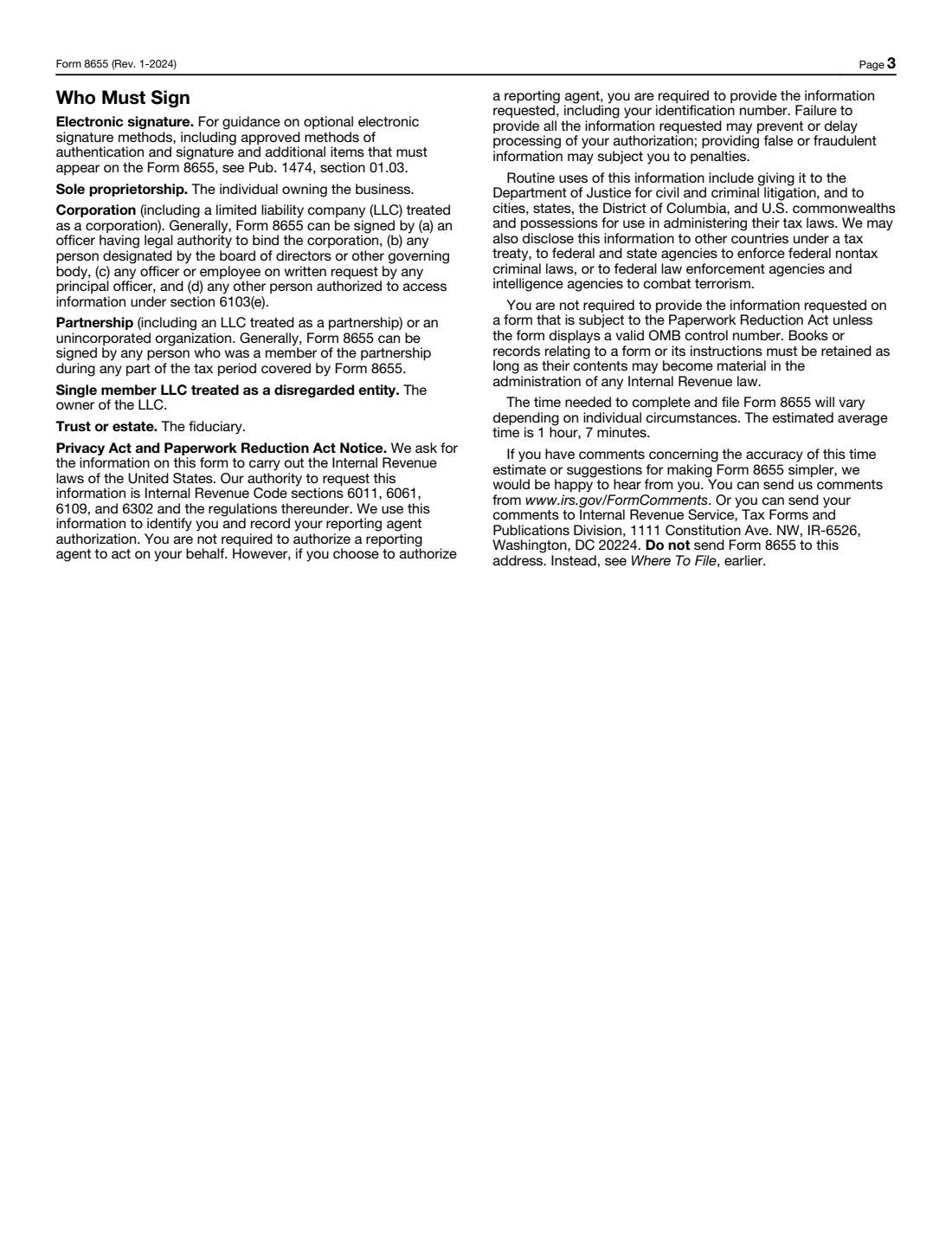
- The taxpayer: the owner, an authorized corporate officer, a partner, the single-member LLC's owner, or a trust or estate's fiduciary.
- Who files
- Usually the reporting agent sends it to the IRS; you can also mail or fax it yourself.
- Where
- IRS Accounts Management Service Center, MS 6748 RAF Team, 1973 North Rulon White Blvd., Ogden, UT 84404, or fax 855-214-7523 (as printed in the instructions).
- Lasts
- Until revoked by the taxpayer or terminated by the agent.
- Edition
- Rev. January 2024
- Agency
- Internal Revenue Service (IRS), Department of the Treasury
Who needs to fill out Form 8655?
- Employers that use a payroll company or PEO to file their federal employment tax returns.
- Businesses whose payroll provider makes their federal tax deposits through EFTPS.
- Employers that want their payroll provider to help answer IRS notices about Forms W-2, 1099, 3921 or 3922.
- Businesses switching payroll providers: a new Form 8655 for a new agent ends the prior agent's authority from the period on the new form.
When to use Form 8655
- When you start with a new payroll provider or reporting agent.
- When you want to add authority to an existing authorization: file another signed Form 8655 completing lines 1-14 and the lines you are adding.
- To revoke an authorization, the instructions say to send a copy of the earlier form re-signed under the original signature with REVOKE written across the top, or a signed statement.
What you need before you start
- The business's legal name, trade name, EIN and address.
- The reporting agent's name, EIN, address and contact details (the agent usually provides these).
- The returns the agent will sign and file, and the first quarter (YYYY/MM) or year (YYYY) for each.
- The returns the agent will make deposits and payments for, and the first month (YYYY/MM) for each.
- The signer's title.
What’s on Form 8655
The 2024 edition has 3 pages. FileIt asks for it in 6 parts, and it is signed by Taxpayer (the business):
- Taxpayer (lines 1-8)Taxpayer (the business)
- Reporting agent (lines 9-14)Taxpayer (the business)
- Line 15: Returns the agent may sign and fileTaxpayer (the business)
- Line 16: Returns the agent may make deposits and payments forTaxpayer (the business)
- Lines 17-19: Notices, information returns and state returnsTaxpayer (the business)
- Sign hereTaxpayer (the business)
How to fill out Form 8655, step by step
1 Lines 1-8: The taxpayer
Enter the legal name (not the trade name) on line 1a, the trade name on 1b, the EIN, the address, and a contact person. Tick line 4 if you are a seasonal employer.
2 Lines 9-14: The reporting agent
Enter the agent's company name, EIN, address and contact details, exactly as the agent gives them.
3 Line 15: Returns to sign and file
For Form 941 enter YYYY/MM with the last month of the first quarter covered, for example 2027/03. For the annual returns (940, 943, 944, 945, 1042, CT-1) enter the first year as YYYY.
4 Line 16: Deposits and payments
Enter the month the agent starts making deposits or payments for each return, as YYYY/MM. Form 1120 covers the other returns in the 1120 series too.
5 Lines 17-19: Notices, information returns, state returns
Optionally ask for duplicate notices to the agent (17), let the agent receive information to help with notices about Forms W-2, 1099, 3921 and 3922 from a calendar year (18), and authorize state or local returns related to lines 15 and 16 (19).
6 Sign here
Read the Authorization Agreement, then sign, add your title and date. The instructions describe optional electronic signature methods in Pub. 1474.
Common mistakes to avoid
- Entering the trade name on line 1a instead of the legal name.
- Using YYYY for Form 941 on line 15, or a month that isn't the last month of a quarter.
- Leaving lines 15 and 16 blank so nothing is authorized.
- Having someone sign who isn't authorized to sign for the business.
- Assuming the authorization makes the agent responsible: the business remains responsible for every return and deposit, and can check deposits in EFTPS.
After you fill it out
Sign and date the form and return it to your reporting agent, who usually files it, or mail or fax it to the IRS at the address in the instructions.
Enroll in EFTPS to view the deposits and payments the agent makes for you, as the form's agreement suggests.
Keep a copy in your FileIt vault: you need it to revoke the authorization later.
Fill out Form 8655 online with FileIt
- Pick the person. Choose someone from People and FileIt fills in their name, date of birth, address and other details it already knows.
- Answer plain-language questions. One part of the form at a time, with the official help text beside each question — 42 fields in all. Your answers save as you go.
- Check the live preview. Watch your answers land on the real Internal Revenue Service (IRS) form, and let FileIt do any worksheet arithmetic.
- Generate the official PDF. FileIt prints your answers into the agency’s own PDF and files it in that person’s folder in your vault. Sign it, or send it for e-signature.
FileIt fills the form — it never files or submits anything for you. Deliver the finished form to whoever asked for it, the way the form’s instructions say.
Start Form 8655 now — it’s freeForm 8655: frequently asked questions
Can I fill out Form 8655 online?
Yes. FileIt asks each line in plain language and prints your answers into the official IRS PDF, which you sign and give to your reporting agent or send to the IRS.
Is Form 8655 the same as a power of attorney?
No. Form 8655 authorizes a reporting agent to sign and file certain returns and make deposits. It doesn't revoke and isn't replaced by a Form 2848 (power of attorney) or Form 8821 (tax information authorization).
Where do I send Form 8655?
To Internal Revenue Service, Accounts Management Service Center, MS 6748 RAF Team, 1973 North Rulon White Blvd., Ogden, UT 84404, or by fax to 855-214-7523, as the instructions say. Many payroll providers send it for you.
How do I enter the quarter for Form 941?
Use YYYY/MM, where MM is the last month of the first quarter the authorization covers, for example 2027/03 for the first quarter of 2027.
Can I sign Form 8655 electronically?
The instructions point to optional electronic signature methods in Pub. 1474, section 01.03, which reporting agents usually manage. Otherwise sign by hand.
How do I end an authorization?
A new Form 8655 naming a new agent ends the prior agent's authority from the new period. To revoke without a new agent, send a re-signed copy of the earlier form marked REVOKE, or a signed revocation statement, to the address in the instructions.
Official sources
- Blank form (PDF), published by Internal Revenue Service (IRS): https://www.irs.gov/pub/irs-pdf/f8655.pdf
- Official instructions and guidance: https://www.irs.gov/forms-pubs/about-form-8655
- Edition shown on this page: Rev. January 2024 (checked 2026-10-25).
FileIt is not affiliated with or endorsed by Internal Revenue Service (IRS) or any government. This page explains the form in general terms and is not legal, tax or immigration advice. Always read the official instructions, and check that you are using the edition the recipient accepts. Page last reviewed 2026-10-25.