What is Form 4506-C?
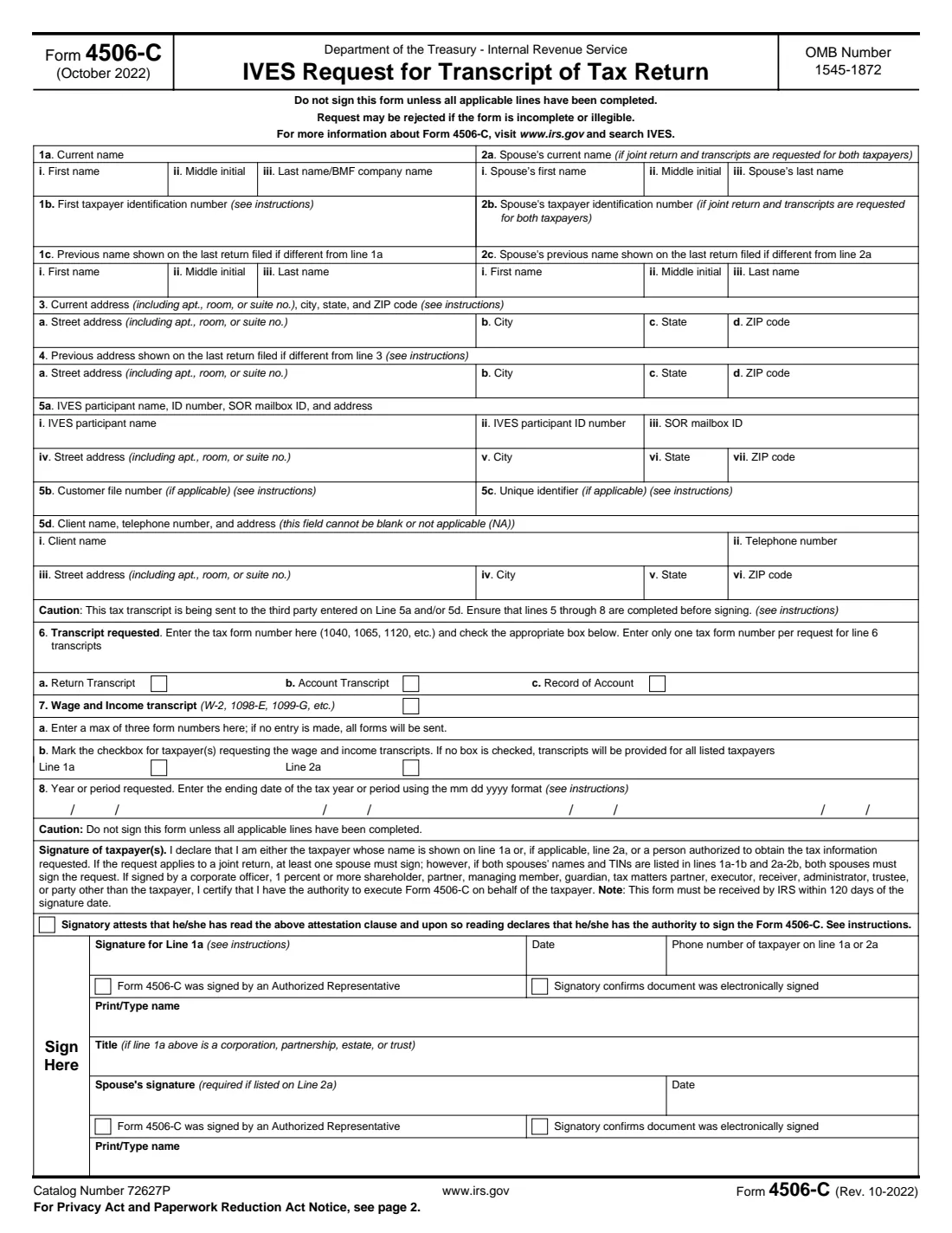
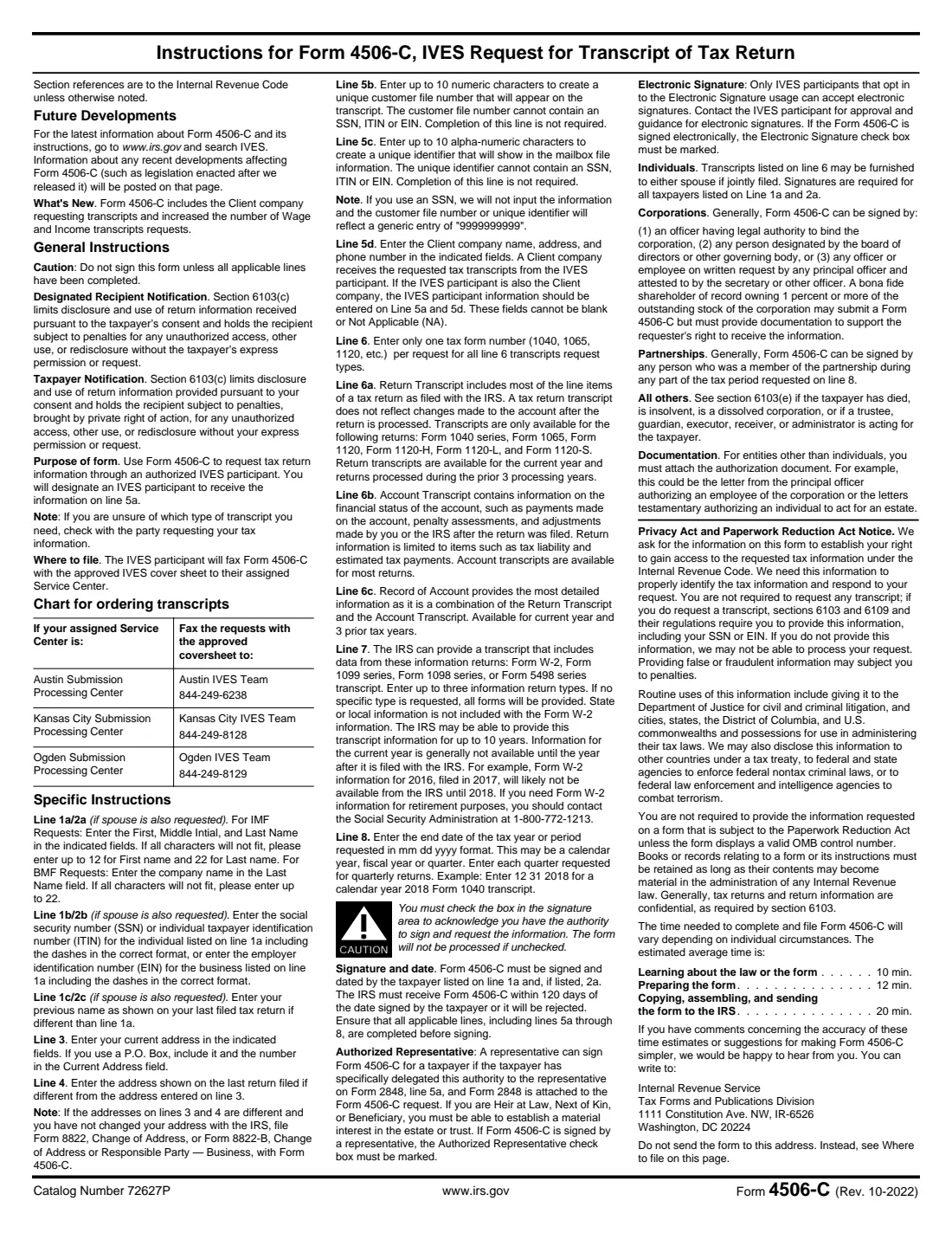
Form 4506-C, IVES Request for Transcript of Tax Return, authorizes a participant in the IRS Income Verification Express Service (IVES) to receive your tax transcripts. Mortgage lenders and other companies that need to verify income typically ask borrowers to sign it. You name the IVES participant on line 5a and the client company (often the lender) on line 5d; the IVES participant then faxes the form to the IRS with an approved cover sheet. The current edition is Rev. October 2022.
You can request a return transcript, an account transcript or a record of account for one tax form (line 6), and a wage and income transcript built from Forms W-2, 1099, 1098 and 5498 (line 7), for up to four years or periods (line 8). The IRS must receive the form within 120 days of the date you sign it, and both spouses sign if both are listed.
FileIt fills in each line, including the separate month, day and year boxes on line 8, and prints your answers into the IRS's official PDF, saved in your vault. The form allows electronic signatures only when the IVES participant has opted in, so FileIt asks how you'll sign and ticks the form's "electronically signed" box when you choose e-signature. You hand the form to the company that asked for it; FileIt never sends anything to the IRS.
- Who fills it
- Taxpayers (and spouses on a joint return) whose income a lender or other company verifies through IVES.
- Given to
- The company that asked for it; the IVES participant faxes it to its assigned IRS service center.
- Deadline
- The IRS must receive it within 120 days of the signature date.
- Signatures
- The taxpayer on line 1a, and the spouse on line 2a if listed. Electronic only if the IVES participant accepts it.
- Edition
- Rev. October 2022
- Agency
- Internal Revenue Service (IRS), Department of the Treasury
Who needs to fill out Form 4506-C?
- Home buyers and people refinancing, whose mortgage lender verifies income with IRS transcripts.
- Borrowers applying for other loans where the lender uses an IVES participant.
- Married couples who filed jointly and whose lender wants transcripts for both spouses.
When to use Form 4506-C
- When a lender or other company asks you to sign Form 4506-C as part of an application.
- After every applicable line, including lines 5 to 8, has been completed: the form says not to sign it before then.
- Not when you want your own transcripts mailed to you: that's Form 4506-T, or Get Transcript at irs.gov.
What you need before you start
- Your name, SSN or ITIN (with dashes), current address, and any previous name or address shown on your last return.
- Your spouse's name and SSN if transcripts are needed for both of you.
- From the company asking: the IVES participant's name, ID number, SOR mailbox ID and address; the client company's name, phone and address; and optional customer file number and unique identifier.
- Which transcripts and which years or periods they need.
- A daytime phone number.
What’s on Form 4506-C
The 2022 edition has 2 pages. FileIt asks for it in 7 parts, and it is signed by Taxpayer and Spouse (line 2a):
- Line 1: TaxpayerTaxpayer
- Line 2: Spouse (joint return, transcripts for both)Spouse (line 2a)
- Lines 3 and 4: AddressesTaxpayer
- Line 5: IVES participant and clientTaxpayer
- Lines 6 and 7: Transcripts requestedTaxpayer
- Line 8: Years or periodsTaxpayer
- SignatureTaxpayer
How to fill out Form 4506-C, step by step
1 Lines 1 and 2: Names and TINs
Enter your first name, middle initial and last name (up to 12 characters of the first name and 22 of the last if they don't fit) and your SSN or ITIN with the dashes. Add a previous name if your last return showed a different one. For a joint return with transcripts for both of you, add your spouse on line 2.
2 Lines 3 and 4: Addresses
Enter your current address, and on line 4 the address on your last return if it was different. If they differ and you haven't told the IRS, the instructions say to file Form 8822 with this form.
3 Line 5: Who receives the transcript
Enter the IVES participant's name, ID number, SOR mailbox ID and address (5a), any customer file number or unique identifier (5b, 5c, up to 10 characters each and never an SSN, ITIN or EIN), and the client company's name, phone and address (5d), which can't be blank or NA. Your lender gives you these.
4 Lines 6 and 7: Which transcripts
On line 6 enter one tax form number (1040, 1065, 1120, etc.) and tick Return Transcript, Account Transcript or Record of Account. On line 7 tick Wage and Income transcript if needed, optionally listing up to three information return types, and mark whose transcripts you want (if neither, all listed taxpayers).
5 Line 8: Years or periods
Enter the ending date of each year or period in mm dd yyyy format, such as 12 31 2025 for a calendar-year 2025 Form 1040. Up to four.
6 Sign
Tick the box attesting that you've read the attestation and have the authority to sign (the form isn't processed without it), add your phone number and printed name, and sign and date. Mark whether it was signed by an authorized representative (who needs authority delegated on Form 2848 line 5a, attached) and whether it was signed electronically.
Common mistakes to avoid
- Signing before lines 5 to 8 are filled in. The form warns not to.
- Leaving the attestation box unchecked. The form won't be processed.
- Entering the SSN without dashes. The instructions ask for the correct dashed format.
- Using an SSN as the customer file number or unique identifier.
- Signing electronically when the IVES participant hasn't opted in to electronic signatures.
- Listing your spouse but having only one signature: if both names and TINs are listed, both must sign.
After you fill it out
Sign and date it (and your spouse, if listed), then give it to the lender or company that asked. The IVES participant faxes it to the IRS with its approved cover sheet; you don't send it yourself.
The IRS must receive it within 120 days of your signature date, so sign close to when it will be sent.
FileIt keeps a copy in your vault with your loan documents.
Fill out Form 4506-C online with FileIt
- Pick the person. Choose someone from People and FileIt fills in their name, date of birth, address and other details it already knows.
- Answer plain-language questions. One part of the form at a time, with the official help text beside each question — 64 fields in all. Your answers save as you go.
- Check the live preview. Watch your answers land on the real Internal Revenue Service (IRS) form, and let FileIt do any worksheet arithmetic.
- Generate the official PDF. FileIt prints your answers into the agency’s own PDF and files it in that person’s folder in your vault. Sign it, or send it for e-signature.
FileIt fills the form — it never files or submits anything for you. Deliver the finished form to whoever asked for it, the way the form’s instructions say.
Start Form 4506-C now — it’s freeForm 4506-C: frequently asked questions
Why did my lender ask me to sign Form 4506-C?
To get your tax transcripts directly from the IRS through the IVES program and verify the income on your application.
Do I send Form 4506-C to the IRS?
No. You give it to the company that asked; the IVES participant faxes it to its assigned IRS service center with an approved cover sheet.
Can I sign Form 4506-C electronically?
Only if the IVES participant has opted in to accept electronic signatures; ask them first. If it's signed electronically, the "Signatory confirms document was electronically signed" box must be checked.
How long is a signed Form 4506-C good for?
The IRS must receive it within 120 days of the signature date, or it's rejected.
What's the difference between Form 4506-C and Form 4506-T?
Form 4506-C sends transcripts to an IVES participant (such as a lender's vendor). Form 4506-T is a general request for transcripts, which can be mailed to you or to a third party you name.
Do both spouses need to sign?
If both spouses' names and TINs are listed on lines 1 and 2, both must sign. On a joint return otherwise, at least one spouse must sign.
Official sources
- Blank form (PDF), published by Internal Revenue Service (IRS): https://www.irs.gov/pub/irs-pdf/f4506c.pdf
- Official instructions and guidance: https://www.irs.gov/forms-pubs/about-form-4506-c
- Edition shown on this page: Rev. October 2022 (checked 2026-10-01).
FileIt is not affiliated with or endorsed by Internal Revenue Service (IRS) or any government. This page explains the form in general terms and is not legal, tax or immigration advice. Always read the official instructions, and check that you are using the edition the recipient accepts. Page last reviewed 2026-10-01.