What is Form 14039?
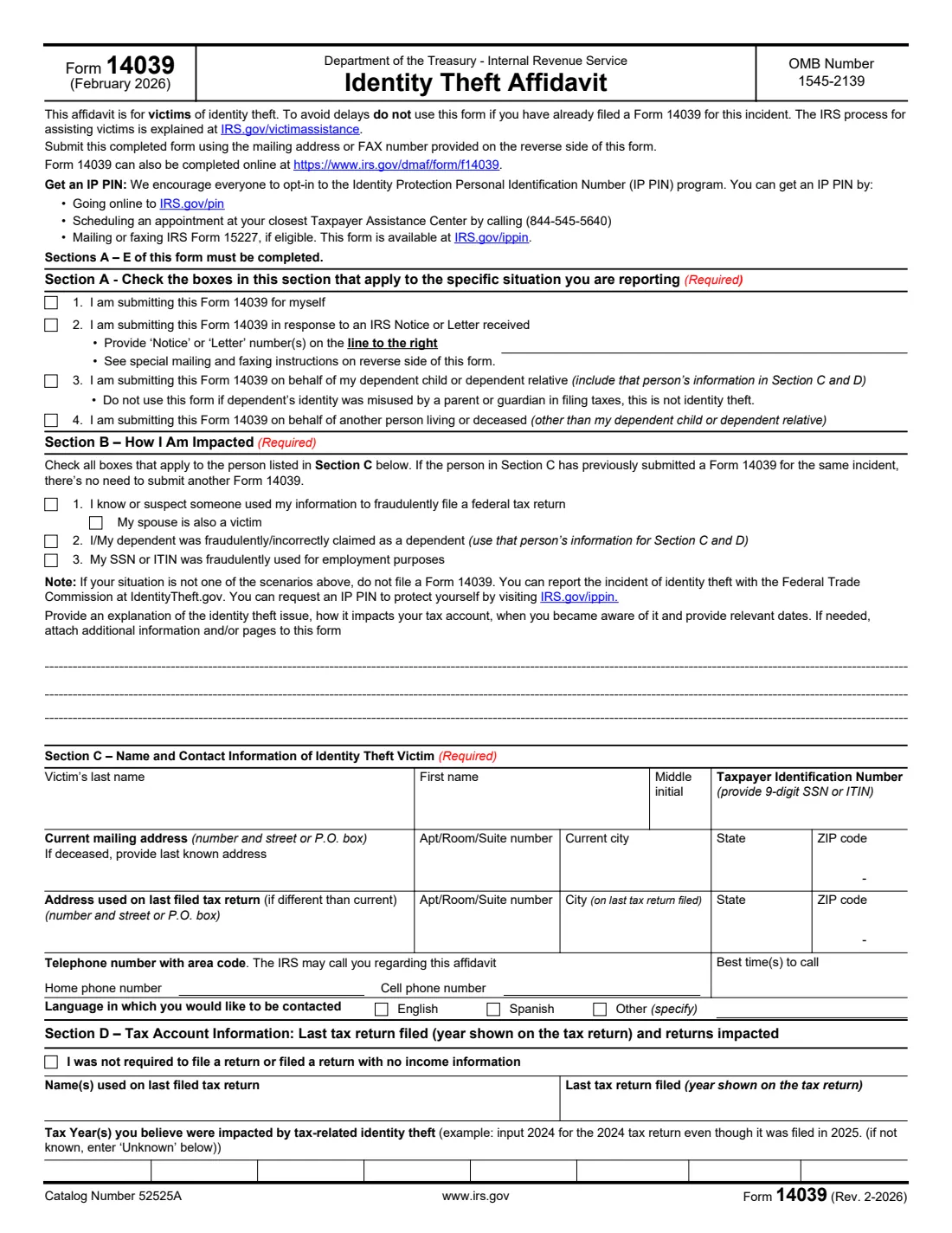
Form 14039 tells the IRS that you are a victim of tax-related identity theft, so it can document your situation and protect your tax account. The form lists three situations: someone used your information to file a federal tax return, you or your dependent were fraudulently or incorrectly claimed as a dependent, or your SSN or ITIN was used for employment. If none of these applies, the form says not to file it, and to report identity theft to the Federal Trade Commission at IdentityTheft.gov instead.
You can file it for yourself, for your dependent child or dependent relative, or on behalf of another person living or deceased — for example as a surviving spouse, a court-appointed representative, next of kin when no representative has been appointed, a conservator, or someone holding a power of attorney. Sections A to E must be completed; Section F is for the person filing on someone else's behalf. Don't use it if you already filed a Form 14039 for the same incident.
FileIt walks you through each section, fits your explanation onto the form's lines, checks that Section F matches who you are filing for, and prints everything into the IRS's own PDF, including names with accents or non-English letters. The PDF is saved in your vault and can be sent for e-signature. You then submit it to the IRS yourself — online, by mail or by fax, as page 2 of the form explains. FileIt never submits anything.
- Who files
- The victim, or their spouse, representative, conservator, parent or guardian.
- Submit
- Choose one: online at irs.gov/dmaf/form/f14039 (preferred), by mail, or by fax. Not more than one.
- Mail (most filers)
- Department of the Treasury, Internal Revenue Service, Fresno, CA 93725 (as printed on the form).
- Fax (most filers)
- 855-807-5720 toll-free, with a cover sheet marked "Confidential".
- Responding to a notice
- Use the address or fax number in the IRS notice or letter.
- Edition
- Rev. 2-2026 (February 2026)
Who needs to fill out Form 14039?
- People whose e-filed return was rejected because someone already filed with their SSN, or who got an IRS notice about a return they didn't file.
- Anyone whose SSN or ITIN was used by someone else to work, for example a Form W-2 from an employer they never worked for.
- Parents whose child was fraudulently claimed as a dependent on someone else's return.
- Surviving spouses and personal representatives of a deceased taxpayer whose identity was used.
- Conservators and people with a power of attorney (Form 2848) acting for a taxpayer who can't complete the form.
When to use Form 14039
- When you know or suspect someone used your information to file a federal tax return.
- When you receive an IRS notice or letter about possible identity theft and the notice asks for it. Then follow the notice's own mailing or fax instructions.
- When your SSN or ITIN was used for employment, or you or your dependent were claimed as a dependent by someone else.
- Not when you already filed a Form 14039 for the same incident, and not for identity theft that doesn't affect your taxes (report that at IdentityTheft.gov).
What you need before you start
- The victim's name, SSN or ITIN, current mailing address (last known address if deceased), and the address on the last return filed if it was different.
- Phone numbers and the best time to call, and your preferred language.
- The year of the last tax return filed and the name(s) used on it, and the tax years you believe were affected.
- Any IRS notice or letter number(s) you received.
- A short explanation: what happened, how it affects the tax account, when you became aware and the relevant dates.
- If filing for someone else: your name, address and phone number, plus the attachments Section F asks for (a court certificate, a death certificate or government notification, conservatorship or power of attorney documents).
What’s on Form 14039
The 2026 edition has 2 pages. FileIt asks for it in 5 parts, and it is signed by Taxpayer, representative, conservator, parent or guardian:
- Section A: Your situationTaxpayer, representative, conservator, parent or guardian
- Section B: How you are impactedTaxpayer, representative, conservator, parent or guardian
- Section C: The identity theft victimTaxpayer, representative, conservator, parent or guardian
- Section D: Tax account informationTaxpayer, representative, conservator, parent or guardian
- Section F: Representative, conservator, parent or guardianTaxpayer, representative, conservator, parent or guardian
How to fill out Form 14039, step by step
1 Section A: Your situation
Tick whether you are submitting the form for yourself (item 1), for your dependent child or dependent relative (item 3), or for another person living or deceased (item 4). Tick item 2 as well if you're responding to an IRS notice or letter, and write its number(s) on the line — those forms go to the address or fax number in the notice.
2 Section B: How you are impacted
Tick every box that applies to the person in Section C: a fraudulent federal return (and whether your spouse is also a victim), being fraudulently or incorrectly claimed as a dependent, or an SSN or ITIN used for employment. Then explain the issue, how it affects the tax account, when you became aware and the relevant dates. Attach extra pages if needed.
3 Section C: The victim's details
The victim's name and 9-digit SSN or ITIN, current mailing address (last known address if deceased), the address on the last filed return if different, phone numbers, best time to call and language.
4 Section D: Tax account information
Tick the box if you weren't required to file or filed a return with no income information. Otherwise give the name(s) and year of the last return filed. List the tax years you believe were affected using the year shown on the return — the form's example is 2024 for the 2024 return filed in 2025 — or Unknown.
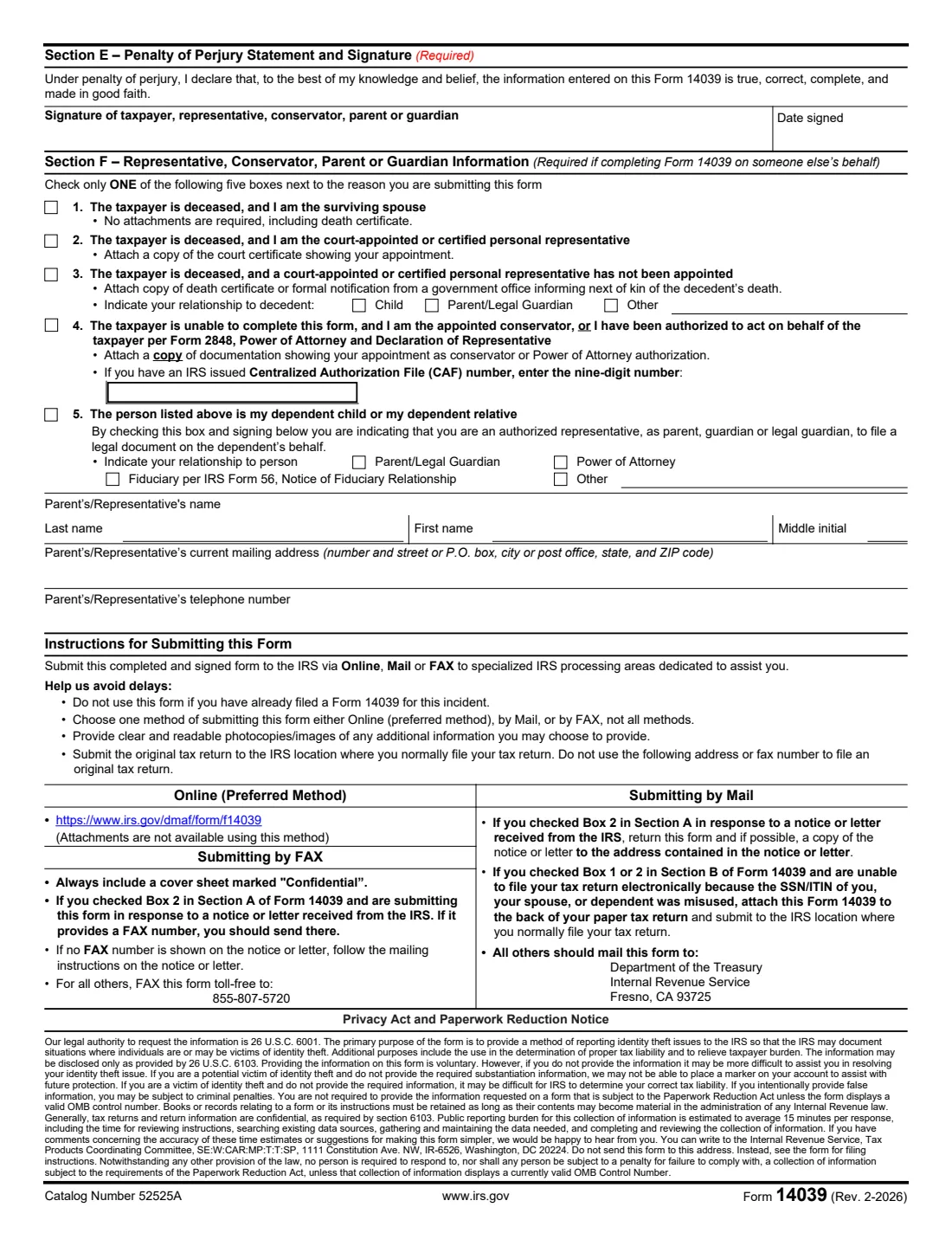
5 Section E: Signature
The taxpayer, representative, conservator, parent or guardian signs and dates under penalty of perjury.
6 Section F: Filing for someone else
Check only one of five reasons: surviving spouse of a deceased taxpayer (no attachments required, including the death certificate); court-appointed or certified personal representative (attach the court certificate); deceased taxpayer with no appointed representative (attach a death certificate or formal government notification, and give your relationship); conservator or Form 2848 power of attorney (attach the documentation, and the CAF number if you have one); or your dependent child or dependent relative. Then give your name, address and phone number.
Common mistakes to avoid
- Filing a second Form 14039 for the same incident. That causes delays.
- Filing when none of the Section B situations applies. Report other identity theft at IdentityTheft.gov.
- Submitting more than one way. Choose online, mail or fax — not all of them.
- Mailing to Fresno when responding to a notice. Use the address or fax number in that notice.
- Using this form for a dependent whose identity was misused by a parent or guardian filing taxes. The form says that is not identity theft.
- Leaving out Section F or its attachments when filing for someone else.
- Filing an original tax return to the identity theft address or fax number. Send your return to the IRS location where you normally file.
After you fill it out
Sign and date Section E. Then submit it one way only: online at irs.gov/dmaf/form/f14039 (attachments aren't available that way), by fax to 855-807-5720 with a cover sheet marked "Confidential", or by mail to the Fresno address printed on the form. If you're responding to an IRS notice, use the address or fax in the notice.
If you can't e-file your return because your SSN, your spouse's or your dependent's was misused, the form says to attach Form 14039 to the back of your paper return and mail it where you normally file.
Consider an Identity Protection PIN (IP PIN): online at IRS.gov/pin, by appointment at a Taxpayer Assistance Center (844-545-5640), or with Form 15227 if eligible.
FileIt keeps the completed affidavit in your vault as a record of what you sent and when.
Fill out Form 14039 online with FileIt
- Pick the person. Choose someone from People and FileIt fills in their name, date of birth, address and other details it already knows.
- Answer plain-language questions. One part of the form at a time, with the official help text beside each question — 54 fields in all. Your answers save as you go.
- Check the live preview. Watch your answers land on the real Internal Revenue Service (IRS) form, and let FileIt do any worksheet arithmetic.
- Generate the official PDF. FileIt prints your answers into the agency’s own PDF and files it in that person’s folder in your vault. Sign it, or send it for e-signature.
FileIt fills the form — it never files or submits anything for you. Deliver the finished form to whoever asked for it, the way the form’s instructions say.
Start Form 14039 now — it’s freeForm 14039: frequently asked questions
Where do I send Form 14039?
Online at irs.gov/dmaf/form/f14039 (the IRS's preferred method), by fax to 855-807-5720, or by mail to Department of the Treasury, Internal Revenue Service, Fresno, CA 93725. If you're responding to an IRS notice or letter, use the address or fax number in it. If you can't e-file because of the theft, attach it to the back of your paper return.
Can I file Form 14039 for a deceased family member?
Yes. Tick Section A item 4 and complete Section F: as the surviving spouse (no attachments required), as the court-appointed or certified personal representative (attach the court certificate), or as next of kin when no representative was appointed (attach a death certificate or formal government notification).
Can I file it for my child?
Yes. Tick Section A item 3, put the child's information in Sections C and D, and tick Section F box 5. The form says not to use it if the dependent's identity was misused by a parent or guardian filing taxes.
Should I file Form 14039 if my identity was stolen but my taxes weren't affected?
No. The form says to report it to the Federal Trade Commission at IdentityTheft.gov instead. You can still request an IP PIN to protect your tax account.
Can I fill out Form 14039 online with FileIt?
Yes. FileIt prints your answers into the official IRS PDF and keeps it in your vault. You then submit it by mail or fax yourself, or use the IRS's own online version instead.
Official sources
- Blank form (PDF), published by Internal Revenue Service (IRS): https://www.irs.gov/pub/irs-pdf/f14039.pdf
- Official instructions and guidance: https://www.irs.gov/forms-pubs/about-form-14039
- Edition shown on this page: Rev. 2-2026 (February 2026) (checked 2026-09-28).
FileIt is not affiliated with or endorsed by Internal Revenue Service (IRS) or any government. This page explains the form in general terms and is not legal, tax or immigration advice. Always read the official instructions, and check that you are using the edition the recipient accepts. Page last reviewed 2026-09-28.