What is Form 13844?
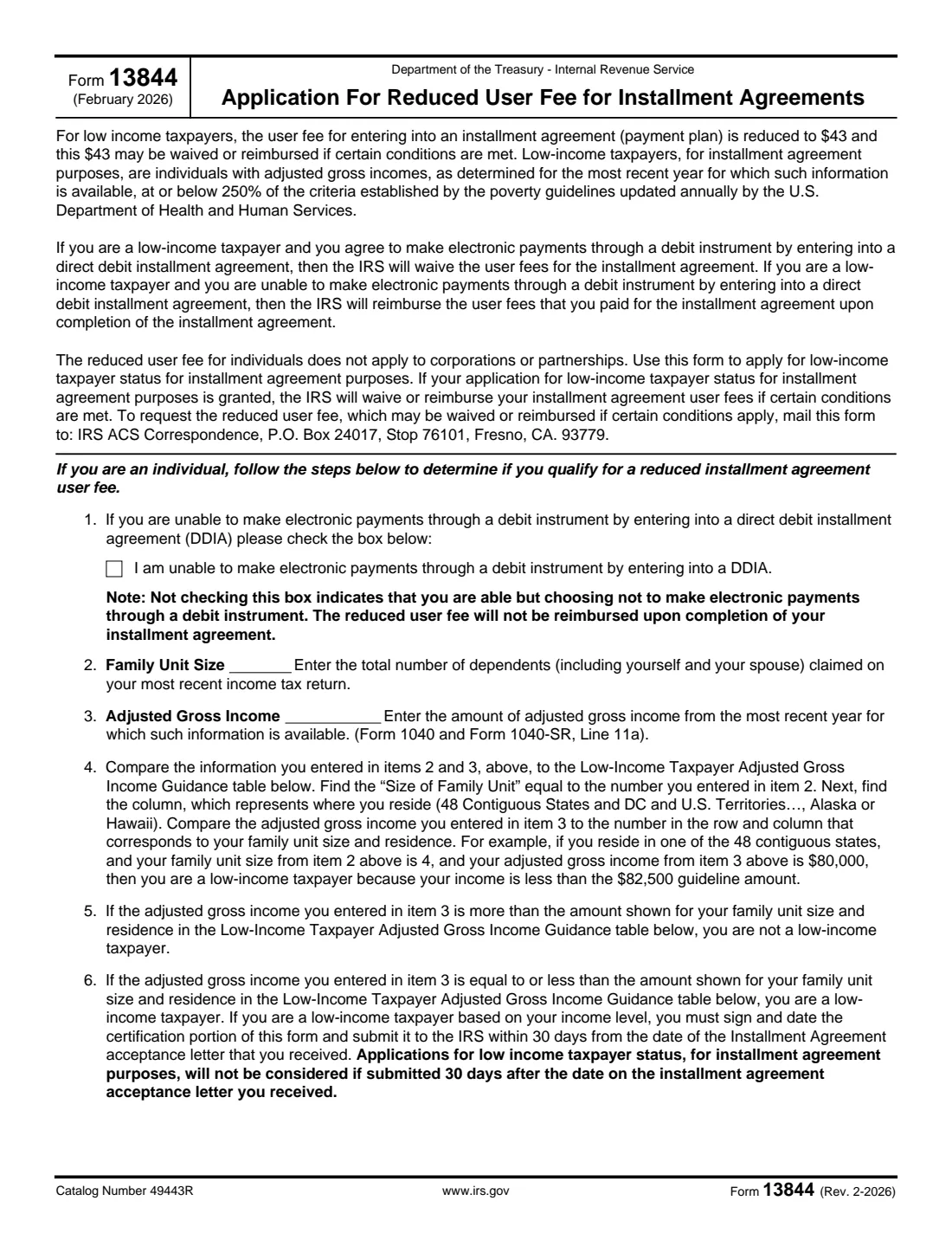
Form 13844 is how an individual with an IRS installment agreement (payment plan) applies for low-income taxpayer status for the agreement's user fee. Under the February 2026 edition, the user fee for low-income taxpayers is reduced to $43, and that $43 may be waived or reimbursed: it's waived if you set up a direct debit installment agreement (DDIA), and if you can't make electronic payments through a debit instrument, it's reimbursed when you complete the agreement.
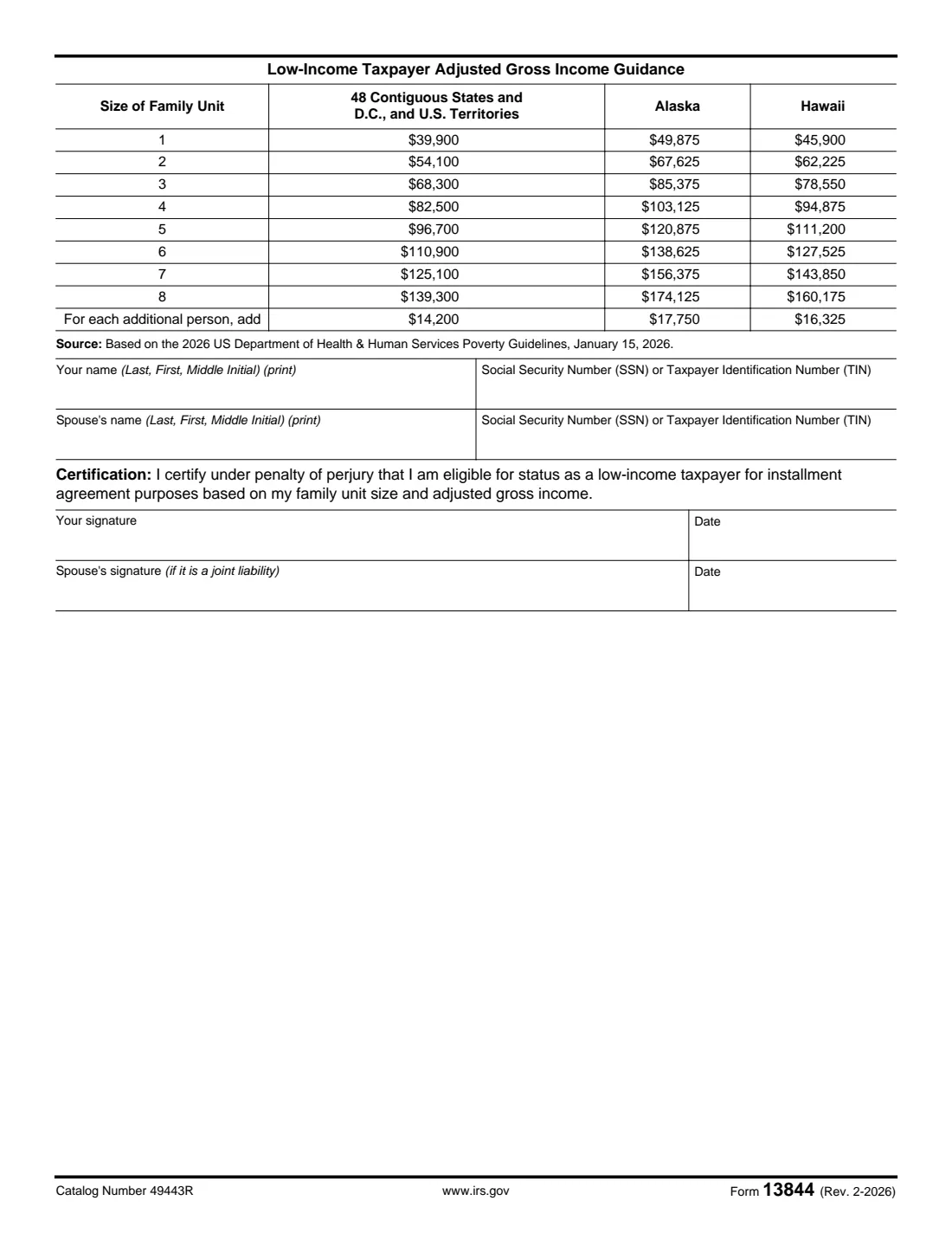
You qualify if your adjusted gross income for the most recent year available is at or below 250% of the U.S. Department of Health and Human Services poverty guidelines. Page 2 of the form has the table, based on the 2026 HHS guidelines (January 15, 2026), by family unit size and by where you live: the 48 contiguous states, D.C. and U.S. territories, Alaska, or Hawaii. Timing matters: the form must reach the IRS within 30 days of the date on your Installment Agreement acceptance letter.
FileIt looks up your limit in the 2026 table, tells you straight away if your income is too high, and prints your answers into the IRS's official PDF, saved in your vault. You sign it (electronically in FileIt or in ink) and mail it yourself; FileIt never sends anything to the IRS.
- Who fills it
- Individuals (not corporations or partnerships) with an IRS installment agreement and low income.
- Reduced fee
- $43, waived with a direct debit agreement, or reimbursed on completion if you can't pay electronically.
- Deadline
- Within 30 days of the date on your Installment Agreement acceptance letter.
- Sent to
- IRS ACS Correspondence, P.O. Box 24017, Stop 76101, Fresno, CA 93779 (as printed on the form).
- Signatures
- You, and your spouse if it's a joint liability, under penalty of perjury.
- Edition
- Rev. February 2026 (2026 HHS poverty guidelines)
Who needs to fill out Form 13844?
- Individuals who've just had an IRS installment agreement accepted and whose income is at or below the limit in the form's table.
- Married couples paying off a joint tax liability (both sign).
- Taxpayers who can't make electronic payments through a debit instrument and want the fee reimbursed when they finish paying.
When to use Form 13844
- After you receive your Installment Agreement acceptance letter, and within 30 days of the date on it. Applications sent later aren't considered.
- Not for corporations or partnerships: the reduced fee is for individuals only.
What you need before you start
- Your Installment Agreement acceptance letter (for the date).
- Your most recent income tax return: the number of people claimed (you, your spouse and dependents) and your adjusted gross income (Form 1040 or 1040-SR, line 11a).
- Your name and Social Security number or TIN, and your spouse's if it's a joint liability.
- Whether you can make electronic payments through a debit instrument.
What’s on Form 13844
The 2026 edition has 2 pages. FileIt asks for it in 3 parts, and it is signed by Taxpayer and Spouse (joint liability):
- Items 1 to 6: Are you a low-income taxpayer?Taxpayer
- Your name and numberTaxpayer
- Spouse (joint liability)Spouse (joint liability)
How to fill out Form 13844, step by step
1 Item 1: Electronic payments
Tick the box if you're unable to make electronic payments through a debit instrument by entering into a direct debit installment agreement. Leaving it unticked tells the IRS you're able but choosing not to, and then the reduced fee won't be reimbursed when the agreement is completed.
2 Items 2 and 3: Family size and income
Enter your family unit size (everyone claimed on your most recent return, including you and your spouse) and your adjusted gross income from the most recent year available.
3 Items 4 to 6: Compare with the table
Find your family unit size and the column for where you live in the table on page 2. If your income is equal to or less than that amount, you're a low-income taxpayer for this purpose; if it's more, you're not. For example, in the 48 contiguous states a family of 4 qualifies up to $82,500. FileIt does the lookup, including the amount added for each person beyond eight.
4 Names, numbers and certification
Print your name (last, first, middle initial) and SSN or TIN, and your spouse's if the liability is joint. Sign and date the certification, which is made under penalty of perjury; your spouse signs too for a joint liability.
Common mistakes to avoid
- Sending it more than 30 days after the date on the Installment Agreement acceptance letter.
- Leaving item 1 unticked when you really can't pay electronically, which loses the reimbursement.
- Using the wrong column of the table: Alaska and Hawaii have their own, higher limits.
- Counting only yourself in the family unit size instead of everyone claimed on your return.
- Forgetting the spouse's signature on a joint liability.
After you fill it out
Sign and date the form (and have your spouse sign for a joint liability), then mail it to the address printed on the form: IRS ACS Correspondence, P.O. Box 24017, Stop 76101, Fresno, CA 93779.
FileIt keeps a copy in your vault, next to your installment agreement papers. Keep the acceptance letter too.
If your status is granted, the IRS waives or reimburses the installment agreement user fees when the conditions on the form are met.
Fill out Form 13844 online with FileIt
- Pick the person. Choose someone from People and FileIt fills in their name, date of birth, address and other details it already knows.
- Answer plain-language questions. One part of the form at a time, with the official help text beside each question — 13 fields in all. Your answers save as you go.
- Check the live preview. Watch your answers land on the real Internal Revenue Service (IRS) form, and let FileIt do any worksheet arithmetic.
- Generate the official PDF. FileIt prints your answers into the agency’s own PDF and files it in that person’s folder in your vault. Sign it, or send it for e-signature.
FileIt fills the form — it never files or submits anything for you. Deliver the finished form to whoever asked for it, the way the form’s instructions say.
Start Form 13844 now — it’s freeForm 13844: frequently asked questions
How much is the reduced installment agreement fee?
This edition says the user fee for low-income taxpayers is reduced to $43, and that $43 may be waived or reimbursed if certain conditions are met.
Who counts as a low-income taxpayer?
An individual whose adjusted gross income for the most recent year available is at or below 250% of the HHS poverty guidelines. Page 2 of the form lists the 2026 amounts by family size and residence.
When is the fee waived and when is it reimbursed?
It's waived if you agree to a direct debit installment agreement. If you can't make electronic payments through a debit instrument, it's reimbursed when you complete the installment agreement.
What's the deadline for Form 13844?
Within 30 days of the date on your Installment Agreement acceptance letter. Later applications aren't considered.
Can a business use Form 13844?
No. The reduced user fee for individuals doesn't apply to corporations or partnerships.
Where do I send Form 13844?
The form gives the address: IRS ACS Correspondence, P.O. Box 24017, Stop 76101, Fresno, CA 93779.
Official sources
- Blank form (PDF), published by Internal Revenue Service (IRS): https://www.irs.gov/pub/irs-pdf/f13844.pdf
- Official instructions and guidance: https://www.irs.gov/forms-pubs/about-form-13844
- Edition shown on this page: Rev. February 2026 (checked 2026-10-01).
FileIt is not affiliated with or endorsed by Internal Revenue Service (IRS) or any government. This page explains the form in general terms and is not legal, tax or immigration advice. Always read the official instructions, and check that you are using the edition the recipient accepts. Page last reviewed 2026-10-01.