What is Form 12277?
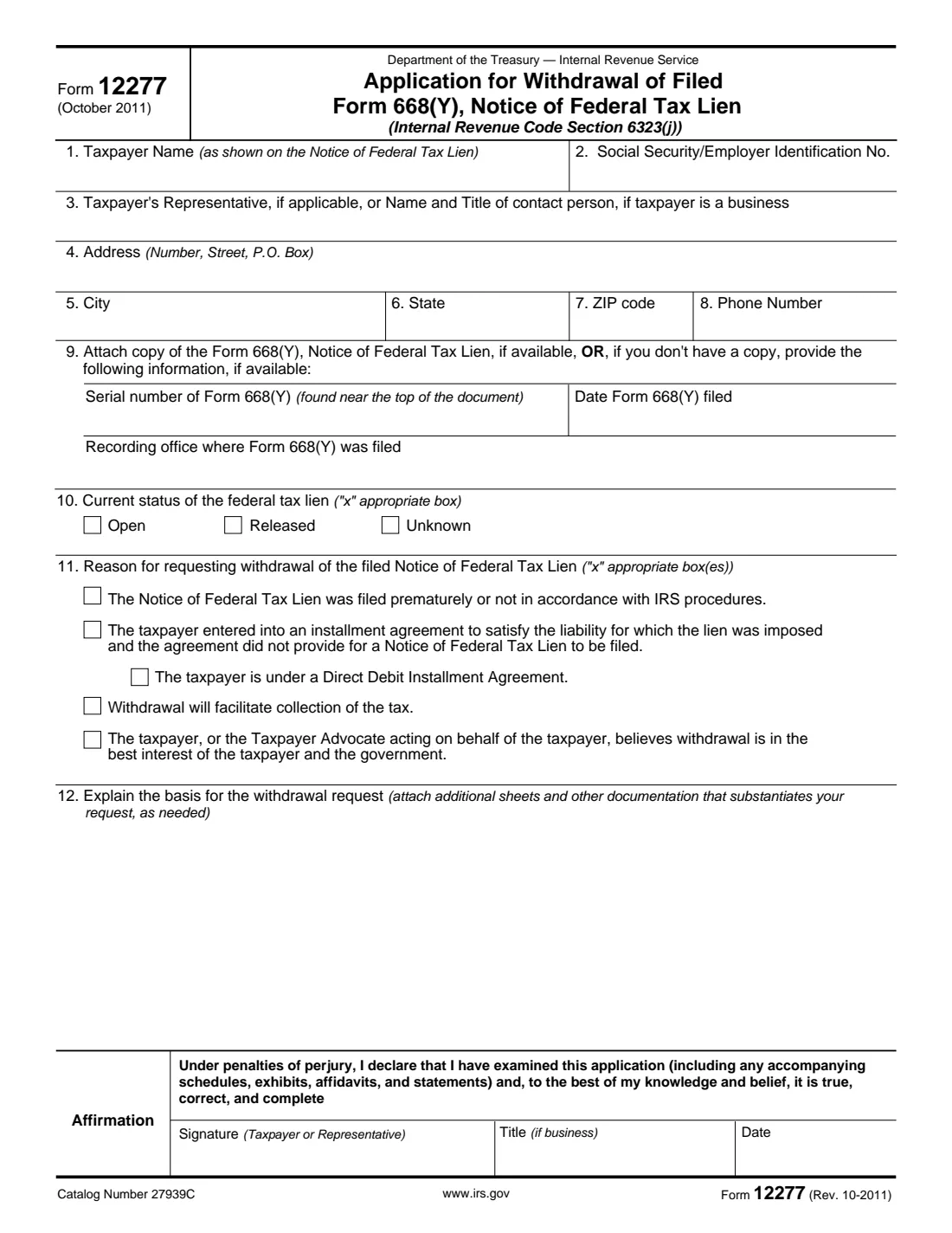
When the IRS files a Notice of Federal Tax Lien (Form 668(Y)) in a county or state recording office, it tells creditors that the government has a claim against your property. Paying the tax gets the lien released, but the notice itself can stay on the public record. Form 12277 asks the IRS to withdraw the filed notice under Internal Revenue Code section 6323(j). If it agrees, it files Form 10916(c), Withdrawal of Filed Notice of Federal Tax Lien, in the same recording office and sends you a copy.
The form gives four grounds for withdrawal: the notice was filed prematurely or not according to IRS procedures; you entered into an installment agreement that didn't provide for a lien notice (with a separate box if it's a Direct Debit Installment Agreement); withdrawal will help collect the tax; or withdrawal is in the best interest of the taxpayer and the government. The instructions say that for a lien that has already been released you generally tick the last one.
FileIt asks for each line in plain English, checks that your explanation fits the box on the form, and prints everything onto the IRS's own PDF, Rev. 10-2011, which is still the current version. The finished form is saved in your vault, and you can sign it with FileIt's optional e-signature before mailing it.
- Who files
- The taxpayer named on the lien notice, or their representative.
- Send to
- The IRS office assigned to your account, or the Advisory Group Manager for your area (Publication 4235 lists the addresses).
- Attach
- A copy of the Notice of Federal Tax Lien if you have one, plus documents that support your request.
- Signature
- The taxpayer or representative signs and dates the affirmation under penalties of perjury.
- Edition
- Form 12277 (Rev. 10-2011)
Who needs to fill out Form 12277?
- Individuals and businesses with a Notice of Federal Tax Lien on file who want it removed from the public record.
- Taxpayers whose lien has been released after paying in full, and who want the notice withdrawn as well.
- Taxpayers paying through an installment agreement, especially a Direct Debit Installment Agreement.
- Representatives, such as attorneys, CPAs or enrolled agents, applying for a client.
When to use Form 12277
- After the lien is released, when the notice is still hurting your credit, a loan or a bonding application.
- When you believe the notice was filed too early or without following IRS procedures.
- When you've set up an installment agreement and want the notice withdrawn.
- When withdrawing the notice would help you pay the tax, for example by letting you borrow against property.
What you need before you start
- The taxpayer's name and SSN or EIN exactly as on the Notice of Federal Tax Lien.
- A copy of the notice, or its serial number, the date it was filed and the recording office.
- Whether the lien is open, released or unknown.
- A clear explanation of the facts behind your request, with any supporting documents.
- Current contact details for you or your representative.
What’s on Form 12277
The 2011 edition has 2 pages. FileIt asks for it in 4 parts, and it is signed by Taxpayer or representative:
- Lines 1-8: TaxpayerTaxpayer or representative
- Lines 9-10: The lienTaxpayer or representative
- Lines 11-12: Why the notice should be withdrawnTaxpayer or representative
- AffirmationTaxpayer or representative
How to fill out Form 12277, step by step
1 Lines 1-3: Taxpayer and contact
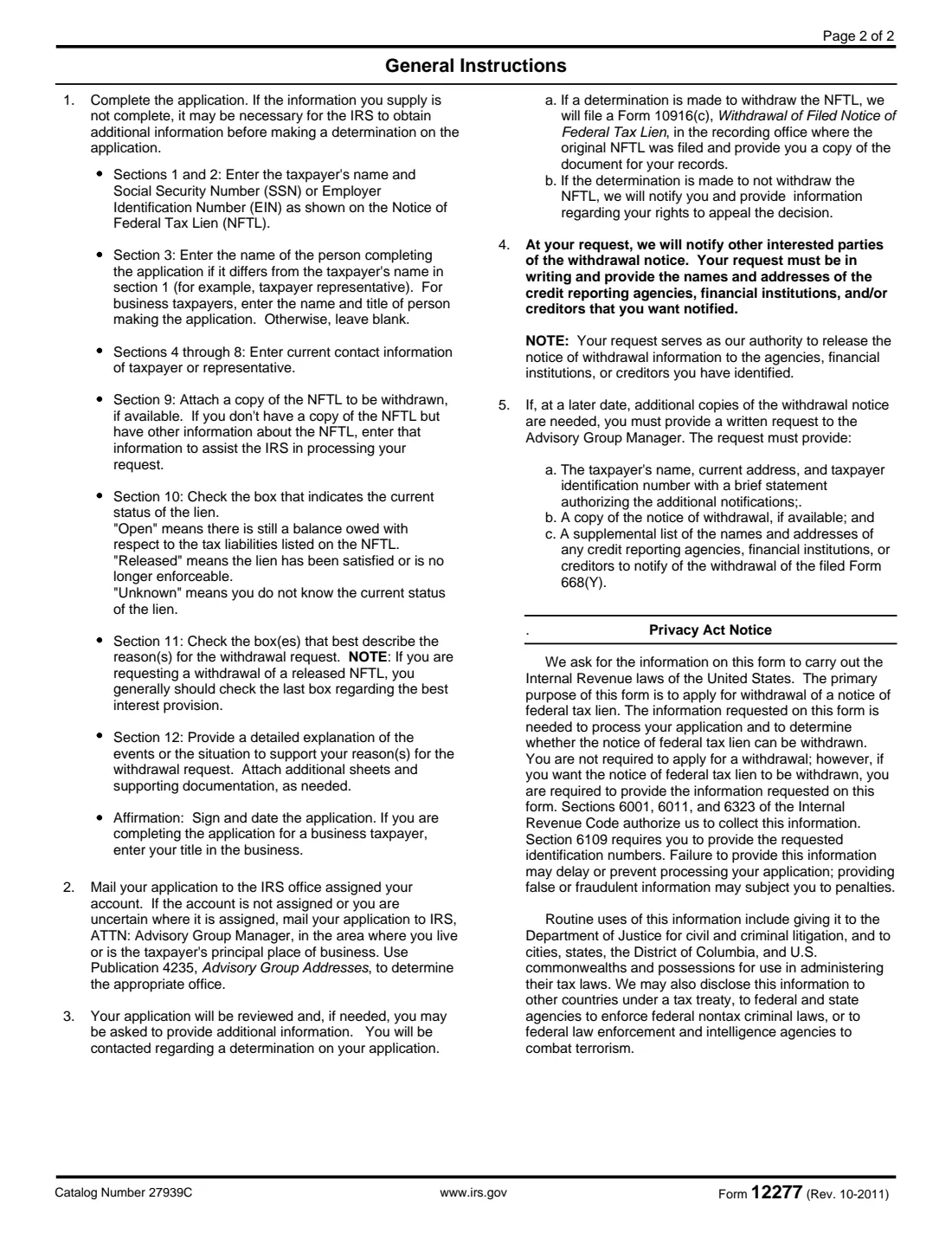
Enter the taxpayer's name and SSN or EIN as they appear on the lien notice. Line 3 is only for someone other than the taxpayer: a representative, or for a business, the name and title of the person making the application. Otherwise leave it blank.
2 Lines 4-8: Contact details
Give the current address and phone number of the taxpayer, or of the representative if one is applying. This is where the IRS will reach you about its decision.
3 Line 9: The notice
Attach a copy of the Form 668(Y) if you have it. If you don't, enter what you know: the serial number near the top of the notice, the date it was filed and the recording office where it was filed.
4 Line 10: Lien status
Open means a balance is still owed on the taxes listed on the notice. Released means the lien has been satisfied or is no longer enforceable. Choose Unknown if you aren't sure.
5 Lines 11-12: Reasons and explanation
Tick every reason that applies, then explain the events behind your request in detail on line 12. Attach more sheets and documents if you need to. FileIt tells you when your explanation won't fit the space on the form.
6 Affirmation
Sign and date the application. If you apply for a business, enter your title in the business.
Common mistakes to avoid
- A name or TIN that doesn't match the lien notice, which makes it harder for the IRS to find the lien.
- Ticking a reason without explaining the facts on line 12 or attaching documents.
- Mixing up a lien release with a withdrawal: a release ends the lien, while a withdrawal removes the public notice as if it had never been filed.
- Sending the form to the wrong office. Use the office assigned to your account, or the Advisory Group for your area.
After you fill it out
Sign and date the form, attach the lien notice and your supporting documents, and mail it to the IRS office assigned to your account. If your account isn't assigned or you aren't sure where it is, mail it to the Advisory Group Manager for your area, using Publication 4235 to find the address.
The IRS reviews the application and may ask for more information. If it withdraws the notice, it files Form 10916(c) in the recording office and sends you a copy. If it refuses, it tells you how to appeal.
You can ask in writing for the IRS to tell credit reporting agencies, banks or creditors about the withdrawal. List their names and addresses. FileIt keeps your copy of the application in your vault.
Fill out Form 12277 online with FileIt
- Pick the person. Choose someone from People and FileIt fills in their name, date of birth, address and other details it already knows.
- Answer plain-language questions. One part of the form at a time, with the official help text beside each question — 19 fields in all. Your answers save as you go.
- Check the live preview. Watch your answers land on the real Internal Revenue Service (IRS) form, and let FileIt do any worksheet arithmetic.
- Generate the official PDF. FileIt prints your answers into the agency’s own PDF and files it in that person’s folder in your vault. Sign it, or send it for e-signature.
FileIt fills the form — it never files or submits anything for you. Deliver the finished form to whoever asked for it, the way the form’s instructions say.
Start Form 12277 now — it’s freeForm 12277: frequently asked questions
What is the difference between a lien release and a lien withdrawal?
A release means the lien no longer attaches to your property, usually because the tax was paid. A withdrawal removes the public Notice of Federal Tax Lien. You can ask for a withdrawal after a release, and the instructions say to generally tick the best-interest box in that case.
Can I ask for a withdrawal if I'm still paying the tax?
Yes. Form 12277 lists an installment agreement that didn't provide for a lien notice as a reason, with a separate box for a Direct Debit Installment Agreement.
Where do I send Form 12277?
To the IRS office assigned to your account. If your account isn't assigned or you aren't sure, send it to the Advisory Group Manager for your area. Publication 4235 has the addresses.
Will the credit bureaus be told?
The IRS will tell other parties about the withdrawal if you ask in writing and give the names and addresses of the credit reporting agencies, banks or creditors you want told.
Can FileIt file the form for me?
No. FileIt fills in the official IRS PDF and keeps it in your vault. You sign it and mail it to the IRS yourself.
Official sources
- Blank form (PDF), published by Internal Revenue Service (IRS): https://www.irs.gov/pub/irs-pdf/f12277.pdf
- Official instructions and guidance: https://www.irs.gov/pub/irs-pdf/f12277.pdf
- Edition shown on this page: Form 12277 (Rev. 10-2011), October 2011 (checked 2026-10-25).
FileIt is not affiliated with or endorsed by Internal Revenue Service (IRS) or any government. This page explains the form in general terms and is not legal, tax or immigration advice. Always read the official instructions, and check that you are using the edition the recipient accepts. Page last reviewed 2026-10-25.