What is Form 12203?
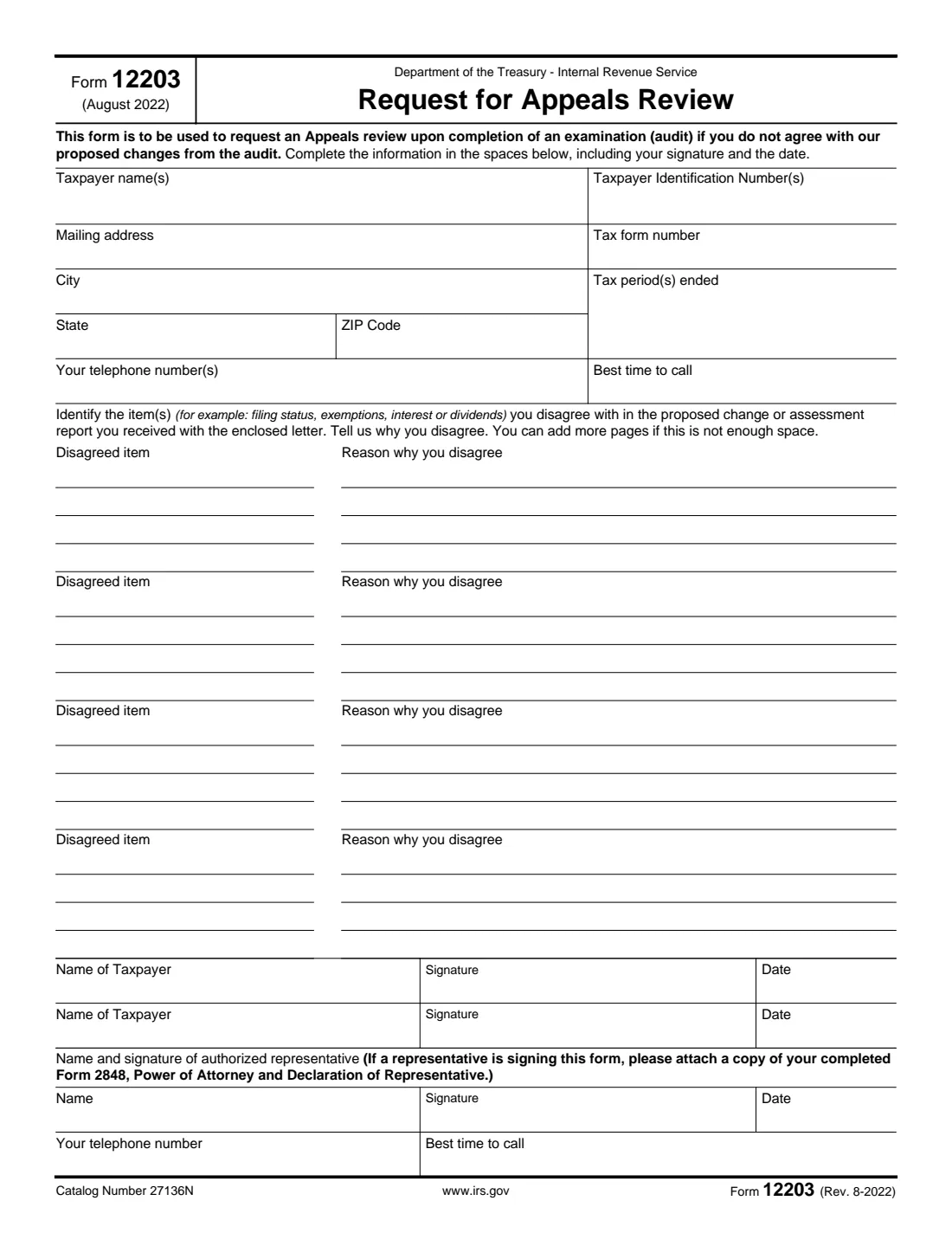
Form 12203, Request for Appeals Review, is how you ask the IRS Independent Office of Appeals to look again at changes an examination (audit) proposes when you don't agree with them. The form says it is for proposed adjustments of $25,000 or less for a tax year examined in the IRS letter it came with. It is a single page: who you are, which return and periods were audited, up to four items you disagree with and why, and your signature.
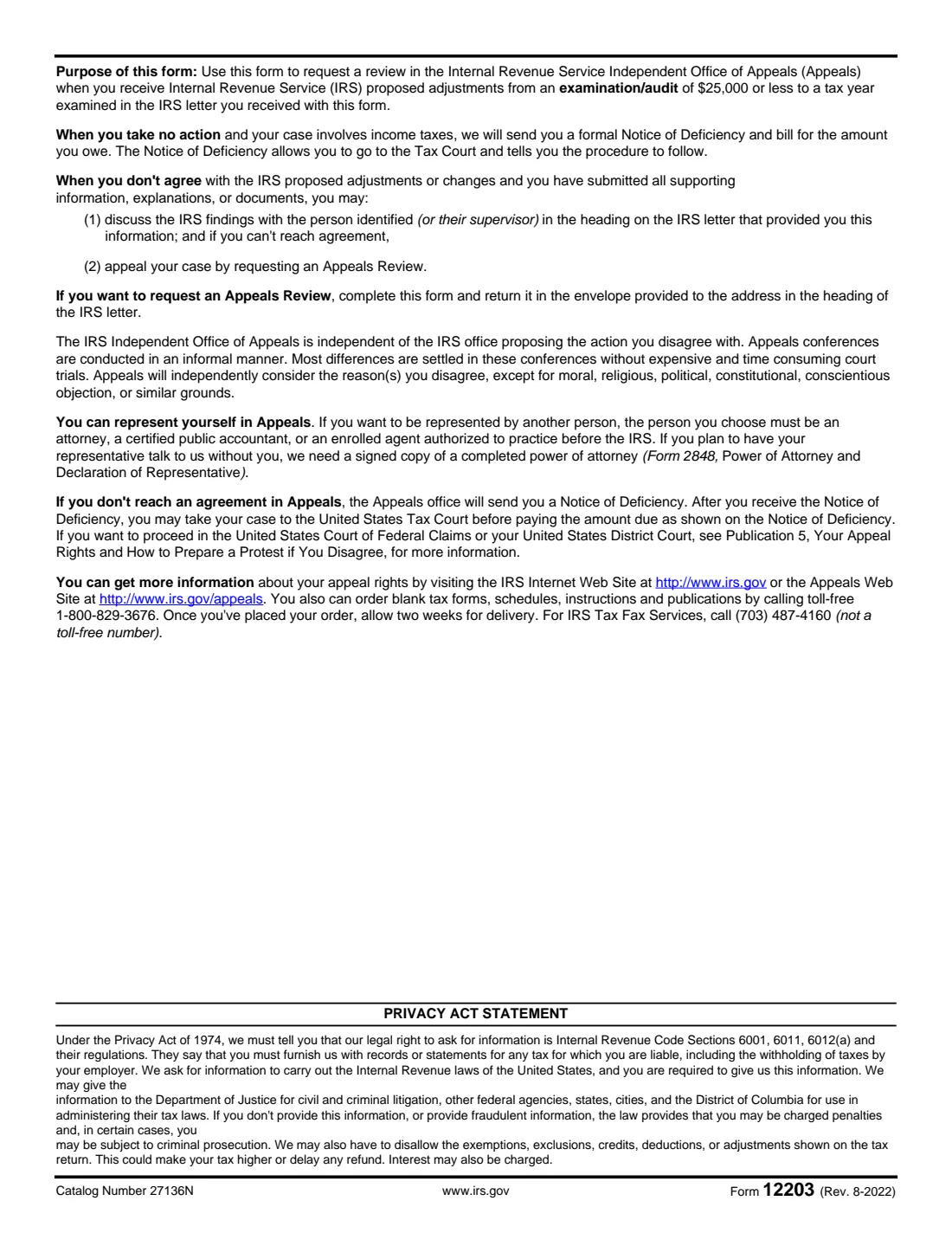
Appeals is independent of the office that proposed the changes, and the form describes its conferences as informal, with most differences settled there rather than in court. Appeals considers your reasons, except moral, religious, political, constitutional, conscientious objection or similar grounds. If you don't reply at all and the case involves income tax, the IRS sends a formal Notice of Deficiency and a bill instead.
FileIt walks you through each box, pre-fills your name from the People in your vault, wraps each disagreed item and reason neatly onto the form's ruled lines, and prints everything into the IRS's own PDF, which is saved in your vault. You can then sign it on screen with FileIt eSignature, including a spouse or representative, and mail it yourself. FileIt never sends anything to the IRS.
- Who fills it
- A taxpayer (and spouse, for a joint return) who disagrees with proposed audit changes of $25,000 or less, or their authorized representative.
- Sent to
- The address in the heading of the IRS letter that came with the form, in the envelope provided.
- When
- By the response date in that IRS letter.
- Signatures
- Taxpayer, spouse on a joint return, and the representative if one signs.
- Edition
- Rev. 8-2022 (August 2022)
- Agency
- Internal Revenue Service (IRS), Independent Office of Appeals
Who needs to fill out Form 12203?
- Taxpayers who received an IRS examination letter proposing changes and want an independent review instead of agreeing.
- Married couples whose joint return was audited, who list both names and identification numbers and both sign.
- People whose proposed adjustment is $25,000 or less for a tax year examined, the small case the form is meant for.
- Attorneys, CPAs and enrolled agents signing on a client's behalf, with a Form 2848 attached.
When to use Form 12203
- After you've sent all your supporting documents and still disagree with the proposed changes. The form suggests first talking with the person named on the IRS letter, or their supervisor.
- Before the reply date on the IRS letter that came with the form, so the case goes to Appeals rather than straight to a Notice of Deficiency.
- Not for collection actions such as a levy or lien notice. Those use a Collection Due Process request (Form 12153) or the collection appeals process instead.
What you need before you start
- The IRS letter and the proposed change or assessment report that came with it.
- Your name, address and Taxpayer Identification Number (and your spouse's, for a joint return).
- The tax form number and the tax period or periods that were audited.
- A short description of each item you disagree with, such as filing status, a dependent or interest income.
- Your reasons for disagreeing, and copies of any records that back them up.
- If a representative signs: their name, phone number and a completed Form 2848.
What’s on Form 12203
The 2022 edition has 2 pages. FileIt asks for it in 5 parts, and it is signed by Taxpayer and Spouse (joint return) and Authorized representative:
- Taxpayer informationTaxpayer
- Spouse (joint return)Spouse (joint return)
- What you disagree withTaxpayer
- Items as printed on the formTaxpayer
- Authorized representativeAuthorized representative
How to fill out Form 12203, step by step
1 Taxpayer information
Enter your name and Taxpayer Identification Number, usually your Social Security number. For a joint return, switch on the spouse part: both names and both numbers then print in the top boxes, separated by a comma. Add your mailing address, the tax form number (for example 1040) and the tax period or periods ended, as shown on the IRS letter.
2 How Appeals can reach you
Give one or more phone numbers and the best time to call. Appeals conferences are informal and often start with a phone call, so pick a number you'll actually answer.
3 Disagreed items and reasons
There is room for four items, each with four ruled lines for the item and four for your reason. Name the item as it appears in the report, then explain plainly why you disagree. FileIt wraps your words onto the lines and shows how they will print. If you need more room, write "see attached" and attach extra pages.
4 Signatures
You sign and date the form, and so does your spouse on a joint return. With FileIt eSignature, each person gets their own signature and date box on the official page.
5 Authorized representative
Only if a representative is signing: switch on this part and enter their name, phone number and best time to call. They must be an attorney, certified public accountant or enrolled agent, and you attach a copy of their completed Form 2848.
Common mistakes to avoid
- Using it for a bill or collection notice. Form 12203 is for disagreeing with proposed audit changes, not collection actions.
- Listing an item without saying why you disagree. The reason is what Appeals reviews.
- Relying on moral, religious, political or constitutional objections, which the form says Appeals won't consider.
- Forgetting your spouse's signature on a joint return.
- Having a representative sign without attaching Form 2848.
- Sending it to a general IRS address instead of the one in the heading of your letter.
After you fill it out
Download the signed PDF from your vault, add any extra pages and supporting copies, and mail it in the envelope that came with the IRS letter, to the address in its heading. Keep a copy, and note the date you mailed it.
Appeals will contact you to arrange a conference. If you and Appeals don't reach agreement, Appeals sends a Notice of Deficiency, and you can then take the case to the United States Tax Court before paying. Publication 5 explains the other court routes.
If you want your representative to talk to Appeals without you, make sure the IRS has their signed Form 2848.
Fill out Form 12203 online with FileIt
- Pick the person. Choose someone from People and FileIt fills in their name, date of birth, address and other details it already knows.
- Answer plain-language questions. One part of the form at a time, with the official help text beside each question — 55 fields in all. Your answers save as you go.
- Check the live preview. Watch your answers land on the real Internal Revenue Service (IRS) form, and let FileIt do any worksheet arithmetic.
- Generate the official PDF. FileIt prints your answers into the agency’s own PDF and files it in that person’s folder in your vault. Sign it, or send it for e-signature.
FileIt fills the form — it never files or submits anything for you. Deliver the finished form to whoever asked for it, the way the form’s instructions say.
Start Form 12203 now — it’s freeForm 12203: frequently asked questions
Can I fill out Form 12203 online?
Yes. FileIt guides you through it, wraps your disagreed items onto the form's lines and prints your answers into the official IRS PDF, saved in your vault. Filling forms is available on every FileIt account, including the free plan. You then mail it yourself; FileIt doesn't submit anything.
Is there a dollar limit?
The form's own instructions say it is for proposed adjustments of $25,000 or less for a tax year examined in the IRS letter you received with it. Larger cases generally call for a formal written protest; see Publication 5.
Where do I send Form 12203?
Return it in the envelope provided, to the address in the heading of the IRS letter that came with the form.
What if I run out of room?
The form says you can add more pages. FileIt tells you when an item or reason is too long for its four lines, so you can shorten it and attach the rest.
Do I need a representative?
No. The form says you can represent yourself in Appeals. A representative must be an attorney, CPA or enrolled agent, and needs a Form 2848 to talk with Appeals without you.
What happens if I don't send it?
If your case involves income tax and you take no action, the IRS sends a formal Notice of Deficiency and a bill. The notice explains how to go to Tax Court.
Official sources
- Blank form (PDF), published by Internal Revenue Service (IRS): https://www.irs.gov/pub/irs-pdf/f12203.pdf
- Official instructions and guidance: https://www.irs.gov/forms-pubs/about-form-12203
- Edition shown on this page: Rev. 8-2022 (August 2022) (checked 2026-10-19).
FileIt is not affiliated with or endorsed by Internal Revenue Service (IRS) or any government. This page explains the form in general terms and is not legal, tax or immigration advice. Always read the official instructions, and check that you are using the edition the recipient accepts. Page last reviewed 2026-10-19.