What is Form 1040-X?
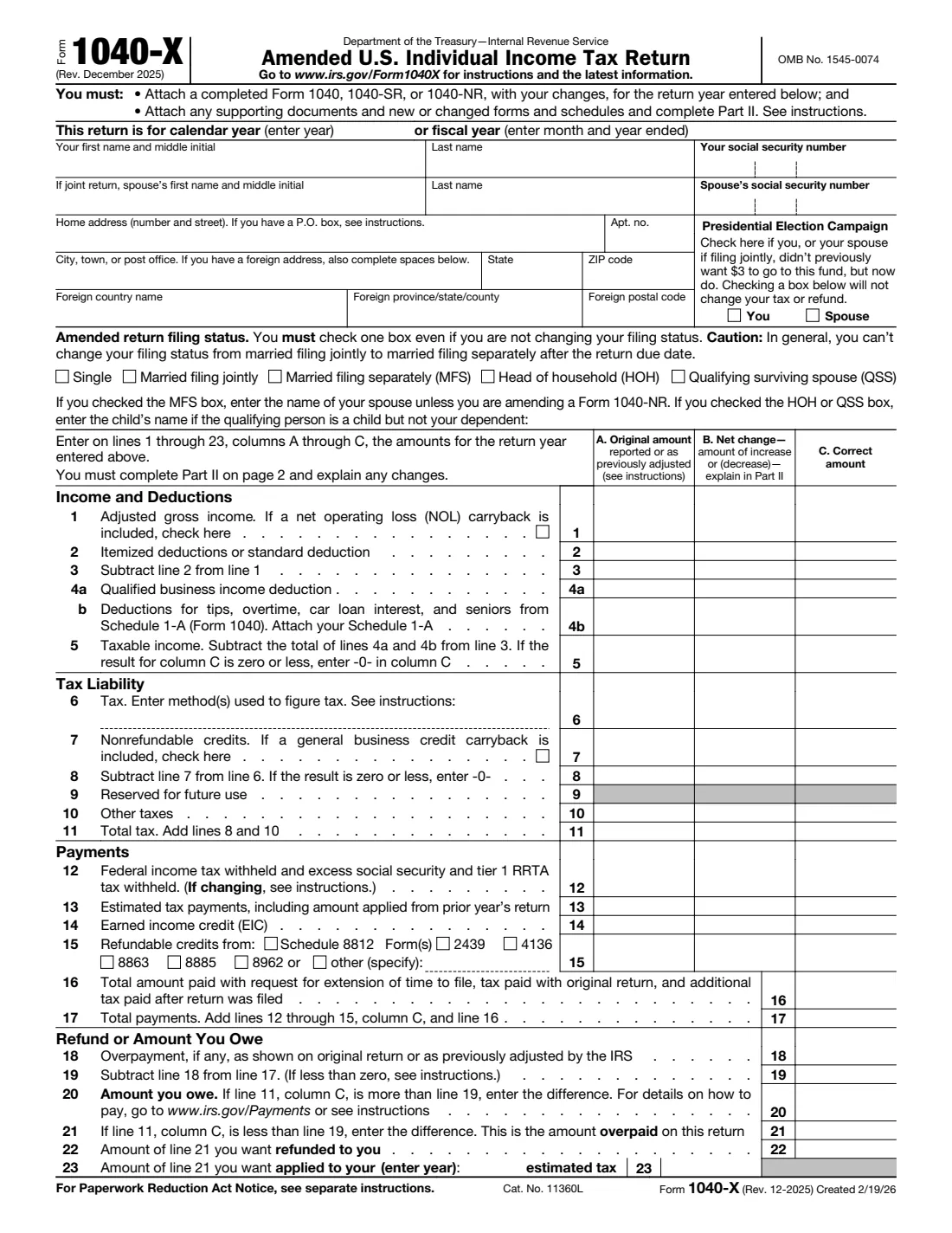
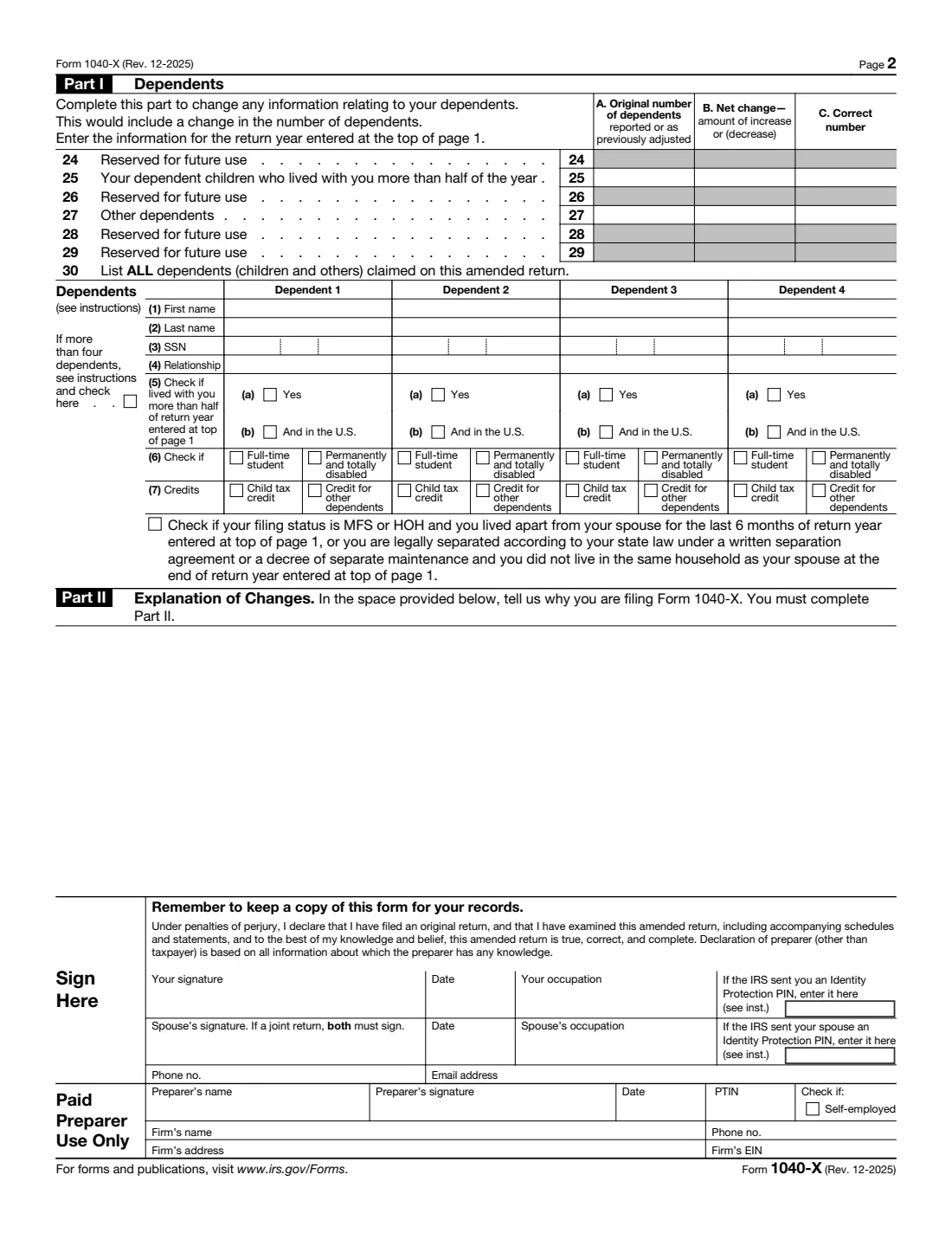
Form 1040-X is how you correct a Form 1040, 1040-SR or 1040-NR after it has been filed: income you left out, a deduction or credit you missed, the wrong filing status, or a dependent to add or remove. The form works in three columns. Column A is what you originally reported (or as the IRS or you later adjusted it), column C is the correct figure, and column B is the difference. Part II is where you explain, in your own words, what changed and why.
The December 2025 revision asks you to attach a completed Form 1040, 1040-SR or 1040-NR showing your changes for that year, plus any new or changed forms and schedules. You use a separate 1040-X for each year you amend. If you're owed more money back, the bottom of page 1 shows the overpayment and lets you split it between a refund and next year's estimated tax. If you owe more, it shows the amount due.
FileIt walks you through each line. You type the original and correct amounts and FileIt works out column B, lines 3, 5, 8 and 11, total payments, and the refund or amount you owe, then checks that the refund split adds up. It also fits your explanation into Part II and prints everything into the IRS's own PDF, saved in your vault. You and your spouse can sign on screen with FileIt eSignature. FileIt doesn't e-file or mail anything for you.
- Who fills it
- Anyone who needs to correct a filed Form 1040, 1040-SR or 1040-NR, including both spouses on a joint return.
- Sent to
- E-filed with tax software in many cases, or mailed to the IRS address in the instructions for where you live.
- When
- Generally within 3 years of filing the original return, or 2 years of paying the tax if later, to claim a refund.
- Signatures
- You, and your spouse too on a joint return.
- Edition
- Rev. December 2025 (created 2/19/26)
- Agency
- Internal Revenue Service (IRS), Department of the Treasury
Who needs to fill out Form 1040-X?
- People who got a corrected W-2 or 1099 after filing.
- Anyone who missed a deduction or credit, such as the child tax credit, an education credit or the earned income credit.
- Taxpayers who need to add or remove a dependent.
- Couples changing filing status, for example from separate returns to married filing jointly.
- People who received an IRS notice and agree that a change is needed but must file an amended return themselves.
- Anyone who reported income they shouldn't have, or claimed a deduction they didn't qualify for.
When to use Form 1040-X
- After your original return has been processed, if you find a mistake that changes your income, deductions, credits, tax or filing status.
- Within the refund deadline if you're due money back: generally 3 years after filing or 2 years after paying, whichever is later.
- Not for simple math errors or a missing schedule. The IRS usually corrects or asks for those without an amended return.
What you need before you start
- A copy of the return you're amending, and any later IRS adjustment notices.
- The new or corrected documents behind the change, such as a corrected 1099 or a Form 1098-T.
- A completed Form 1040, 1040-SR or 1040-NR showing the changes, and any new or changed schedules.
- Your Social Security number (and your spouse's and dependents' if relevant), and your current address.
- Your corrected tax, figured on the corrected taxable income, and the method you used.
- Your Identity Protection PINs, if the IRS issued them.
What’s on Form 1040-X
The 2025 edition has 2 pages. FileIt asks for it in 11 parts, and it is signed by Taxpayer and Spouse (joint return):
- Return year and your detailsTaxpayer
- Spouse (joint return)Spouse (joint return)
- Amended return filing statusTaxpayer
- Lines 1-5: Income and deductionsTaxpayer
- Lines 6-11: Tax liabilityTaxpayer
- Lines 12-15: PaymentsTaxpayer
- Lines 16-23: Refund or amount you oweTaxpayer
- Part I: DependentsTaxpayer
- Part II: Explanation of changesTaxpayer
- Sign hereTaxpayer
- Paid preparer use onlyTaxpayer
How to fill out Form 1040-X, step by step
1 Year, names and address
Enter the calendar year of the return you're amending (or the fiscal year end), your name and Social Security number, and your current address. For a joint return, switch on the spouse part. The presidential campaign boxes are only for adding a $3 designation you didn't make before.
2 Filing status
Check one box even if it isn't changing. Married filing separately needs your spouse's name; head of household or qualifying surviving spouse needs the child's name if they qualify you but aren't your dependent. The form warns that you generally can't switch from joint to separate after the due date.
3 Lines 1-5: Income and deductions
For adjusted gross income, deductions, the qualified business income deduction and the new Schedule 1-A deductions, enter the original amount in column A and the correct amount in column C. FileIt figures the net change and lines 3 and 5, entering -0- if taxable income is zero or less.
4 Lines 6-11: Tax
Enter the original and corrected tax and the method you used, nonrefundable credits, and other taxes. FileIt works out line 8 (tax after credits, never below zero) and the total tax on line 11.
5 Lines 12-23: Payments, refund or amount owed
Enter withholding, estimated payments, the earned income credit and refundable credits, tick which credit forms they come from, and add any amount paid with an extension, the original return or later. Enter the overpayment from your original return. FileIt totals payments and shows the amount you owe on line 20 or the overpayment on line 21, which you split between a refund (line 22) and next year's estimated tax (line 23).
6 Part I and Part II
If dependents change, switch on Part I: the original and correct number of children and other dependents, then up to four dependents with names, SSNs, relationship, residency and credits. Part II is required: explain each change and why. Sign, add your occupation and phone, and a paid preparer adds their details.
Common mistakes to avoid
- Forgetting the required attachments: this revision asks for a completed 1040, 1040-SR or 1040-NR with the changes, plus new or changed schedules.
- Leaving Part II empty. You must explain the changes.
- Putting the corrected figure in column A. Column A is what you originally reported or as previously adjusted.
- Amending two years on one form. Each year needs its own 1040-X.
- Missing the refund deadline, generally 3 years from filing or 2 years from payment.
- Only one spouse signing a joint amended return.
After you fill it out
Download the signed PDF from your vault, attach the completed return with your changes and the supporting forms and schedules, and mail it to the address in the Form 1040-X instructions for where you live. Or use tax software to e-file the amended return where that's available. Keep a full copy.
If you owe, pay as soon as you can to limit interest and penalties. The form points to irs.gov/Payments for your options.
Amended returns take longer to process than original ones. You can track progress with the IRS Where's My Amended Return tool.
Fill out Form 1040-X online with FileIt
- Pick the person. Choose someone from People and FileIt fills in their name, date of birth, address and other details it already knows.
- Answer plain-language questions. One part of the form at a time, with the official help text beside each question — 144 fields in all. Your answers save as you go.
- Check the live preview. Watch your answers land on the real Internal Revenue Service (IRS) form, and let FileIt do any worksheet arithmetic.
- Generate the official PDF. FileIt prints your answers into the agency’s own PDF and files it in that person’s folder in your vault. Sign it, or send it for e-signature.
FileIt fills the form — it never files or submits anything for you. Deliver the finished form to whoever asked for it, the way the form’s instructions say.
Start Form 1040-X now — it’s freeForm 1040-X: frequently asked questions
Can I fill out Form 1040-X online?
Yes. FileIt guides you through every line, does the arithmetic for columns B and the totals, and prints your answers into the official IRS PDF, saved in your vault. Filling forms is available on every FileIt account, including the free plan. You then mail it, or e-file through tax software instead.
What goes in columns A, B and C?
Column A is the amount you originally reported or as previously adjusted, column C is the correct amount, and column B is the increase or decrease between them. FileIt asks for A and C and works out B for you.
Do I need to attach a new Form 1040?
Yes. The December 2025 revision says to attach a completed Form 1040, 1040-SR or 1040-NR with your changes for the return year, and any supporting documents and new or changed forms and schedules.
How long do I have to amend?
To claim a refund, generally 3 years from when you filed the original return, or 2 years from when you paid the tax, if that's later. See the instructions for exceptions.
Can I amend more than one year on one form?
No. File a separate Form 1040-X for each year, and enter the year at the top of each one.
Can I change from married filing jointly to separately?
The form cautions that in general you can't change from married filing jointly to married filing separately after the return's due date.
Official sources
- Blank form (PDF), published by Internal Revenue Service (IRS): https://www.irs.gov/pub/irs-pdf/f1040x.pdf
- Official instructions and guidance: https://www.irs.gov/forms-pubs/about-form-1040x
- Edition shown on this page: Rev. December 2025 (created 2/19/26) (checked 2026-10-19).
FileIt is not affiliated with or endorsed by Internal Revenue Service (IRS) or any government. This page explains the form in general terms and is not legal, tax or immigration advice. Always read the official instructions, and check that you are using the edition the recipient accepts. Page last reviewed 2026-10-19.