What is PPS-KUR kasambahay registration?
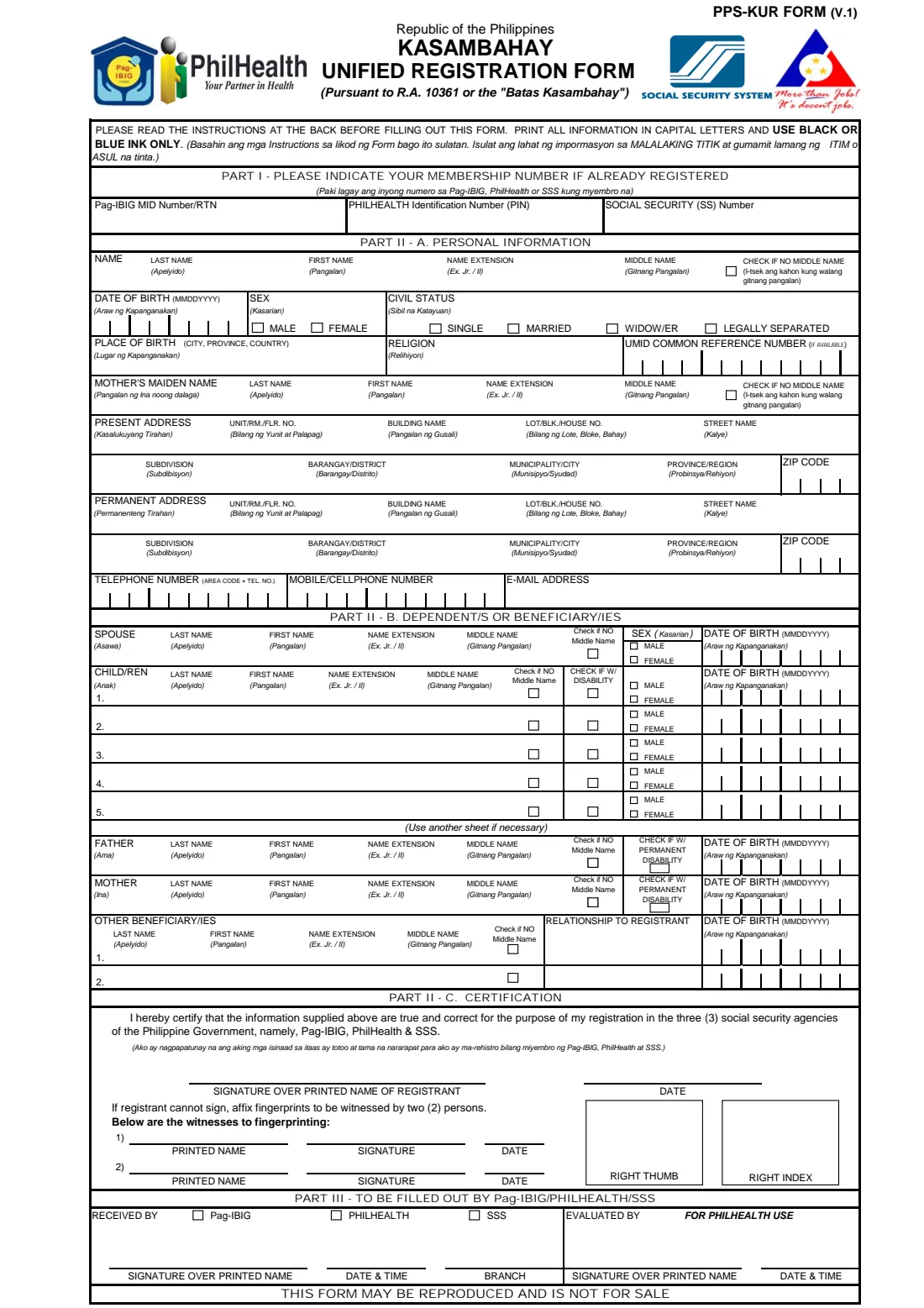
The Kasambahay Unified Registration Form (PPS-KUR) registers a household worker with the three social security agencies at the same time, as the Batas Kasambahay (R.A. 10361) provides. It is the companion of the PPS-HEUR1 form, on which the employer registers.
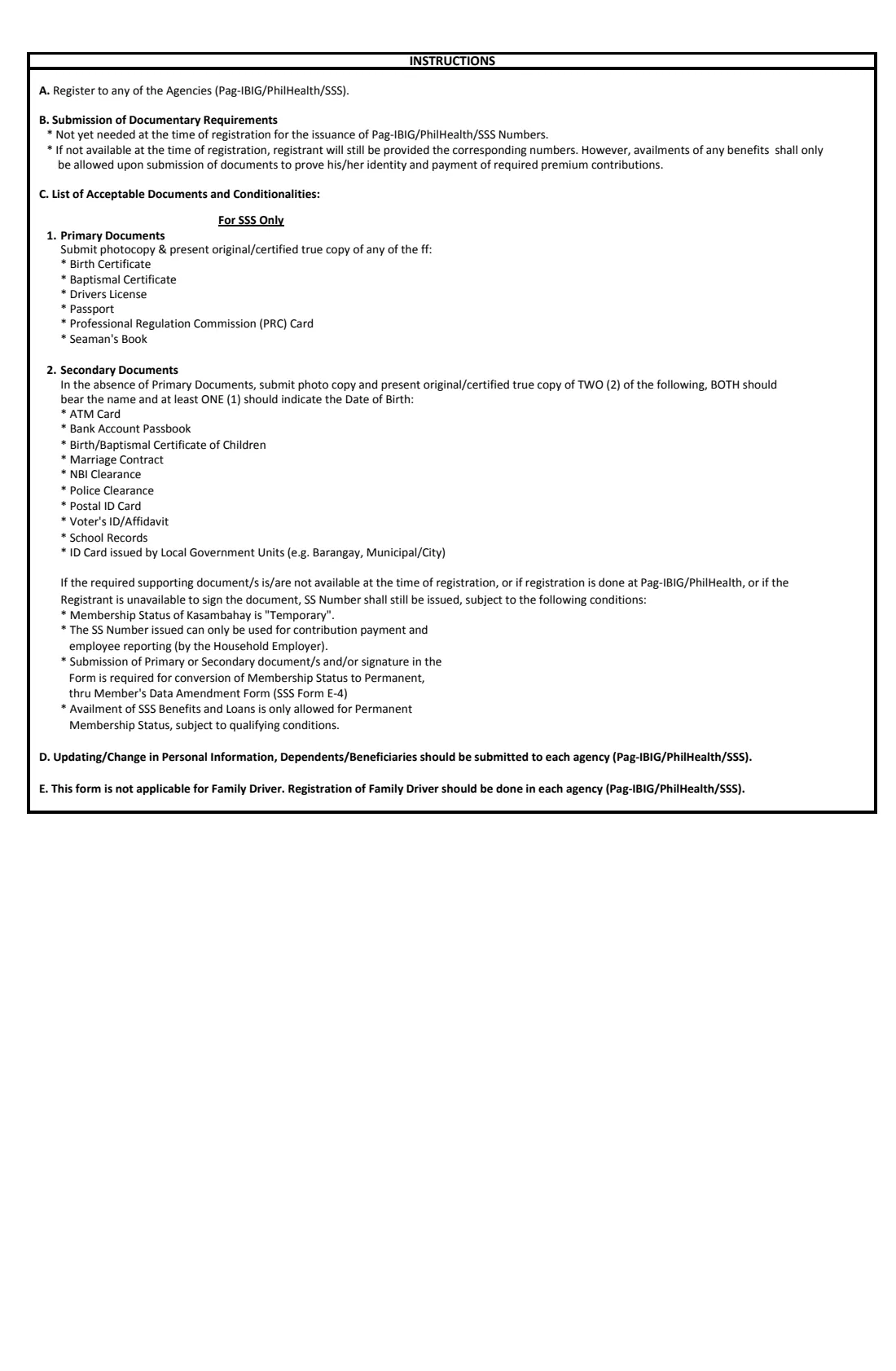
Page 1 is the form. Part I takes any Pag-IBIG, PhilHealth or SSS numbers the kasambahay already has. Part II-A covers personal information: name, date of birth, sex, civil status, place of birth, religion, UMID common reference number, mother's maiden name, present and permanent addresses and contact details. Part II-B lists dependents and beneficiaries: spouse, up to five children, father, mother and two other beneficiaries. Part II-C is the certification, with a fingerprint and witness block for a registrant who cannot sign. Page 2 holds the instructions and the list of acceptable documents.
FileIt asks the questions in English, opens each dependent only when you need it, and prints everything in capitals into the comb boxes of the agencies' own PDF.
- Who fills it
- The kasambahay, usually with the household employer's help
- Given to
- Pag-IBIG, PhilHealth or SSS
- Law
- R.A. 10361 (Batas Kasambahay)
- Not for
- Family drivers, who register with each agency separately (instruction E)
- Edition
- PPS-KUR Form (V.1), 2013
- Pages
- 2 (form and instructions)
Who needs to fill out PPS-KUR kasambahay registration?
- Household workers — yaya, cooks, gardeners, laundry persons and other kasambahay — being registered for the first time.
- Kasambahay already registered with one agency who need to be registered with the others.
- Household employers helping their kasambahay get Pag-IBIG, PhilHealth and SSS numbers.
When to use PPS-KUR kasambahay registration
- When a new kasambahay starts work, together with the employer's PPS-HEUR1 registration.
- When a kasambahay has no Pag-IBIG, PhilHealth or SSS number yet.
- The instructions say later changes to personal information, dependents or beneficiaries go to each agency.
What you need before you start
- Any Pag-IBIG MID/RTN, PhilHealth PIN or SS number the kasambahay already has.
- Their full name, date of birth, sex, civil status, place of birth and religion.
- Their UMID common reference number, if they have a UMID card.
- Their mother's maiden name.
- Their present address (usually the household) and permanent address, phone numbers and email.
- Names and dates of birth of the spouse, children, parents and any other beneficiaries.
- For SSS, a primary document such as a birth certificate or passport, or two secondary documents, as page 2 lists.
What’s on PPS-KUR kasambahay registration
The 2013 edition has 2 pages. FileIt asks for it in 12 parts:
- Part I — Numbers already issuedKasambahay
- Part II-A — Personal informationKasambahay
- Mother's maiden nameKasambahay
- Present addressKasambahay
- Permanent addressKasambahay
- Contact detailsKasambahay
- Part II-B — SpouseKasambahay
- ChildrenKasambahay
- FatherKasambahay
- MotherKasambahay
- Other beneficiariesKasambahay
- Part II-C — CertificationKasambahay
How to fill out PPS-KUR kasambahay registration, step by step
1 Part I — Numbers already issued
Enter any Pag-IBIG MID number or RTN, PhilHealth Identification Number and Social Security number the kasambahay already has. Leave them blank for a first registration.
2 Part II-A — Personal information
The kasambahay's name, date of birth (MMDDYYYY boxes), sex and civil status, place of birth, religion and UMID common reference number, then their mother's maiden name. Tick 'no middle name' where it applies.
3 Addresses and contact details
Both the present and the permanent address are asked for in full, each with a 4-digit ZIP code. Then the telephone (10 boxes with the area code), mobile number (11 boxes) and email.
4 Part II-B — Dependents and beneficiaries
Add the spouse (only if married), up to five children with their sex, date of birth and any disability, the father and mother, and up to two other beneficiaries with their relationship to the kasambahay. The form says to use another sheet if there are more.
5 Part II-C — Certification
The kasambahay certifies that the information is true for registration with the three agencies and signs over their printed name. If they cannot sign, they affix their right thumb and right index fingerprints, witnessed by two people who print their names, sign and date.
Common mistakes to avoid
- Declaring a spouse when the civil status is not married.
- Retyping the permanent address with a different spelling from the present address when they are the same place.
- Using this form for a family driver, which the instructions exclude.
- Forgetting the two witnesses when the kasambahay fingerprints instead of signing.
- Leaving out the employer's own PPS-HEUR1 registration.
After you fill it out
Print both pages from your FileIt vault. The kasambahay signs over their printed name, or fingerprints with two witnesses.
Hand the form to Pag-IBIG, PhilHealth or SSS with the documents page 2 lists. FileIt does not submit it.
Keep the PDF in the kasambahay's folder in your vault, with their contract and contribution records.
Fill out PPS-KUR kasambahay registration online with FileIt
- Pick the person. Choose someone from People and FileIt fills in their name, date of birth, address and other details it already knows.
- Answer plain-language questions. One part of the form at a time, with the official help text beside each question — 117 fields in all. Your answers save as you go.
- Check the live preview. Watch your answers land on the real Pag-IBIG Fund, PhilHealth and the Social Security System (joint form) form, and let FileIt do any worksheet arithmetic.
- Generate the official PDF. FileIt prints your answers into the agency’s own PDF and files it in that person’s folder in your vault.
FileIt fills the form — it never files or submits anything for you. Deliver the finished form to whoever asked for it, the way the form’s instructions say.
Start PPS-KUR kasambahay registration now — it’s freePPS-KUR kasambahay registration: frequently asked questions
What is the PPS-KUR form?
The Kasambahay Unified Registration Form. It registers a household worker with Pag-IBIG, PhilHealth and SSS on one form.
Are documents needed at registration?
Page 2 says documents are not yet needed for the numbers to be issued, but benefits can only be availed once documents proving identity are submitted and contributions paid.
Can a family driver use this form?
No. Instruction E says family drivers register with each agency separately.
What if the kasambahay can't sign?
They affix their right thumb and right index fingerprints in the boxes, witnessed by two people who print their names, sign and date on the form.
Can I fill in PPS-KUR online?
Yes. FileIt prints the answers into the official PDF and saves it in your vault. You print it for signing and hand it in.
Official sources
- Blank form (PDF), published by Pag-IBIG Fund, PhilHealth and the Social Security System (joint form): https://www.philhealth.gov.ph/downloads/kasambahay/Kasambahay_Unified_Registration_Form.pdf
- Official instructions and guidance: https://www.philhealth.gov.ph/downloads/
- Edition shown on this page: PPS-KUR Form (V.1), November 2013 (checked 2026-10-19).
FileIt is not affiliated with or endorsed by Pag-IBIG Fund, PhilHealth and the Social Security System (joint form) or any government. This page explains the form in general terms and is not legal, tax or immigration advice. Always read the official instructions, and check that you are using the edition the recipient accepts. Page last reviewed 2026-10-19.