What is Household Employment Unified Report (PPS-HEUR2)?
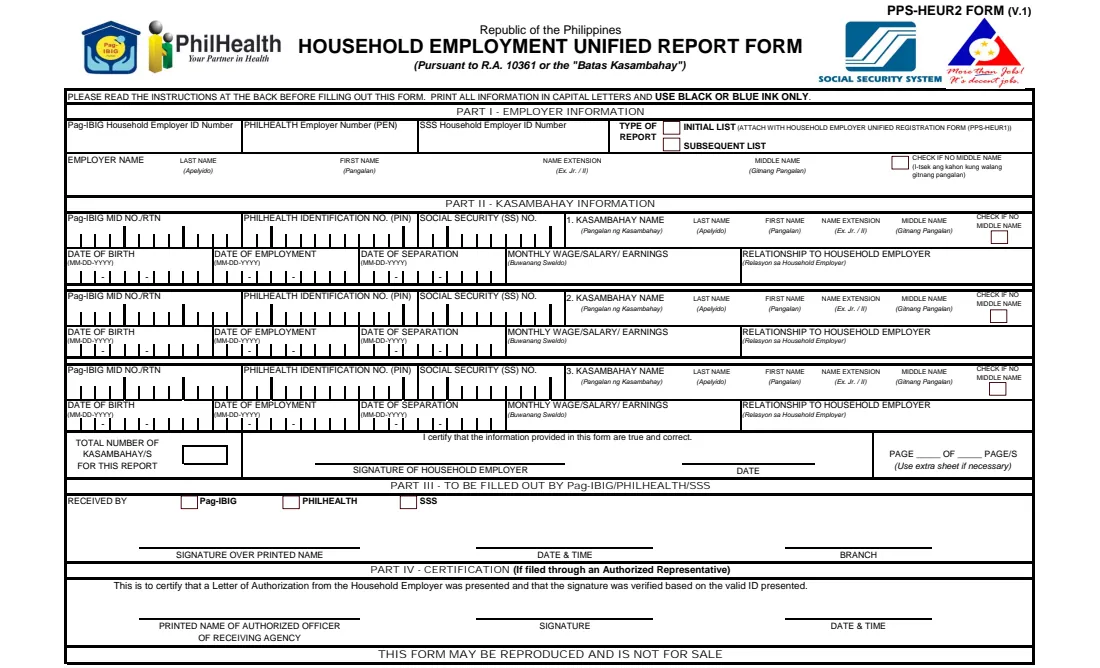
The Household Employment Unified Report Form, PPS-HEUR2, is the joint Pag-IBIG, PhilHealth and SSS form a household employer uses under the Batas Kasambahay (R.A. 10361) to report the kasambahay (domestic workers) they employ: new hires, and those who have left.
Part I identifies the household employer and whether this is the initial list, filed with the Household Employer Unified Registration Form (PPS-HEUR1), or a subsequent list. Part II takes up to three kasambahay per sheet: their agency numbers, name, date of birth, dates of employment and separation, monthly wage and relationship to the employer. Parts III and IV are for the receiving agency.
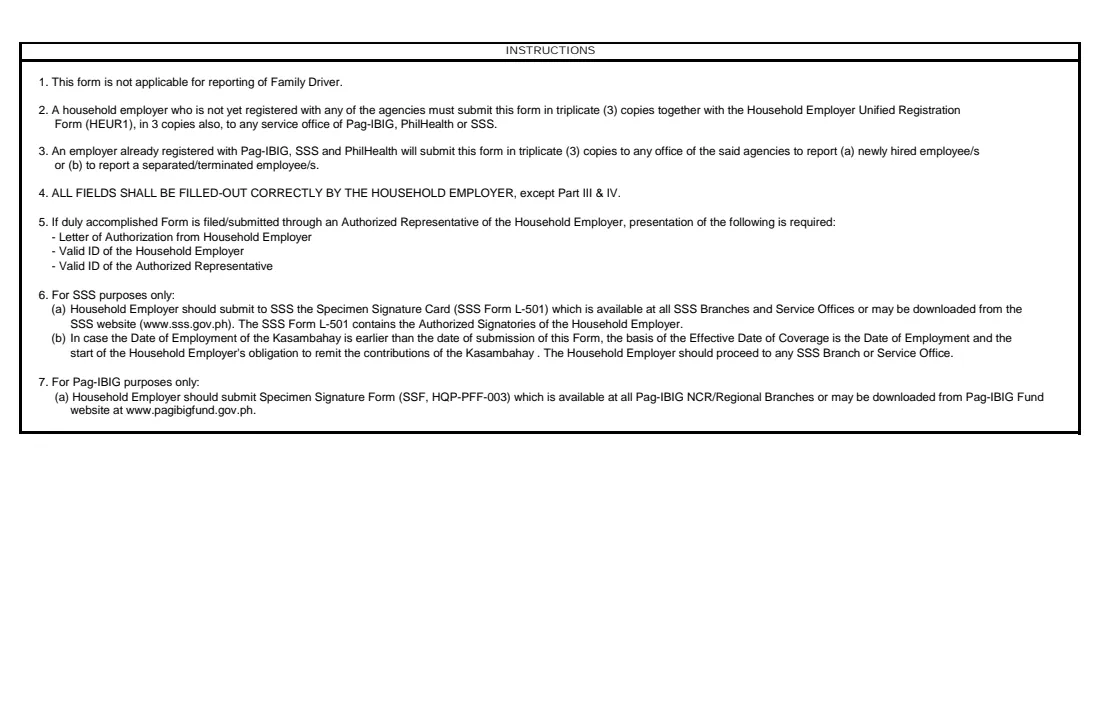
FileIt prints everything in capital letters, one digit per box, on PhilHealth's own PDF. The form's instructions say to file it in three copies at any office of Pag-IBIG, PhilHealth or SSS.
- Who fills it
- The household employer
- Filed at
- Any Pag-IBIG, PhilHealth or SSS office, in three copies (as the form's instructions say)
- Per sheet
- Up to three kasambahay; use extra sheets for more
- Not for
- Reporting a family driver
- Signature
- The household employer, in black or blue ink
- Edition
- PPS-HEUR2 Form (V.1)
Who needs to fill out Household Employment Unified Report (PPS-HEUR2)?
- Households that employ a kasambahay (a domestic worker).
- New household employers registering with PPS-HEUR1, who attach the initial list of their kasambahay.
- Registered household employers reporting a newly hired or a separated kasambahay.
When to use Household Employment Unified Report (PPS-HEUR2)
- When you first register as a household employer: the initial list goes with PPS-HEUR1.
- When you hire a kasambahay after registering.
- When a kasambahay leaves or is let go.
What you need before you start
- Your Pag-IBIG household employer ID, PhilHealth Employer Number (PEN) and SSS household employer ID, if already issued.
- Your full name as household employer.
- For each kasambahay: their Pag-IBIG MID number or RTN, PhilHealth PIN and SS number if they have them, full name and date of birth.
- The date each kasambahay was hired or separated, their monthly wage and their relationship to you, if any.
What’s on Household Employment Unified Report (PPS-HEUR2)
The 2013 edition has 2 pages. FileIt asks for it in 3 parts:
- Part I — Employer informationHousehold employer
- Part II — Kasambahay informationHousehold employer
- CertificationHousehold employer
How to fill out Household Employment Unified Report (PPS-HEUR2), step by step
1 Part I — Employer information
Enter the IDs each agency has issued you, tick initial list (filed with PPS-HEUR1) or subsequent list, and give your name. Tick the box if you have no middle name.
2 Part II — Kasambahay information
For each kasambahay, enter the Pag-IBIG MID/RTN, PhilHealth PIN and SS number they have, their name and date of birth, the date of employment for a new hire or the date of separation for one who left, the monthly wage and the relationship to you. Dates print as month, day and year in the boxes.
3 Certification
FileIt counts the kasambahay on the report. You certify the information is true and correct, sign in black or blue ink and date it. For a report on more than one sheet, give the page number and the number of pages.
Common mistakes to avoid
- Leaving out both dates: each kasambahay needs a date of employment, a date of separation, or both.
- Using this form for a family driver, which the instructions exclude.
- Forgetting to attach the initial list to the registration form (PPS-HEUR1) when you first register.
- Ticking 'no middle name' and also writing one.
- Filing fewer than the three copies the instructions ask for.
After you fill it out
Print three copies from your FileIt vault and sign each in black or blue ink.
Take them to any Pag-IBIG, PhilHealth or SSS office. If someone files for you, the instructions ask for your letter of authorization and valid IDs of you and your representative. FileIt does not file the form.
Keep the PDF with your household employment records in your vault.
Fill out Household Employment Unified Report (PPS-HEUR2) online with FileIt
- Pick the person. Choose someone from People and FileIt fills in their name, date of birth, address and other details it already knows.
- Answer plain-language questions. One part of the form at a time, with the official help text beside each question — 52 fields in all. Your answers save as you go.
- Check the live preview. Watch your answers land on the real PhilHealth, with SSS and Pag-IBIG form, and let FileIt do any worksheet arithmetic.
- Generate the official PDF. FileIt prints your answers into the agency’s own PDF and files it in that person’s folder in your vault.
FileIt fills the form — it never files or submits anything for you. Deliver the finished form to whoever asked for it, the way the form’s instructions say.
Start Household Employment Unified Report (PPS-HEUR2) now — it’s freeHousehold Employment Unified Report (PPS-HEUR2): frequently asked questions
What is PPS-HEUR2?
The Household Employment Unified Report Form: the joint Pag-IBIG, PhilHealth and SSS report of the kasambahay a household employs, hires or separates.
How is it different from PPS-HEUR1?
PPS-HEUR1 registers you as a household employer. PPS-HEUR2 reports your kasambahay; the initial list goes with PPS-HEUR1, later lists on their own.
How many kasambahay fit on one form?
Three per sheet. Use extra sheets and number the pages.
Can I report my family driver on it?
No. The instructions say the form is not for reporting a family driver.
Can I sign it electronically?
No. The form asks for black or blue ink, so you sign the printed copies.
Official sources
- Blank form (PDF), published by PhilHealth, with SSS and Pag-IBIG: https://www.philhealth.gov.ph/downloads/kasambahay/Household_Employment_Unified_Report_Form.pdf
- Official instructions and guidance: https://www.philhealth.gov.ph/downloads/
- Edition shown on this page: PPS-HEUR2 Form (V.1), file dated November 2013 (checked 2026-10-25).
FileIt is not affiliated with or endorsed by PhilHealth, with SSS and Pag-IBIG or any government. This page explains the form in general terms and is not legal, tax or immigration advice. Always read the official instructions, and check that you are using the edition the recipient accepts. Page last reviewed 2026-10-25.