What is DFA passport application form?
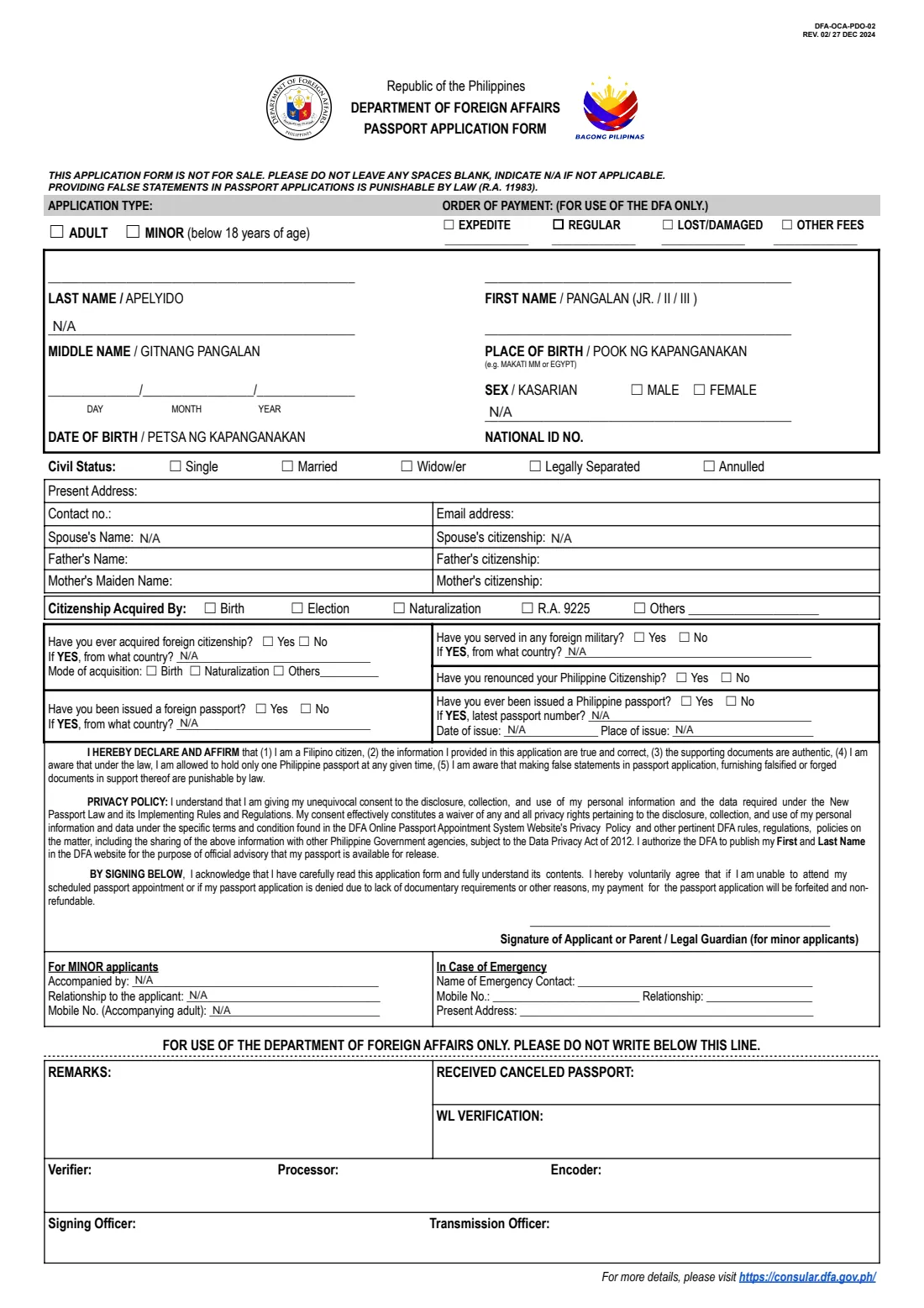
Every Philippine passport application, new or renewal, adult or minor, starts with the Department of Foreign Affairs' passport application form. The current revision, DFA-OCA-PDO-02 REV. 02 of 27 December 2024, cites the New Philippine Passport Act (R.A. 11983). It is what you bring to your appointment at a DFA consular office or a Philippine embassy or consulate abroad.
The form fits on one page but packs in a lot: your name exactly as on your PSA birth certificate, date and place of birth, national ID number, civil status, address and contacts, your spouse and parents, how you acquired Philippine citizenship, any foreign citizenship, military service or passports, and your previous Philippine passport. It also warns that no space may be left blank. Anything that doesn't apply must say N/A.
FileIt asks each question in plain English and prints the answers in neat capitals where the form expects them. It writes N/A in every line that doesn't apply, spells out the month of birth so day and month can't be confused, and checks that adult or minor matches the date of birth. Your name and birthday can come from People. The finished PDF is saved in your vault for you to print and bring to the appointment. FileIt doesn't book appointments or submit anything.
- Who fills it
- Every Philippine passport applicant, or a parent or guardian for a minor below 18
- Given to
- A DFA consular office, or a Philippine embassy or consulate abroad, at your appointment
- Signatures
- Signed by the applicant (or parent / guardian) in front of the officer at the appointment
- Pages
- 1
- Edition
- DFA-OCA-PDO-02 REV. 02 / 27 DEC 2024
- Blank spaces
- Not allowed: N/A wherever a question doesn't apply
Who needs to fill out DFA passport application form?
- Filipinos applying for their first passport.
- Adults renewing an expired or expiring Philippine passport.
- Parents or legal guardians applying for a child below 18.
- Dual citizens under R.A. 9225 applying for a Philippine passport.
- Filipinos abroad applying through a Philippine embassy or consulate.
When to use DFA passport application form
- Before your passport appointment, so the form is ready when you arrive.
- When your passport is nearing expiry. Many countries refuse entry with less than six months' validity left.
- After a change of name or civil status that the new passport should show, with the supporting documents.
- When your post asks you to bring a completed application form to the appointment.
What you need before you start
- Your PSA birth certificate, and PSA marriage certificate if you use your married name.
- Your current or latest Philippine passport, with its number, date and place of issue.
- Your PhilSys national ID number, if you have one.
- Your parents' full names and citizenships, and your mother's maiden name.
- Details of any foreign citizenship, foreign passport or foreign military service.
- An emergency contact's name, mobile number, relationship and address.
- For a minor, the accompanying adult's name, relationship and mobile number.
What’s on DFA passport application form
The 2024 edition has 1 page. FileIt asks for it in 5 parts:
- Application type and personal detailsApplicant
- Address, contact and familyApplicant
- Citizenship and previous passportsApplicant
- For minor applicantsApplicant
- In case of emergencyApplicant
How to fill out DFA passport application form, step by step
1 Application type and personal details
Adult or minor, then your last, first and middle names, place and date of birth, sex, national ID number and civil status. Names must match your PSA documents exactly. FileIt prints N/A for a missing middle name or national ID.
2 Address, contact and family
Present address, contact number, email, your spouse's name and citizenship (N/A if single), and your father's and mother's names and citizenships.
3 Citizenship and previous passports
How you acquired Philippine citizenship (birth, election, naturalisation, R.A. 9225 or other), whether you have ever acquired foreign citizenship, served in a foreign military, renounced Philippine citizenship or held a foreign passport, and the details of your latest Philippine passport.
4 Declaration and signature
The declaration confirms you are a Filipino citizen, that your information and documents are true, and that you may hold only one Philippine passport. You sign it at the appointment, not before.
5 Minor applicants and emergency contact
For a child, the adult accompanying them, their relationship and mobile number. FileIt prints N/A here for adults. Every applicant gives an emergency contact.
Common mistakes to avoid
- Leaving any space blank. The form says to write N/A where something doesn't apply.
- Spelling a name differently from the PSA birth certificate, or leaving out a suffix such as JR.
- Mixing up day and month in the date of birth.
- Signing the form before the appointment instead of in front of the officer.
- Ticking adult for a child who is still below 18.
After you fill it out
Print the form, bring it to your passport appointment with your supporting documents, and sign it in front of the DFA or consular officer.
Your photo, fingerprints and signature are captured at the appointment, and you pay the fee or show proof of payment as your post instructs.
FileIt keeps the completed form in your vault. When the new passport arrives, add it with its expiry date so FileIt reminds you well before the next renewal.
Fill out DFA passport application form online with FileIt
- Pick the person. Choose someone from People and FileIt fills in their name, date of birth, address and other details it already knows.
- Answer plain-language questions. One part of the form at a time, with the official help text beside each question — 54 fields in all. Your answers save as you go.
- Check the live preview. Watch your answers land on the real Department of Foreign Affairs, Office of Consular Affairs (DFA-OCA) form, and let FileIt do any worksheet arithmetic.
- Generate the official PDF. FileIt prints your answers into the agency’s own PDF and files it in that person’s folder in your vault.
FileIt fills the form — it never files or submits anything for you. Deliver the finished form to whoever asked for it, the way the form’s instructions say.
Start DFA passport application form now — it’s freeDFA passport application form: frequently asked questions
Is this the latest DFA passport application form?
This is revision REV. 02 of 27 December 2024, which cites the New Philippine Passport Act (R.A. 11983). FileIt's copy comes from the Philippine Embassy in Seoul, because the DFA's own site couldn't be reached. Check with your post if you are unsure.
Why does every line need N/A?
The form says not to leave any spaces blank and to indicate N/A if a question doesn't apply. FileIt does this for you on the lines that may not apply.
Can I sign the form in advance?
Sign it at the appointment. The applicant, or the parent or guardian for a minor, signs in front of the officer.
Do minors use the same form?
Yes. Tick 'Minor', and complete the 'For minor applicants' section with the accompanying adult's details. A parent or legal guardian signs.
Do I still need the form if I booked online?
The DFA's appointment system may give you an application form with your appointment. Bring whatever your post asks for. FileIt's version is the same official form, filled in neatly.
Does FileIt book my passport appointment?
No. Book through the DFA's passport appointment system or your embassy or consulate. FileIt only fills in the form.
Official sources
- Blank form (PDF), published by Department of Foreign Affairs, Office of Consular Affairs (DFA-OCA): https://philembassy-seoul.com/storage/downloadables/Passport%201.pdf
- Official instructions and guidance: https://consular.dfa.gov.ph/
- Edition shown on this page: DFA-OCA-PDO-02, REV. 02 / 27 DEC 2024 (checked 2026-10-19).
FileIt is not affiliated with or endorsed by Department of Foreign Affairs, Office of Consular Affairs (DFA-OCA) or any government. This page explains the form in general terms and is not legal, tax or immigration advice. Always read the official instructions, and check that you are using the edition the recipient accepts. Page last reviewed 2026-10-19.