What is BIR Form 1906 authority to print invoices?
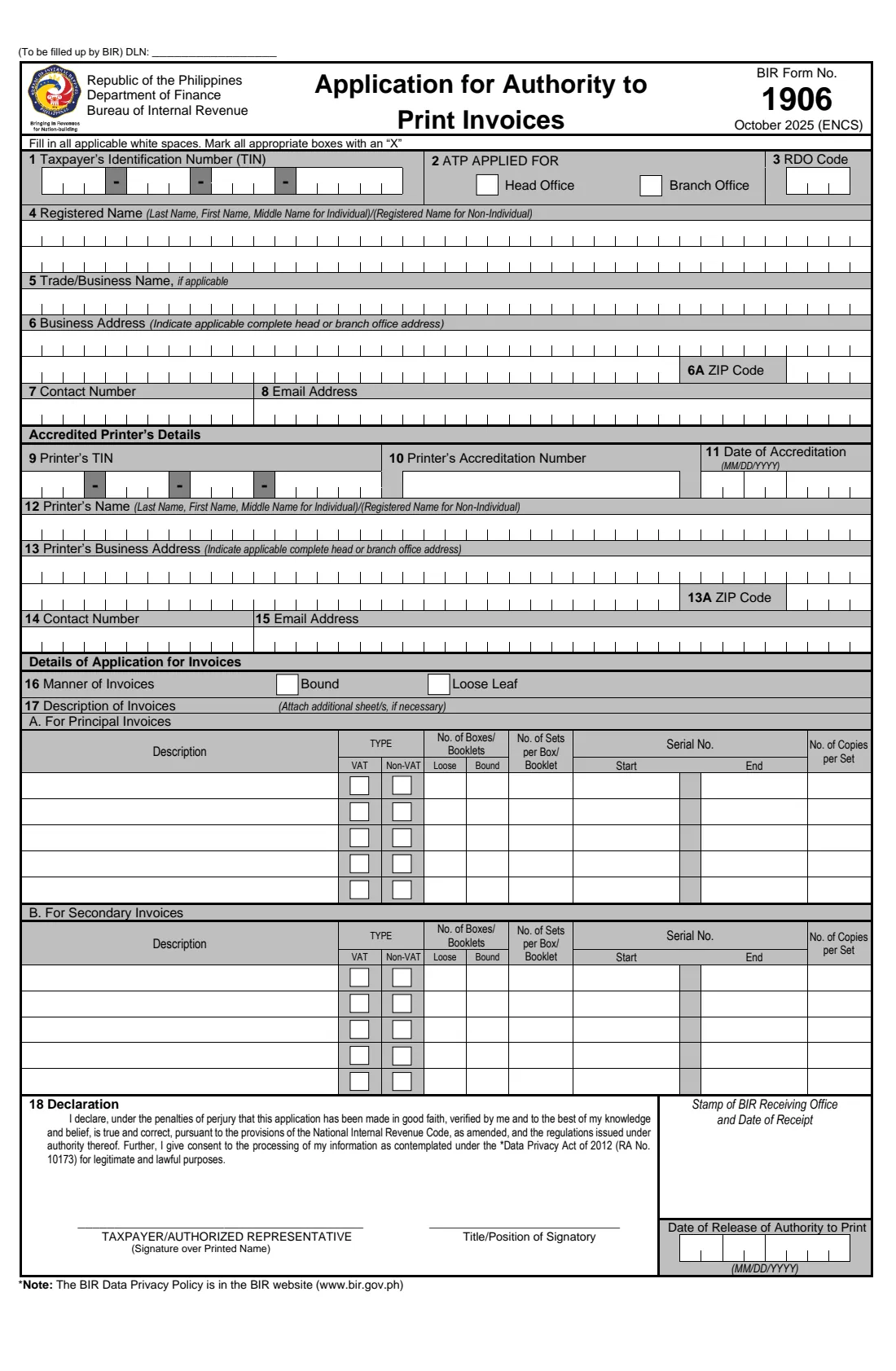
Businesses in the Philippines that issue manual invoices printed by a private printer need an Authority to Print from the BIR first. BIR Form 1906 is the application. The October 2025 edition follows the invoice rules under the Ease of Paying Taxes (EOPT) Act.
You give your TIN and branch code, registered and trade names, business address and contact details, the accredited printer's TIN, accreditation and address, whether the invoices are bound or loose-leaf, and each principal and secondary invoice: VAT type, quantity, sets, serial numbers and copies.
FileIt prints your answers onto the BIR's own PDF, one capital letter per box where the form draws cells, TINs in their groups and dates in MM/DD/YYYY order, ready to sign and file at your RDO.
- Who fills it
- The head office of a registered business, one application per establishment
- Filed with
- The BIR Revenue District Office (RDO)
- Printer
- A BIR-accredited printer
- Signature
- Taxpayer or authorized representative, by hand over the printed name
- Edition
- October 2025 (ENCS)
Who needs to fill out BIR Form 1906 authority to print invoices?
- Small businesses and professionals ordering printed sales or service invoices.
- Businesses ordering supplementary documents such as delivery receipts or order slips.
- Head offices applying for a branch's invoices.
When to use BIR Form 1906 authority to print invoices
- Before an accredited printer prints your manual invoices, for each establishment.
- For each new batch of invoices, with your last issued ATP attached for subsequent applications.
What you need before you start
- Your TIN, branch code, RDO code and registered name as on your Certificate of Registration.
- The accredited printer's TIN, accreditation number and date, and address.
- The invoices to print: type, VAT or non-VAT, number of booklets, sets per booklet, serial numbers and copies.
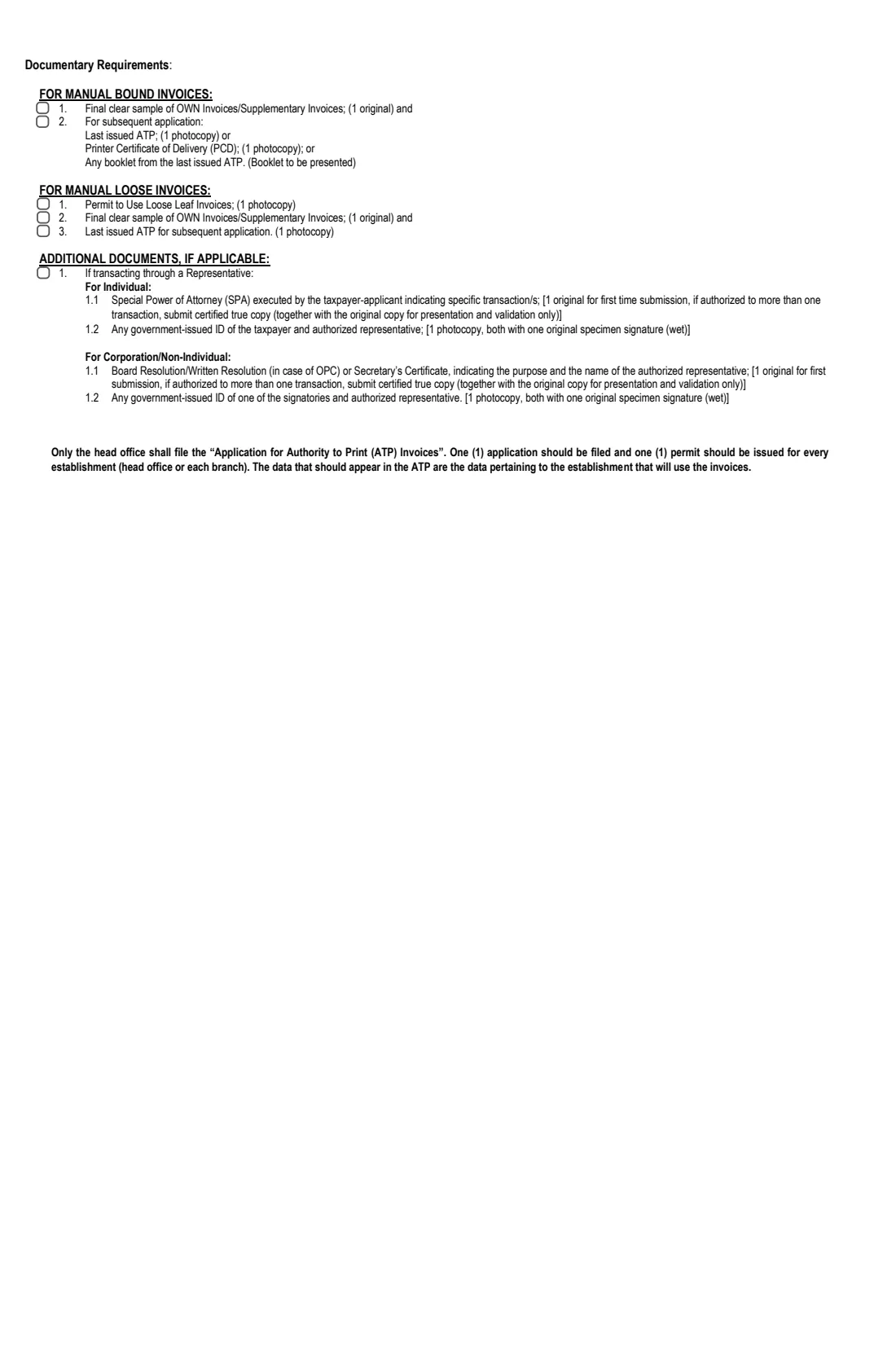
- A final clear sample of your invoice, and a Permit to Use Loose Leaf Invoices if you'll use loose leaf.
What’s on BIR Form 1906 authority to print invoices
The 2025 edition has 2 pages. FileIt asks for it in 5 parts:
- Taxpayer (items 1-8)Taxpayer
- Accredited printer's details (items 9-15)Taxpayer
- Details of application for invoices (items 16-17)Taxpayer
- 17B Secondary invoicesTaxpayer
- 18 DeclarationTaxpayer
How to fill out BIR Form 1906 authority to print invoices, step by step
1 Your business
Give your TIN and branch code, whether this is for the head office or a branch, your RDO code, registered and trade names, address and contacts.
2 The printer
Add the accredited printer's TIN, accreditation number and date, name, address and contacts.
3 The invoices
Choose bound or loose leaf, then list each principal invoice and, if any, each secondary invoice with its VAT type, quantities and serial numbers.
4 Declaration
FileIt prints the registered name and title under the signature line. Sign in ink and file at the RDO.
Common mistakes to avoid
- Filing from a branch: only the head office files ATP applications.
- Putting the quantity under Loose when item 16 says bound, or the other way round.
- Serial numbers that overlap a previous ATP.
- Leaving out the invoice sample or the last issued ATP for a subsequent application.
After you fill it out
Sign the form and file it at the RDO with the documentary requirements on page 2.
Give the approved ATP to your accredited printer.
FileIt keeps the completed PDF in your vault with your business registration papers.
Fill out BIR Form 1906 authority to print invoices online with FileIt
- Pick the person. Choose someone from People and FileIt fills in their name, date of birth, address and other details it already knows.
- Answer plain-language questions. One part of the form at a time, with the official help text beside each question — 101 fields in all. Your answers save as you go.
- Check the live preview. Watch your answers land on the real Bureau of Internal Revenue form, and let FileIt do any worksheet arithmetic.
- Generate the official PDF. FileIt prints your answers into the agency’s own PDF and files it in that person’s folder in your vault.
FileIt fills the form — it never files or submits anything for you. Deliver the finished form to whoever asked for it, the way the form’s instructions say.
Start BIR Form 1906 authority to print invoices now — it’s freeBIR Form 1906 authority to print invoices: frequently asked questions
What is BIR Form 1906?
The BIR's Application for Authority to Print Invoices, filed before an accredited printer prints your manual invoices.
Who files the ATP for a branch?
The head office. One application is filed and one permit issued for every establishment, with the branch's own details.
What are secondary invoices?
Supplementary documents such as delivery receipts, order slips or purchase orders, listed in part B of item 17.
Do I need Form 1906 if I buy BIR Printed Invoices?
No. Form 1906 is for invoices printed by an accredited printer. BIR Printed Invoices are chosen in item 41 of Form 1901.
Official sources
- Blank form (PDF), published by Bureau of Internal Revenue: https://bir-cdn.bir.gov.ph/BIR/pdf/1906%20October%202025%20ENCS%20Final.pdf
- Official instructions and guidance: https://www.bir.gov.ph/bir-forms
- Edition shown on this page: October 2025 (ENCS) (checked 2026-10-25).
FileIt is not affiliated with or endorsed by Bureau of Internal Revenue or any government. This page explains the form in general terms and is not legal, tax or immigration advice. Always read the official instructions, and check that you are using the edition the recipient accepts. Page last reviewed 2026-10-25.