What is RF-1441B - Convert a registered partnership into marriage?
Norway's registered partnerships were replaced by the gender-neutral Marriage Act in 2009, but couples who registered a partnership before then can keep it or have it converted into a marriage. The Marriage Act (ekteskapsloven) section 95 allows the conversion on request, and RF-1441B, 'Begjæring om omgjøring av registrert partnerskap til ekteskap', is the paper request for it.
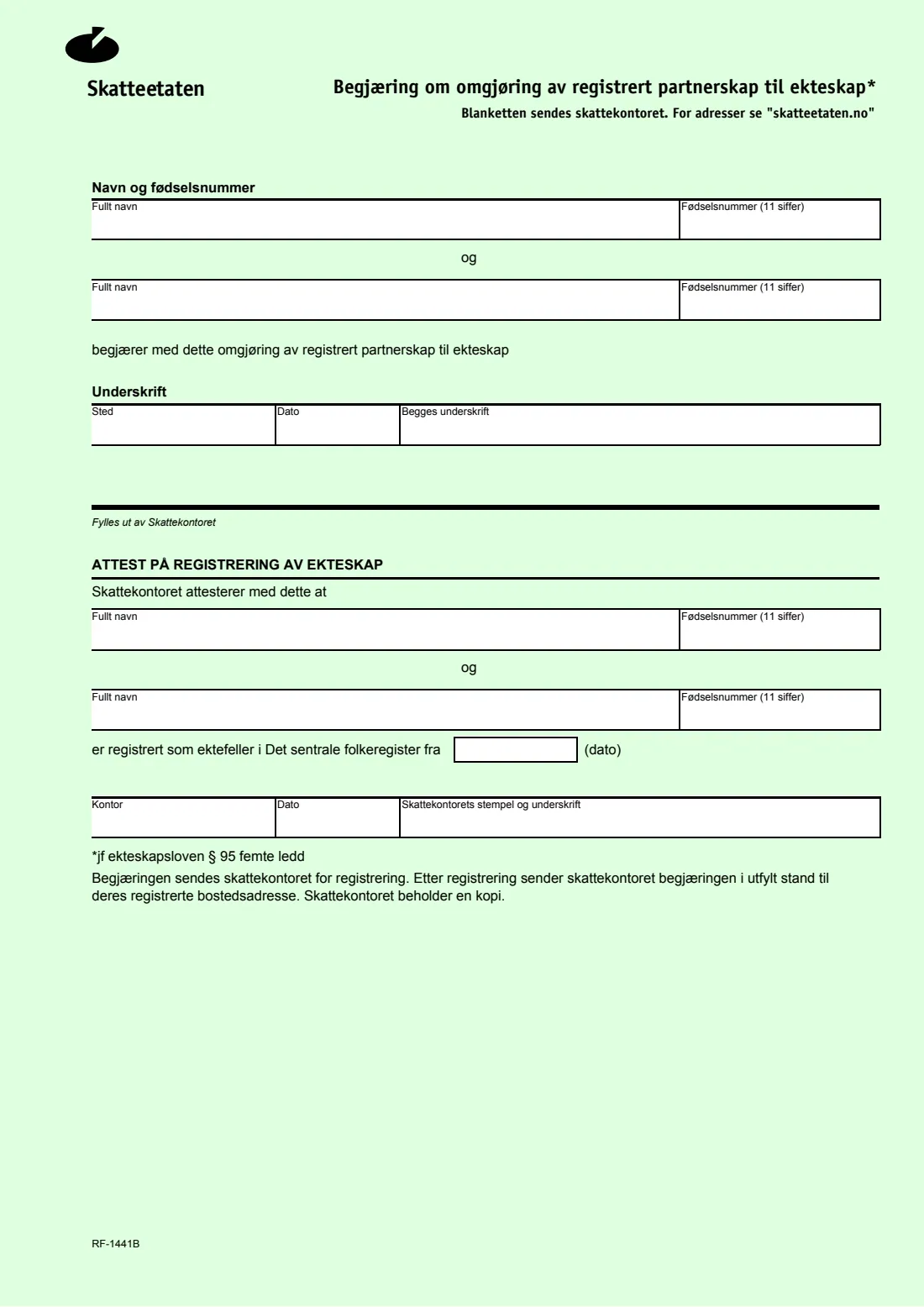
The form is one page. Both partners give their full name and 11-digit national identity number, the place and date, and both sign in the shared signature box. The tax office (skattekontoret) then registers the marriage in the National Registry, fills in the certificate at the bottom ('Attest på registrering av ekteskap') and posts the completed form back to your registered home address, keeping a copy.
FileIt walks you through it in English with the Norwegian labels shown, checks both identity numbers' check digits, prints your answers into Skatteetaten's PDF and saves the result in your FileIt vault. The tax office's certificate part is left blank for the tax office. FileIt never sends the request; you post it yourselves.
- Who fills it
- Both registered partners
- Sent to
- Skatteetaten (the tax office)
- Legal basis
- Marriage Act section 95, fifth paragraph (printed on the form)
- Signatures
- Both partners, in one box
- Edition
- RF-1441B (2010 PDF)
Who needs to fill out RF-1441B - Convert a registered partnership into marriage?
- Couples in Norway in a registered partnership (registrert partnerskap) who want to be registered as married.
- Partners who registered their partnership before the gender-neutral Marriage Act took effect in 2009.
- Couples who need a marriage registration, for example for documents abroad that don't recognise registered partnerships.
When to use RF-1441B - Convert a registered partnership into marriage
- Whenever you both decide to convert your registered partnership into a marriage.
- Before applying for documents that should show you as married rather than as registered partners.
What you need before you start
- Both partners' full names as registered in the National Registry.
- Both 11-digit national identity numbers (fødselsnummer).
- The place and date you sign.
What’s on RF-1441B - Convert a registered partnership into marriage
The 2010 edition has 1 page. FileIt asks for it in 3 parts, and it is signed by Partner 1 and Partner 2:
- Partner 1 (Navn og fødselsnummer)Partner 1
- Partner 2 (Navn og fødselsnummer)Partner 2
- Signatures (Underskrift)Partner 1
How to fill out RF-1441B - Convert a registered partnership into marriage, step by step
1 Navn og fødselsnummer (names and numbers)
Give each partner's full name and 11-digit national identity number. FileIt checks both check digits and flags it if the two numbers are the same.
2 Underskrift (signature)
Give the place (Sted) and date (Dato). The date prints as dd.mm.yyyy. Both partners sign in the 'Begges underskrift' box, by hand on the printout or with FileIt's optional e-signature if the tax office accepts it.
3 Attest på registrering av ekteskap
The certificate at the bottom is filled in by the tax office ('Fylles ut av Skattekontoret'). FileIt leaves it blank.
Common mistakes to avoid
- Only one partner signing; the box asks for both signatures.
- Filling in the tax office's certificate part yourself.
- Mistyping a national identity number; FileIt checks both before printing.
After you fill it out
Both sign the printed request and send it to the tax office; see skatteetaten.no for the address, as the form says.
After registering the marriage, the tax office posts the completed form back to your registered home address and keeps a copy.
Keep the PDF FileIt saves in your vault, and file the returned certificate there too when it arrives.
Fill out RF-1441B - Convert a registered partnership into marriage online with FileIt
- Pick the person. Choose someone from People and FileIt fills in their name, date of birth, address and other details it already knows.
- Answer plain-language questions. One part of the form at a time, with the official help text beside each question — 6 fields in all. Your answers save as you go.
- Check the live preview. Watch your answers land on the real Skatteetaten (Norwegian Tax Administration, National Registry) form, and let FileIt do any worksheet arithmetic.
- Generate the official PDF. FileIt prints your answers into the agency’s own PDF and files it in that person’s folder in your vault. Sign it, or send it for e-signature.
FileIt fills the form — it never files or submits anything for you. Deliver the finished form to whoever asked for it, the way the form’s instructions say.
Start RF-1441B - Convert a registered partnership into marriage now — it’s freeRF-1441B - Convert a registered partnership into marriage: frequently asked questions
What is RF-1441B?
Skatteetaten's request form for converting a registered partnership into a marriage under section 95 of the Marriage Act. Both partners sign it.
What happens after I send it?
The form says the tax office registers the request, then sends the completed form to your registered home address and keeps a copy.
Do we need to fill in the bottom part?
No. The part headed 'Fylles ut av Skattekontoret' is for the tax office.
Can I fill it in online?
Yes. FileIt lets you answer in English and prints your answers into Skatteetaten's PDF, free on every FileIt account. You then sign and post it yourselves.
Is the 2010 PDF still valid?
It is the edition Skatteetaten still links. FileIt notes the file it was built from in the form's notes.
Official sources
- Blank form (PDF), published by Skatteetaten (Norwegian Tax Administration, National Registry): https://www.skatteetaten.no/globalassets/skjema/alltid/rf-1441b.pdf
- Official instructions and guidance: https://www.skatteetaten.no/globalassets/skjema/alltid/rf-1441b.pdf
- Edition shown on this page: RF-1441B (PDF of May 2010) (checked 2026-10-19).
FileIt is not affiliated with or endorsed by Skatteetaten (Norwegian Tax Administration, National Registry) or any government. This page explains the form in general terms and is not legal, tax or immigration advice. Always read the official instructions, and check that you are using the edition the recipient accepts. Page last reviewed 2026-10-19.