What is RF-1440B - Notification that a separation has ended?
In Norway, a legal separation (separasjon) is registered in the National Registry (Folkeregisteret), and your marital status changes to 'separated'. If you and your spouse or registered partner resume living together, the separation ends, and Skatteetaten needs to be told so it can register you as married or registered partners again. RF-1440B, 'Melding om opphør av separasjon', is the paper notice for that.
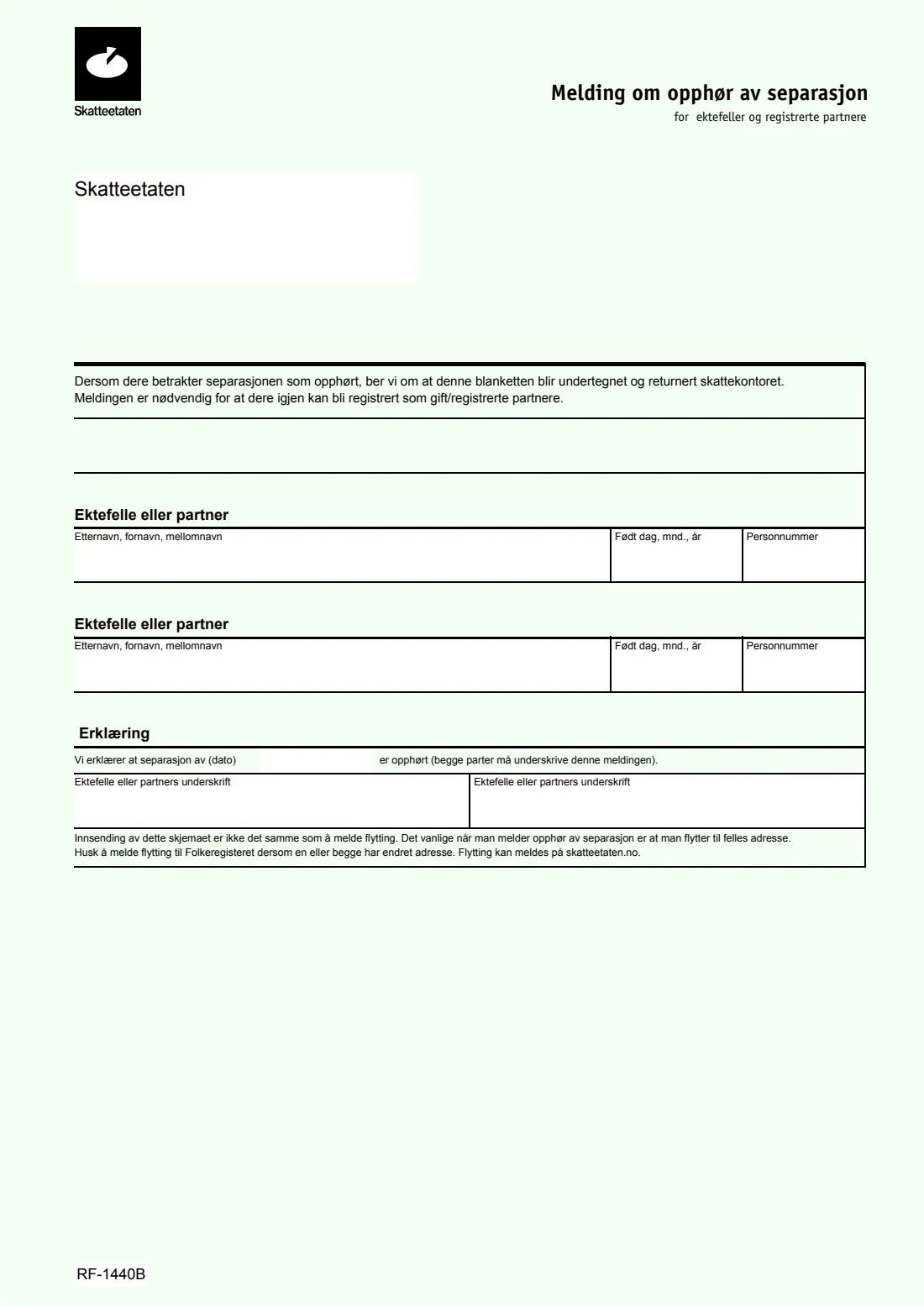
The form is short: both spouses give their surname, first and middle names, date of birth and personnummer, then declare together the date of the separation that has now ended. Both of you must sign. The form also reminds you that it isn't a moving notice: if either of you changed address, report the move to the National Registry separately.
FileIt walks you through RF-1440B in English with the Norwegian wording beside each question. You give each full 11-digit national identity number once; FileIt checks the check digits and that the first six digits match the date of birth, then prints the last five digits in the 'Personnummer' box as the form expects. The finished PDF is saved in your FileIt vault, ready to sign and post. FileIt never sends it for you.
- Who fills it
- Both spouses or registered partners
- Sent to
- Skatteetaten (the tax office), by post
- When
- When you consider the separation ended
- Signatures
- Both spouses
- Edition
- RF-1440B (2018 PDF)
Who needs to fill out RF-1440B - Notification that a separation has ended?
- Married couples in Norway who were granted a legal separation and have moved back together.
- Registered partners whose registered separation has ended.
- Couples whose National Registry status still shows 'separated' after reconciling.
When to use RF-1440B - Notification that a separation has ended
- When you consider the separation ended, typically because you live together again.
- When you want the National Registry to show you as married (or registered partners) again.
- Together with a moving notice, if one or both of you changed address when moving back together.
What you need before you start
- Both spouses' full names as registered in the National Registry.
- Both dates of birth and 11-digit national identity numbers (fødselsnummer).
- The date of the separation, from the separation decision (separasjonsbevilling) or court judgment.
- Skatteetaten's current postal address for the window envelope, if you want it printed.
What’s on RF-1440B - Notification that a separation has ended
The 2018 edition has 1 page. FileIt asks for it in 4 parts, and it is signed by Spouse or partner 1 and Spouse or partner 2:
- Where you send it (Skatteetaten)Spouse or partner 1
- Spouse or partner 1 (Ektefelle eller partner)Spouse or partner 1
- Spouse or partner 2 (Ektefelle eller partner)Spouse or partner 2
- Declaration (Erklæring)Spouse or partner 1
How to fill out RF-1440B - Notification that a separation has ended, step by step
1 Address box
The box at the top shows through a window envelope under the printed 'Skatteetaten'. You can have FileIt print the postal address there; check the current address on skatteetaten.no before posting.
2 Ektefelle eller partner (first spouse)
Give the surname first, then first and middle names, as the box asks (Etternavn, fornavn, mellomnavn). FileIt prints the names in capitals, the date of birth as dd.mm.yyyy, and the five-digit personnummer from your national identity number.
3 Ektefelle eller partner (second spouse)
The same details for the other spouse or partner. FileIt flags it if both numbers are the same.
4 Erklæring (declaration)
Give the date of the separation that has ended. By signing, you both declare that the separation is over; the form says both parties must sign.
5 Signatures
Each of you signs in your own box. Sign by hand on the printout, or use FileIt's optional e-signature if Skatteetaten accepts an electronically signed copy.
Common mistakes to avoid
- Only one spouse signing; the form requires both signatures.
- Writing the full 11-digit number in the 'Personnummer' box; it takes the last five digits, which FileIt prints for you.
- Giving the date you moved back together instead of the date of the separation itself.
- Assuming this form also registers a new shared address; a move must be reported separately.
After you fill it out
Both sign the form and post it to Skatteetaten (the tax office).
If either of you moved, report the move to the National Registry as well, for example online at skatteetaten.no.
Keep the PDF FileIt saves in your vault, together with your marriage and separation papers.
Fill out RF-1440B - Notification that a separation has ended online with FileIt
- Pick the person. Choose someone from People and FileIt fills in their name, date of birth, address and other details it already knows.
- Answer plain-language questions. One part of the form at a time, with the official help text beside each question — 8 fields in all. Your answers save as you go.
- Check the live preview. Watch your answers land on the real Skatteetaten (Norwegian Tax Administration, National Registry) form, and let FileIt do any worksheet arithmetic.
- Generate the official PDF. FileIt prints your answers into the agency’s own PDF and files it in that person’s folder in your vault. Sign it, or send it for e-signature.
FileIt fills the form — it never files or submits anything for you. Deliver the finished form to whoever asked for it, the way the form’s instructions say.
Start RF-1440B - Notification that a separation has ended now — it’s freeRF-1440B - Notification that a separation has ended: frequently asked questions
What does RF-1440B do?
It tells the National Registry that a registered separation has ended, so you can be registered as married or registered partners again. The form says the notice is needed for that.
Do we both have to sign?
Yes. The declaration says both parties must sign the notice.
Is this the same as reporting a move?
No. The form says sending it isn't the same as reporting a move. If one or both of you changed address, report the move to the National Registry too.
Which number goes in 'Personnummer'?
The five-digit individual number, which is the last five digits of the 11-digit national identity number. FileIt asks for the full number and prints those five digits.
Can I fill it in online?
Yes. FileIt lets you answer in English and prints your answers into Skatteetaten's own PDF, free on every FileIt account. You then sign it and post it yourself.
The PDF is from 2018. Is it still current?
It is the edition Skatteetaten still links. FileIt records the file it was built from in the form's notes.
Official sources
- Blank form (PDF), published by Skatteetaten (Norwegian Tax Administration, National Registry): https://www.skatteetaten.no/globalassets/skjema/alltid/rf-1440b.pdf
- Official instructions and guidance: https://www.skatteetaten.no/globalassets/skjema/alltid/rf-1440b.pdf
- Edition shown on this page: RF-1440B (PDF of April 2018) (checked 2026-10-19).
FileIt is not affiliated with or endorsed by Skatteetaten (Norwegian Tax Administration, National Registry) or any government. This page explains the form in general terms and is not legal, tax or immigration advice. Always read the official instructions, and check that you are using the edition the recipient accepts. Page last reviewed 2026-10-19.